Goodwe GALAXY Series Manuel utilisateur

INSTALLATION
MANUAL
GOODWE PVBM
SOLARIZE EVERY BUILDING
GALAXY SERIES
GOODWE AUSTRALIA PTY. LTD. sales.au@goodwe.com

Galaxy* Lightweight Products
Construction Manual
2022-06-14

GOODWE(GUANGDE)POWER SUPPLY TECHNOLOGY CO., LTD.
Page 1
Content
1、Description of the main structure of Galaxy* lightweight products..... 2
2、Installation materials list....................................................................................... 2
3、Installation tools list............................................................................................... 2
4、Pre-installation inspection work of Galaxy* lightweight products........ 3
5、Installation work of Galaxy* lightweight products...................................... 6
6、Electrical installation ............................................................................................13
7、Electrical construction Process.........................................................................18
8、Cautions ...................................................................................................................20
9、Appendix..................................................................................................................22

GOODWE(GUANGDE)POWER SUPPLY TECHNOLOGY CO., LTD.
Page 2
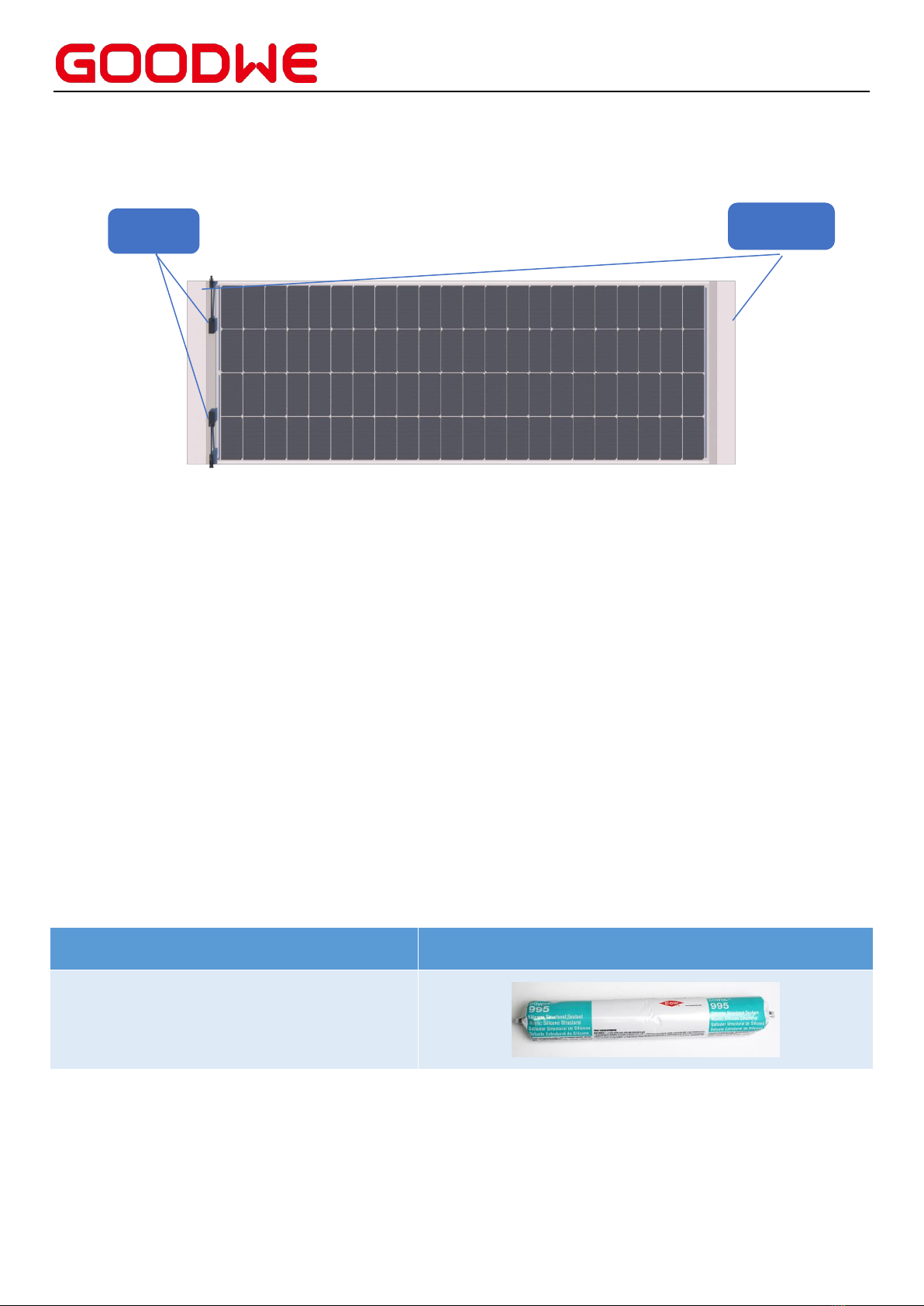
1、Description of the main structure of Galaxy* lightweight products
Galaxy* Lightweight Products Front
Installation Altitude: <2000m
Fire Protection Level:CLASS C
(IEC61730-2-MST23)
Protection Level:Level II
maximum static load: front 5400Pa; back 2400Pa
Coil material is made of thermoplastic TPO membrane.
2、Installation material list
Name
Neutral one-component silicone
Illustration
3、Installation tools list
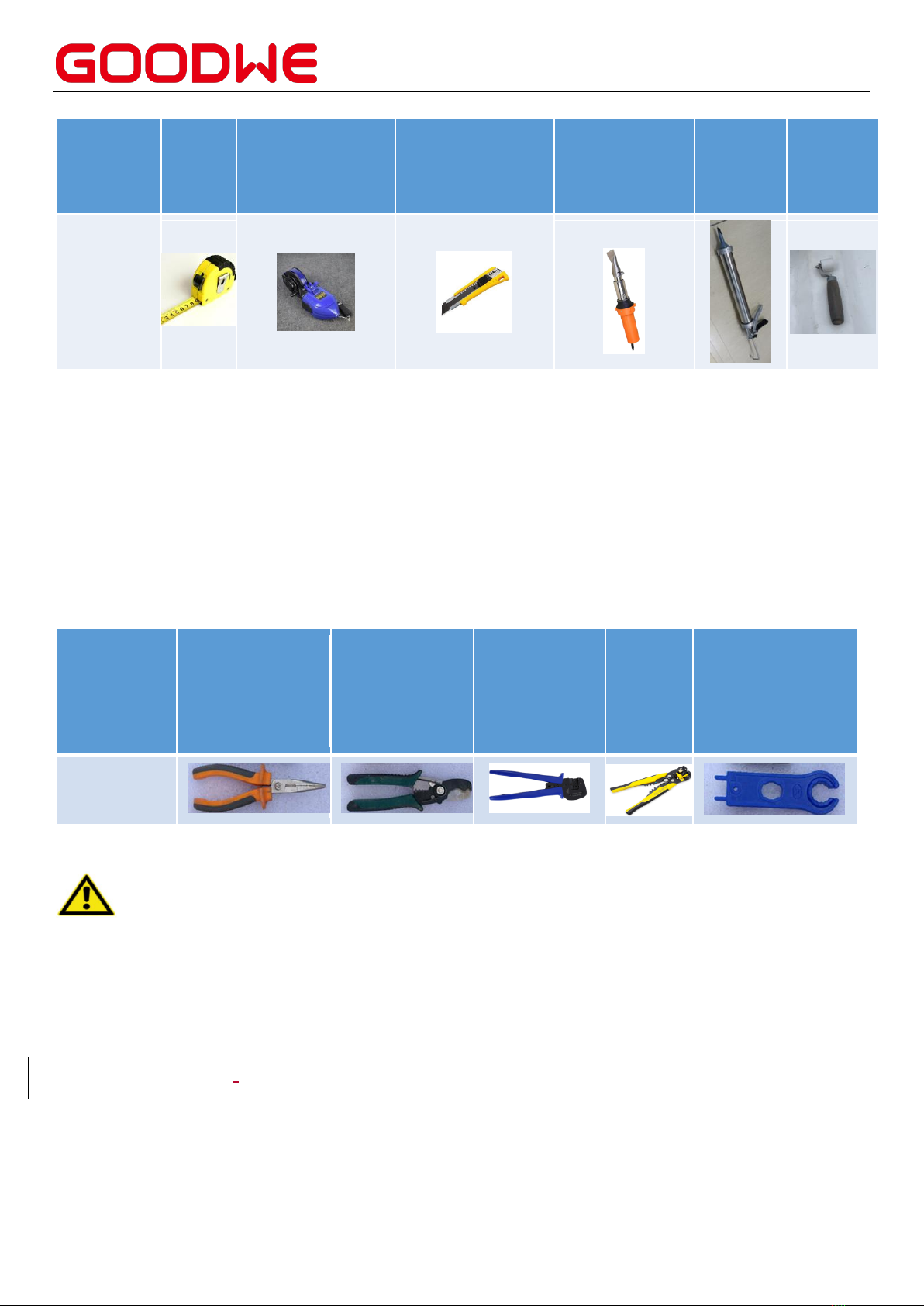
3.1 Construction tools list
Coil material
(Thermoplastic TPO)
Junction
box

GOODWE(GUANGDE)POWER SUPPLY TECHNOLOGY CO., LTD.
Page 3
PS:This list only indicates the main tools required for the installation of Galaxy* Lightweight Products
structural system, excluding the tools used for the installation of the roof support section and the
electrical section.
For the tools of release and installation of roof brackets, you can refer to the preparation of building
works.
3.2 Electrical tools list
Tool name
Needle Nose
Plier
Wire cutter
Photovoltaic
special
crimping
pliers
Wire
stripping
pliers
Joint wrench
Illustration
4、Inspection work of Galaxy* lightweight products before installation
Warning
Please use insulated tools to reduce the risk of electric shock.
Please adopt appropriate protective measures (non-slip gloves, work clothes, etc.) to avoid
direct contact with 30V DC or higher, and avoid direct contact with sharp edges during
installation. Please do not wear metal ornaments during installation to avoid poking through
the Galaxy* lightweight products and causing electric shock hazards.
DO NOT install the product in rainy weather or strong wind.
DO NOT allow children or unauthorized personnel to approach the installation area or the
Tool
Name
Steel
tape
measure
Chalk Line
Utility Knife
Hot air welding
gun
Glue gun
Roller
Illustration

GOODWE(GUANGDE)POWER SUPPLY TECHNOLOGY CO., LTD.
Page 4
storage area of Galaxy* Lightweight products.
During installation or wiring of Galaxy* Lightweight products, if the circuit breaker and
overcurrent protection circuit breaker cannot be turned on or the inverter cannot be turned
off, then use an opaque material to cover the array Galaxy* Lightweight products to stop the
power output.
Do not use or install Galaxy* Lightweight products that have been damaged.
If the surface material is damaged or worn, direct contact with the surface of Galaxy*
lightweight products may result in electric shock.
Do not attempt to repair any part of the Galaxy* Lightweight product.
The lid of the junction box should be kept closed at all times.
Do not disassemble, modify, or move any part of the Galaxy* Lightweight product.
Do not artificially concentrate light on Galaxy* lightweight products.
It is important to note that only one piece of product can be moved in a single operation
when installing the Galaxy* products.
Installers are advised to consider additional hazards and local regulations relevant to the use
of a hot air weld gun including but not limited to welding at height, power cord management,
burns risks, restraint system management in the presence of a heat source, and consideration
for fumes and vapors, specifically:
Always lie the tool on a non-flammable surface & keep the hot air stream well away from
combustible materials, including combustible materials hidden behind ceilings, walls,
cavities or floors.
Do not point the hot air stream at the same spot for extended periods. Incorrect use can
cause fire.
Do not touch the element housing or nozzle with any part of the body during use as they
get very hot and there is a danger of serious injury by burning.
When working with plastics, varnish or similar materials vapors/gases/smoke develop
which can be harmful.

GOODWE(GUANGDE)POWER SUPPLY TECHNOLOGY CO., LTD.
Page 5
Do not breathe in vapors/gasses/smoke as they can be highly toxic.
Always provide good ventilation of the working area with an extraction system and/or
wear a respirator.
Keep the hot air welding unit dry. Do not use in the rain or in damp conditions. Always store the hot air
welding unit in a dry place.
Be careful
Before installing Galaxy* Lightweight products, the relevant authorities should be contacted
to obtain information about the installation site, construction permits or impact on roof
warranty, and the requirements for installation and inspection should be observed.
Check the applicable building codes to ensure that the building and its structure (roof,
exterior façade, load bearing, etc.) in which Galaxy* lightweight products are to be installed
have adequate load-bearing capacity.
Ensure that Galaxy* Lightweight products are installed on a fireproof roof, when installing
Galaxy* Lightweight products.
Galaxy* Lightweight products are compliant with Safety Class II. These Galaxy* Lightweight
products can be used in systems where the public is likely to be exposed to voltages greater
than 50V or power greater than 240W.
The installation surface should be flat and free of pits or bumps.
Galaxy* lightweight products must not be installed near flames or combustible objects.
Galaxy* lightweight products must not be immersed in water (pure or salt water), installed in
environments that are permanently wet (pure or salt water) (e.g. fountains, waves, etc.) or in
locations where water is likely to accumulate (e.g. potholes, drainage inlets, etc.).
There is a risk of corrosion if Galaxy* lightweight products are placed in salt spray (i.e., marine
environments) or environments containing sulfur (i.e., sulfur-containing sources, volcanoes,
etc.).
Ensure that Galaxy* Lightweight products meet the overall technical requirements of the

GOODWE(GUANGDE)POWER SUPPLY TECHNOLOGY CO., LTD.
Page 6
system.
Ensure that other system components do not cause damaging mechanical or electrical
performance effects on Galaxy* Lightweight products.
It is allowed to connect Galaxy* Lightweight products in series to increase the voltage or in
parallel to increase the current. When connected in series, the positive terminal of the Galaxy*
Lightweight product is connected to the next negative terminal. When connected in parallel,
the positive terminal of the Galaxy* Light product is connected to the positive terminal of the
next Galaxy* Light product.
To avoid (or minimize) the mismatch effect of the array, it is recommended to connect Galaxy*
Lightweight products with similar electrical properties on the same string.
To reduce the risk of indirect lightning strikes, the system should be designed to avoid the
creation of loops.
Galaxy* lightweight products should be securely fastened so that they can withstand all
possible loads, including wind and snow loads.
Secondary handling should be avoided as much as possible during the installation of Galaxy*
lightweight products.
Please ensure that the installation location of Galaxy* Lightweight products is free from
shading all year round, as shadows can cause a decrease in the power generation of Galaxy*
Lightweight products. Hot spots and long-term heat generation from diodes caused by
frequent shading of Galaxy* Lightweight products can affect the service life of Galaxy*
Lightweight products.
5、Installation work of Galaxy** lightweight products
5.1 Unpacking and stacking (storage and unpacking)
To ensure the safety of Galaxy* Lightweight products during transportation, it is better to
open the packaging box of Galaxy* Lightweight product after reaching the installation site.
Check whether the box is damaged before unpacking.
It is advised that unpackers wear non-slip gloves in advance.

GOODWE(GUANGDE)POWER SUPPLY TECHNOLOGY CO., LTD.
Page 7
Galaxy* lightweight products should be stored in a dry and ventilated environment.
Galaxy* Lightweight products must be shipped in the boxes provided by GoodWe and should
be stored in the original boxes before installation. Please protect the packaging from damage.
Follow the recommended unpacking procedure to open Galaxy* Lightweight product
packaging. Careful handling is required during unpacking, transportation and storage.
DO NOT apply excessive loads or twist Galaxy* Lightweight products.
DO NOT use wires or junction boxes to carry Galaxy* lightweight product.
DO NOT stand, climb, walk or jump on Galaxy* Lightweight products.
DO NOT to allow Galaxy* Lightweight products to come in contact with sharp objects;
scratches can directly affect the safety of Galaxy* Lightweight products.
DO NOT place Galaxy* lightweight products in an environment that is not reliably supported
or not fixed.
Changing the wiring of the bypass diode is prohibited.
All electrical connectors need to be kept clean and dry.
Galaxy* lightweight products are not allowed to be stacked flat and the quantity should not
exceed 3 pieces. The junction box shall not be in direct contact with the front side.
5.2 checking
Please check whether the surface of Galaxy* Lightweight products is damaged, if there is
damage or wear on the surface of the products, please do not use the product.
Please check whether the junction box, connectors and cables are damaged , please do not
use the product if there is damage.
Do NOT apply adhesives, paint, label or any other product on the surface of Galaxy*
Lightweight products.
5.3 Roof Substrate requirements
The base layer application scenario includes pitched metal roof and flat roof. and TPO rolls
need to be laid on the base layer.
The roof substrate needs to be covered with TPO material.

GOODWE(GUANGDE)POWER SUPPLY TECHNOLOGY CO., LTD.
Page 8
5.4 Chalk line Positioning
Measure the roof and determine the position of Galaxy* lightweight products according to
the design drawings.
5.5 Carrying
To avoid damaging the cells, two people are required to lift the four corners of the Galaxy*
Lightweight product (avoiding touching the position of the cells) at the same time when
carrying it.
The downward bending distance of Galaxy* lightweight products should not exceed 300mm.
Please carefully position Galaxy into predestined location.
Galaxy* lightweight products should be carried upright as much as possible when handled
manually. Do NOT twist the product during transportation.
Care is required during the handling of Galaxy* lightweight products to avoid them bumping
into the ground or other sharp, hard objects.
5.6 Installation
Note: all installation actions should in line with the requirements of the National Construction
Code
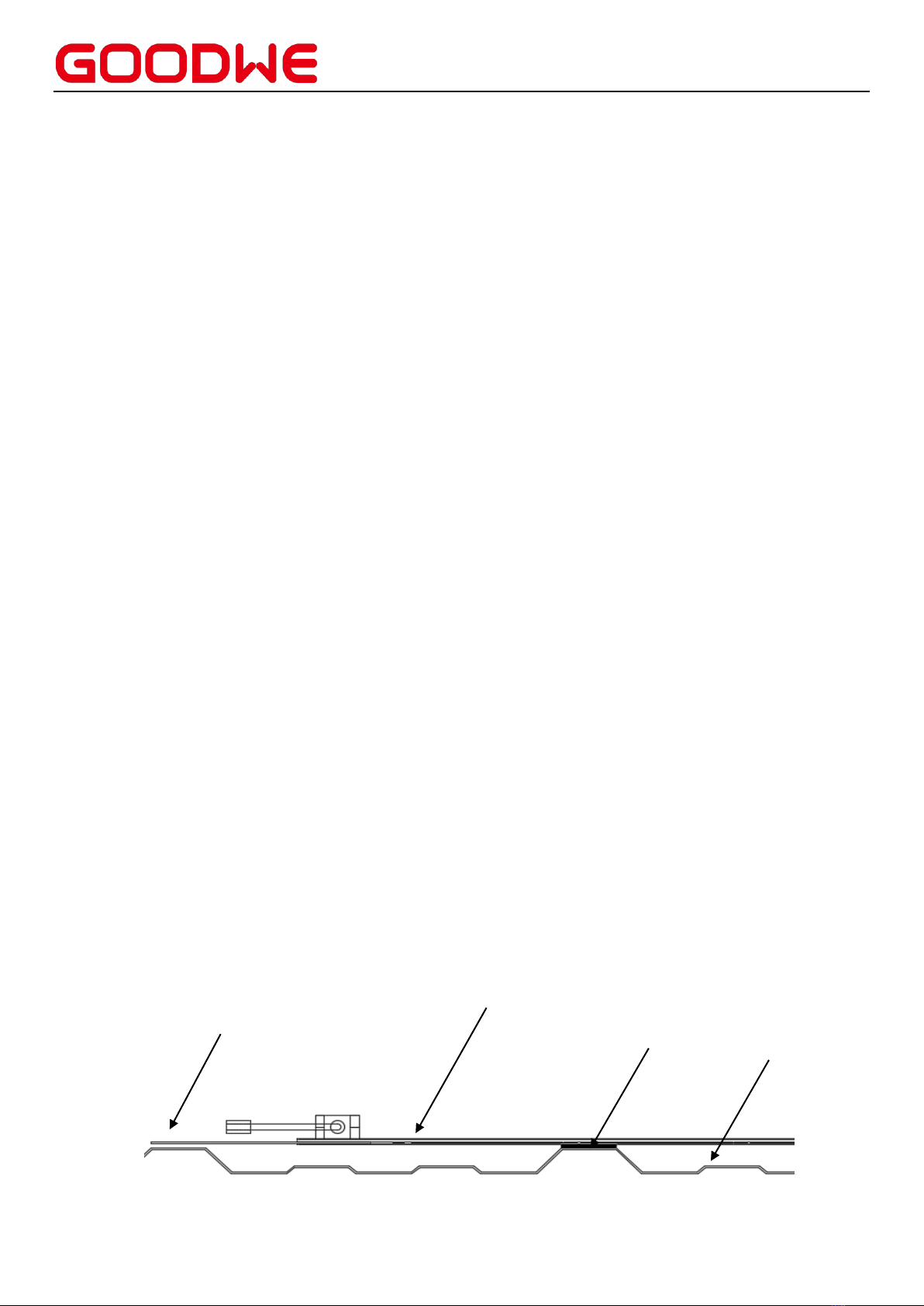
Metal roof with TPO membranes.
Apply structural adhesive to crests of TPO metal roof, with minimum spacing of 400mm.
Adhesive cross-section width ≥ 8mm, height ≥ 6mm.
Carry the product upright by grabbing the corners by two person
Place the product cell side up to the adhesive area (Figure 1)
Galaxy* Lightweight Products
Adhesive
Metal roof
Edge of product
Autres manuels pour GALAXY Series
2
Ce manuel convient aux modèles suivants
5
Table des matières
Autres manuels Goodwe Panneau solaire