
GME TX685 Manuel utilisateur

Gloss white art stock - 130gsm
Trimmed document size: 105mm (w) x 195 mm (h) 20 pages
Book to be saddlestiched in 2 places
Printed in CMYK throughout with gloss Aq Varnish
3 and 5 watt compact UHF CB radios
INSTRUCTION MANUAL

The TX685 and TX6150 are radio transmitting devices.
•Whentransmitting,keeptheantennamorethan25mmfromanypartoftheheadorbody.
•Donottransmitnearelectricalblastingequipmentorinexplosiveatmospheres.
•Donotallowchildrentooperatearadiotransmitterunsupervised.
CONTENTS
SAFETY INFORMATION
ACCESSORIES SupplIEd
TX685
•Li-IonBatteryPack(2000mAh)
•DesktopCharger
•ACAdapter
•RemovableFlexibleAntenna
•EarpieceStyleMicrophonewithVOXandPTT
•BeltClip
•InstructionManual
TX6150
•Li-IonBatteryPack(2200mAh)
•DesktopRapidCharger
•ACAdapter
•RemovableFlexibleAntenna
•SpeakerMicrophone
•EarpieceStyleMicrophonewithVOXandPTT
•VehicleLighter12VDCLead
•BeltClip
•InstructionManual
SAFETYINFORMATION...................................... 2
ACCESSORIESSUPPLIED.................................... 2
IMPORTANTINFORMATIONCONCERNINGUHF
CBRADIO ......................................................... 3
IMPORTANTADVICE........................................... 4
FEATURES ......................................................... 4
CONTROLS........................................................ 5
LCDICONS........................................................ 6
POWERINGTHERADIO ..................................... 7
ChargingtheBatteryPack.............................. 8
BatteryLowAlert .......................................... 8
BatteryUsage ................................................ 8
ConservingBatteryPower ............................. 8
GENERALOPERATION....................................... 9
PowerOn/Off................................................ 9
AdjustingtheVolume..................................... 9
DisplayLighting ............................................. 9
ReceivingSignals .......................................... 9
Transmitting .................................................. 9
SelectingChannels......................................... 9
Squelch......................................................... 9
KeypadLock................................................. 10
DuplexOperation........................................ 10
SCANNING ..................................................... 10
ScanningFeatures........................................ 11
CTCSS/DCSSILENTMODE ................................ 11
MENU............................................................. 11
UsingtheMenu .......................................... 12
DuplexModeSelection................................. 12
CTCSSandDCSCodeSelection ................... 12
TransmitterPower ....................................... 13
VoiceScrambler .......................................... 13
VOXSettings............................................... 13
SquelchLevelSetting ................................... 14
RogerBeepTone......................................... 14
ButtonBeep................................................ 14
CallAlarmSelection .................................... 14
DualWatch ................................................. 15
DualWatchOperation .................................. 15
CTCSSTONEFREQUENCIES............................. 15
DCSTONECHART............................................ 16
UHFCBOPERATINGFREQUENCIES ................. 17
SPECIFICATIONS .............................................. 18
SCCONTRACTWARRANTYAGAINSTDEFECTS. 18
PAGE2 INSTRUCTIONMANUAL TX6150/TX685

TX6150/TX685 INSTRUCTIONMANUAL PAGE3
IMpORTANT INFORMATION CONCERNING uHF CB RAdIO
TheuseoftheCitizenBandradioserviceislicensedinAustraliabytheACMA
Radiocommunications(CitizensBandradioStations)ClassLicenceandinNewZealandby
theMinistryofEconomicDevelopmentNewZealand(MED).AGeneralUserRadioLicence
forCitizensBandradioandoperationissubjecttoconditionscontainedinthoselicences.
TheclasslicenceforusersandequipmentoperatingintheCB/PRS477MHzbandhasbeen
amended.Thisradiomeetsthenew80channelstandard.
Insimpletermsthesameamountofspectrumisavailable;however,radiotransceiverscan
nowoperateinanarrowerbandwidthandhenceuselessspectrum.Theseradiosaregenerally
referredtoasnarrowbandor12.5kHzradios.Byusing12.5kHzchannelspacinginsteadof
25kHz,the40channelsoriginallyallocatedcannowbeexpandedto80channelsthereby
doublingthechannelcapacityandrelievingcongestionintheUHFCB/PRSband.
Original40channelwidebandradioswillcontinuetooperateontheoriginal40channels,
howevertheywillnotbeabletoconverseonthenewerchannels41–80.Thenewer
narrowbandradioswillbeabletoconversewithallolder40channelwidebandradiosonall
channels1to40aswellasthenewerchannelsallocatedfrom41to80.
Themixingofnarrowbandandwidebandradiosinthesamespectrumcancausesome
possibleoperatingissuesofinterferenceandvaryinglevelsofreceivedvolume.
POSSIBLE ISSUES
Whenanewnarrowbandradioreceivesatransmissionfromanolderwidebandradiothe
speechmaysoundloudanddistorted–simplyadjustyourradiovolumeforbestperformance.
Whenanolderwidebandradioreceivesasignalfromanewnarrowbandradio,thespeech
maysoundquiet–simplyadjustyourradiovolumeforbestperformance.
Dependingonhowcloseyourreceivingradioistoanothertransmittingradio,therecanbe
interferencefromthetransmittingradioifitisusingachanneladjacenttothechannelyouare
listeningto.Simplytrygoingupordownafewchannelsfromthecurrentlyselectedchannel.
Theabovesituationsarenotafaultoftheradiobutasymptomofoperatingwidebandand
narrowbandradiosinthesamebandwidth.Thispossibleinterferencewilldecreaseovertime
asthepopulationofwidebandradiosagesanddecreases.
FurtherinformationandupdatesareavailablefromtheAustralianCommunicationsandMedia
Authority(ACMA)atwww.acma.gov.au andtheMinistryofEconomicDevelopment(MED),
RadioSpectrumManagementat:www.rsm.govt.nz
EMERGENCY CHANNELS
TheACMAhasallocatedchannels5/35foremergencyuseonly.Channel5istheprimary
SimplexEmergencyChannel.Whereachannel5repeaterisavailable,youshouldselect
DuplexonCH5.
NOTE: Channel35istheinputchannelforthechannel5repeaterthereforechannel35
shouldalsonotbeusedforanythingotherthanemergencytransmissions.
TELEMETRY CHANNELS
ACMAregulationshaveallocatedchannels22and23fortelemetry-onlyapplicationsandhave
prohibitedthetransmissionofspeechonthesechannels.Consequentlytheradiohasa
transmit-inhibitappliedtochannels22and23.
Intheeventthatadditionaltelemetry/telecommandchannelsareapprovedbytheACMA,
thesechannelsshallbeaddedtothosecurrentlylistedwherevoicetransmissionisinhibited.
Currently,transmissionsonchannels61,62and63arealsoinhibitedandthesechannelsare
reservedforfutureallocation.

PAGE4 INSTRUCTIONMANUAL TX6150/TX685
TRANSMIT (TX)
TX685 – 3/1 watt and TX6150 – 5/1 watt RF Power: Selectabletransmitterpowerallows
youtoconservebatterypowerwhentransmittingincloserangebyusingtheLowPowersetting.
Individually Programmable Duplex Function: Userselectableforonlythoseindividual
channelsinyourareathathaverepeaters,leavingothersfreeforuseasextrasimplexchannels.
RECEIVE (RX)
80†Channels 477 UHF CB
Power-Save Feature: Conservesbatterypowerbysleepingduringperiodsofinactivity.
Calling Tone and Roger Beep: Alertsyoutoincomingcalls.
Signal Receive Indicator
SCANNING AND MEMORY FUNCTIONS
Microprocessor Controlled Frequency Synthesiser: Allowsuserprogrammablecontrolof
scanning,channelmemoriesandselectedfeatureoptions.
Programmable Scan Function: Scansupto80UHFCBchannels.
Dual Watch: Monitorstwochannelssimultaneously.
PRIVACY FUNCTIONS
Voice Inversion Scrambler: Asimplevoicescramblerthat,whenactivated,willmakeyour
transmissionandreceptionintelligibleonlytootherradiosusingthesamescramblertechnology.
CTCSS & DCS: Abuilt-inContinuousToneCodedSquelchSystemandaDigitalCodedSquelch
optionprovidequietchanneloperation.
PHYSICAL PROPERTIES
Water & Dust proof IP67
:
Providesprotectionagainstdustandtemporaryimmersioninwater.
Removable Flexible Antenna
Rugged Construction with Die-cast Chassis
USER CONTROLS AND INTERFACE
Keypad Lock: Preventsaccidentalbuttonpresses.
Backlit LCD: Fornightviewing.
Desktop Charger – TX685, Desktop Rapid Charger – TX6150
IMpORTANT AdVICE
FEATuRES
READ ALL INSTRUCTIONScarefullyand
completelybeforeoperatingyourradioand
retainthismanualforfuturereference.
•NEVERconnecttheradiotoapowersource
otherthanthesuppliedbattery.Thismay
damageyourradio.
•DO NOTplaceyourradioinfrontofa
vehicleairbag.
•DO NOTuseyourradiowithadamaged
antenna.
•DO NOTattempttomodifyyourradio
inanyway.
•ALWAYSchargeyourradioatnormalroom
temperature.
•ALWAYSswitchoffyourradiowherenotices
restricttheuseoftwo-wayradioormobile
telephones.
•ONLYuseGMEapprovedrechargeable
batterypackswiththesuppliedcharger.
•AVOIDstoringorchargingyourradioin
directsunlight.
•AVOIDstoringorusingyourradiowhere
temperaturesarebelow-20°Corabove
+60°C.
†Refer to Page 3. Important information concerning UHF CB radio.

TX6150/TX685 INSTRUCTIONMANUAL PAGE5
CONTROlS
Antenna
IndicatorLED
PTTButton
SquelchButton
Menu/FunctionKey
ChannelDown
VolumeOn/Off
BeltClip
Speaker
AccessoryJack
Microphone
LCDDisplay
ChannelUp
Battery
PAGE6 INSTRUCTIONMANUAL TX6150/TX685
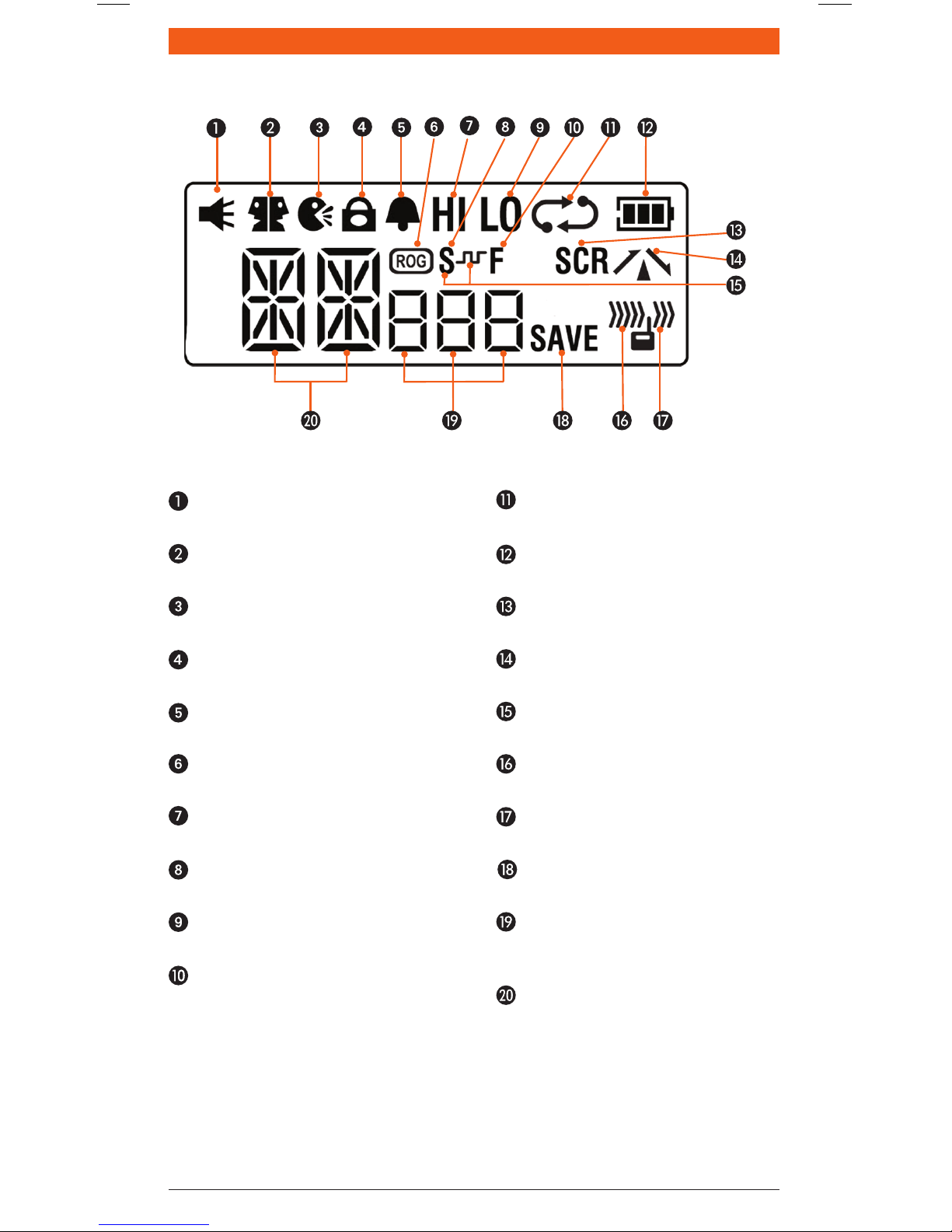
lCd ICONS
Monitor Icon:Appearswhenthe
Squelchisopen.
Dual Watch Icon:Appearswhen
DualWatchisactive.
VOX Icon:AppearswhenVOXmode
is active.
Key Lock Icon:Appearswhenthe
keypadislocked.
Button Beep Icon:Appearswhen
buttonconrmationtonesareon.
Roger Beep Icon:Appearswhenthe
RogerBeeptonesareactive.
Hi Power Icon:AppearswhenHigh
TXpowerisselected.
CTCSS Silent Icon:Appearswhen
SilentmodeisactiveusingCTCSS.
Low Power Icon: Appearswhen
LowTXpowerisselected.
Function Icon:Appearswhenthe
function‘F’keyispressedtoactivate
secondaryfunctions.
Scan Icon:Flasheswhenradio
is scanning.
Battery Icon:Displaysbattery
chargelevel.
Scrambler Icon:Appearswhen
Scramblerisenabled.
Duplex Icon:Appearsonchannels
whereDuplexisenabled.
DCS Silent Icon:Appearswhen
SilentmodeisactiveusingDSC.
Receive Icon:Appearswhen
receivingsignals.
Transmit Icon:Appearswhen
transmitting.
Power Save Icon:Appearswhen
theradioissleeping.
CTCSS/DCS Display: Indicates the
selectedCTCSSorDCStonewhenin
theMenu.
Channel Display:Displaysthe
selectedchannelinuse.

TX6150/TX685 INSTRUCTIONMANUAL PAGE7
pOWERING THE RAdIO
Yourradioispoweredbya7.4voltLi-Ionbatterypack.Whenthebatterypackisnew,itshould
befullychargedbeforebeingusedforthersttime.Ifleftunused,yourradio’sbatterypackwill
dischargeitselfwithinafewmonths.Ifyouhavenotusedyourradioforsometime,youwillneed
torechargethebatterypackbeforeuse.
WARNING: UseonlytheapprovedGMEcharger.Theuseofothertypesmaybedangerousand
willvoidthewarranty.
To Fit the Battery Pack
1. Ensurethatyourradioisswitchedoff.
2. Aligntheslotsinthebatterypackwiththebatteryguidesonthebackoftheradio.
3. Slidethebatterypackupwardsasfarasitwillgountilit‘clicks’.
To Remove the Battery Pack
1. Ensurethatyourradioisswitchedoff.
2. Holdtheradioupside-down.
3. Usingyourngernail,slidethebatterycatchtowardsthefrontoftheradiotoreleasethe
batterythenslidethebatterytowardsyou.Thebatterypackshouldseparatefromtheradio.
Slide to lock battery
Pull to release battery

PAGE8 INSTRUCTIONMANUAL TX6150/TX685
Charging the Battery Pack
TheTX685issuppliedwithadesktopcharger.Thedesktopchargerwillchargeafullydischarged
2000mAhbatterypacktofullcapacityinaround7–8hours.
TheTX6150issuppliedwitharapiddesktopcharger.Thechargerwillchargeafullydischarged
2200mAhbatterypacktofullcapacityinaround3hours.
Tochargethebatterypack:
1. Plugtheincludedplugpackpowersupplyintoastandard240voltACoutlet.
2. Connecttheplugpack’sDCconnectortothesocketunderthebaseofthedesktopcharger.
Routetheleadthroughtheslotunderthecharger’sbase.
3. Placetheradiowithbatteryattached,intothecradle.TheRED‘CHG’LEDwilllighttoindicate
thebatteryischarging.
4. Whenthebatteryhascharged,theGREEN‘FULL’LEDwilllight.
Battery Low Alert
Whenthebatteryiconblinksontheradio’sdisplay,thebatterylevelislowandthebatterypack
shouldberecharged.Ifthebatteryisnotcharged,anaudiotonewillthensoundtowarntheuser
thatthebatteryisalmostdischarged.
Battery Usage
Thetimetakentodischargethebatterypackwilldependonhowyouusetheradio.Thebattery
packsuppliedispowerfulenoughforafullday’suseunderaverageconditions.
Conserving Battery Power
Theradiohasbuilt-inpowersavingfeaturestohelpyougetthemaximumamountoftimebetween
chargesfromyourLi-Ionbatterypack.Ifyouneedtooperateyourradioinasituationwhereyou
requiremaximumbatterylife(e.g.aremotesitewherethereisnoconvenientrechargingfacility
nearby)thefollowinghintscangreatlyreducetheamountofpowerdrawnfromthebatterypack.
Standby Mode
Theradiowillautomaticallyenterthe‘Standby’modewhenitisinactive(i.e.nottransmittingor
receivingsignals).
WhileinStandbymodeitwillstillcheckforincomingsignalsbutitwilldrawconsiderablylesspower
fromthebatterypack.Assoonasasignalisheardorthekeysarepressedtheradiowill‘wakeup’
again.ThisStandbymodeisautomaticandbyitselfcanextendthebatterylifebymanyhours.
Using CTCSS/DCS
Ifyouareexpectingtoreceivesignalsonabusychannel,youcanprogramthatchannelforCTCSS/
DCSoperationandgettheotherpersontocallyouusingthesameCTCSS/DCStone.Yourradiowill
thenremaininStandbyandignoreallothersignalsuntilyourselectedCTCSS/DCStoneisreceived.
Scanning
Theradiodrawsmorepowerfromthebatterypackwhenscanningthanwhenmonitoringasingle
channel.Thisisbecauseitmust‘wakeup’moreoftentomonitoreachchannelforactivity.You
can‘squeeze’thatextrabitoflifefromthebatterypackbyavoidinganyunnecessaryscanning.In
addition,scanningincreasesthechanceofndingasignaltherebykeepingthereceiver‘awake’
andthesquelchopenmoreoften.
Low Transmit Power Settings
Thetransmitterhasbothhighandlowpowersettings.Ifyouareonlyoperatingovershortdistances,
areinareasonablyhighlocationorareclosetoalocalrepeater,tryusingtheLowtransmitterpower
setting.Thisreducesthetransmitterpowerto1watteffectivelydoublingthetalktimeavailable.

TX6150/TX685 INSTRUCTIONMANUAL PAGE9
GENERAl OpERATION
Power On/Off
RotatetheVOLUMEcontrolclockwisepastthe‘click’toturntheradioon.Theradiowillemita
conrmationtonewhenitisswitchedon.RotatetheVOLUMEcontrolcounter-clockwisepastthe
clicktoturntheradiooffagain.
Adjusting the Volume
Withtheunitpoweredon,rotatethe VOLUMEcontrolclockwisetoincreasethevolumeand
counter-clockwisetodecreasethevolume.
Display Lighting
TheLCDbacklightingactivatesautomaticallywheneverakeyispressedandturnsoffautomatically
afterabout5seconds.
Receiving Signals
Whiletheradioisnotreceivingsignals,itwillremaininstandbymodetoconservebatterypower.
Whenasignalisreceived,theLEDindicatorontheupperedgeoftheradiowilllightGREEN and the
iconwillappearonthedisplay.AdjusttheVOLUMEcontrolforacomfortablelisteninglevel.
IftheincomingsignalisencodedwithaCTCSSorDCStonematchingtheonesetinyourradio,the
LEDindicatorwilllightORANGEandyouwillbeabletohearthesignalinthespeaker.IftheLED
indicatorlightsGREEN and the iconappearsbutyoucannothearthesignal,itislikelythat
theincomingsignalisusingadifferentCTCSSorDCStonetothatselectedinyourradio(seeMenu
optionsformoredetailsonsettingCTCSS/DCStones).
Ifnofurthersignalsarereceived,theunitwillreturntostandbymode.
Transmitting
Totransmit,pressandholdthePTT (Push-To-Talk)switch.Theotherradioyouaretalkingto
mustbesettothesamechannel.Holdtheradioapproximately5to8cmfromyourmouthwiththe
antennaverticalandspeakintothebuilt-inmicrophone.
WhilethePTTswitchispressed,theLEDindicatorontheupperedgeoftheradiowilllightREDand
the iconwillappearontheLCD.Whenyouhavenishedspeaking,releasethePTTswitchto
receiveincomingsignals(itisnotpossibletotransmitandreceiveatthesametime).Ifnofurther
signalsarereceived,theunitwillreverttostandbymode.
TIP: The PTTswitchcanalsobeusedtotransmitaCallAlarmmelody.WhentheCallAlarm
melodyisenabled(seeMenuoptionsformoredetailsonCallAlarmsettings),pressingthe
PTTswitchtwicequicklywillplaytheCallAlarmmelodyinthespeakerofotherradiosonthe
samechanneltoalertthemtoyourcall.Duringthistimethe iconisdisplayedand
the
LED
indicatorwilllightREDforabout5seconds.TheCallAlarmcanonlybesentonceperminute.
Selecting Channels
Inthe‘standby’mode,pressthe keytostepuponechannelor thekeytostepdownone
channel.Pressandholdthe or keystoquicklyscrollthroughthechannels.
Squelch
Thesquelchisusedtoeliminatethebackgroundnoisewhentherearenosignalspresent.When
thesquelchisopenthereceiver’sbackgroundnoisecanbeheard.Whenthesquelchisclosedthe
receiverremainsquietwhiletherearenosignalspresentbutanyincomingsignalswilloverridethe
squelchandbeheardinthespeaker.
Toopenthesquelch,brieypresstheSQLkey.Thiswillallowyoutocheckthecurrentchannel
foractivitybeforetransmitting,particularlyifyouhaveCTCSSenabled.Whenthesquelchisopen,
theLEDindicatorontheupperedgeoftheradiowilllightGREEN and the and iconswill
appearonthedisplay.Duringthistimeyouwillhearstaticorhissifthechannelisclear.Donot
transmitifyouhearanysignals.
Toclosethesquelch,brieypresstheSQLkeyagain.

PAGE10 INSTRUCTIONMANUAL TX6150/TX685
NOTE: ThesquelchsensitivityispresetintheMenu–SquelchLevelsetting(seeMenuoptionsfor
moredetailsonsettingthesquelchsensitivity).
Keypad Lock
TheKeypadLockdisablesthekeystopreventaccidentalkeypressesfromchangingthepreferred
settingsoftheradio.Whenthekeysarelocked,the Iconisdisplayedandallkeypressesare
ignoredexceptforthePTT, SQLandtheKeypadunlockfunction.
ToactivatetheKeypadLockpresstheFkey(theFiconwillappear)thenholdthe keyuntil
theradiobeeps.The iconwillappearonthedisplay.
TocanceltheKeypadLock,presstheFkeythenholdthe keyagainuntiltheradiobeeps.
The iconwilldisappear.
Duplex Operation
Duplexoperationallowstheradiototransmitonadifferentfrequencytothatwhichitreceives.This
allowsoperationthroughrepeaterstationsinyourarea.Repeatersautomaticallyre-transmityour
signaloveramuchwiderarea,providinggreatlyincreasedrange.TheDuplexmodeonlyworkson
designatedrepeaterchannels1–8and41–48.WithDuplexselectedononeofthesechannels,
yourradioactuallytransmits30channelshigherthanitreceives.
e.g.IfDuplexisselectedonchannel1,yourradiowillreceiveonchannel1butwilltransmiton
channel31.
Duplexcanbeenabledordisabledseparatelyonindividualchannels.WhenDuplexisenabledon
theselectedchannel, isdisplayed.
TheDuplexModeissetthroughtheMenu.PleaserefertotheMenuoptionsfurtherbelow.
Simplex/Duplex Range Comparison
SCANNING
Channelscanningallowsyoutomonitorasequenceofselectedchannelsforincomingsignals.
NOTE: Whiletheradioisscanning,theMenusettingkeyisdisabled.
To Select Channels for Scanning
1. Pressthe or ▼keystoselecttherequiredchannel.
2. HoldtheSCANkeyuntiltheradiobeeps. willbedisplayedindicatingtheselectedchannel
isnowstoredintheScanMemory.
3. RepeattostorefurtherchannelsintotheScanMemory.
4. ToremoveachannelfromtheScanGroup,pressthe or ▼keystoselecttherequiredchannel
thenholdtheSCANkeyuntiltheradiobeeps. willdisappearfromthedisplay.
To Scan the Selected Channels
BrieypresstheSCANkey.The iconwillashandthechannelnumberswillchangeasthe
radioscansthroughthechannels.Whilescanning,brieypressthe or keystochangethescan
directionupwardsordownwards.
CHANNEL 31
CHANNEL 1
CHANNEL 1
CHANNEL 31
VEHICLE
SIMPLEX
REPEATER
OPERATION
VEHICLE
REPEATER
STATION
Ce manuel convient aux modèles suivants
1
Table des matières
Autres manuels GME Radio

GME
GME TX675 Manuel utilisateur

GME
GME TX3500SVP Manuel utilisateur

GME
GME CP30 Manuel utilisateur

GME
GME XRS-330C Manuel utilisateur

GME
GME RC900 Manuel utilisateur

GME
GME TX3350 Manuel utilisateur

GME
GME TX4600 Manuel utilisateur

GME
GME TX4600 Manuel utilisateur

GME
GME TX670 Manuel utilisateur

GME
GME TX677 Manuel utilisateur

GME
GME TX3550S Manuel utilisateur

GME
GME GR200B Manuel utilisateur

GME
GME TX670TP Manuel utilisateur

GME
GME TX6200 Manuel utilisateur

GME
GME TX3100 Manuel utilisateur

GME
GME TX3120S Manuel utilisateur

GME
GME XRS-330CP Manuel utilisateur

GME
GME TX670 Manuel utilisateur

GME
GME XRS-370C Manuel utilisateur

GME
GME TX3510S Manuel utilisateur


