
GMC MDI Manuel utilisateur


2008 MDI User’s Guide Section I – i
I. Introduction
- PREVIOUS VIEW - - RETURN MAIN MENU -
MDI User’s Guide
The Multiple Diagnostic Interface User’s Guide provides an overview of the MDI tool.
Everything contained in this manual is based on the latest product information available at the time of publication. The right is
reserved to make changes at any time without notice.
No part of this publication may be reproduced, stored in any retrieval system, or transmitted in any form by any means,
including but not limited to electronic, mechanical, photocopying, recording, or otherwise, without the prior written permission
of GM Service and Parts Operations. This includes all text, tables, illustrations, and charts.
Requests for permission should be sent to:
General Motors Corporation
Service and Parts Operations
Product Engineering
37350 Ecorse Road
Romulus, MI 48174-1376
U.S.A.
© 2008GM Service and Parts Operations. Made in the U.S.A. All rights reserved.
® MDI is a registered trademark of General Motors Corporation.
Service and Parts Operations
GM
2008MDI User’s Guide Section I – ii
I. Introduction
- PREVIOUS VIEW - - RETURN MAIN MENU -
FCC Compliance
This equipment has been tested and found to comply with the limits for a Class A digital device, pursuant to Part 15 of the
FCC rules. These limits are designed to provide reasonable protection against harmful interference when the equipment is
operated in a commercial environment.
This equipment generates, uses, and can radiate radio frequency energy. If not installed and used in accordance with the
instruction manual, it may cause harmful interference to radio communications. Operation of this equipment in a residential
area is likely to cause harmful interference, in which case the user will be required to correct the interference at his or her
own expense.
VDE Certication (for European Use)
This equipment complies with the requirements of VDE 0871/6.78. Improper use or maintenance neglect may cause
unacceptable radio or TV interference.
Using This Manual
To increase their effectiveness with the MDI, users should familiarize themselves with the format and information contained
in this guide.
If you are reading this guide online, note that the gures and illustrations are hyperlinked to the text. To view
a gure, simply click on its reference, which is shown in blue text. After viewing the gure, click on the back
button of your viewing software to return to your place in the manual.
NOTE

2008MDI User’s Guide Section I – iii
I. Introduction
- PREVIOUS VIEW - - RETURN MAIN MENU -
Foreword
The Multiple Diagnostic Interface and host computer applications are designed for use by trained service personnel to
diagnose and repair automotive electronic systems. Every attempt has been made to provide complete and accurate
technical information based on factory service information available at the time of publication. However, the right is reserved
to make changes at any time without notice.
To familiarize yourself with the Multiple Diagnostic Interface and host computer applications and their capabilities, and how to
use them, please read through the User’s Guides before putting the MDI to work.
The Multiple Diagnostic Interface and host computer applications provide the following capabilities:
• Data transfer and Electronic Control Unit (ECU) reprogramming
• Shop network communications (LAN and WLAN)
• Future expandability, including diagnostic applications
Location of Vehicle ECUs and Test Connectors
For the location of vehicle Electronic Control Units (ECUs) and Data Link Connectors (DLCs), refer to the Service Information
for the vehicle being tested.
2008MDI User’s Guide
Section I – iv
I. Introduction
- PREVIOUS VIEW - - RETURN MAIN MENU -
Customer Support Overview
To obtain assistance with a question or problem concerning the operation of your GM-Techline product and its attached
products, or to arrange for warranty and non-warranty repairs, telephone your local Customer Support Center. To order
replacement parts, contact GM Dealer Equipment.
Before Calling
Before making a call to your local Customer Support Center or GM Dealer Equipment, be sure to have the following
information ready:
• Dealership name, address and dealer code number
• Serial number of MDI
• Name, part number, and quantity of the item to be requested
• Telephone number where the technician may be reached.
Prepare a brief description of the problem:
• Tell when the problem occurred
• List any error codes displayed
• Tell what accessories were being used when the problem occurred, and vehicle information
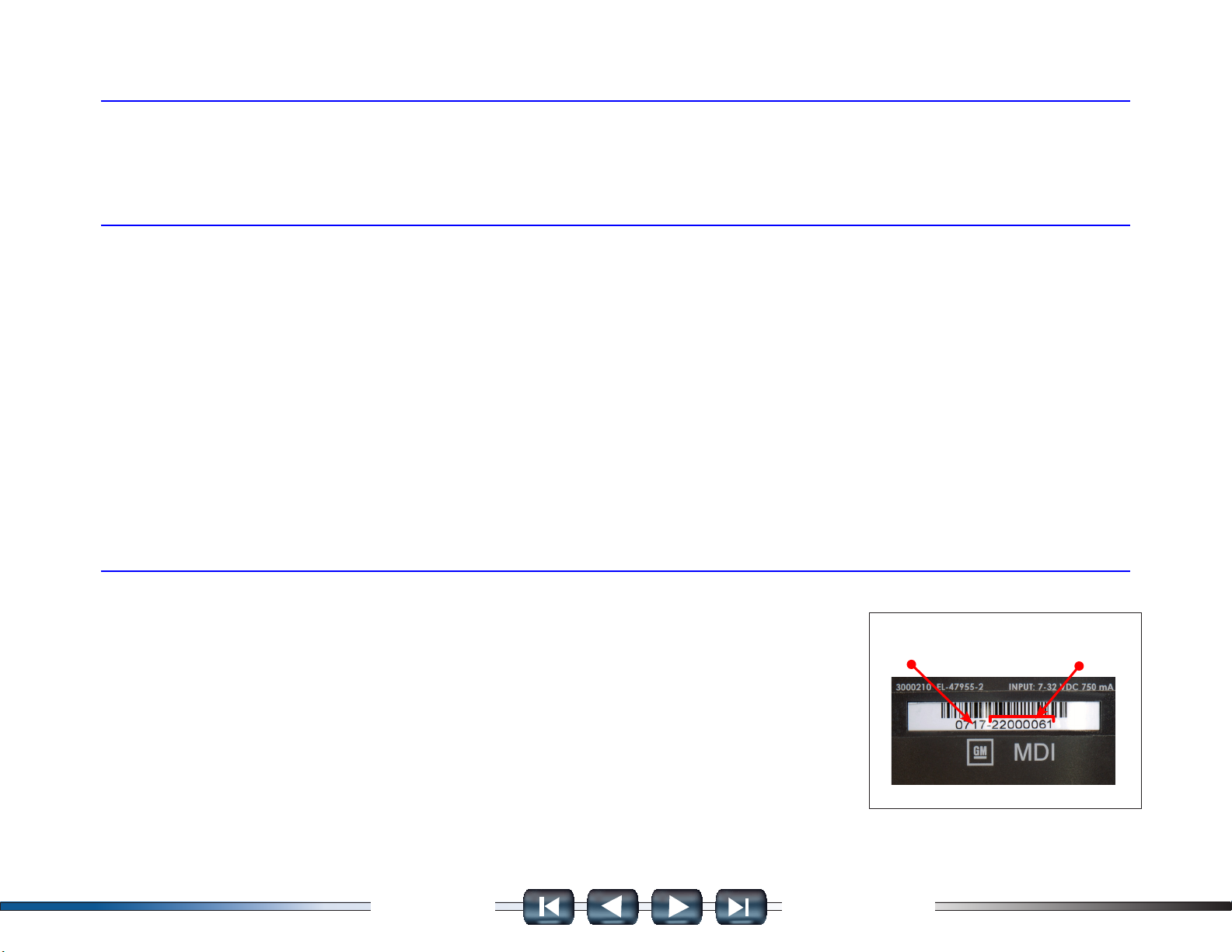
IDENTIFYING YOUR MDI
The GM MDI assembly label is located on the back of the unit. As shown in the illustration
at the right, the assembly identication number has two parts: a manufacturing code for
traceability and a unique serial number (22000061, in this example Figure IV-1). The serial
number is used to identify the MDI in the software.
Customer Support Overview continued on next page…
manufacturing
code
serial
number
FIGURE IV-1.

2008MDI User’s Guide Section I – v
I. Introduction
- PREVIOUS VIEW - - RETURN MAIN MENU -
Customer Support Overview continued…
Making the Call
The GM Service and Parts Operations GM-Techline Customer Support Center telephone lines operate from 8:00 a.m. to
8:00 p.m. (Eastern Standard Time) Monday to Friday.
In the United States and Canada to contact Customer Support, dial:
• English: 1-800-828-6860 (option 1) or 1-888-337-1010 (option 3)
• French: 1-800-503-3222
• Spanish: 1-248-265-0840 (option 2)
• Fax line: 1-248-265-9327*
To call GM Dealer Equipment, dial 1-800-GM-TOOLS (1-800-468-6657).
TCSC supports North America only. International customers can send questions or comments by fax, (U.S. country code)
248-265-9327, or use the following telephone numbers:
• Latin America 1-248-265-0840 • Asia Pacic 045-562-4483
• Europe 41-41-766-2940 • Australia 613-9544-6222
A GM-Techline Customer Support representative will come on the line or respond by fax to answer questions, make
suggestions, and take repair and parts orders. To make sure every problem is resolved to the satisfaction of the caller, the
GM-Techline Customer Support representative will record each problem, question, or suggestion into a special problem
tracking system. Any problems that cannot be resolved over the phone will be directed to the appropriate group for
resolution.
* You may also send a GM-Techline Product Assistance fax form to the Customer Support Center.

2008MDI User’s Guide Section I – vi
I. Introduction
- PREVIOUS VIEW -
- RETURN MAIN MENU -
Software License Agreement
Please read this software license agreement carefully before proceeding with use of the software. Proceeding with use of
the software will constitute your acceptance of the terms and conditions contained herein.
OWNERSHIP: The software is a copyrighted work of General Motors Corporation and you acknowledge that General
Motors Corporation owns all copyright and other proprietary right, title and interest in and to the software. Any rights to the
software not specically licensed hereunder are expressly reserved by General Motors Corporation.
USE: You are granted a non-exclusive, non-transferable license to use the software on multiple computer systems. You
may not reverse engineer, decompile, modify, reproduce, distribute or sell the software, in whole or in part. This license is
personal to you and conditioned upon your strict compliance with all of the terms and conditions contained herein.
TERMINATION: General Motors Corporation may terminate this software license agreement for your failure to comply with
the terms and conditions contained herein. Upon termination, you must immediately discontinue your use of the software
and destroy any and all copies of the software including, but not limited to, those contained on your computer systems.
2008 MDI User’s Guide Section II – 1
II. Product Description
- PREVIOUS VIEW - - RETURN MAIN MENU -
THE MULTIPLE DIAGNOSTIC INTERFACE
The MDI is used by professional technicians as an aid in diagnosing and repairing automotive electrical and electronic
systems. The MDI is designed to connect the vehicle to a TIS 2 Web PC computer application which then functions
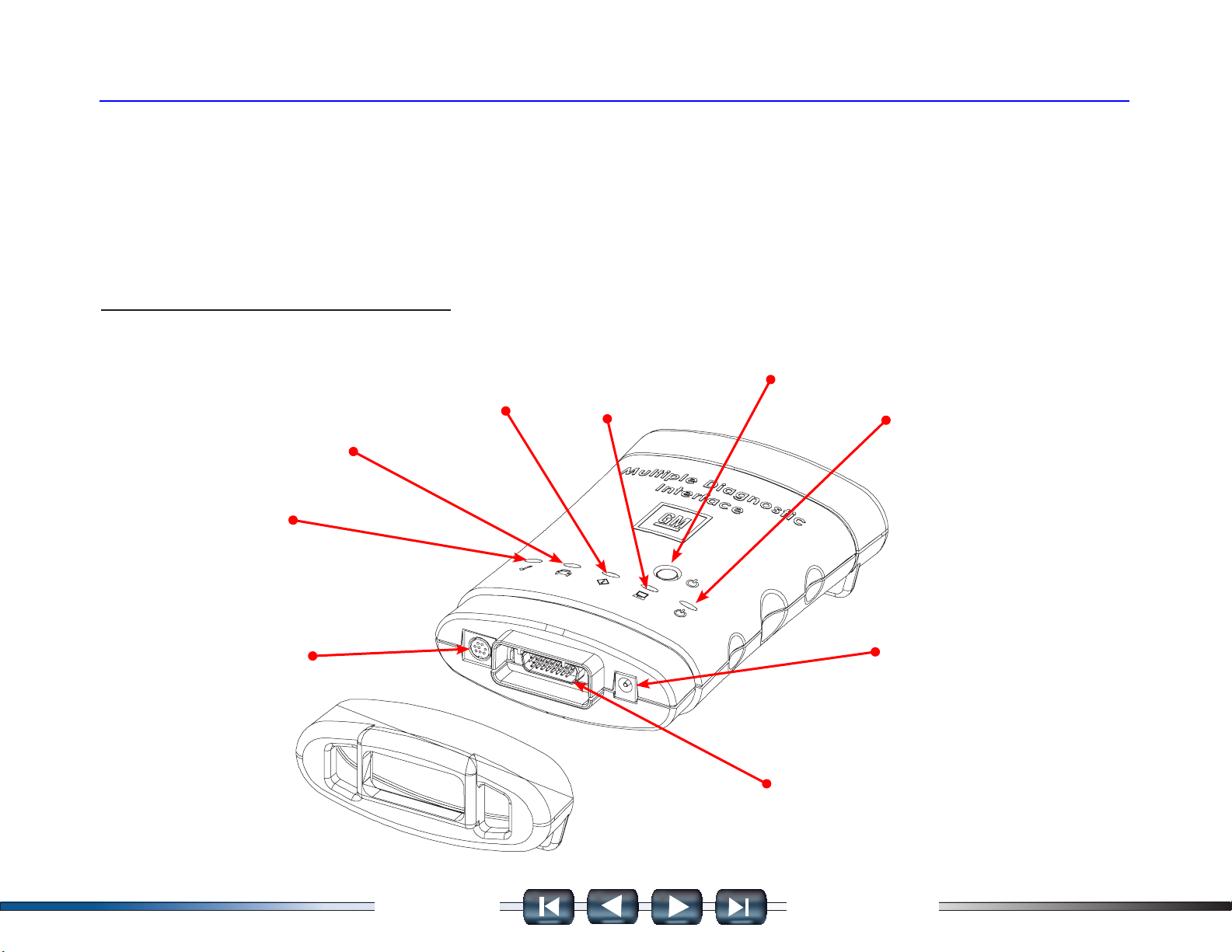
though the MDI for data transfer and Electronic Control Unit (ECU) reprogramming. See Figure IV-2 for the location of the
connectors and indicators (LEDs) on the MDI.
FIGURE IV-2.
Connectors and Indicators (LEDs) on the MDI
RS-232 Connector
(Future use)
Future Use
LED
Vehicle
Communication
Active
MDI
Error
Detected
MDI Host
Communication
Active
Power button
On/Off LED
AC 12-volt
Adapter Plug
26-Pin DLC Cable
Connector
2008 MDI User’s Guide Section II – 2
II. Product Description
- PREVIOUS VIEW - - RETURN MAIN MENU -
Host Computer Interface
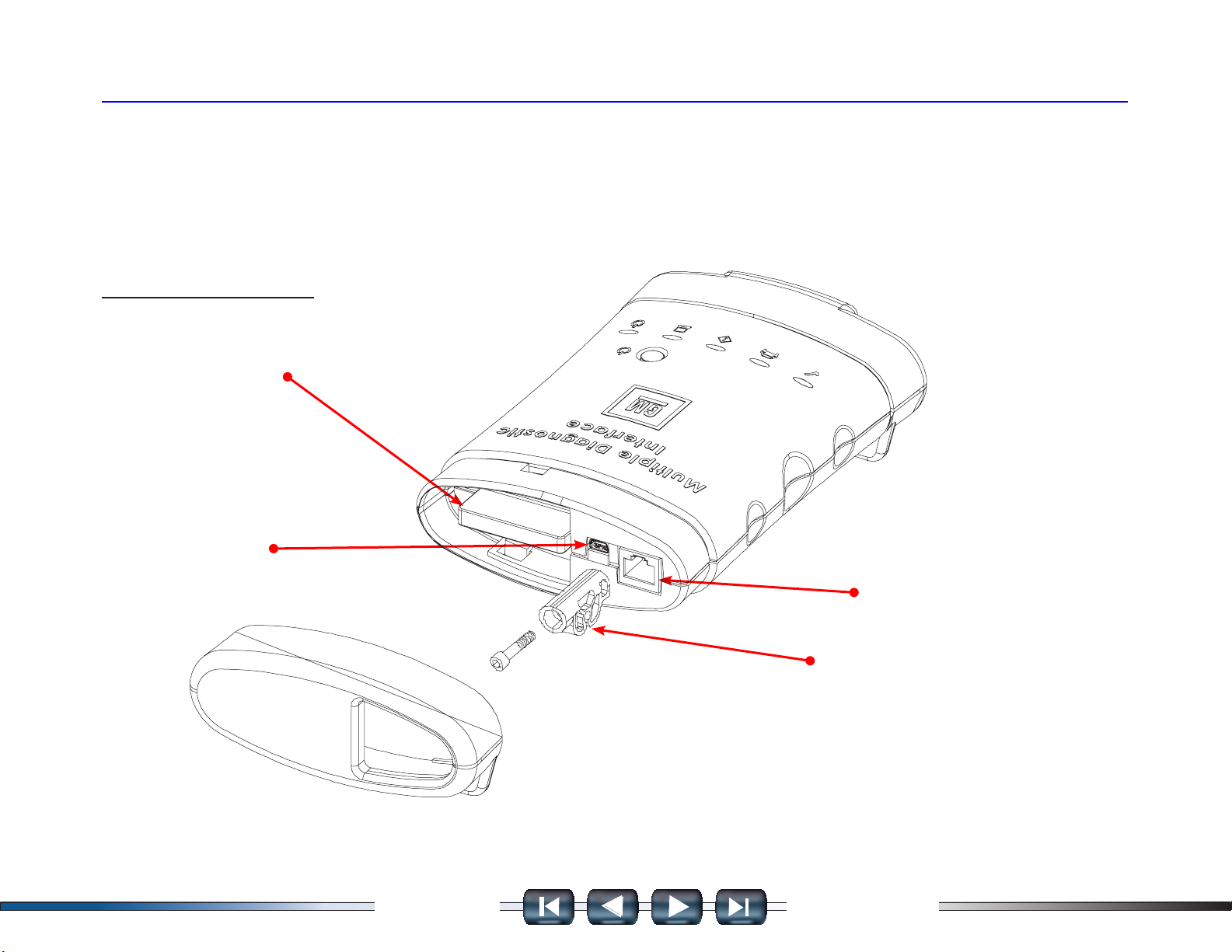
Using the PC application MDI Manager software, you congure the MDI to communicate with a host computer. The MDI is
capable of communicating over a USB cable, an ethernet cable (LAN), or wireless (WLAN). Refer to Figure IV-3.
FIGURE IV-3.
PC Connections on the MDI
802. 11g
WLAN / Compact Flash Card
USB Connector
Ethernet Connector
USB Cable Keeper
3000215
2008 MDI User’s Guide Section II – 3
II. Product Description
- PREVIOUS VIEW -
- RETURN MAIN MENU -
Minimum hardware requirements
Minimum hardware requirements: (refer to GM Online Support for further information.)
• Intel Pentium IV / 1.3 GHz
• System Memory (RAM)
• 256 MB SDRam
• Hard Disk Drive: 20 GB3 ATA or greater
• CD-ROM Drive / DVD combo drive
• RAM: 512 MB RAM or greater
• Parallel Port 1
• Serial Port 1
• USB Ports 1 or more Audio Adapter 16-Bit or greater
• Audio Speaker Yes
• Video Memory
PC Computer Application
The MDI functions with a PC computer applications (PC program) for testing specic vehicles and systems. The programs
are upgraded periodically to include new vehicles, model years, systems, and functions. Specic operating instructions are
provided within the PC computer application.
The MDI supports pass-thru programming of the ash calibration les that are stored in a vehicle onboard controller
(e.g. PCM, ABS, VTD). Refer to The Service Programming System (SPS) guide located in this manual.
Processors such as Celeron, Cyrix and AMD are NOT compatible with some GM software.
NOTE
Autres manuels pour MDI
1
Table des matières
Manuels Équipement d'enregistrement populaires d'autres marques


Strymon
Strymon NIGHTSKY Manuel utilisateur

Mitsubishi Electric
Mitsubishi Electric 16CH DIGITAL RECORDER DX-TL5000U Manuel utilisateur

Tews Technologies
Tews Technologies TPMC465 Manuel utilisateur

Honeywell
Honeywell Excel 50 Manuel utilisateur

SeaLevel
SeaLevel COMM+8.LPCI Manuel utilisateur

Arturia
Arturia AUDIOFUSE STUDIO Manuel utilisateur


