GlobalTop HG-100 Manuel utilisateur

HUDGPS
User Manual
Rev.A00
1
GlobalTop Technology Inc.
16 Nan-ke 9th Rd Science-based Industrial Park, Tainan 741, Taiwan, R.O.C.
© Copyright 2006 GlobalTop Inc.
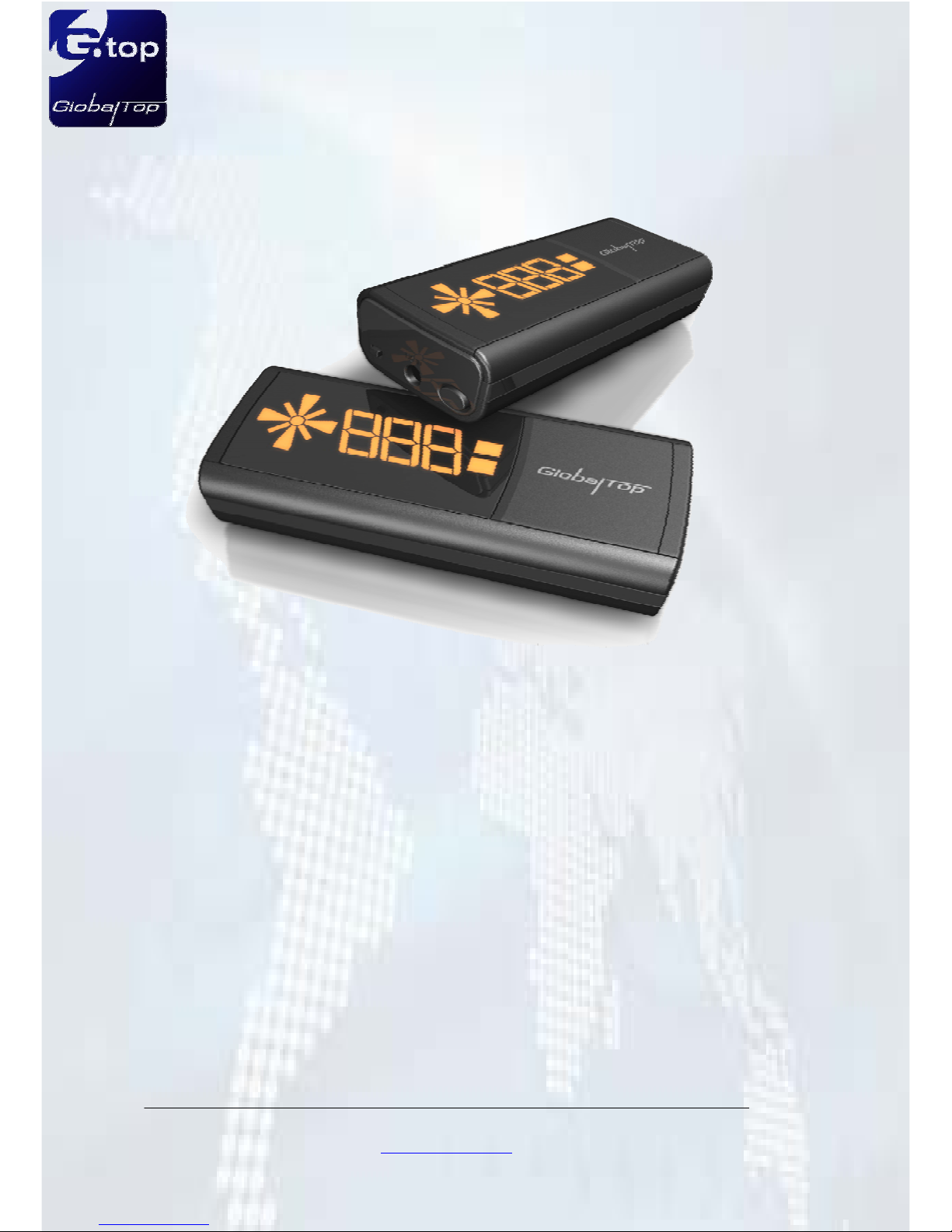
HUD GPS Speed Meter
with Bluetooth
By MTK Chipset
HG-100

HUDGPS
User Manual
Rev.A00
2
GlobalTop Technology Inc.
16 Nan-ke 9th Rd Science-based Industrial Park, Tainan 741, Taiwan, R.O.C.
© Copyright 2006 GlobalTop Inc.
Precaution
GPS is possessed and maintained by USA DOD (Department Of Defense), which
has the absolute right to degrade the GPS signal without alert in advance.
GPS Signal reception will be certainly effected if you are inside building, tunnel
and extreme urban environment. In these cases, it doesn’t mean that the device
is defective
Drive safety always has to be the first priority while using this device.
For safety, don’t operate this device while driving. Start to drive after everything is
set well.
Please use the qualified car charger only which is packed inside accessories box.
Please return defective one to your dealer or agent. Personal disassemble or
repair is not permitted and guaranteed.

HUDGPS
User Manual
Rev.A00
3
GlobalTop Technology Inc.
16 Nan-ke 9th Rd Science-based Industrial Park, Tainan 741, Taiwan, R.O.C.
© Copyright 2006 GlobalTop Inc.
Chapter 1 Product Introduction
1.1 Description
GlobalTop Technology Inc. is proud to present you the most innovative GPS
application product, HUD GPS Speed Meter with Bluetooth,HG-100. HG-100 is
combined with the three exciting modern technology, Heads-Up Display (HUD), GPS,
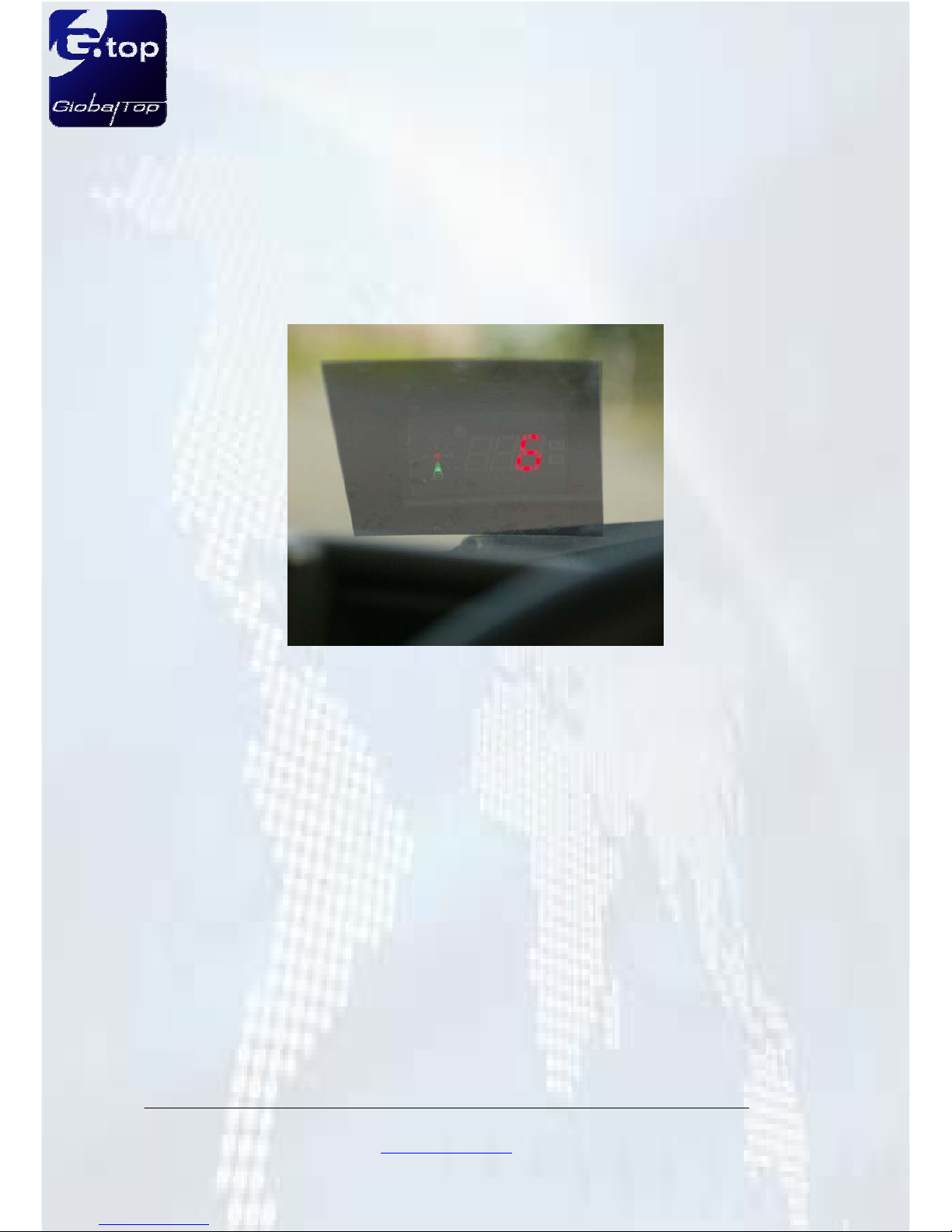
and Bluetooth. With HUD, the car information of car heading and speed are being
projected onto the windshield window which is ahead of driver and drivers can keep
their eyes on the road and enjoy the fun of driving. HG-100 has also the Over-Speed
Alert function to remind drivers with condition of vehicles in real time. The GPS
technology, based on MediaTek Inc. architecture, the world's leading digital media IC
solution provider, is providing the 32 channel all-in-view satellite tracking, 5Hz update
rate function to show the most detail position fix and bring drivers enjoying the feeling
of speed. HG-100 also has the Bluetooth interface function, compliant with Bluetooth
V2.0, works with PDA, Smart Phone and laptop computer and is compatible with all
navigation software.
HG-100 is going to re-define the meaning of Bluetooth GPS receiver and going to be
the driving force of GPS innovation.

HUDGPS
User Manual
Rev.A00
4
GlobalTop Technology Inc.
16 Nan-ke 9th Rd Science-based Industrial Park, Tainan 741, Taiwan, R.O.C.
© Copyright 2006 GlobalTop Inc.
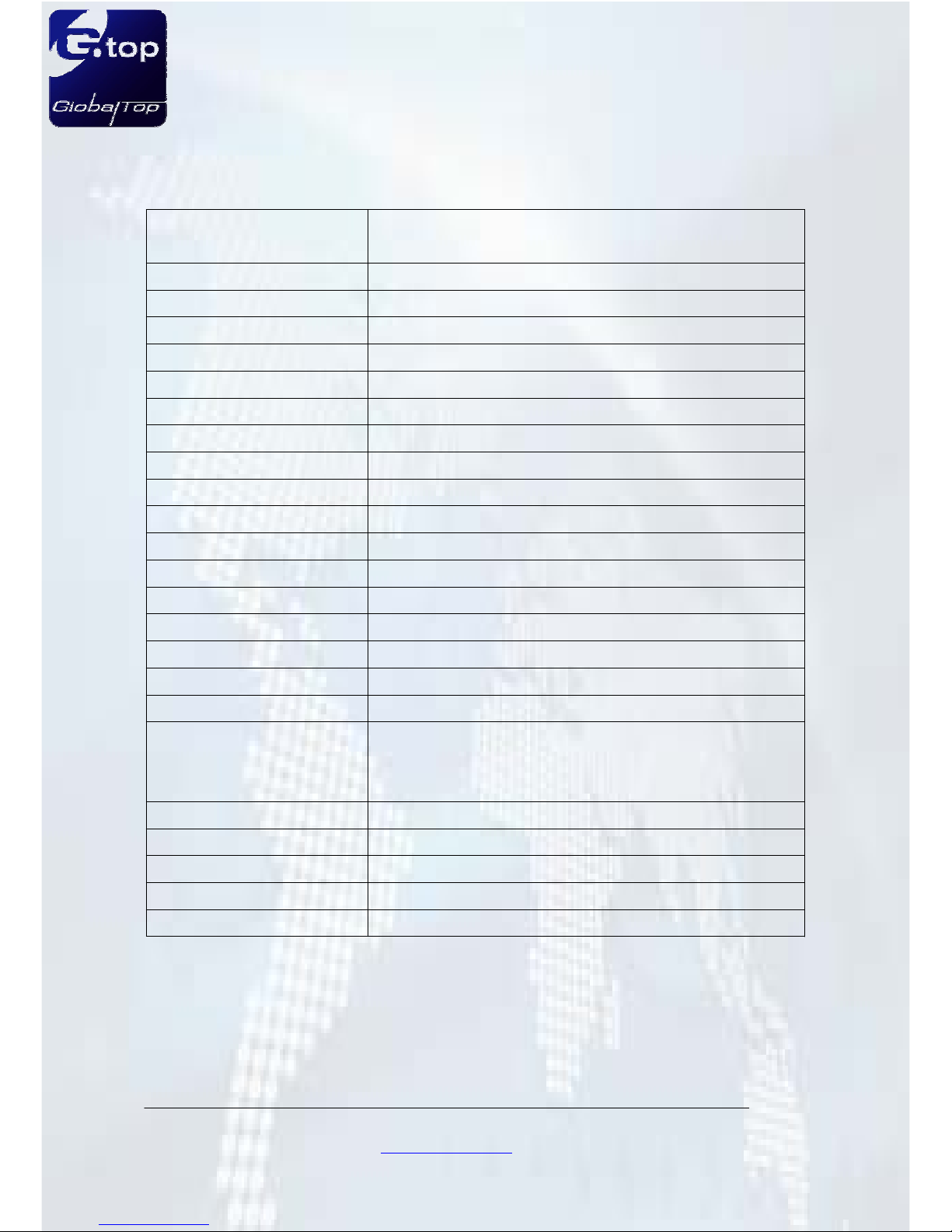
1.2 Electrical Characteristics
Protocol NMEA 0183 v3.01 (DefaultΚGGA,GSA,GSV,RMC,VTG)
MTK NMEA Command
Baud Rate 38400,N,8,1 (Default)
Update Rate 5 Hz
Datum WGS84
Channel 32-channel satellites all-in-view tracking
Frequency L1, 1575.42MHz
Hot Start 1 sec. (Average)
Warm Start 34 sec. (Average)
Cold Start 36 sec. (Average)
Reacquisition Time Less than 1 sec (Typical)
Position Accuracy < 3m CEP (50%) without SA (Horizontal)
Sensitivity TrackingΚ-158 dBm
Power Supply DC 5V
Power Consumption 100mA(Average)
Battery Life 7~9 HRs with rechargeable Li-Ion Battery
Antenna Type Built-in low noise patch antenna
Bluetooth Class 2, distance up to 10 meters
Dimension 104.08(W)x20(L)x41.06(H) mm
LED Indicator
Red LEDΚGPS is fixed or not fixed / Power On
Green LEDΚBattery Indicator
Blue LEDΚBluetooth is connected or not connected
Operating Temperature -10°C to + 70°C
Storage Temperature -40°C to + 85°C
Operation Humidity 5%~95%, Non-Condensing
HUD function Vehicle Speed, Heading, Speed Warning
Availability of HUD Plug-in Car charger

HUDGPS
User Manual
Rev.A00
5
GlobalTop Technology Inc.
16 Nan-ke 9th Rd Science-based Industrial Park, Tainan 741, Taiwan, R.O.C.
© Copyright 2006 GlobalTop Inc.
1.3 System Operating Chart
HUD display
Bluetooth Connection
for GPS Navigation

HUDGPS
User Manual
Rev.A00
6
GlobalTop Technology Inc.
16 Nan-ke 9th Rd Science-based Industrial Park, Tainan 741, Taiwan, R.O.C.
© Copyright 2006 GlobalTop Inc.
1.4 Product Appearance
1Direction
Indicator Indicate the direction of the moving vehicles
2Light
Sensor Automatic change the brightness of the LEDs
3Speed
Indicator Indicate the speed of the moving vehicles for 1~999
4Speed
Unit Indicate the speed unit, kilometer/hour and mile/hour
1
4
2
3
5
7
6

HUDGPS
User Manual
Rev.A00
7
GlobalTop Technology Inc.
16 Nan-ke 9th Rd Science-based Industrial Park, Tainan 741, Taiwan, R.O.C.
© Copyright 2006 GlobalTop Inc.
5Function
Touch Function switch for speed unit and speed warning system
6Power
inlet Car charger power input
7Power
Button Power ON/OFF, HUD Off (power saving mode)
8LED
Indicator
Red LEDΚGPS is fixed or not fixed / Power On
Green LEDΚBattery Indicator
Blue LEDΚBluetooth is connected or not connected
9Permanent
Magnet The location of permanent magnet
9
8

HUDGPS
User Manual
Rev.A00
8
GlobalTop Technology Inc.
16 Nan-ke 9th Rd Science-based Industrial Park, Tainan 741, Taiwan, R.O.C.
© Copyright 2006 GlobalTop Inc.
1.4 Quick Hardware Installation
A. Paste the heat insulation film
1. Please find the most suitable position of the heat insulation film on the windshield
window to get the best projecting angle. It is recommended to put the heat
insulation film on the left under corner of the windshield window.
2. Remove the backside film of the heat insulation film and apply to the choosing
position on last step. Gently smoothing this film onto windshield to avoid bubbling
generated.(Note: regular process will be recommended to apply one thin layer of
soap mixed water on the side which to stick onto windshield and get rid of bubble)
3. Paste the heat insulation film on the windshield window and adjust the position to
the suitable place.
4. Use the smooth slab to remove the bubbles of the heat insulation film.
5. Remove the surplus soap water.
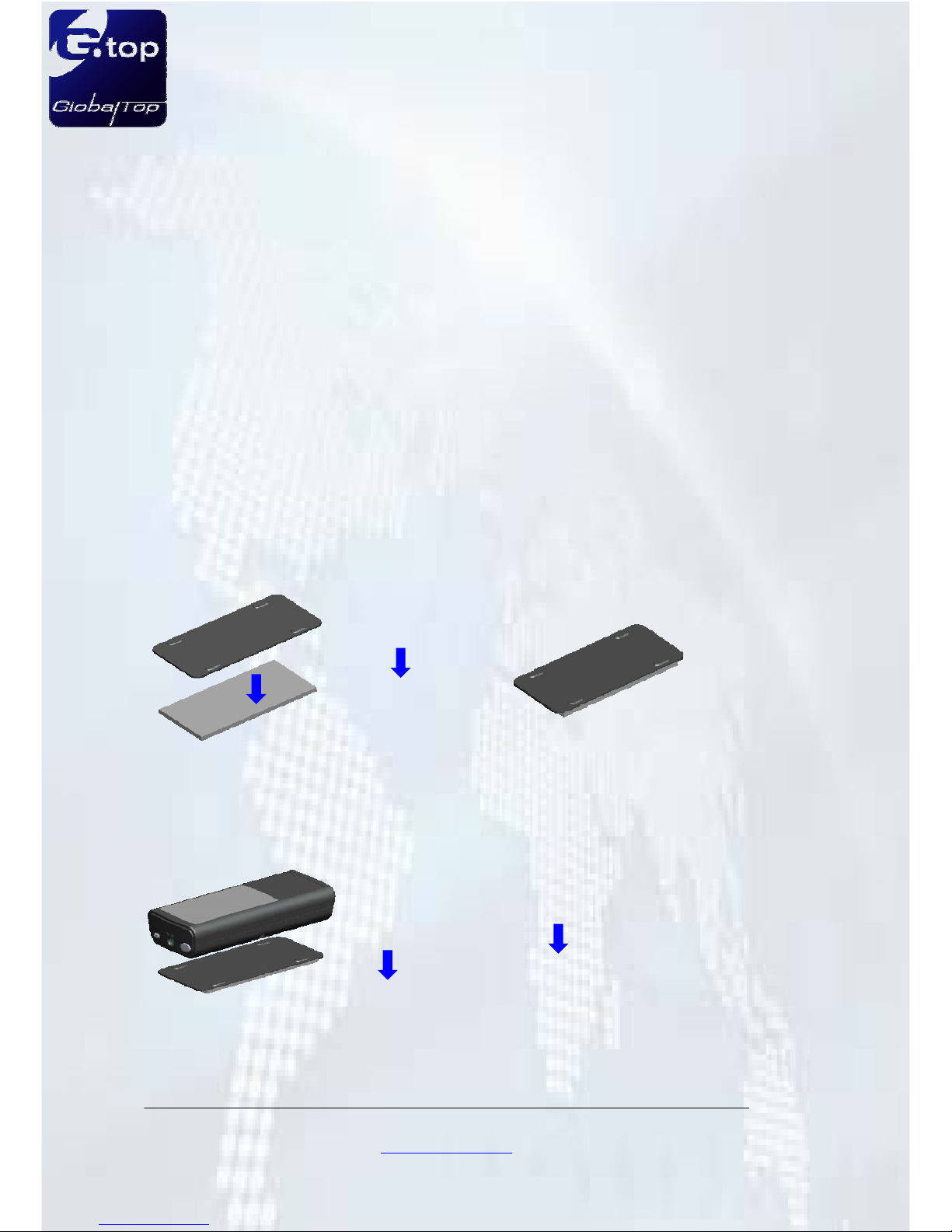
B. Fix the HG-100
1. Remove the backside film of the rubber film and stick it on the iron plate.
2. Put the iron plate below the heat insulation film. Check the image of the iron plate
is projected to the area of the heat insulation film.
3. Put HG-100 on the iron plate and check the projecting area is in the heat insulation
film to get the most comfortable view angle.
4. Remove the other backside film of the rubber film and stick it.
C. Starting the HG-100

HUDGPS
User Manual
Rev.A00
9
GlobalTop Technology Inc.
16 Nan-ke 9th Rd Science-based Industrial Park, Tainan 741, Taiwan, R.O.C.
© Copyright 2006 GlobalTop Inc.
1. Starting your car and plug in the car charger to the HG-100.
2. Press the power button of the HG-100 last 2 seconds.
3. Put the HG-100 on the iron plate and it will be magnetic fixed on the plate.
4. HG-100 will show “GPS” until get position fixed.
5. In the open sky, the HG-100 will get fixed under 1 minute.
6. After GPS position fixed, the HG-100 will project the heading and speed of drive
information.

HUDGPS
User Manual
Rev.A00
10
GlobalTop Technology Inc.
16 Nan-ke 9th Rd Science-based Industrial Park, Tainan 741, Taiwan, R.O.C.
© Copyright 2006 GlobalTop Inc.
Chapter 2 Basic Operation Instruction
2.1 Note before Use
The HUD function of HG-100 is only activated with the car charger plug-in. But without
car charger plug-in, the GPS and Bluetooth function still remain. Keep HG-100
embedded battery charged firstly at least 1 hrs.
Just press Power button ON, HG-100 will start GPS signal searching automatically
without any other setting. Strongly recommend you doing the first time GPS position
fix outdoor (free of sky obstruction) for better level of GPS signal reception and keep
stayed 10~15 min for satellite constellation update.
2.2 Machine ON/OFF
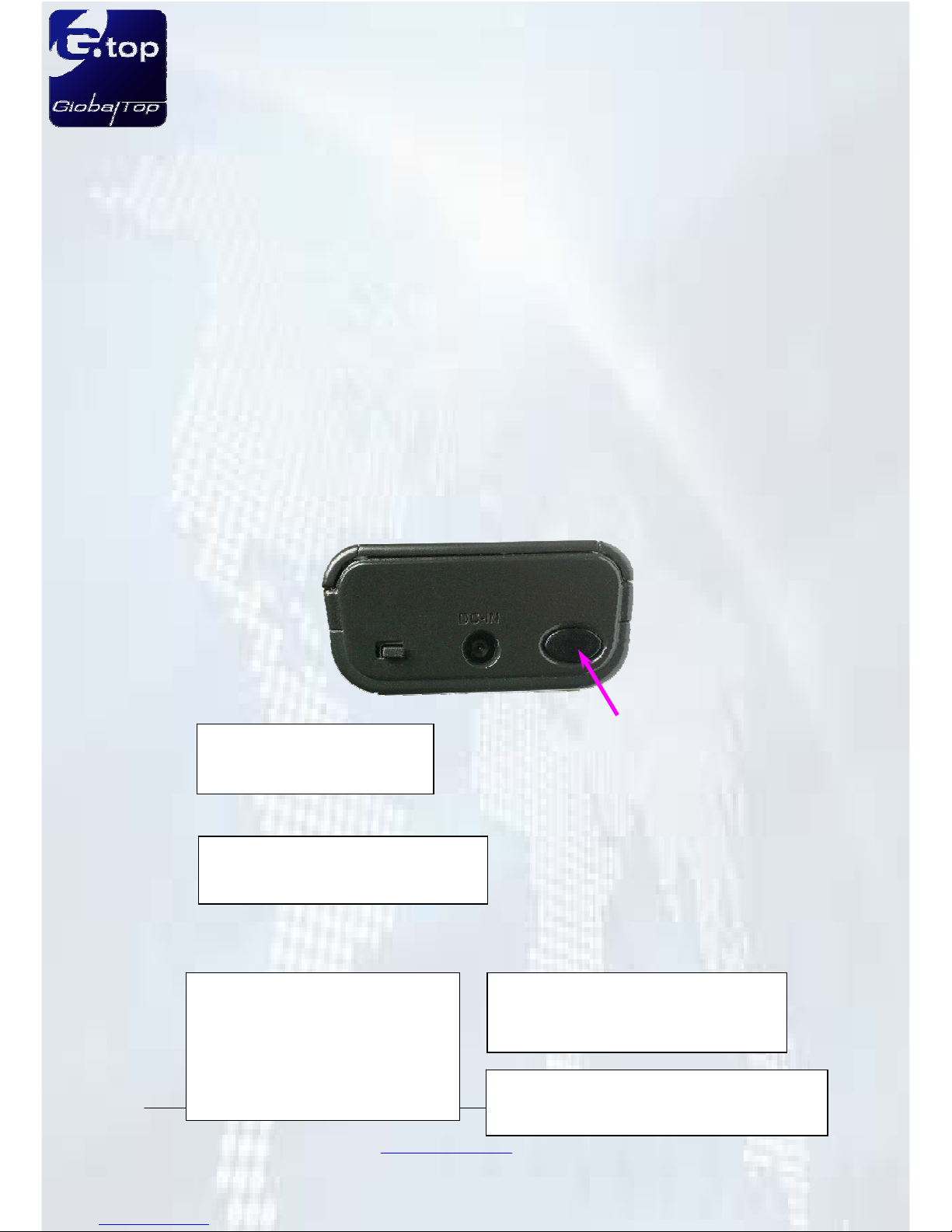
Press the Power Button to start HG-100.
Power ON
2 sec button pressed
HUD will light on in 1 sec
Power button
Power Off
Machine shuts down automatically
with button 2 sec pressed.
HUD OFF
For some certain purposes or
driving considerations, you may
switch off the screen with button
1 sec pressed and the GPS still
working.
HUD ON
HUD recovery will be obtained by
pressing the button 1 sec again.
Note
Κ
The HUD function is only
activated with the car charger plug-in.
Autres manuels pour HG-100
1
Table des matières
Autres manuels GlobalTop GPS