
Glensound PARADISO Guide d'installation

PARADISO
& PARADISO LITE
COMMENTARY BOX WITH DANTE NETWORK
AUDIO & ANALOGUE I/O
PRODUCT DETAILS
6 BROOKS PLACE, MAIDSTONE, KENT, ME14 1HE. ENGLAND. TEL: +44 (0) 1622 753662
Visit our Website at www.glensound.com FAX: +44 (0) 1622 762330

Page 2of 62
Glensound Electronics Ltd
Thank you for choosing a new Glensound product.
All rights reserved.
Information contained in this manual is subject to change without notice, if
in doubt please contact us for the latest product information.
If you need any help with the product then we can be contacted at:
Glensound Electronics Ltd
1 –6 Brooks Place
Maidstone
Kent
ME14 1HE
United Kingdom
Telephone: +44 (0) 1622 753662
Fax: +44 (0) 1622 762330
EMAIL ADDRESSES
General enquires: office@glensound.co.uk
Technical enquires: techinfo@glensound.co.uk

Page 3of 62
PRODUCT WARRANTY:
All equipment is fully tested before dispatch and carefully designed to
provide you with trouble free use for many years.
We have a policy of supporting products for as long as possible and
guarantee to be able to support your product for a minimum of 10 years.
For a period of one year after the goods have been despatched the
Company will guarantee the goods against any defect developing after
proper use providing such defects arise solely from faulty materials or
workmanship and that the Customer shall return the goods to the
Company’s works or their local dealer.
All non-wear parts are guaranteed for 2 years after despatch and any
defect developing after proper use from faulty materials or workmanship
will be repaired under this warranty providing the Customer returns the
goods to the Company's works or their local dealer.

Page 4of 62
EU DECLARATION OF CONFORMITY FOR:
PARADISO
DanteTM / AES67 Network Commentary Box
This declaration of conformity is issued under the sole responsibility of
the manufacturer.
This equipment is manufactured by Glensound Electronics Ltd of Brooks
Place Maidstone Kent ME14 1HE is marked and conforms to the
following Union harmonisation legislation:
Low Voltage Directive: EN60065 and EN62368-1:2014
Emissions: BS EN55032:2015
Immunity: BS EN55035:2017
Signed for and on behalf of Glensound Electronics Ltd.
Gavin Davis, Managing Director
Maidstone, Kent, England
Date: 07/02/2018

Page 5of 62
RoHS DIRECTIVE
RoHS 2 Directive 2011/65/EU restricts the use of the hazardous
substances listed below in electrical and electronic equipment.
This product conforms to the above directive and for this purposes, the
maximum concentration values of the restricted substances by weight in
homogenous materials are:
Lead
0.1%
Mercury
0.1%
Hexavalent Chromium
0.1%
Polybrominated Biphenyls
0.1%
Polybrominated Diphenyl
Ethers
0.1%
Cadmium
0.01%

Page 6of 62
WASTE ELECTRICAL AND ELECTRONIC
EQUIPMENT REGULATIONS 2006 (WEEE)
Glensound Electronics Ltd is registered for business to business sales of
WEEE in the UK our registration number is:
WEE/JJ0074UR

Page 7of 62
GLENSOUND PARADISO & LITE
Handbook Contents Issue 7
PRODUCT WARRANTY:...............................................................................................................................3
OVERVIEW....................................................................................................................................................8
PRODUCTS COVERED BY THIS MANUAL.................................................................................................9
PANEL LAYOUT & FUNCTIONS ...............................................................................................................10
Rear Panel................................................................................................................................................10
Top Panel.................................................................................................................................................12
Front Panel...............................................................................................................................................14
WINDOWS 10 REMOTE CONTROL APPLICATION..................................................................................15
First Time App Installation.......................................................................................................................16
Updating A Previously Installed App......................................................................................................17
USING THE APP ..........................................................................................................................................18
General.....................................................................................................................................................18
Compressors & Disabling Hardware Gain Controls..............................................................................20
Presets & Loading/ Exporting Configurations........................................................................................22
Entering Configuration Menus................................................................................................................23
Pots & Buttons .........................................................................................................................................24
Button Relations.......................................................................................................................................25
DC Inputs..................................................................................................................................................26
DC Inputs Further Information................................................................................................................27
DC Outputs...............................................................................................................................................29
Audio Mixer ..............................................................................................................................................30
Call Alerts.................................................................................................................................................35
Channel Names.......................................................................................................................................36
Restore Factory Defaults.........................................................................................................................38
AUDIO MIXER.............................................................................................................................................39
General.....................................................................................................................................................39
Factory Preset Mixing Configuration......................................................................................................41
Fixed Audio Mixing Circuits.....................................................................................................................47
Test Tone .................................................................................................................................................47
CONNECTING THE PARADISO TO A DANTE NETWORK......................................................................48
Device Not Showing Up In Dante Controller..........................................................................................50
UPDATING FIRMWARE..............................................................................................................................51
UPDATING THE BROOKLYN MODULE ...................................................................................................54
REFRESHING ePAPER DISPLAYS .............................................................................................................55
AES67 MODE ...............................................................................................................................................57
WIRING INFORMATION.............................................................................................................................60
XLR & JACK Wiring.................................................................................................................................60
D9 Wiring & Loop Interconnecting To External Equipment ..................................................................61
SPECIFICATIONS........................................................................................................................................62

Page 8of 62
OVERVIEW
The Glensound Paradiso is a commentator’s box for 3 commentators. It can be used
by itself to provide the commentary facilities alongside an OB truck for small events,
or multiple Paradisos can be used at large events that require Worldwide broadcast
coverage.
The Paradiso is designed to connect to a Dante audio network, with the added
advantage of having multiple local analogue audio inputs & outputs available for
local or backup circuits. The unit provides all the talkback and monitoring circuits
required by the commentators whilst incorporating a very high quality microphone
amplifiers and compressor limiter circuits designed specifically for the requirements
of commentators equipment.
The audio inputs and outputs of the Paradiso are DanteTM / AES67 network audio
circuits. DanteTM network audio is a common protocol for distributing high quality
linear audio over standard IP networks and it is widely used by many audio
equipment manufacturers. The Glensound Paradiso’s Dante audio interface will be
compatible with any other manufacturers Dante audio interface. Further details of
Dante network audio can be found at www.audinate.com
Being designed for live on-air broadcast applications the Glensound Paradiso has
been designed with multiple redundancy capabilities. It has 4 possible sources of
power (Mains, 2 x PoE & 1 external DC) and it also has fully redundant network
connections for both Copper & Fibre circuits.
The Paradiso has been designed to be intuitive & easy to use for Commentators who
would rather be talking about the game than working out how the equipment works.
It is also built to our exacting rugged and robust standard to make it a reliable piece
of broadcast equipoment for the busy engineer.

Page 9of 62
PRODUCTS COVERED BY THIS MANUAL
This manual covers both the Paradiso & the Paradiso Lite.
The Paradiso Lite is a cut down very slightly simplified version of the Paradiso. There
are 2 main differences:
1) The Paradiso has front panel mounted ePaper displays.
The Paradiso Lite does not have these ePaper displays.
2) The Paradiso has Fibre network connectors.
The Paradiso Lite does not have Fibre network connectors.
Apart from the above differences the two products are identical.
Page 10 of 62
PANEL LAYOUT & FUNCTIONS
PLEASE NOTE AS THE UNIT IS CONFIGURABLE IT IS POSIBLE TO CHANGE THE OPERATION
OF SOME OF THE CONTROLS SHOWN HERE. THEREFORE THE FOLLOWING IS MEANT AS A
GUIDE ONLY.
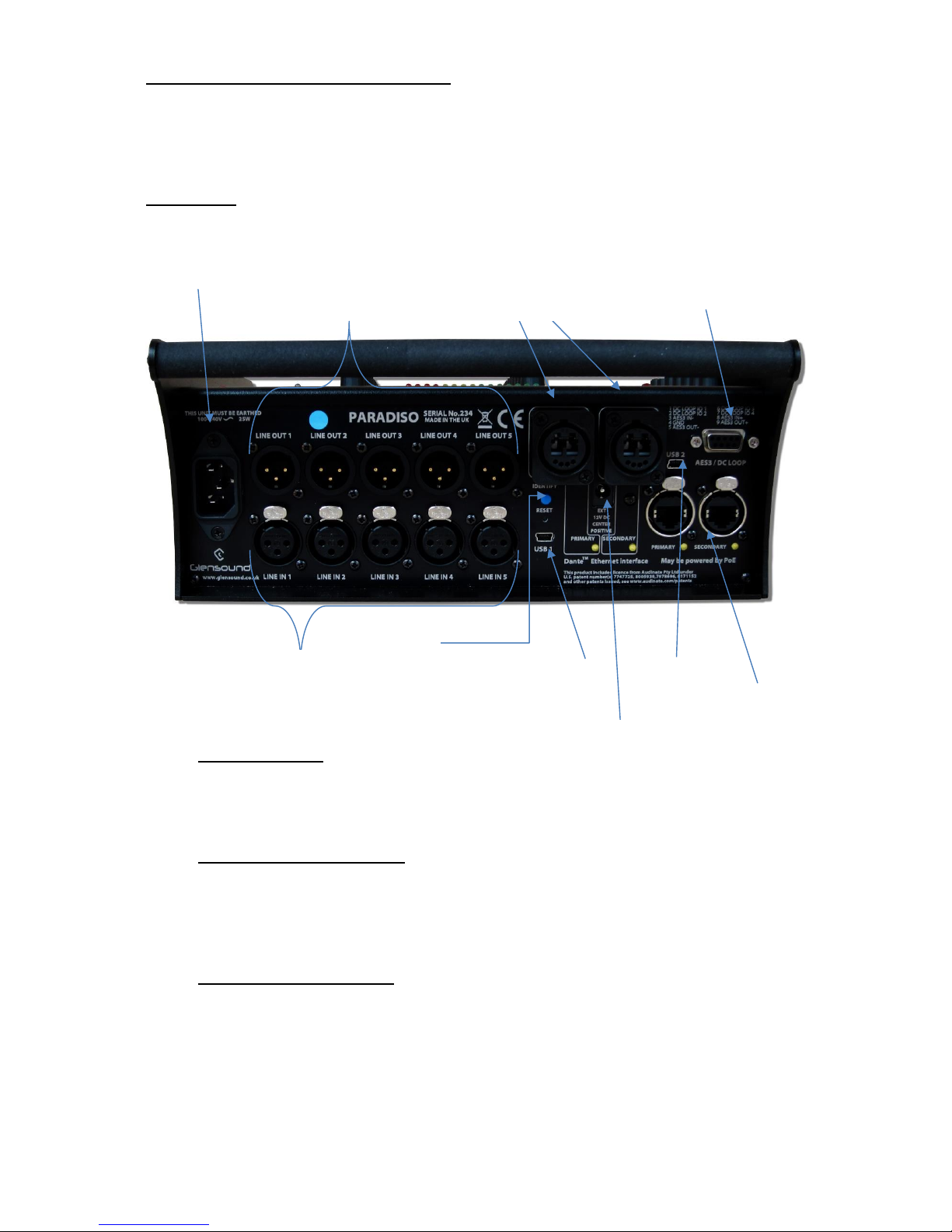
Rear Panel
1. IEC Mains Inlet
3 pin IEC Mains inlet accepting a mains input range of 100 –240 VAC.
********THIS UNIT MUST BE EARTHED********
2. Analogue Audio Outputs
Standard balanced audio outputs, fed internally from the DSP. These can be
completely independent to the Dante audio circuits and do not require the
Dante network to operate.
3. Fibre Network Interface
(Not fitted on Paradiso Lite) Primary & Secondary Dante network fibre
interfaces on Neutrik Opticon connectors. By default these are fed from an
internal Single Mode transceiver (Multi Mode is available as an option).
5. Analogue
Audio Inputs
6. Identify &
Reset Buttons
7. USB 1
8. Copper
Network
Connections
9. USB 2
1. Mains In
2. Analogue
Audio Out
10. DC IN
3. Fibre
Network
Connections
4. AES I/O
and GPIO
Ce manuel convient aux modèles suivants
2
Table des matières
Autres manuels Glensound Mixeur musical


