Gigaware 16-953 Manuel utilisateur

TM
16-953
User’s Guide
8” Digital Photo Frame
with Remote Control
Please read this user’s guide before using your new
photo frame.

TM
2
Package contents
• PhotoFrame• ACAdapter• RemoteControl
• User’sGuide• QuickStart
• RemoteControlHolder
Features
• 16Mbbuilt-inashmemorystoresupto14pictures
• Addadditionalpictureswiththe4-in-1CardSlot
(supportsupto8GBmemorycard)
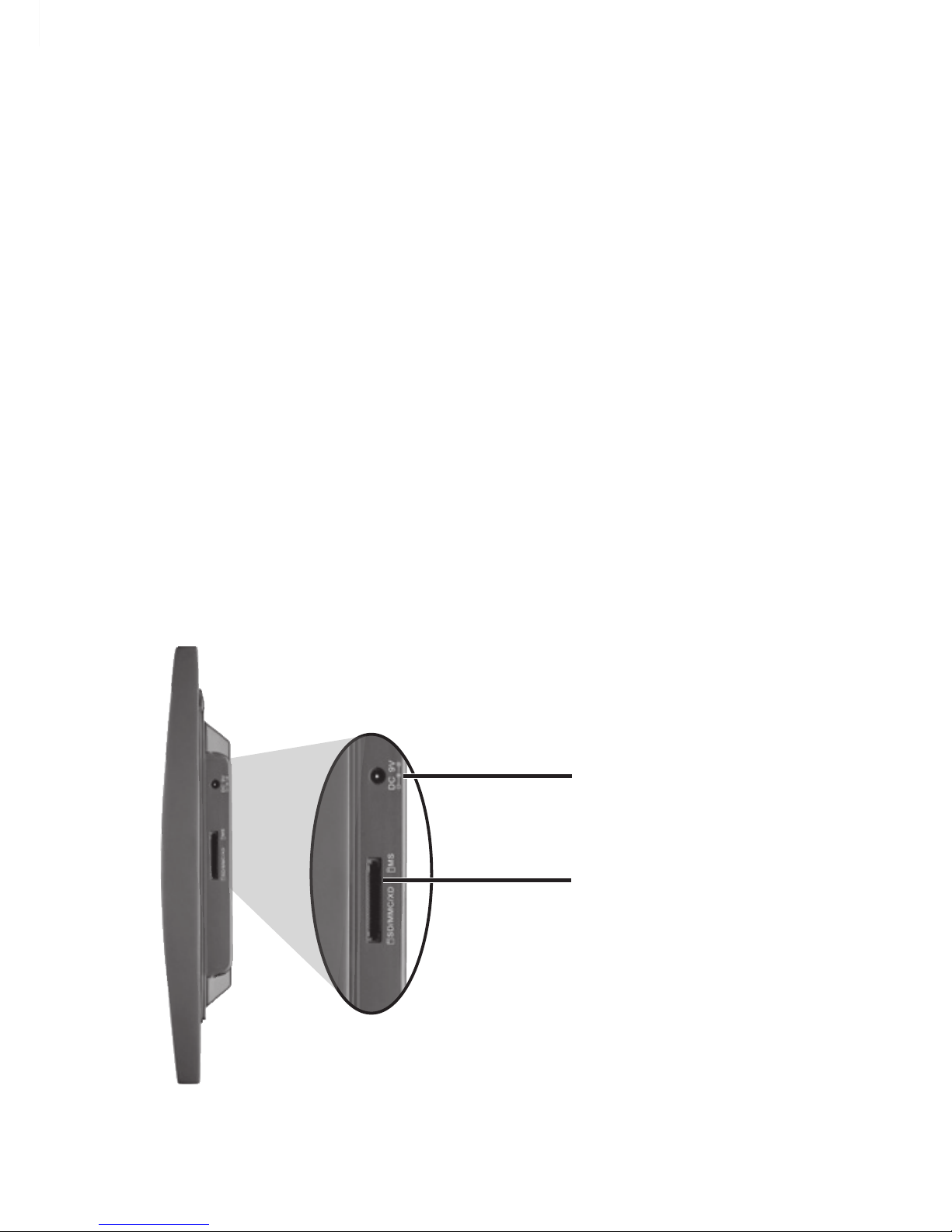
1Power the Photo Frame
ConnectthesuppliedACadaptertotheDC 9V jackand
plugintoastandardhouseholdoutlet.
SD/MMC/XD/MS
memory card slot
Insert a memory card.
DC 9V
Plug in the supplied
AC adapter.

TM
3
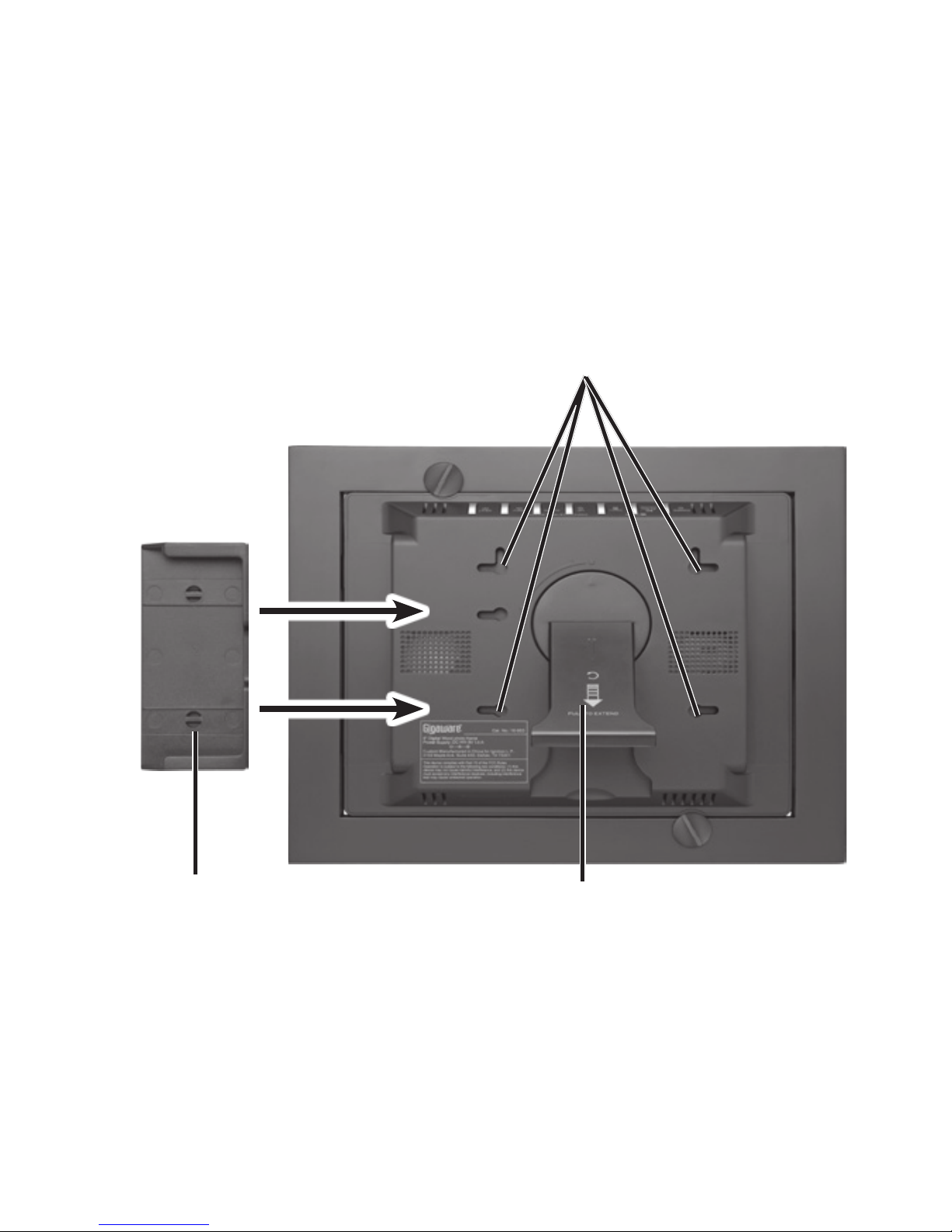
2Position the Frame
Keeptheframeawayfromstrongmagnets,heat
sources,directsunlight,andexcessivedust.
Hanging Slots
Hang your frame vertically or horizontally
or mount the remote control holder.
Adjustable Stand
Pull down and rotate to
position the frame vertically or
horizontally.
Remote Control Holder

TM
4
3Setup
Todeneframesettings,completethefollowingsteps:
1.PressMENUtoenterthemainmenu.
2.PressPREVorNEXTtonavigatetoSETUP and
pressPLAY/PAUSE/MODE.Thesetupmenu
appears.
3.UsethePREV,NEXT,UP,orDOWNbuttonsto
navigatetoasetting.
4.UsePLAY/PAUSE/MODEtoselectoptions.
TFT Brightness:–3to+3
Slide Show Time:5,10,or30secondsdisplay
timeforeachphoto.
Transition Effect:NoEffect,BlindHorizontal,
BlindVertical,ColorationHor(horizontal),Color-
ationVer(vertical),orRandom.
OSD Language:English,French,orSpanish.
Show Type:FitScreenorFullScreen.
Default:Restoresalloptionstofactorysettings.
Exit Setup Menu:Returntothemainmenu.

TM
5
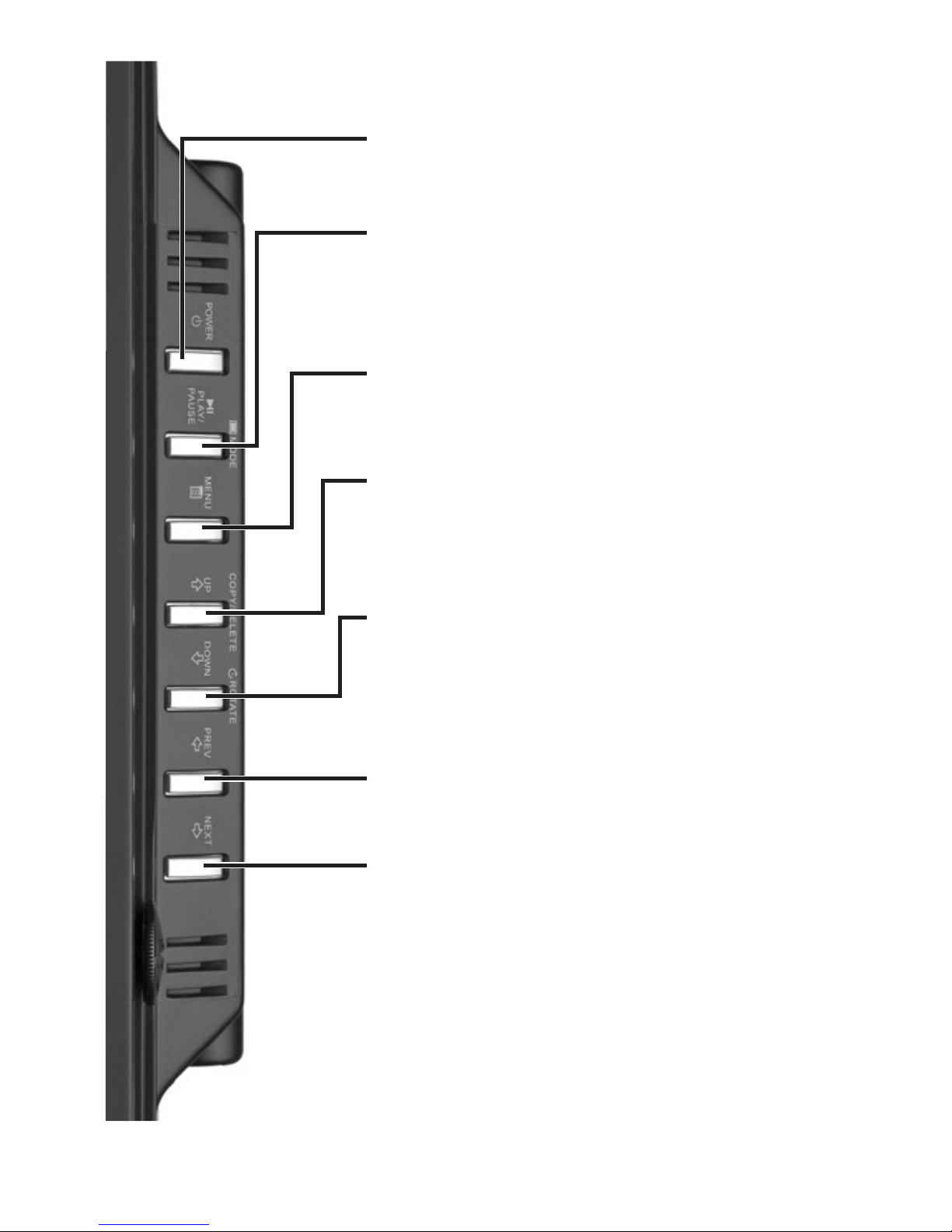
POWER
Turn the frame on or off.
PLAY/PAUSE/MODE
Select functions.
MENU
Access the main menu.
DOWN/ROTATE
Navigate to or rotate a photo.
UP/COPY/DELETE
Navigate to, copy, or delete a
photo.
NEXT
Navigate to or view the next
photo.
PREV
Navigate to or view the previous
photo.

TM
6
Use the Remote Control
MENU
Access the main menu.
Select functions: PLAY/PAUSE/
MODE.
DOWN/ROTATE
Navigate menus or rotate a
photo.
UP
Navigate menus or go to a photo.
NEXT
Navigate menus or view the
next photo.
PREV
Navigate menus or view the
previous photo.
COPY/DEL
Copy or delete a photo.
SLIDE SHOW
Start the slide show.
Zoom
Zoom in or out a photo.
SETUP
Access setup menu.

7
Viewing Photos on Your Frame
Yourframecanreadmemorycardsupto8GB.It
automaticallydisplayssavedphotosandphotosfroma
memorycardintheSD/MMC/XD/MSslot.
1.PressthePOWERbuttontoturnontheframe.
2.Insertamemorycardintothelabeledslot.Theframe
entersSlideShowmodeafterseveralseconds.
3.PressPLAY/PAUSE/MODE toenterBrowsemode.
Theframedisplaysasingleimage.UsethePREV
andNEXTbuttonstoselectaphoto.
4.PressPLAY/PAUSE/MODEagaintoenterThumbnail
mode.Smallimagesofthememorycard’scontents
appear.UsethePREV,NEXT,UP,andDOWN
buttonstonavigatethepictures.
nNote: The aspect ratio of the screen is 4:3. Photos
with different ratios (for example, 5 × 7 or 4 × 6 photos)
appear with black bars on the sides. Photos shot in
Panoramic mode (with a 4:3 ratio) appear without the
bars. This is a normal function of the frame designed to
retain image quality.
Copying Photos to Your Frame
Tocopyphotosfromamemorycardtotheframe’s
memory:
1.LocatethephotoandpressUP/COPY/DELETE.

8
2.SelectYES whenaskedifyouwanttocopythe
photo,thenpressPLAY/PAUSE/MODE.Theframe
cancopyupto14photostotheframe’smemory.
nNote: You can rotate photos clockwise by pressing
ROTATE repeatedly while the photo is displayed.
Rotated photos are copied in the rotated position.
Deleting Photos from your Frame
Todeleteaphotofromyourframe’smemory:
1.Removeanymemorycardsfromyourphotoframe.
2.LocatethephotoandpressUP/COPY/DELETE.
3.SelectYESwhenaskedifyouwanttodeletethe
photo,thenpressPLAY/PAUSE/MODE.Theframe
deletesthephotofromtheframe’smemory.
nNote: The delete function only deletes photos from
the frame’s memory, not from a memory card.
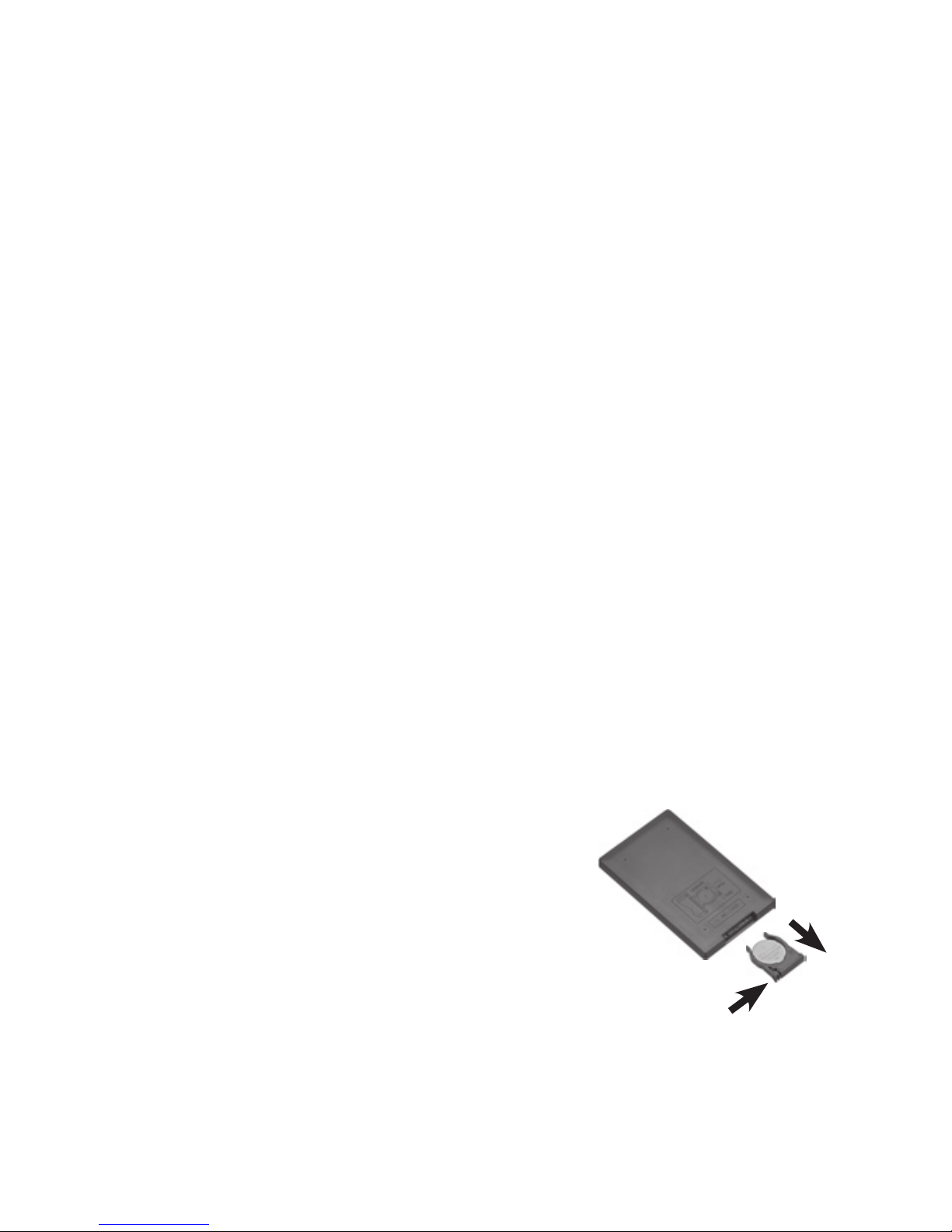
Replacing the Battery in the Remote
Control
Yourremotecontrolcomeswitha
batteryinstalled.Removetheplastic
tabbeforeusingtheremote.Replace
thebatteryiftheremotecontrol
stopsoperatingproperly.Pressthe
tabonthebatterycompartmenttray,
slidethebatterycompartmenttray
out,andinsertanew3V,CR2025battery,positive“+”
sideup.Thenslidethetraybackuntilitclicks.

9
b Battery Notes:
• Keepbutton-cellbatteryawayfromchildren.
Swallowingabutton-cellbatterycanbefatal.
• Disposeoftheoldbatterypromptlyandproperly.Do
not burn or bury it.
• Useonlyafreshbatteryoftherequiredsizeand
recommended type.
• Replacethebatteryiftheremotecontrolstops
operating properly.
w Cautions and Warnings
• Donotinsertanyforeignobjectsintotheframe
throughopenings;donotspillorsprayanyliquids
onorintheframe(thismayresultinareorelectric
shock).Donotplaceanythingheavyontheframe.
• Toensureproperventilationandproperoperation,
nevercoverorblockslotsoropenings.Keeptheframe
awayfromopenames,suchasresorcandles.
Donotusetheframeintemperatureshigherthan
104°F/40°C.
• Whencleaning,makesuretheframeisunplugged
fromthepowersource.Donotuseliquidcleanersor
aerosolcleaners.Useaclothlightlydampenedwith
waterforcleaningthehousingonly.
• Toavoiddamagingyourphotoframe,usetheprovided
poweradapteroranadapterwithproperspecications.

10
Specifications
Fileformat......................................................................................JPEG
ScreenResolution..................................................................800×600
Powersource........................................................................ DC9V1.5A
CompatibleRAM......................................................... SD/MMC/XD/MS
Operatingtemperature..........................................32–104°F(0–40°C)
Dimensions(W×H×D)........................................10.35×8.72×1.5in
.............................................................................(26.3×22.1×3.9cm)
Specicationsaresubjecttochangeandimprovementwithoutnotice.
Actualproductmayvaryfromtheimagesfoundinthisdocument.
FCC Information
Thisequipmenthasbeentestedandfoundtocomplywiththelimitsfora
ClassBdigitaldevice,pursuanttoPart15oftheFCCRules.Theselimits
aredesignedtoprovidereasonableprotectionagainstharmfulinterference
inaresidentialinstallation.Thisequipmentgenerates,usesandcanradiate
radiofrequencyenergyand,ifnotinstalledandusedinaccordancewith
theinstructions,maycauseharmfulinterferencetoradiocommunications.
However,thereisnoguaranteethatinterferencewillnotoccurinaparticular
installation.Ifthisequipmentdoescauseharmfulinterferencetoradioor
televisionreception,whichcanbedeterminedbyturningtheequipmentoff
andon,theuserisencouragedtotrytocorrecttheinterferencebyoneor
moreofthefollowingmeasures:
•Reorientorrelocatethereceivingantenna.
•Increasetheseparationbetweentheequipmentandreceiver.
•Connecttheequipmentintoanoutletonacircuitdifferentfromthatto
whichthereceiverisconnected.
•Consultthedealeroranexperiencedradio/TVtechnicianforhelp.
ChangesormodicationsnotexpresslyapprovedbyIgnitionL.P.maycause
interferenceandvoidtheuser’sauthoritytooperatetheequipment.
ThisdevicecomplieswithPart15oftheFCCRules.Operationissubjectto
thefollowingtwoconditions:(1)Thisdevicemaynotcauseharmfulinterfer-
ence,and(2)thisdevicemustacceptanyinterferencereceived,including
interferencethatmaycauseundesiredoperation
Autres manuels pour 16-953
1
Table des matières
Autres manuels Gigaware Cadre photo numérique