
GeoMax Zenith06 Manuel utilisateur

English
Version 1.0
User Manual
GeoMax Zenith06 Smart
Antenna

Introduction
Congratulations on the purchase of the GeoMax Zenith06 Smart Antenna.
This manual contains important safety directions as well as instructions for setting up the
product and operating it. Refer to 1 Safety Directions for further information.
Read carefully through the User Manual before you switch on the product.
The content of this document is subject to change without prior notice. Ensure that the product
is used in accordance with the latest version of this document.
The content of this document is subject to change without prior notice. Ensure that the product
is used in accordance with the latest version of this document.
Updated versions are available for download at the following Internet address:
https://geomax-positioning.com/partner-area
The model and serial number of your product are indicated on the type plate.
Always refer to this information when you need to contact your agency or GeoMax authorised
service centre.
•Bluetooth® is a registered trademark of Bluetooth SIG, Inc.
All other trademarks are the property of their respective owners.
This manual applies to the GeoMax Zenith06 smart antenna.
Name Description/Format
Zenith06 Quick
Guide
Provides an overview of the product together with technical
data and safety directions. Intended as a quick reference
guide.
ü ü
Zenith06 User
Manual
All instructions required in order to operate the product to
a basic level are contained in the User Manual. Provides an
overview of the product together with technical data and
safety directions.
-ü
Refer to the Technical Library web page for all GeoMax Zenith06 smart antenna documentation
and software:
•https://portal.hexagon.com/
GeoMax Technical Library offers a wide range of services and information. With direct access to
GeoMax Technical Library, you are able to access all relevant services whenever it is convenient
for you.
☞The availability of services depends on the instrument model.
Purchase
☞
Product identification
Trademarks
Validity of this manual
Available documentation
GeoMax Technical Library
2

Table of Contents
1 Safety Directions 4
1.1 General Introduction 4
1.2 Definition of Use 4
1.3 Limits of Use 5
1.4 Responsibilities 5
1.5 Hazards of Use 5
1.6 Labelling 9
2 Description of the System 10
2.1 General Information 10
2.2 Instrument Components 10
2.3 Accessories 11
3 Operation 12
3.1 Power On/Off, Charging 12
3.2 Setup for the Zenith06 Smart Antenna 12
3.3 Phase Centre of the Zenith06 Smart Antenna 13
3.4 Settings of the Zenith06 Smart Antenna 13
4 Care and Transport 14
4.1 Transport 14
4.2 Storage 14
4.3 Cleaning and Drying 15
5 Technical Data 16
5.1 Technical Data 16
5.2 Conformity to National Regulations 18
5.3 Dangerous Goods Regulations 18
6 GeoMax Zenith06 smart antenna Bundle 19
6.1 Standard Configuration 19
6.2 Accessories 19
7 Software Licence Agreement/Warranty 20
3
Table of Contents

1 Safety Directions
1.1 General Introduction
The following directions enable the person responsible for the product, and the person who
actually uses the equipment, to anticipate and avoid operational hazards.
The person responsible for the product must ensure that all users understand these directions
and adhere to them.
Warning messages are an essential part of the safety concept of the instrument. They appear
wherever hazards or hazardous situations can occur.
Warning messages...
•make the user alert about direct and indirect hazards concerning the use of the product.
•contain general rules of behaviour.
For the users‘ safety, all safety instructions and safety messages shall be strictly observed and
followed! Therefore, the manual must always be available to all persons performing any tasks
described here.
DANGER, WARNING, CAUTION and NOTICE are standardised signal words for identifying
levels of hazards and risks related to personal injury and property damage. For your safety,
it is important to read and fully understand the following table with the different signal words
and their definitions! Supplementary safety information symbols may be placed within a warning
message as well as supplementary text.
Type Description
DANGER
Indicates an imminently hazardous situation which, if
not avoided, will result in death or serious injury.
WARNING
Indicates a potentially hazardous situation or an unin-
tended use which, if not avoided, could result in death
or serious injury.
CAUTION
Indicates a potentially hazardous situation or an unin-
tended use which, if not avoided, may result in minor
or moderate injury.
NOTICE Indicates a potentially hazardous situation or an unin-
tended use which, if not avoided, may result in appre-
ciable material, financial and environmental damage.
☞Important paragraphs which must be adhered to in
practice as they enable the product to be used in a
technically correct and efficient manner.
1.2 Definition of Use
•Computing with software
•Recording measurements
•Carrying out measurement tasks using various GNSS measuring techniques
•Recording GNSS and point related data
•Remote control of product
•Data communication with external appliances
•Measuring raw data and computing coordinates using carrier phase and code signal from
GNSS satellites (GNSS systems)
Description
About warning messages
Intended use
4Safety Directions

•Use of the product without instruction
•Use outside of the intended use and limits
•Disabling safety systems
•Removal of hazard notices
•Opening the product using tools, for example screwdriver, unless this is permitted for cer-
tain functions
•Modification or conversion of the product
•Use after misappropriation
•Use of products with recognisable damage or defects
•Use with accessories from other manufacturers without the prior explicit approval of
GeoMax
•Inadequate safeguards at the working site
1.3 Limits of Use
Suitable for use in an atmosphere appropriate for permanent human habitation. Not suitable for
use in aggressive or explosive environments.
WARNING
Working in hazardous areas, or close to electrical installations or similar situations
Life Risk.
Precautions:
▶Local safety authorities and safety experts must be contacted by the person responsible for
the product before working in such conditions.
1.4 Responsibilities
GeoMax AG, CH-9443 Widnau, hereinafter referred to as GeoMax, is responsible for supplying
the product, including the user manual and original accessories, in a safe condition.
The person responsible for the product has the following duties:
•To understand the safety instructions on the product and the instructions in the User
Manual
•To ensure that it is used in accordance with the instructions
•To be familiar with local regulations relating to safety and accident prevention
•To inform GeoMax immediately if the product and the application become unsafe
•To ensure that the national laws, regulations and conditions for the operation of the product
are respected
1.5 Hazards of Use
DANGER
Risk of being struck by lightning
If the product is used with accessories, for example on masts, staffs, poles, you may increase
the risk of being struck by lightning. Danger from high voltages also exists near power lines.
Lightning, voltage peaks, or the touching of power lines can cause damage, injury and death.
Precautions:
▶Do not use the product in a thunderstorm as you can increase the risk of being struck by
lightning.
▶Be sure to remain at a safe distance from electrical installations. Do not use the product
directly under or close to power lines. If it is essential to work in such an environment
contact the safety authorities responsible for electrical installations and follow their instruc-
tions.
▶If the product has to be permanently mounted in an exposed location, it is advisable to
provide a lightning conductor system. A suggestion on how to design a lightning conductor
for the product is given below. Always follow the regulations in force in your country
regarding grounding antennas and masts. These installations must be carried out by an
authorised specialist.
▶To prevent damages due to indirect lightning strikes (voltage spikes) cables, for example
for antenna, power source or modem should be protected with appropriate protection ele-
ments, like a lightning arrester. These installations must be carried out by an authorised
specialist.
▶If there is a risk of a thunderstorm, or if the equipment is to remain unused and unatten-
ded for a long period, protect your product additionally by unplugging all systems compon-
ents and disconnecting all connecting cables and supply cables, for example, instrument -
antenna.
Reasonably foreseeable
misuse
Environment
Manufacturer of the
product
Person responsible for the
product
5
Safety Directions

DANGER
Risk of electrocution
Because of the risk of electrocution, it is dangerous to use poles, levelling staffs and extensions
in the vicinity of electrical installations such as power cables or electrical railways.
Precautions:
▶Keep at a safe distance from electrical installations. If it is essential to work in this envir-
onment, first contact the safety authorities responsible for the electrical installations and
follow their instructions.
WARNING
Improper disposal of product
If the product is improperly disposed of, the following can happen:
•If polymer parts are burnt, poisonous gases are produced which may impair health.
•If batteries are damaged or are heated strongly, they can explode and cause poisoning,
burning, corrosion or environmental contamination.
•By disposing of the product irresponsibly you may enable unauthorised persons to use it in
contravention of the regulations, exposing themselves and third parties to the risk of severe
injury and rendering the environment liable to contamination.
Precautions:
▶
The product must not be disposed with household waste.
Dispose of the product appropriately in accordance with the national
regulations in force in your country.
Always prevent access to the product by unauthorised personnel.
WARNING
Distraction or loss of attention
During dynamic applications there is a danger of accidents occurring if the user does not pay
attention to the environmental conditions around, for example obstacles, excavations or traffic.
Precautions:
▶The person responsible for the product must make all users fully aware of the existing
dangers.
WARNING
Lightning strike
If the product is used with accessories, for example masts, staffs, poles, you may increase the
risk of being struck by lightning.
Precautions:
▶Do not use the product in a thunderstorm.
WARNING
Inadequate securing of the working site
This can lead to dangerous situations, for example in traffic, on building sites and at industrial
installations.
Precautions:
▶Always ensure that the working site is adequately secured.
▶Adhere to the regulations governing safety, accident prevention and road traffic.
6Safety Directions

WARNING
Improperly repaired equipment
Risk of injuries to users and equipment destruction due to lack of repair knowledge.
Precautions:
▶Only authorised GeoMax Service Centres are entitled to repair these products.
For the AC/DC power supply:
WARNING
Electric shock due to missing ground connection
If unit is not connected to ground, death or serious injury can occur.
Precautions:
▶The power cable and power outlet must be grounded!
For the AC/DC power supply and the battery charger:
WARNING
Electric shock due to use under wet and severe conditions
If unit becomes wet it may cause you to receive an electric shock.
Precautions:
▶If the product becomes humid, it must not be used!
▶Use the product only in dry environments, for example in buildings or vehicles.
▶Protect the product against humidity.
For the AC/DC power supply and the battery charger:
WARNING
Unauthorised opening of the product
Either of the following actions may cause you to receive an electric shock:
•Touching live components
•Using the product after incorrect attempts were made to carry out repairs.
Precautions:
▶Do not open the product!
▶Only GeoMax authorised service centres are entitled to repair these products.
CAUTION
Unapproved chargers or cables
Connecting the charger improperly may cause serious damage to the device. Any damage
caused by misuse is not covered by the warranty. Unapproved chargers or cables can cause
the battery to explode or damage the device.
Precautions:
▶Use only GeoMax-approved chargers, batteries, and cables.
7
Safety Directions

CAUTION
Keeping the device too close to the human body during operation
Health risk
Precautions:
▶Use the device at least 10 mm apart from the human body.
▶This device has been tested for typical operations near the human body, for example
handheld mode, with the device kept at 10 mm from the user’s body.
CAUTION
Not properly secured accessories
If the accessories used with the product are not properly secured and the product is subjected
to mechanical shock, for example blows or falling, the product may be damaged or people can
sustain injury.
Precautions:
▶When setting up the product, make sure that the accessories are correctly adapted, fitted,
secured, and locked in position.
▶Avoid subjecting the product to mechanical stress.
CAUTION
Dropping the product
When being dropped, the product can cause personal injury and/or mechanical damage.
Precautions:
▶Ensure to have a firm grip on the product before operating it.
CAUTION
Before any cleaning procedure, ensure that the instrument is switched off and the battery has
been removed.
CAUTION
Unused connectors must be protected using the attached dust cap.
NOTICE
Rooting your Android device will void your right for any warranty services and support by
GeoMax!
8Safety Directions

1.6 Labelling
IP67
Model: Zenith06
Smart Antenna
Art. No.: 948918
Input:
5V 2A DC
Battery:
3.85V /6120mAh
/23.562Wh
GeoMax AG
Espenstrasse 135
CH-9443 Widnau,Switzerland
Made in China
IP67
Model: Zenith06
Smart Antenna
Art. No.: 948918
Input:
5V 2A DC
Battery:
3.85V /6120mAh
/23.562Wh
GeoMax AG
Espenstrasse 135
CH-9443 Widnau,Switzerland
Made in China
22825_001
Labelling GeoMax
Zenith06 smart antenna
9
Safety Directions
2 Description of the System
2.1 General Information
The Zenith06 smart antenna:
•has an integrated helix antenna and Bluetooth capability.
•supports four satellite systems: GPS, GLONASS, BeiDou, Galileo.
•supports access to external differential signals to get typically < 2 cm (2D) positioning
results.
•is small, lightweight, durable and has a rubber bumper for drop protection.
•has a low power consumption and a long battery duration.
•is designed to be used on a pole.
•calculates a position from the computed ranges to all visible and activated GNSS satellites.
•can communicate with X-PAD and Zenith Manager software.
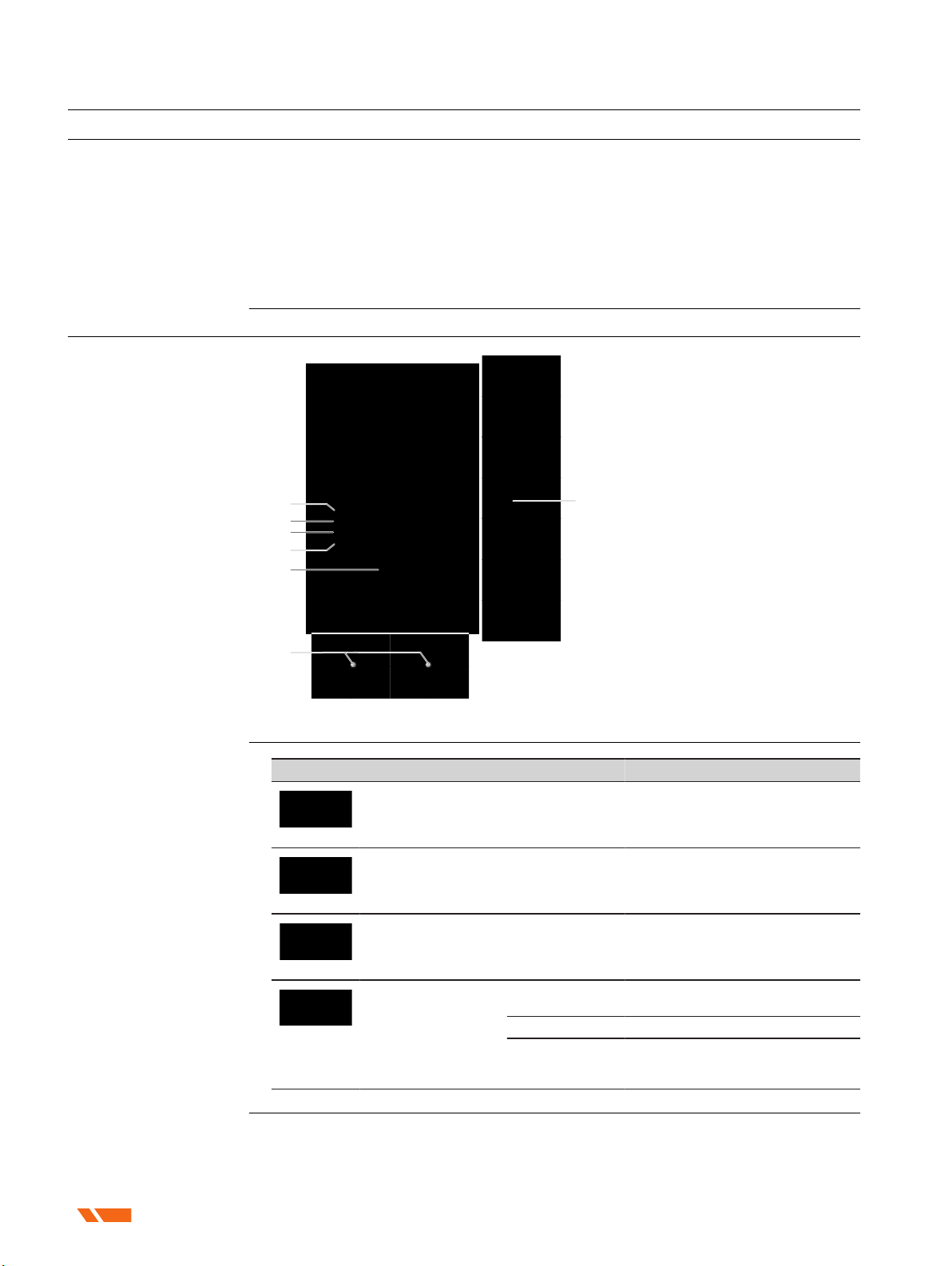
2.2 Instrument Components
21274_001
f
e
g
d
c
b
a
a Bluetooth LED
b RTK LED
c Position LED
d Battery LED
e ON/OFF button
f Holes for the screws to fix the
pole adapter
g USB type-C port
LED indicator Status Desciption
22832_001
Bluetooth LED flashes blue Bluetooth is connected.
22834_001
RTK correction LED flashes green The instrument is receiving correc-
tion data.
22835_001
Position LED flashes green The position is available.
22836_001
Battery LED
flashes red The instrument is being operated
and the battery power is < 10%.
solid red The battery is being charged.
solid green The battery is fully charged or the
instrument is being operated and
the battery power is > 10%.
Design
Description
LED indicators
10 Description of the System
Autres manuels pour Zenith06
1
Table des matières
Autres manuels GeoMax Antenne

Manuels Antenne populaires d'autres marques

Alfa Network
Alfa Network APA-L01 Manuel utilisateur

Naval
Naval PR-422CA Manuel utilisateur

Feig Electronic
Feig Electronic ID ISC.ANTH200/200 Series Manuel utilisateur

TERK Technologies
TERK Technologies TV44 Manuel utilisateur

Directive Systems & Engineering
Directive Systems & Engineering DSE2324LYRMK Manuel utilisateur

HP
HP J8999A Manuel utilisateur


CommScope
CommScope CMAX-OMFX-43M-I53 Manuel utilisateur

Ramsey Electronics
Ramsey Electronics DAP25 Manuel utilisateur

COBHAM
COBHAM SAILOR 800 VSAT Manuel d'utilisation et d'entretien

Trango Systems
Trango Systems AD900-9 Manuel utilisateur

Steren
Steren ANT-100 Manuel utilisateur

Proxim
Proxim 5054-PA-23 Manuel utilisateur