
Genie SDI07HY Manuel utilisateur

MODEL: SDI07HY
Hybrid Portable Test Monitor
User Manual


Hybrid Portable Test Monitor 3
Precautions
• Always handle the unit with care to avoid damaging the LCD display panel. Damage caused by
physical shocks is not covered by the product warranty.
• Avoidgettingngerprintsonthescreen.Tocleanthescreen,wipeitwithaclean,softanddrytowel,
beingcarefulnottodamagetheLCDdisplaypanel.
• Toreducetheriskofreorelectricshock,donotexposetheLCDtorainormoisture.
• Donotconnectpowertothevideoinput/outputports.Itwillcauseamalfunction.
• Onlyusetheapprovedbatterychargerincludedinthepackage–aremaybecausedifanon
unapprovedchargerisused(iftheredLEDickersduringrecharging,requestaftersalesservice).
• Thebuilt-inLi-Polymerbattery(11.1V/2200mA)hasasixmonthwarranty-effectivefromthe
purchasedate.Donotuseanyanothertypeofbatteryonthisportablemonitorasitmaycauseare
orexplosion.
• Thebatterycouldbedamagedifashortcircuitispresentattheconnectingport,orifthepolarityofthe
power cable is reversed.
• Whensupplyingpowertothecameraviathetestmonitor,alwaysusetheenclosedpowerharness
(DCJack).
• Whensupplyingpower,connectthepowercabletothecameraandthenapplypower.Otherwise,a
shortcircuitmightbeinducedwhichautomaticallyswitchestheunitofftoprotectthebattery.Ifashort
isproduced,turnthemonitoroff,removeandre-insertthepowerharness(DCJack).Thenturnthe
unit on again.
• KeeptheunitinsidethecarrybagtoprotecttheLCDscreenfromscratches.
• Donotputthemonitoron,ornear,anythingelectricallyconductiveorexposetheunittorainor
moisture.
• Immediatelyswitchtheproductoffifitemitssmoke,makesanabnormalnoiseoremitsstrange
odours.
• Iftheunitisnotworkingproperly,pleasecontactyourdistributor.Pleasedonotdisassembletheunit
yourselfasitwillinvalidatethewarranty.
Hybrid Portable Test Monitor
4
1. Introduction
1-1. Overview
TheSD107HYisamulti-functionalAnalogue/HD-SDI/HDMIportabletestmonitor.Itcanbeusedfor
variouspurposes,includingcheckingvideosignals,thecablingstatus(hasabuilt-inHDSDI/Analogue
videosignallevelmeter,adjustingcameraangleofviewandfocusing,supplyingpowertocamera,
controlling a speed dome camera and generating color pattern to the monitor.
1-2. Features
• 7-InchWideTFT-LCDDigitalLEDBacklitPanel
• Variousinputs:HD-SDI(3G),HDMI(1080p60),VGA(1600x1200),CVBS
• VariousOutputs:HD-SDI(3G,LoopThrough),CVBS(LoopThrough)
• HD-SDI and Analogue Video Signal Level Meter
• HD-SDI Focus Meter
• PTZcontrolviaRS-485communicationforspeeddomecameras
• Coaxialcommunication(UptheCoax).ControlscameraOSDmenu/PTZovercoaxcable(Max.800m)
• Supplypowertothecamera(DC12V/500mA)
• HD-SDI,HDMIAudioOutput(Optional)
• Leather bag and strap
• Li-polymerbattery(6~8hoursofuse)
1-3. Applications
• Displayvideosignalsoradjustcameraangles.
• Check the cable status and/or DVR.
• Checkspeeddomecameras,PTZcamerastatusorcontrolPTZ.
• ControltheOSDmenuofacamerawhichsupportscoaxcommunication.
• CheckHD-SDI,HDMISignals.
• Check the distance at which HD-SDI Repeaters & Receivers should be installed.
• Check DVR VGA outputs
• TestandinstallPOC(PoweroverCoax)Camera(HD-SDI,CVBS)(Optional)
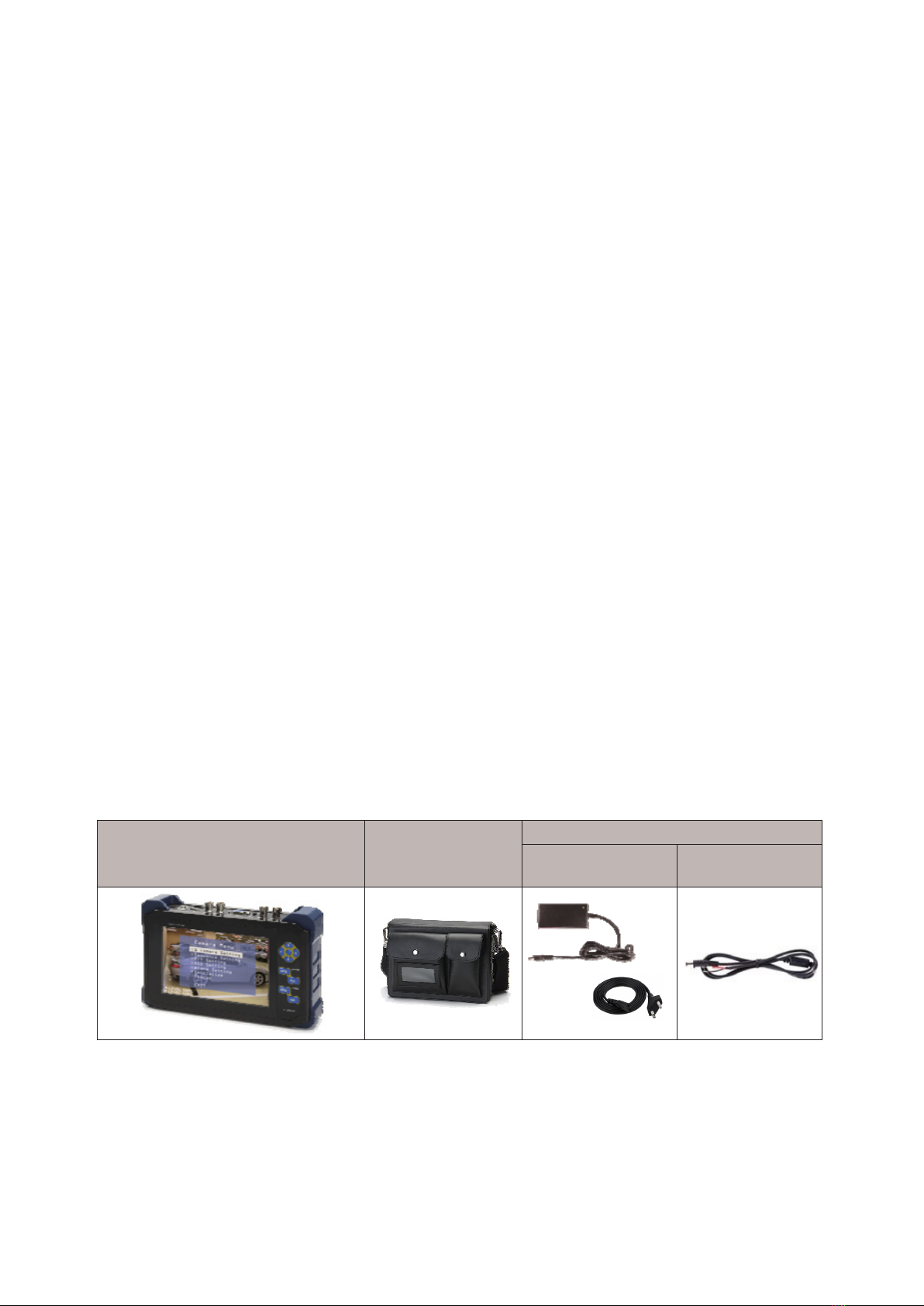
Main Unit Leather Bag
& Shoulder Strap
Accessories
Charger &
Power Cord
Power Harness
2. Components

Hybrid Portable Test Monitor 5
1 2 3 4 5 6 789 10
No. Marking Function
12V ChargetheBuilt-InLi-PolymerBattery(withIncludedCharger)
or,SupplyPowertotheCamera(DC12V/500mA)viaPower
Harness.
RS-485 RS-485CommunicationforPTZReceiverandSpeedDome
Camera
HDMI INPUT HDMISignalInput(Max.1920x1080p60Hz)
HD-SDI INPUT HD-SDISignalInput(Max.Resolution:~3G)PowerOutput
(WhenUsingPowerOverCoaxFeature)
OUTPUT HD-SDISignalOutput(LoopThrough)
VGA INPUT UXGAInput(Max.Resolution:1600x1200)
VIDEO
TERM With Loop Through Output: HI-Z Position
INPUT CVBSVideoSignalInputCoaxialCommunication:PTZReceiver
or Speed Dome Camera Power Output (When Using Power
OverCoaxFeature)
OUTPUT CVBSVideoSignalOutput(LoopThrough)
OutputsFullColourBar(PatternGenerator)
POWER PowerSwitch(ON/OFF)
3. Product Parts and Peripheral Device Connection
3-1. Part Names and Functions
1
2
3
4
5
6
7
8
9
10

Hybrid Portable Test Monitor
6
3-1-2. Buttons for Each of the Functions
VP : Link Check
16:9
1920X1080p60
HDMI
16:9
1920X1080p60
S.LVL: 90% Good
FOCUS: 100 / 100
1
1
2
2
54
3
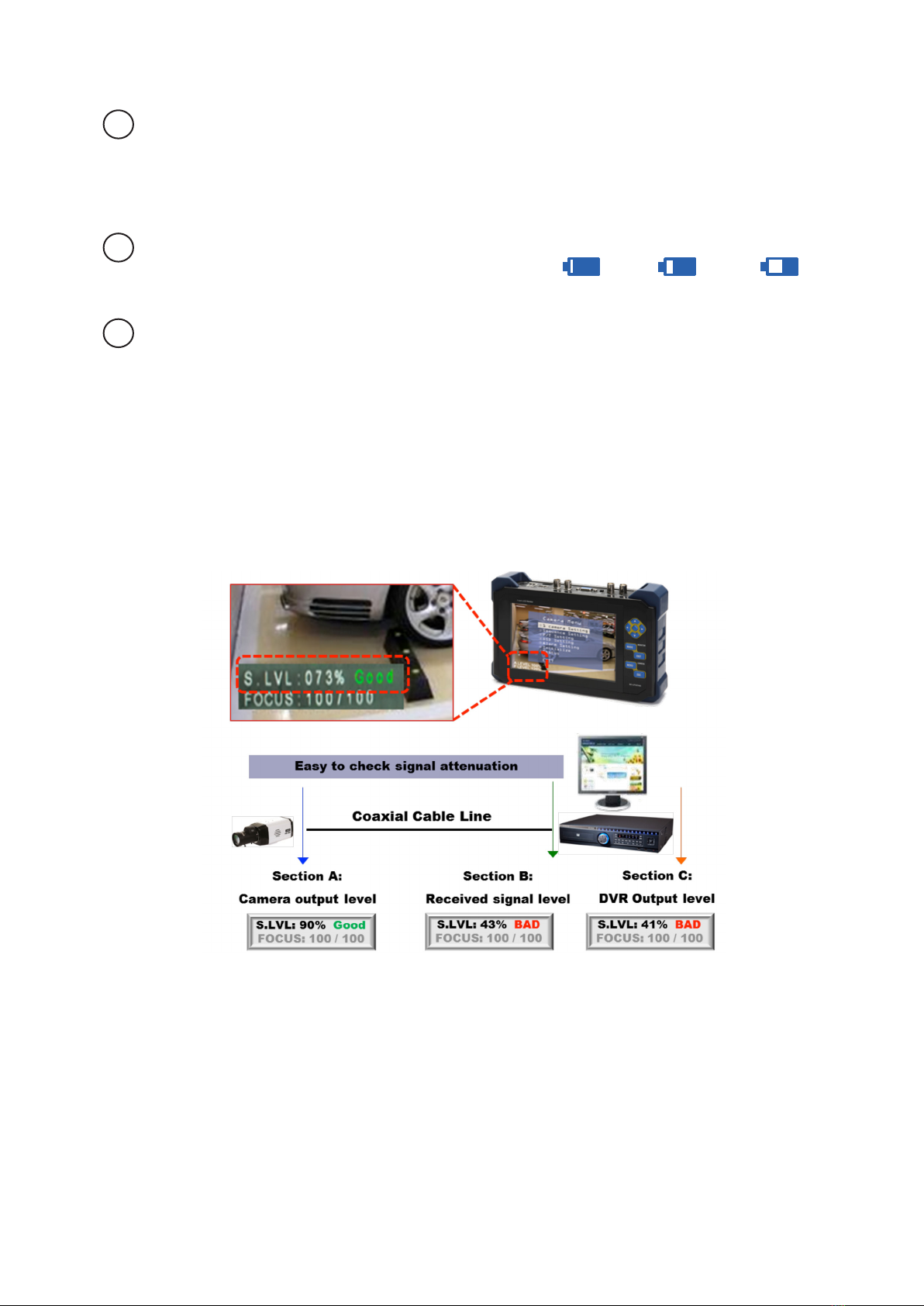
Level Meter Indicator
• S.LVL:IndicatesthevideosignallevelofHD-SDIasapercentage.
• FOCUS:IndicatesthefocusingstatusforHD-SDIvideoasapercentage.
• A.LEVEL:Indicatesthebrightnesslevelofthevideo(Amplitude/Synclevel)asapercentage
• F.LEVEL:Indicatesthecolourlevelofthevideo(Frequency/Burstlevel)asapercentage.
Button Camera Menu RS-485 & Coax
Mode
Angle Guide Video Input
MODE PTZ&OSD Mode
Switch
Source Change
EXIT Operate in PTZ
Mode
Angle Mode Out Hot Key
(Zoomin)
MENU Operate in OSD
Mode
Menu ON
ESC Operate in OSD
Mode
Menu OFF
Multi-Way
Key
Up,Down,
Right,Left
Pan/Tilt/Zoom/Fo-
cus
Up,Down,
Right,Left
ENTER
Key
ENTER SelectBar Long: VP ON/
OFF
MenuOperationButtons
Hybrid Portable Test Monitor 7
5
4
3Video Status
• InputMode:HD-SDI,HDMI,VGA,CVBS
• DisplayMode:4:3,Full(16:10),16:9,Zoom1,Zoom2
• InputResolution:1920x1080p60,NTSC,PAL
BatteryStatus
• Therearesevenstepsindicatingbatterystatus.090%070%050%
POC(PowerOverCoax)deviceconnectionindicator.
3-1-2-1. Level Meter Indicator
HD-SDI Level Meter
• S. Level:IndicatesHD-SDIsignalsasapercentage.Thecloserto100%,thebetterthequalityofthe
video; and the lowest Video level is 27%.

Hybrid Portable Test Monitor
8
CVBSLevelMeter
• A. Level:Indicatesthebrightnessofthevideo(Amplitude/Synclevel)asapercentage.Thecloserto
100%,thebetterthequalityofthevideo.WhentheA.Level%isunder100%,itindicatesthevideo
signals are decreased and the brightness is reduced.
• F. Level:Indicatesthecolourlevelofthevideo(Frequency/Burstlevel)asapercentage.Thecloserto
100%,thebetterthequalityofthevideocolourandtheresolution.
• ThevideolevelmeterindicatesthesyncandburstlevelofCVBSvideosignalsinA.LevelandF.Level
respectively.
FocusMeterforHD-SDICameraandFocusMeter
• Focus Meter: Indicates the HD-SDI or Analogue Camera Focus as a percentage.
• Showsthefocuslevel(Min.20%toMax.255%)andoutputshighfrequencysoundstothespeaker
(Optional),dependingonthelevel.

Hybrid Portable Test Monitor 9
3-2. Connection Diagram
※Onlyusetheincludedpowerharnesscablewhensupplyingpowertoacamera.
3-2-1. HD-SDI Input
• ConnecttoHD-SDIcamera/outputthepowertocamerausingpowerovercoaxfeature.(Inputdata
bitrate:~3G)
• Outputspower(DC24V)toHD-SDIVP(Video+Power)cameraorHD-SDIVPdevice
3-2-2. HD-SDI Loop through Output
•OutputtheHD-SDIsignalinputfromtheHD-SDIcamera(Outputdatabitrate:~3G)
3-2-3. Analogue Video Input
• Connect to Analogue Camera
• Outputthepower(DC12V/500mA)tocamerausingpowerovercoaxfeature.
• UsingCoaxcommunicationfeature(Coaxitron),itispossibletocontrolthecameraOSDmenuora
PTZSpeedDomecameraviacoaxialcable.
3-2-4. Analogue Video Loop Through Output & Pattern Signal Output
• WhenPatternOutisOFF,V.OUTportoutputsthevideoreceivedfromAnaloguecamera.
• SelectPatternOutON,V.OUTportoutputsFullColourBartocheckthewiringstatus,monitor,DVR,
etc.
3-2-3. VGA Input
• ConnecttoDVRorComputerandUXGAissupportedatmaximumresolution;higherresolutionsmay
not be displayed normally.
3-2-7. HDMI Input
• ConnecttoDVR,ComputerorotherdevicewhichoutputsHDMIsignal.(Resolution:~1080p60Hz)

Hybrid Portable Test Monitor
10
3-2-4. PTZ & OSD Control Through RS-485
• ConnecttoPTZReceiverand/orSpeedDomeCameraasacontroller.Also,connecttocontrolleras
aPTZreceivertocheckifthecontrolleroutputsdataaccurately.
※Powerovercoaxfeature(Video+Power)forHD-SDI&AnalogueVPcameraandVP
transmission devices.
• UsingthePowerOverCoaxfeatureoftheHybridTestmonitor,it’spossibletosupplypowertoVP
(Video+power)analogueandHD-SDIcamerasviacoaxialcable.
• POC(PowerOverCoax)featureforHD-SDIVPcamera(Optional):Whenit’snecessaryto
usethePowerPOC(PowerOverCoax)feature,forinstallationandmaintenanceofaHD-SDIVP
cameraorotherHD-SDIVPTransmissionproduct,pressandholdthe‘Enter’keyfor3secondsor
more,andtheVPfeatureisactivated;afterdetectingifthedeviceautomaticallysupportsthePOC
feature.
• PowerOverCoaxfeatureforAnalogueVPcamera(Optional):Whenit’snecessarytousethe
PowerPOC(PowerOverCoax)feature,forinstallationandmaintenanceofananalogueVPcamera
orotherVPTransmissionproduct,pressandholdthe‘Enter’keyfor3secondsormore,andtheVP
featureisactivated;afterdetectingifthedeviceautomaticallysupportsthePOCfeature.
4. Menu Setting
4-1. MENU Mode
4-1-1. SELECT MENU
• PressMENUButtonandmainmenuisdisplayed,asshownbelow.
• PressthedirectionalbuttonstomoveUp,Down,RightorLeft.
Themenumodeisautomaticallyswitchedoffifyoudon’tpressanybuttonsforafewminutes.
4-1-1-1. PICTURE SET
Table des matières
Autres manuels Genie Moniteur


