
General Photonics BPD-002-OEM-400-15 Guide de démarrage rapide

BPD-002-OEM-400-15
OEM Balanced Photodetector
Instruction Note
August 14, 2020
Document #: GP-IN-BPD-002-OEM-11 Page 1 of 11

Table of Contents:
Section 1. Specifications:............................................................................................ 3
Section 2. Overview: ..................................................................................................... 4
Section 3. Device Description:................................................................................... 5
3.1 General Description............................................................................................ 5
Section 4. Device Operation:...................................................................................... 8
4.1. Getting Started.................................................................................................... 8
4.2. Test Fixture.......................................................................................................... 9
Section 5. Warranty and Technical Support:........................................................ 11
Document #: GP-IN-BPD-002-OEM-11 Page 2 of 11

Section 1. Specifications:
Photodetector
Operating Wavelength 1550 ± 50nm
Photodetector Type InGaAs
PD Responsivity2> 0.8mA / mW at 1550nm
PDL <0.2 dB
Return Loss >45 dB
Maximum Input Power 10 mW
RF and Monitor Outputs
RF Output Bandwidth (3dB) ≥400 MHz
Coupling AC
Lower cut-off frequency <1 MHz
Transimpedance Gain at 50Ω>18 ×103mV/mA
Conversion Gain at 50Ω>14 ×103mV/mW (1550nm)
CW Balanced Saturation Power >120 μW at 1550nm
Common Mode Rejection Ratio >25 dB (DC to 400MHz)
NEP (10 - 100MHz) <6 pW / Hz
Bandpass Ripple (150-400 MHz) ±2dB max.
RF Output Impedance 50 Ω
RF Output Voltage Linear Range >−1V to 1V at 50 Ωload
>−2V to 2V at high impedance load
RF Output Connector SMA
Monitor Output Bandwidth DC to1kHz
Monitor Output Impedance 200 Ω
Monitor Gain at High impedance30.42 ×103mV/mW
Monitor Voltage (high Z and DC input) >4V
Monitor Output Connector SMA
Power Supply
Power Supply Input Connectors 2 rows (6 pins/row) with 0.1” pitch
Power Supply ±5V / 200 mA
PSRR (power supply rejection ratio, f < 1MHz,
differential referred to output, ΔVCC = 30mV P-P) >30 dB
General
Pigtail Length 1 m
Fiber Type SMF-28e or equivalent
Operating Temperature 0 to 50 °C (Target : 0~70 °C)
Storage Temperature −40 to 85 °C
Dimensions 2.21”(L) ×1.81”(W) ×0.65”(H)
Notes: Values are referenced without connectors.
1. All specifications in this table are tested under 23± 5°C
2. Includes the coupling loss of fiber to photodiode.
3. If the output voltages for the monitor ports are equal, then the photocurrents
are equal.
Document #: GP-IN-BPD-002-OEM-11 Page 3 of 11

Section 2. Overview:
The BPD-002-OEM is a compact, high performance, AC coupled balanced detector
specially designed for OEM applications. It has 3 SMA connectors for the RF output and
two power monitors. The balanced detectors, monitors, and amplifier circuits are
packaged in a compact shielding box with metal standoffs for mounting. With a
bandwidth of up to 400 MHz and a high conversion gain, the BPD-002-OEM is ideal for
integration into OCT, fiber sensor and high performance optical measurement systems.
Figure 1 BPD-002-OEM balanced photodetector.
Document #: GP-IN-BPD-002-OEM-11 Page 4 of 11

Section 3. Device Description:
3.1 General Description
The BPD-002-OEM is a compact module packaged in a shielding box. Physical and
electrical features are described below.
3.1.1 Dimensions
Dimensions are shown in Figure 2.
Unit: inch
Figure 2 Package dimensions (in inches)
The BPD can be mounted by using 2-56 screws to connect to the 4 metal standoffs on
the bottom of the shielding box.
Electrical and optical interfaces are shown in Figure 3.
Document #: GP-IN-BPD-002-OEM-11 Page 5 of 11
Input
pigtails
Monitor 1
Monitor 2 RF output
Pin 1
Pin 6
Pin 12
Pin 7
Figure 3 BPD-002-OEM with electrical and optical interfaces labeled
Optical interface:
Input 1 and Input 2 pigtails.
Pigtails are labeled.
Electrical interfaces:
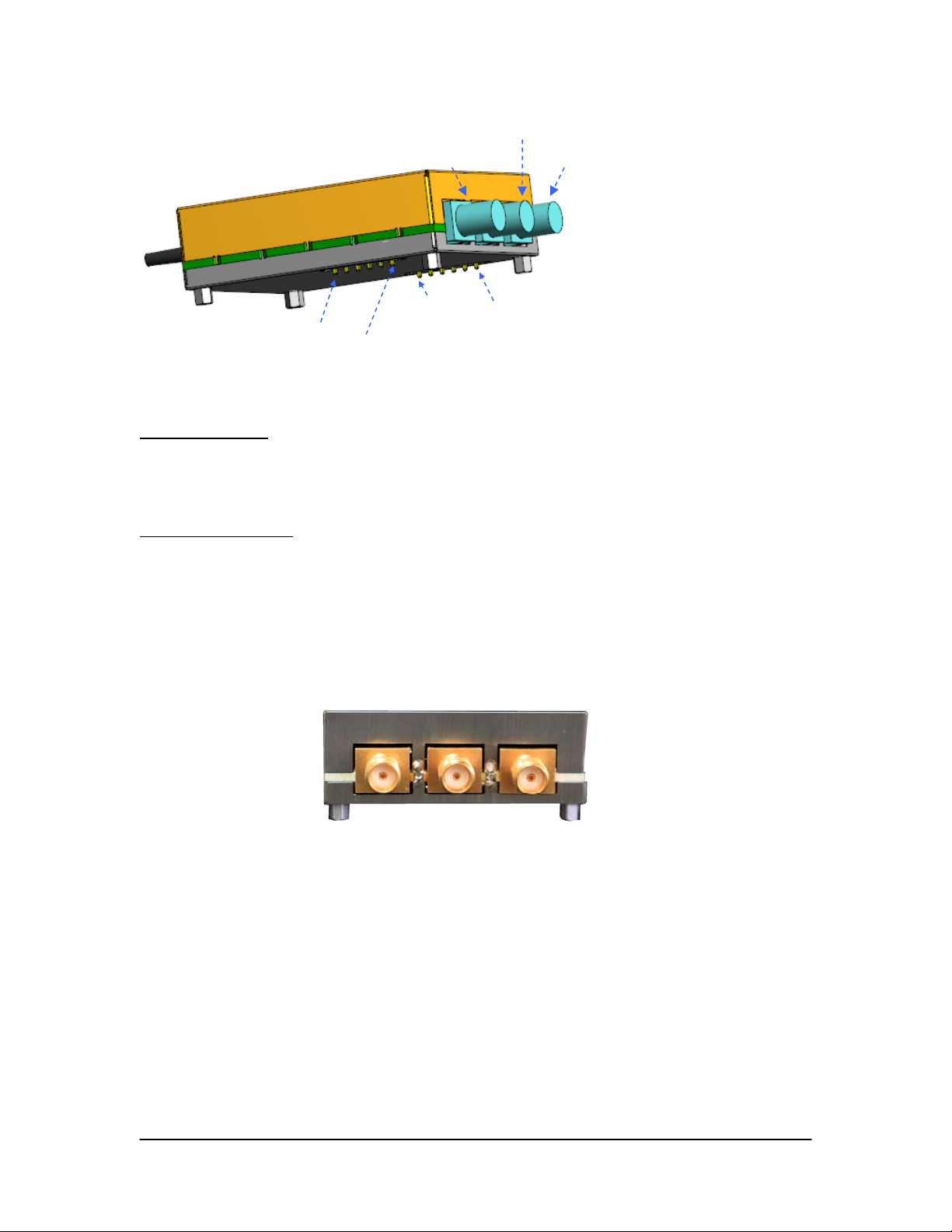
Outputs:
RF signal: SMA connector (50Ω)
Monitor 1: SMA connector (200Ω)
Monitor 2: SMA connector (200Ω)
Monitor 1RF OutMonitor 2
Figure 4 Side view, showing electrical output connectors (SMA)
Power supply:
Description: 12-pin connector (2 rows) for ±5V power supply.
Connector type on module: Samtec TSW-106-05-G-S or equivalent
Mating part: Samtec SLW-106-01-G-S or equivalent
Document #: GP-IN-BPD-002-OEM-11 Page 6 of 11

Document #: GP-IN-BPD-002-OEM-11 Page 7 of 11
Figure 5 Bottom view of BPD-002-OEM
Power connector pinout:
Pin # Description
1 GND
2 GND
3 GND
4 GND
5 −5V
6 −5V
7 +5V
8 +5V
9 GND
10 GND
11 GND
12 GND
Pin 1
Pin 6
Pin 7 Pin 12

Section 4. Device Operation:
Electrical and optical connections are required during setup of the BPD-002-OEM.
Follow safety precautions when making these connections.
4.1. Getting Started
Unpacking
Be careful when unpacking the BPD from its original packaging.
Avoid applying any force to optical fiber pigtails, and do not let any free-drop of fiber
connectors occur at any time. Excessive force to fiber pigtails may degrade device
performance or damage the module.
Observe standard electrical safety and antistatic precautions when handling the BPD
and making electrical connections.
Operation
Follow the steps below to operate the BPD-002
1. Connect the ±5V power supplies to 12-pin power connector.
2. Connect RF output connector (SMA, 50Ωimpedance).
3. Connect monitor output connectors (SMA, 200Ωimpedance).
Note that the gains of the monitor outputs have been set to compensate for
differences in the responsivities of the detectors. If the monitor 1 and monitor 2
outputs are equal, the inputs are balanced.
4. Connect optical inputs to the 2 input pigtails. Make sure that optical power levels
are within range and that the two inputs are balanced to within the balanced
saturation power.
Document #: GP-IN-BPD-002-OEM-11 Page 8 of 11

4.2. Test Fixture
General Photonics provides a test fixture and cables to facilitate power connections to
the BPD-002-OEM for testing.
Mating connectors to the
BPD-002-OEM’s power
connectors, used to mount
BPD-002-OEM to the test
board.
Connectors for cables to
connect to power supply
Color coded cables to
connect test fixture to
power supply
Figure 6 Test fixture and power cables
To use the test fixture with the BPD-002-OEM:
1. Mount the BPD-002-OEM to the board by connecting the power connectors on
the bottom of the BPD to the mating connectors on the board. The pins are
labeled.
2. Connect the 3 power cables to the corresponding connectors on the board. The
cables are color coded.
Red: +5V
Green: Ground
Black: −5V
Document #: GP-IN-BPD-002-OEM-11 Page 9 of 11

Optical inputs
Power cables
RF Out
Monitor 2
Monitor 1
Figure 7 Test fixture with BPD-002-OEM
3. Verify power supply settings and connect the cables to the ±5V power supplies
and to ground.
4. Connect RF output connector (SMA, 50Ωimpedance).
5. Connect monitor output connectors (SMA, 200Ωimpedance).
Note that the gains of the monitor outputs have been set to compensate for
differences in the responsivities of the detectors. If the monitor 1 and monitor 2
outputs are equal, the inputs are balanced.
6. Connect optical inputs to the 2 input pigtails. Make sure that optical power levels
are within range and that the two inputs are balanced to within the balanced
saturation power.
Document #: GP-IN-BPD-002-OEM-11 Page 10 of 11
Table des matières


