
Gefen EXT-HD-DSWF Manuel utilisateur
®

ASKING FOR ASSISTANCE
Technical Support:
Telephone (818) 772-9100
(800) 545-6900
Fax (818) 772-9120
Technical Support Hours:
8:00 AM to 5:00 PM PST Monday thru Friday.
Write To:
Gefen LLC
c/o Customer Service
20600 Nordhoff St
Chatsworth, CA 91311
www.gefen.com
Notice
Gefen LLC reserves the right to make changes in the hardware, packaging and
any accompanying documentation without prior written notice.
Digital Signage Player with Wi-Fi is a trademark of Gefen LLC
All trademarks are the property of their respective companies.
© 2011 Gefen LLC, All Rights Reserved
All trademarks are the property of their respective companies
Rev A2

CONTENTS
1 Introduction
2 Operation Notes
3 Features
4 Front Panel Layout
5 Front Panel Descriptions
6 Side Panel Layout
7 Side Panel Descriptions
8 Connecting the Digital Signage Player with Wi-Fi
8 Wiring Diagram
9 Operating the Digital Signage Player with Wi-Fi
9 Powering the Digital Signage Player
10 Menu System
10 Connecting a USB Keyboard
10 Displaying the Device Information
11 Setting the Output Resolution
12 Setting the Content Source
13 Changing the Name of the Digital Signage Player
14 Connecting the Digital Signage Player to a Network using DHCP
16 Connecting the Digital Signage Player to a Network using a Static IP
17 Connecting the Digital Signage Player to a Network using Wi-Fi
18 Manually Configuring a Wi-Fi Access Point
20 Changing the Proxy Type
21 Changing the Proxy Server
22 Setting the Internal Clock
23 Setting the Time Zone
26 Setting the Time Server
28 Setting a Password
29 Undo Changes
30 Saving Changes / Exiting the Menu System
31 Signage Manager Express
31 Installing the Signage Manager Express
32 Creating a Simple Digital Signage Presentation
35 Adding the Content
37 Ingesting the Content
42 Changing the Display Interval
44 Adding Video
47 Combining Images with Video
49 Adding a Ticker
51 Resetting the Digital Signage Player
52 Network Cable Wiring Diagram
53 Specifications
54 Warranty

1
INTRODUCTION
Congratulations on your purchase of the Digital Signage Player with Wi-Fi. Your
complete satisfaction is very important to us.
Gefen
Gefen delivers innovative, progressive computer and electronics add-on solutions
that harness integration, extension, distribution and conversion technologies.
Gefen’s reliable, plug-and-play products supplement cross-platform computer
systems, professional audio/video environments and HDTV systems of all sizes
with hard-working solutions that are easy to implement and simple to operate.
The Gefen Digital Signage Player with Wi-Fi
This SMIL-compliant Digital Signage Player is a LAN-based product, which
supports 1080p Full HD, one-line scrolling text, 2-channel L/R audio, and
calendar scheduling with over ten pre-loaded templates to choose from.
The all-metal enclosure features a passive cooling system. The product comes
with 4 GB of built-in flash memory and the integrated compact flash card slot
allows the addition of up to 16 GB of memory if needed (replacing the internal
storage). Two integrated USB 2.0 ports provide connection to a keyboard and
USB storage devices. Support for over 20 different media formats provides a
wide selection for content creation. A watchdog timer lets the product recover
and resume playback after power and network disruptions.
The included software will allow users to upload video playback schedules and
playlists for easy content management. Additionally, software developers can
utilize W3C SMIL (Synchronized Multimedia Integration Language) syntax which
ensures compatibility across multiple Digital Signage platforms. The included
software features over ten different multi-zoned templates to fit your specific
Digital Signage needs.
How It Works
The Digital Signage Player with Wi-Fi connects to a display using analog
(Composite / Component / VGA) or an HDMI cable. There are two options for
connecting to the network: 1) Connect an Ethernet cable to the network, or 2)
Connect using Wi-Fi. Then, connect a keyboard and peripherals to the USB ports
to configure the unit. Use the included Composite A/V cables to connect the
product to the 3.5 mm connector. Connect the 12 V DC power supply to the unit
and connect the AC power cord to an available electrical outlet.

OPERATION NOTES
2
READ THESE NOTES BEFORE INSTALLING OR
OPERATING THE HD DIGITAL SIGNAGE MEDIA PLAYER
• The maximum internal storage capacity of the Digital Signage Player is
4 GB. However, an additional CF (Compact Flash) card can be installed to
expand the total available memory. CompactFlash cards up to 16 GB are
supported.
NOTE: Using a CompactFlash card replaces the internal memory; it does
not supplement the 4 GB of internal memory.
• In order to access the Menu System, the display must support 1024 x 768
(XGA).
• The Digital Signage Player will not recognize a keyboard when using a PS/2
to USB adapter. A true USB keyboard must be used.
• The Digital Signage Player supports live ingestion, which automatically
downloads content from the USB drive or network to the internal memory.
• When using the Signage Manager Express software for the first time, the
Full HD Open API Media Player V2 must be selected as the active player.
See page 33 for details.
• Download the Signage Manager Express from the Gefen Web site which
includes the latest updates.
ATTENTION: This equipment may only be operated indoors.
Operation outdoors is in violation of 47 U.S.C.301 and could
subject the operator to serious legal penalties. Operation is
subject to the following two conditions:
1 This device may not cause harmful interference.
2 This device must accept any interference received
including interference that may cause undesirable
operation.

3
FEATURES
Features
• Supports MPEG-1, MPEG-2, MPEG L2, MP3, H.264/MPEG-4, and VC-1
codec formats.
• Real-time clock with battery backup.
• Automatic error recovery with built-in WDT.
• Auto-play starts playing scheduled contents automatically.
• 4 GB of built-in memory (expandable).
• NTP client for time synchronization.
• CMS device management in LAN or WAN environments is possible using
the integrated SMIL control.
• SMIL 3.0 instructions (sub-set).
• Compact and wall-mountable solid metal enclosure for excellent heat
dissipation and durability.
Package Includes
(1) Digital Signage Player with Wi-Fi
(1) Wi-Fi Antenna
(1) Ethernet cable
(1) 3.5 mm to RCA cable (Composite audio / video)
(1) RS-232 adapter (RJ-11 to DB-9)
(1) 12 V DC Power Supply
(1) AC Power Cord
(1) User Manual
4
Front Panel
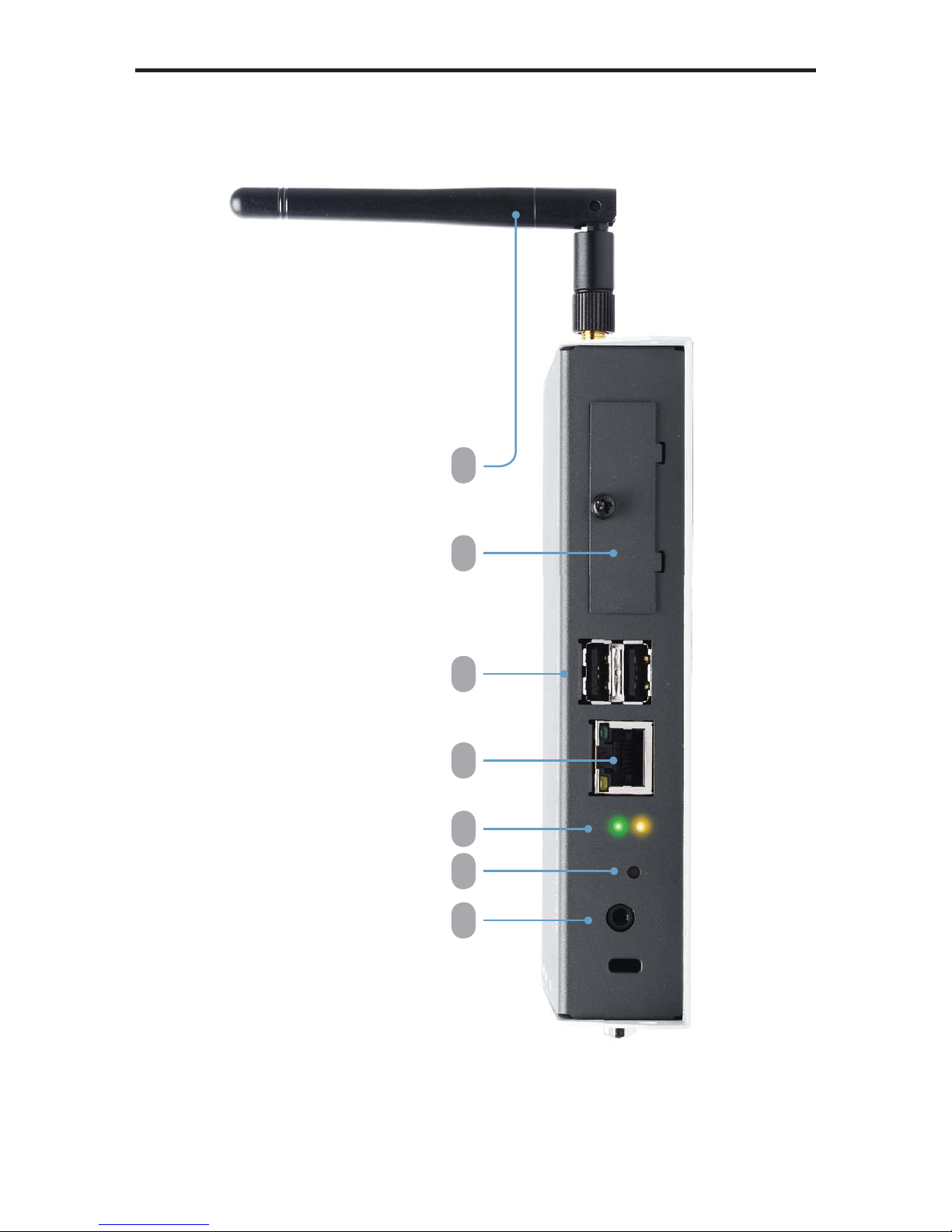
FRONT PANEL LAYOUT
1 2 3 4 5 6 7

5
FRONT PANEL DESCRIPTIONS
Front Panel
1 AV Out
Connect the included 3.5 mm mini-stereo to RCA cable to this output connector.
2 Reset
Press this button while performing a system reset. See page 51 for details.
3 LED Indicators
The Green LED indicates that the unit is powered. The Yellow LED indicates
data flow but is primarily used when performing a factory reset on the Digital
Signage Player (see page 51 for details).
4 Ethernet
Connect an Ethernet cable between the port and the network router or switch.
5 USB Ports
Connect a USB keyboard and flash drive to these ports to configure the Digital
Signage Media Player with Wi-Fi.
6 CF (Compact Flash) Slot
Remove the cover and insert a flash card to replace the 4 GB of internal
storage. The Digital Signage Player supports up to 16 GB of storage space.
7 Wi-Fi Antenna
The included Wi-Fi antenna must be connected to the Digital Signage Player in
order for the device to work properly. Make sure the Wi-Fi antenna is connected
before the unit is powered.
6
SIDE PANEL LAYOUT
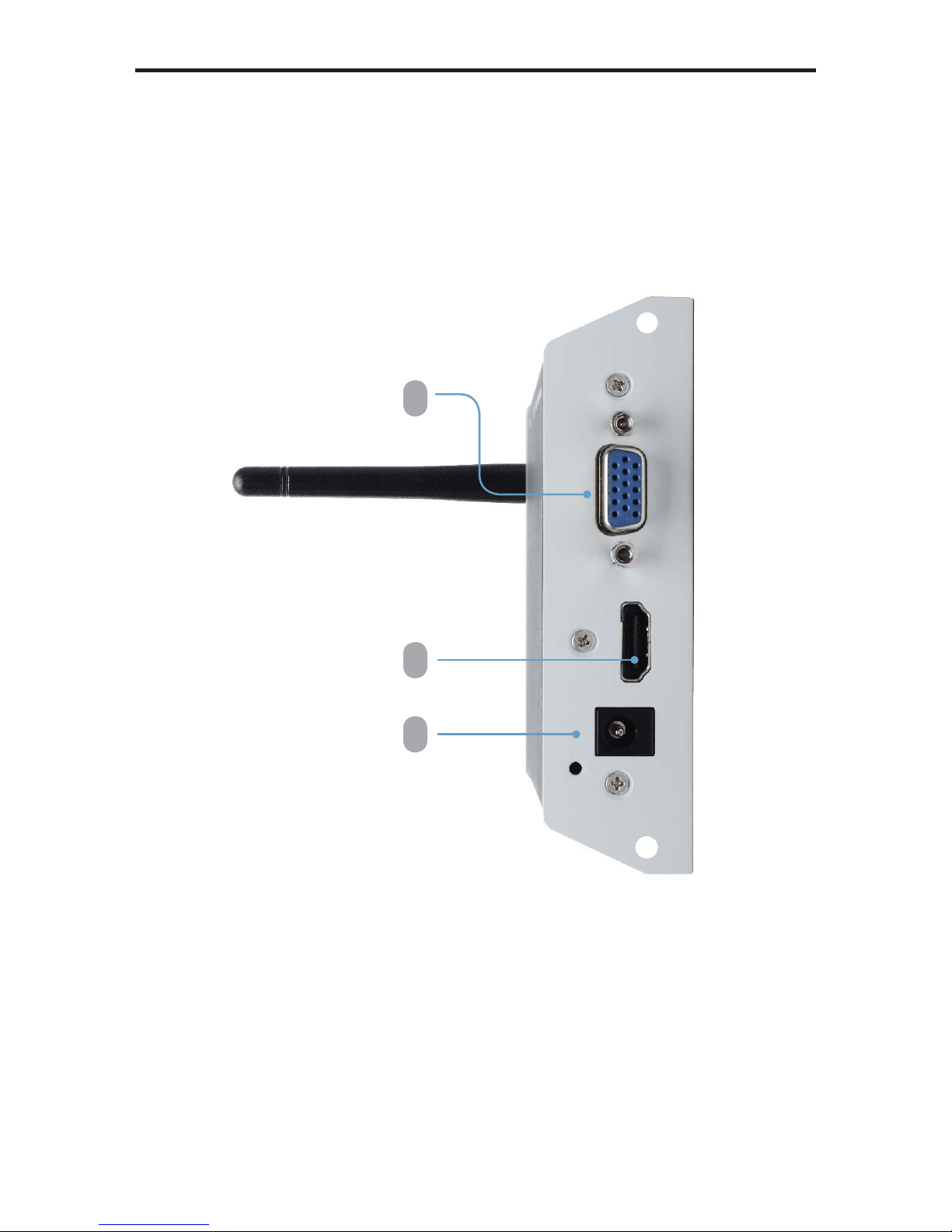
Side Panel
1 2 3

7
SIDE PANEL DESCRIPTIONS
1 12 V DC
Connect the included 12 V DC locking power supply to this connector.
2 HDMI Out
Connect an HDTV to this port using an HDMI cable.
3 VGA Out
Connect an VGA monitor to this port using a VGA cable.
Ce manuel convient aux modèles suivants
1
Table des matières
Autres manuels Gefen Lecteur multimédia


