
Gefen Pro GEF-HDCAT5-ELRPOL2 Manuel utilisateur
1080P
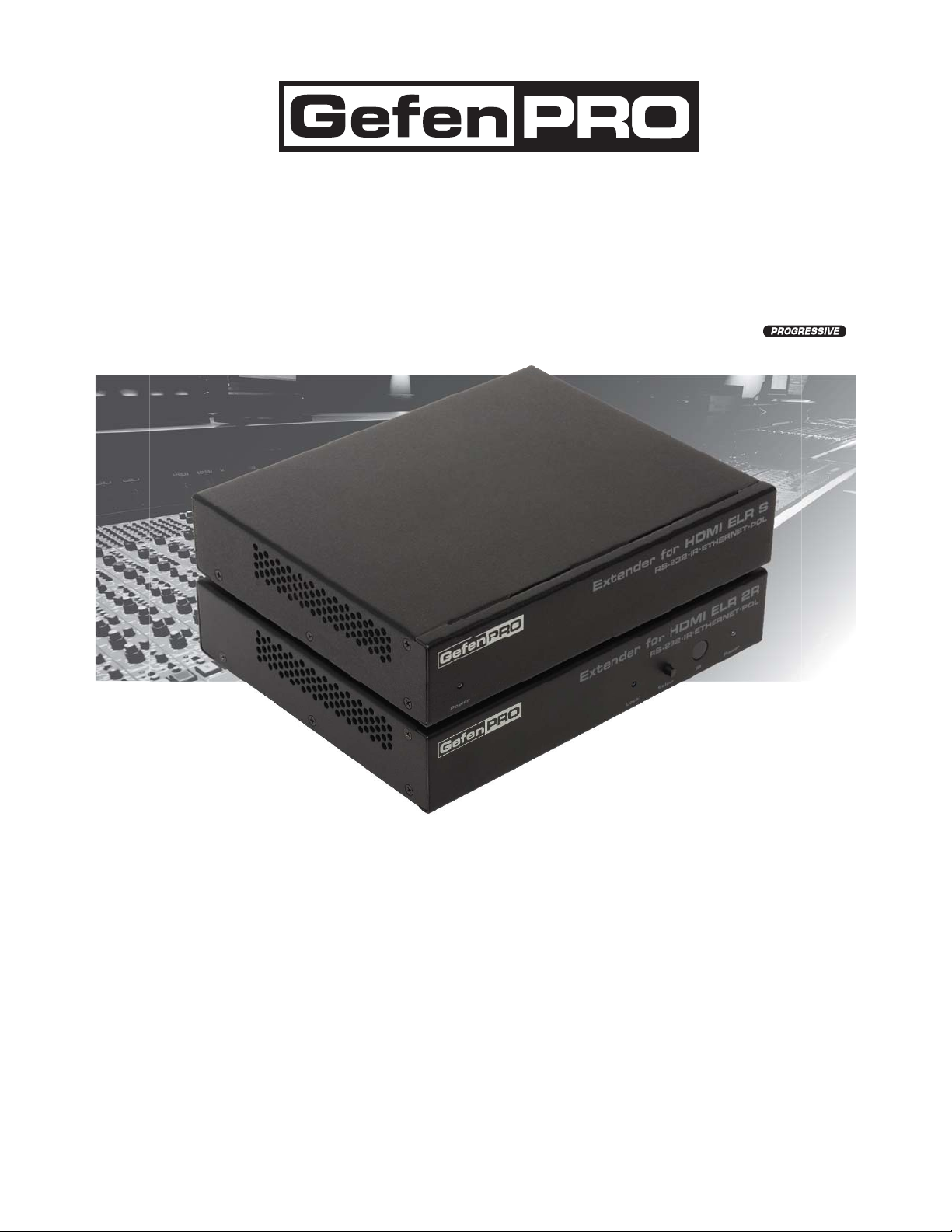
Extender for HDMI ELR
with PoL 2 over CAT5
GEF-HDCAT5-ELRPOL2
User Manual
www.gefenpro.com

ASKING FOR ASSISTANCE
Rev A2
Technical Support:
Telephone (818) 772-9100
(800) 545-6900
Fax (818) 772-9120
Technical Support Hours:
8:00 AM to 5:00 PM Monday thru Friday, Pacific Time
For 24 / 7 support, see the back of the product for the support number
Write To:
Gefen, LLC.
c/o Customer Service
20600 Nordhoff St
Chatsworth, CA 91311
www.gefenpro.com
Notice
Gefen, LLC reserves the right to make changes in the hardware, packaging and
any accompanying documentation without prior written notice.
Extender for HDMI ELR with PoL 2 over CAT5
is a trademark of Gefen, LLC
HDMI, the logo, and High-Definition Multimedia Interface are
trademarks or registered trademarks of HDMI Licensing in the United States and
other countries.
© 2011 Gefen, LLC, All Rights Reserved
All trademarks are the property of their respective owners

CONTENTS
1 Introduction
2 Operation Notes
3 Features
4 Sender Unit Layout
5 Sender Unit Descriptions
6 Receiver Unit Layout
7 Receiver Unit Descriptions
8 Connecting the
Extender for HDMI ELR PoL 2 over CAT5
9 Wiring Diagram
10 DIP Switch Configuration
10 Sender Unit
12 Receiver Unit
15 Network Cable Wiring Diagram
16 Troubleshooting
17 Glossary
24 Specifications
25 Warranty

1
Congratulations on your purchase of the Extender for HDMI ELR PoL2 over CAT5.
Your complete satisfaction is very important to us.
GefenPRO
In the realm of video distribution, certain features are invaluable in a commercial
or broadcast environment. Accommodations such as a build-in power supply
and flat black rack-mount enclosures set GefenPRO apart from our traditional
products. Complex distribution units allow for professional DVI, 3G-SDI, and
HDMI signals to be routed and converted easily and seamlessly, while being
backed up by a renowned and dependable technical support team. Gefen invites
you to explore the GefenPRO product line and hopes that you find the solution
that fits your needs.
The GefenPRO Extender for HDMI ELR with PoL 2 over CAT5
The GefenPRO Extender for HDMI ELR PoL2 over CAT5 does everything that the
GefenPRO Extender for HDMI ELR with PoL 2 over CAT5 does, but adds active
source switching, with an additional Hi-Def input on the Receiver Unit. This pro-
vides the capability to switch between the Hi-Def source connected to the Sender
Unit and a local source connected to the Receiver Unit. The GefenPRO Extender
for HDMI ELR PoL 2 over CAT5 extends a Hi-Def source with multichannel digital
audio at resolutions of up to 1080p Full HD to 330 feet (100 meters), using one
CAT-5 cable. In addition, Gefen’s PoL* technology gives it the capability to power
an additional 5V DC device, up to 2 Amps, at the Receiver unit over the CAT-5
cable.
The Extender for HDMI ELR PoL 2 over CAT5 extends Ethernet and provides an
IR back channel to control A/V sources using the same CAT-5 cable extension.
With the built-in IR Blaster, simply point the IR remote(s) at the display to control
the Hi-Def sources as if they were located in the same room as the display.
How It Works
The GefenPRO Extender for HDMI ELR PoL 2 over CAT5 Sender unit is located
next to a set-top box or DVD player source. Use the supplied HMDI cable to con-
nect an HDMI source to the Sender unit. The GefenPRO Extender for HDMI ELR
PoL 2 over CAT5 Receiver unit is located up to 330 feet away, near the display.
Connect the HDTV display and another Hi-Def source to the Receiver Unit.
One CAT-5 cable connects the Sender and Receiver units to each other. The
Ethernet ports on both the Sender and Receiver units are connected to standard
network devices, such as 100Base-T routers and hubs. Multichannel digital audio
is embedded in the HDMI signal (Dolby® TrueHD / DTS-HD Master Audio™).
To use the switching capability, simply power on the Hi-Def source connected to
the Receiver Unit. The Extender will automatically switch to source connected to
the Receiver Unit. To revert to the source connected to the Sender Unit, simply
power down the source connected to the Receiver Unit.
INTRODUCTION

READ THESE NOTES BEFORE INSTALLING OR
OPERATING THE EXTENDER FOR HDMI ELR WITH POL 2 OVER CAT5
• The Extender for HDMI ELR with PoL 2 over CAT5 units are housed in a
metal box for better RF shielding.
• CAT-5 cables should not exceed 330 feet.
• Shielded CAT-6 with metal RJ-45 connectors are recommended to safeguard
against random video flashes caused by electromagnetic interference (EMI).
• The Extender for HDMI ELR with PoL 2 over CAT5 features the ability
to generate compatible EDID and Hot Plug signals for troubleshooting
purposes when dealing with difficult interfacing issues between Source
devices and Displays. Refer to page 13 for details.
• HDCP content is not supported when the unit is in DVI mode. See page 13
for details.
• Ethernet works as a Full Duplex system.
2
OPERATION NOTES

3
HDMI Features
• 225 MHz (up to 12-bit YUV 444 @ 1080p)
• Deep Color
• x.v.Color
• Dolby® TrueHD and DTS-HD Master Audio™
• Lip-Sync
Features
• Extends HDMI at 1080p Full HD and 1920x1200 up to 330 feet
• Extends RS-232 up to 330 feet over a single CAT5
• Supports high bit-rate audio formats (Dolby® TrueHD and DTS-HD Master
Audio™)
• Supports 3DTV
• Locking HDMI input port on Receiver Unit allows the connection of a
secondary Hi-Def source.
• Source-switching between Sender Unit source and Receiver Unit source.
• Fully HDMI and HDCP compliant
• EDID management for rapid integration of source and display devices
• Built-in IR Blaster allows IR remote control of source devices from remote
viewing location
• Internal 110 / 220 V AC Power Supply
• 5V DC, 2 A Locking Power Supply output connector on Receiver unit
• Rack-mountable (with optional Gefen EXT-RACK-1U Rack Shelf)
Package Includes
(1) Extender for HDMI ELR with PoL 2 over CAT5 - Sender Unit
(1) Extender for HDMI ELR with PoL 2 over CAT5 - Receiver Unit
(1) 6 ft. HDMI locking cable (M-M)
(2) AC power cord
(1) User Manual
FEATURES
4
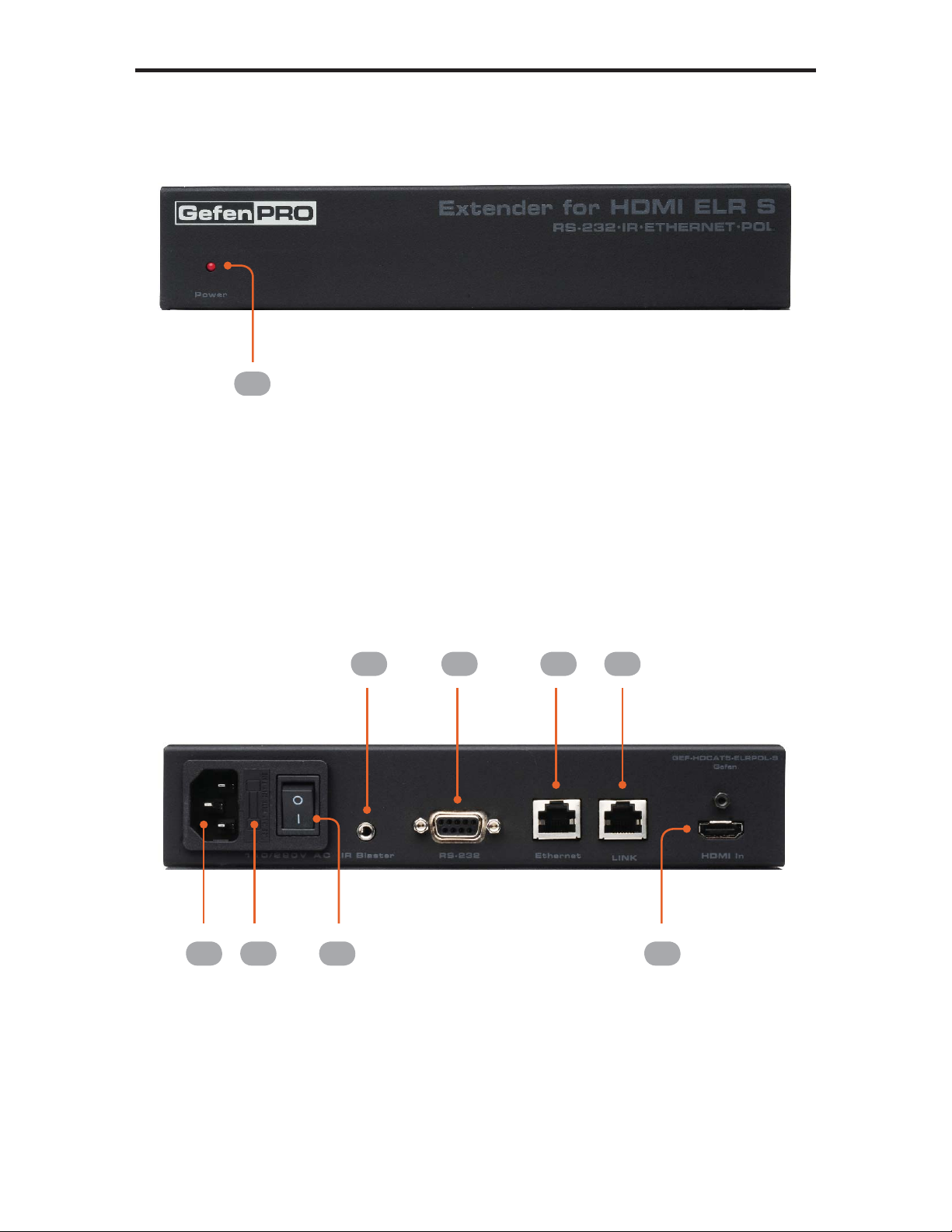
SENDER UNIT LAYOUT
Back
Front
1
2 3
5 6 6 7
84

5
SENDER UNIT DESCRIPTIONS
1 Power
This LED indicator will glow bright red once power has been applied to the unit.
2 110 / 220 V AC
Connect the includedAC power cord to this power receptacle.
3 Fuse Drawer
Each power receptacle houses a fuse drawer. Within each fuse drawer are two
(2) 250 V fuses. One fuse is active and the other is a spare.
4 Power Switch
Turn the power ON or OFF using this switch.
5 IR Blaster
Connect an IR Blaster cable (Gefen part no. EXT-2IREMIT) from this port to the
Hi-Def source to control the source from the viewing location.
6 RS-232
This RS-232 serial port is used to update the Receiver Unit firmware.
7 Ethernet
Connects the Sender Unit to the network using Ethernet cabling.
8 Link
Connects the Sender Unit to the Receiver Unit using CAT-5 cabling.
9 HDMI In
Connect a Hi-Def source to this locking HDMI port, using the included HDMI
cable.
6
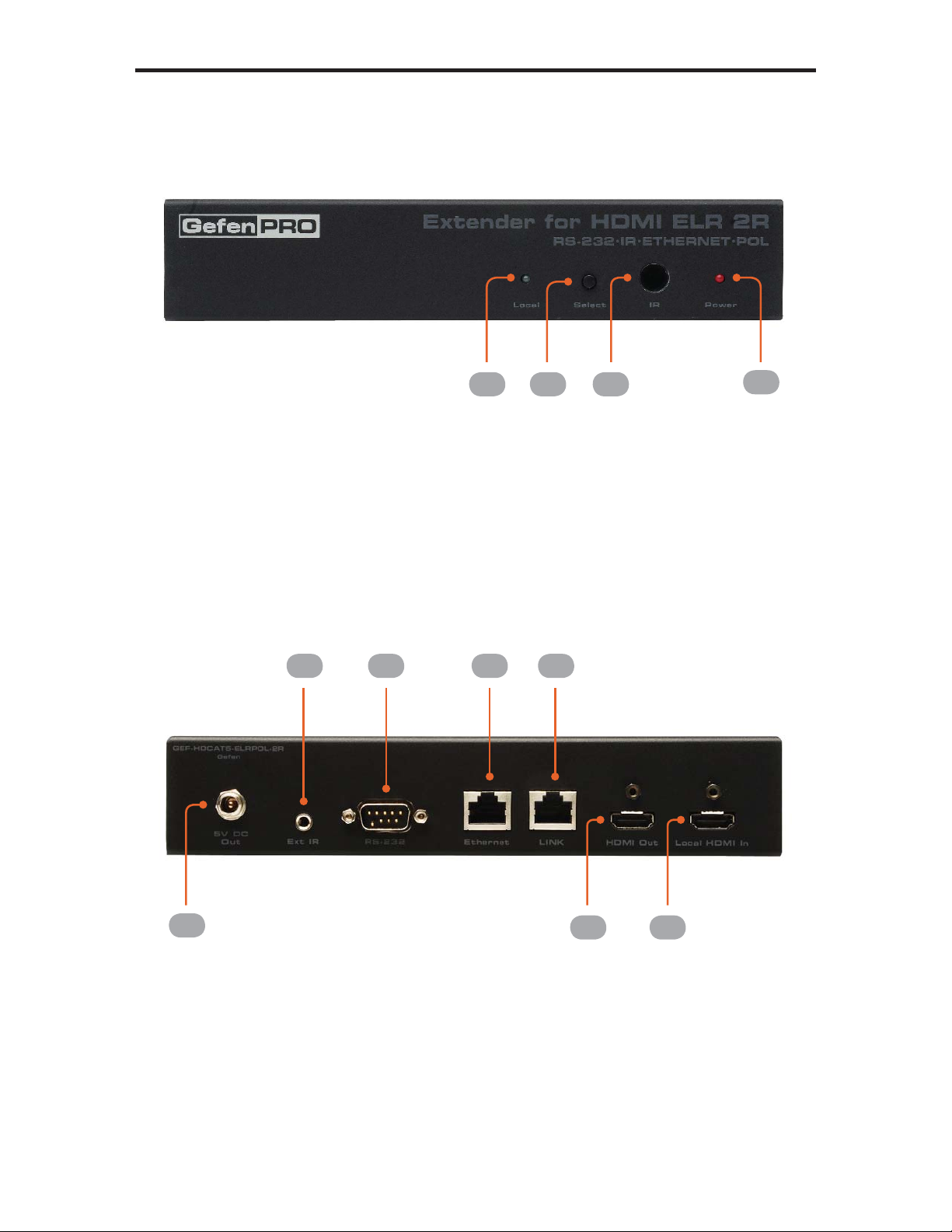
RECEIVER UNIT LAYOUT
Back
Front
1 2 3 4
5
6 7 8 9
10 11

7
RECEIVER UNIT DESCRIPTIONS
1 Local
This LED indicator will glow bright green when the Receiver Unit is switched to
use the Local HDMI input.
2 Select
Switches between the HDMI input on the Sender Unit and the Local HDMI In
port on the Receiver Unit.
3 IR
This IR window receives signals from the Hi-Def source IR remote control. The
IR signals are sent back to the source device, when using an IR Blaster on the
Sender.
4 Power
This LED indicator will glow bright red once power has been applied to the unit.
5 5V DC Out
Connect an optional locking (Gefen part no. CAB-PWR-06LL) or non-locking
(Gefen Part no. CAB-PWR-06NL) power cord to this the included 5 V DC
locking power supply connector to power additional devices.
6 Ext IR
Connect an IR Extender (Gefen part no. EXT-RMT-EXTIR) cable from this port
to the Hi-Def source to extend the IR control.
7 RS-232
This RS-232 serial port is used to update the Receiver Unit firmware.
8 Ethernet
Connects the Receiver Unit to the network device.
9 Link
Connects the Receiver Unit to the Sender Unit using CAT-5 cabling.
10 HDMI Out
Connect an HDTV display or other output device to this locking HDMI port.
11 Local HDMI In
Connect a secondary Hi-Def source device to this locking HDMI port.
Autres manuels pour GEF-HDCAT5-ELRPOL2
2
Table des matières
Autres manuels Gefen Pro Extenseur

Gefen Pro
Gefen Pro GEF-HDCAT5-ELRPOL2 Manuel utilisateur

Gefen Pro
Gefen Pro GEF-HDCAT5-ELRPOL Manuel utilisateur

Gefen Pro
Gefen Pro DVI FM1500 Manuel utilisateur

Gefen Pro
Gefen Pro GEF-DVI FM1500 Manuel utilisateur

Gefen Pro
Gefen Pro GEF-HDCAT5-ELRPOL2 Manuel utilisateur

Gefen Pro
Gefen Pro GEF-HDCAT5-ELRPOL Manuel utilisateur


