
Geermarc iLOOP+ Manuel utilisateur

Neck Loop
Boucle Magnétique
Induktionsschleife
English P1
Français P11
Deutsch P21

1
1. GENERAL
The mobile iLoopTM+ inductive loopset is for
people with hearing aids.
When you use the iLoopTM+, you can speak
directly to the caller by the microphone inside
the system. So, the device works as a wireless
system. Compatible with products equipped
with a standard 3.5mm coaxial microphone,
headset socket & with most cellular like iPhone,
Blackberry, Samsung etc, and DECT.... in
some instances you may need to purchase an
adaptor in case the product does not have a
suitable headset socket.
GENERAL

2
NOTE:
1. Don't forget to switch your hearing aid to T
mode.
2. iLOOPTM+ can be charged by connecting the
USB cable to a PC or standard USB charger.
3. Place the power ON/OFF switch on the side
of the unit to OFF position
when not in use to avoid
discharging the batteries.
The batteries can charge
when the switch is in OFF
position.
4. Any interference or echo when using your
iLoopTM+ could be due to interference from
your telephone's headset socket. In this case
please use the jack adapter that is included
in the box.
5. With the device connected to a mobile phone,
pressing the ‘Hook
On/Off’ button allows
you to answer an
incoming call.
GENERAL

3
NOTE:
● OFF: LED is off
● ON: LED is Green
● Low battery: LED is Red
● Battery Charging: LED is Blue
GENERAL
Microphone
Charging, ON/OFF,
low battery indicator
Loop
Volume
adjustment
Plug for the
telephone
connection
(Φ3.5mm)
Breakout
connector
Hook
ON/OFF
Power
ON/OFF
switch
Charging
micro
USB
socket

4
2. POWER SUPPLY / CONNECTING
The unit needs 2pcs AAA size 1.2V
rechargeable NiMH batteries for correct
functioning. The batteries must be charged for
about 7 hours before use.
- Open the battery compartment door.
- Insert the batteries supplied with the unit,
making sure the polarity is according to the
diagram inside the battery compartment.
- To charge the batteries connect the supplied
USB cable to the Micro USB socket of the
unit and then onto the USB of PC or standard
power supply. The blue LED will light up.
- Continue charging until the LED switches
OFF.
- Disconnect the USB cable after the charging
is complete.
- Connect the iLoopTM+ in the 3.5mm headset
jack of your mobile telephone. If it works
correctly and answers the call then this
means that your socket on your mobile phone
is configured in a way to work in sync with the
Geemarc iLoop+. If you find that the iLoopTM+
does not work correctly or if there is an echo,
POWER SUPPLY / CONNECTING

5
then please attach the jack included in the gift
box to plug into the 3.5mm headset socket.
- You can adjust the volume using the volume
knob on the iLoopTM+. The same instruction
regarding the use of the adaptor applies to
using the iLoopTM+ with tablets, MP3, kindles
etc.
NOTE:
● Always disconnect the plug of the iLoopTM+
from the telephone and place the Power
On/Off switch on the side of the unit to OFF
position, before installing the batteries.
● When the batteries are
discharged, the Red LED
will light up. Charge the
batteries immediately to
avoid damage to the unit
or the batteries.
●Check that the
microphone/headphone
socket is compatible with
the 4 contact plug (speaker R & L, common,
mic). Otherwise if you encounter some
problems you can connect the small jack
POWER SUPPLY / CONNECTING
POWER SUPPLY / CONNECTING

6
adapter provided, so as to have
compatibility with plug (speaker
R & L, mic, common).
● Do not dispose off batteries in
household rubbish. Pay attention
to the battery regulations regarding battery
disposal.
●When using your iLoopTM+ with GSM
phones, please note the following:
1. When the audio cable is plugged into older
models of simple GSM phones, the Green
LED stays OFF. To check if the cable has
been plugged in properly, pressing any
number button on the GSM phone will switch
ON the Green LED.
2. When the audio cable is plugged into the
newer Smart phones, the Green LED will
switch ON to confirm that it has been
connected properly.
POWER SUPPLY / CONNECTING
7
3. MAKING / RECEIVING CALLS
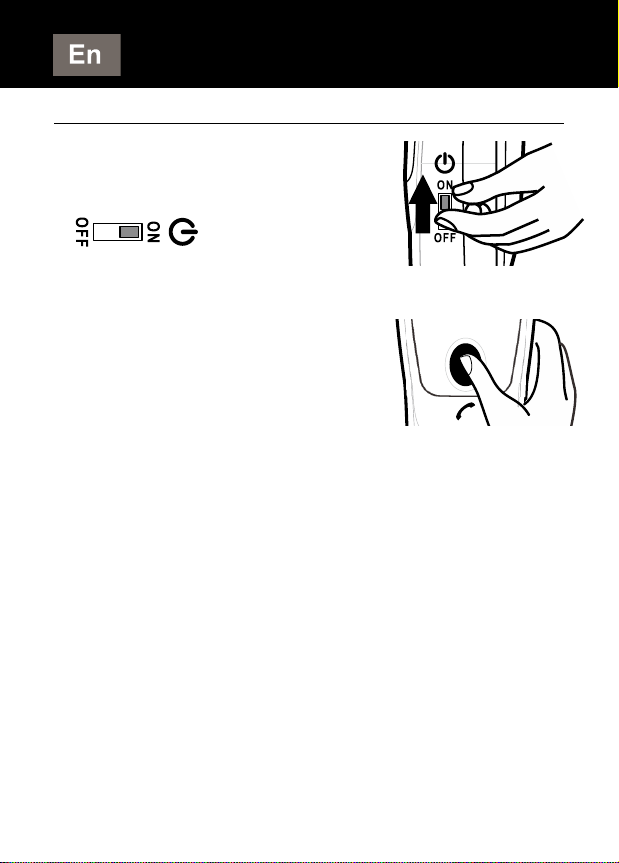
- Place the loop around
your neck. Switch the
Power ON/OFF switch
on the side to
ON position.
- Switch your hearing aid to
Tmode.
- Press the HOOK ON/OFF
button. You are ready to
speak through your
iLoopTM+.
- The Green LED will turn ON.
- During the call you can adjust the volume
of your device by using the volume control
knob located at the bottom of the iLoopTM+.
NOTE:
●The Breakout connector will release if the unit
gets entangled with the cables, so as to avoid
injury to the neck. If this happens, plug back
the connector in the jack to resume normal
operation.
MAKING / RECEIVING CALLS

8
4. GUARANTEE
From the moment your Geemarc product is
purchased, Geemarc guarantee it for the period
of two years. During this time, all repairs or
replacements (at our option) are free of
charge.Should you experience a problem then
contact our helpline or visit our website at
www.geemarc.com. The guarantee does not
cover accidents, negligence or breakages to
any parts. The product must not be tampered
with or taken apart by anyone who is not an
authorised Geemarc representative. The
Geemarc guarantee in no way limits your legal
rights.
IMPORTANT: YOUR RECEIPT IS PART OF YOUR
GUARANTEE AND MUST BE RETAINED AND
PRODUCED IN THE EVENT OF A WARRANTY CLAIM.
DECLARATION : Geemarc Telecom
SA hereby declares that this product is
in compliance with the essential requirements
and other relevant provisions of the Radio and
Telecommunications Terminal Equipment
Directive 2014/53/UE.
The declaration of conformity may be consulted at
www.geemarc.com
GUARANTEE
The guarantee applies to the
United Kingdom only.

9
5. RECYCLING DIRECTIVES
Recycling directives: The WEEE (Waste
Electrical and Electronic Equipment) Directive
has been put in place so that products at the
end of life are recycled in the best way.
When this product is out of order, please do not
put it in your domestic waste bin. Please use
one of the following disposal options:
- Remove the batteries and deposit them in an
appropriate WEEE skip. Deposit the product
in an appropriate WEEE skip.
- Or hand the old product to the retailer. If you
purchase a new one, they should accept it.
Thus if you respect these instructions you
ensure human health andenvironmental
protection.
For product support and help visit our website
at www.geemarc.com
Telephone: +44 (0)1707 387602
or Fax +44 (0)1707 832529
RECYCLING DIRECTIVES
Table des matières
Langues :
Manuels Prothèse auditive populaires d'autres marques


Advanced Bionics
Advanced Bionics Slim HP Standard Manuel utilisateur

Widex
Widex DREAM440 THE DREAM SERIES Manuel utilisateur

Phonak
Phonak myPilot Manuel utilisateur

NIKEN
NIKEN NK-401 Manuel utilisateur

ON Semiconductor
ON Semiconductor Ezairo 7111 Pre Suite Manuel utilisateur

Sonetik
Sonetik GOHEAR Manuel utilisateur