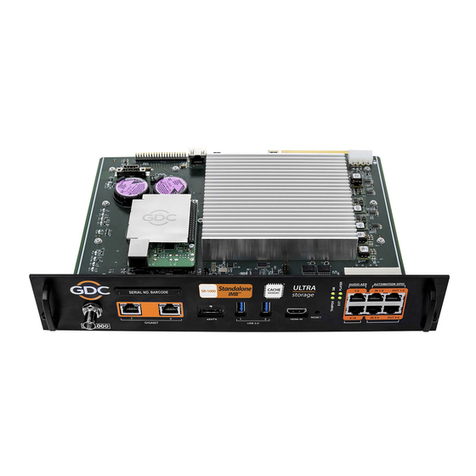
GDC Standalone IMB SR-1000 Manuel utilisateur

INSTALLATION MANUAL FOR
SR-1000 STANDALONE INTEGRATED MEDIA BLOCK™
SMS Version 17.0
December 22nd, 2022

- 1 -
December 22nd, 2022
GDC SR-1000 STANDALONE INTEGRATED MEDIA BLOCK™
INSTALLATION MANUAL
TABLE OF CONTENTS
TABLE OF CONTENTS
1. INTRODUCTION............................................................................................5
1.1. Equipment List ..........................................................................................6
1.1.1. SR-1000 IMB Equipment List........................................................................ 6
1.1.2. Enterprise Storage Equipment List ............................................................. 8
2. INSTALLING SR-1000 INTO THE PROJECTOR..........................................9
2.1. Remove existing interface board/placeholders from the Projector.....10
2.1.1. Barco Projector Placement......................................................................... 10
2.1.2. Christie Projector Placement ..................................................................... 11
2.1.3. NEC Projector Placement ........................................................................... 11
2.2. Installing the SR-1000 into the Projector...............................................12
2.3. Projector Network ...................................................................................12
3. CONNECTING PORTABLE STORAGE/ENTERPRISE STORAGE WITH
THE SR-1000 .....................................................................................................13
3.1. Connecting the Portable Storage...........................................................13
3.2. Connecting the Enterprise Storage .......................................................14
3.2.1. Placement of the Enterprise Storage ........................................................ 15
4. POWER ON/OFF SEQUENCE ....................................................................16
4.1. Power Up Sequence................................................................................16
4.2. Power Down Sequence...........................................................................16
5. SR-1000 WEB UI ACCESS .........................................................................17
6. SR-1000 NETWORK SETUP.......................................................................18
7. STORAGE CONFIGURATION ....................................................................20
8. SERIES 2 PROJECTOR SETUP.................................................................22
8.1. IMB Marriage and Clearing the Service Door Tamper from the SR-1000
22
8.2. Barco Series 2 Projector Setup..............................................................23
8.3. NEC Series 2 Projector ...........................................................................24
8.4. Christie Series 2 Projector .....................................................................25
8.5. 3D settings for Series 2 Projectors........................................................27
9. TIME ZONE SETUP.....................................................................................28
10. CONTENT INGEST MANAGEMENT SETUP..............................................29

- 2 -
December 22nd, 2022
GDC SR-1000 STANDALONE INTEGRATED MEDIA BLOCK™
INSTALLATION MANUAL
TABLE OF CONTENTS
10.1. Content Ingest from USB Disk ...............................................................29
10.2. Content Ingest from FTP ........................................................................30
11. AUDIO SETUP.............................................................................................31
12. SUBTITLES .................................................................................................33
13. AUTOMATION SETUP ................................................................................34
13.1. Automation setup for Server GPIO ........................................................34
13.2. Automation setup for Projectors ...........................................................35
13.3. Automation setup for eCNA devices .....................................................36
13.4. Automation setup for JNIOR devices ....................................................37
13.5. Automation setup for Christie ACT devices..........................................38
13.6. Automation setup for Dolby devices .....................................................39
13.7. Automation setup for USL DAX devices ...............................................40
13.8. Automation setup for USL JSD devices ................................................41
13.9. Automation Setup for AIB-2000 Audio IO Box ......................................42
14. COMPONENT ENGINNERING TA-10 SETUP............................................43
15. TESTING PROCEDURES FOR QC AFTER INSTALLATION ....................44
16. SR-1000 INPUT AND OUTPUT...................................................................45
16.1. AES Audio and GPIO Pinout ..................................................................45
16.2. Audio AES 17-24 Pinout (for SR-1000 Extreme -24) .............................45
16.3. GPIO Power Details.................................................................................46
16.4. Audio Output from the SR-1000 .............................................................47
16.5. Audio Input to the SR-1000 ....................................................................47
16.5.1. HDMI Input.................................................................................................... 47
16.6. Examples of a complete Audio input/output solution (for 5.1/7.1 Audio
formats)...............................................................................................................48
16.6.1. Audio input/output solution using AIB-2000 (suitable for connection to
analog Amplifiers/Crossovers)............................................................................ 48
16.6.1.1. Connections Requirements.............................................................................49
16.6.2. Audio input/output solution using AIB-2000 (suitable for connection to
digital Amplifiers) ................................................................................................. 51
16.6.2.1. Connection Requirements...............................................................................52
16.7. Technical Specifications of AIB-2000 Audio IO Box.............................54

- 3 -
December 22nd, 2022
GDC SR-1000 STANDALONE INTEGRATED MEDIA BLOCK™
INSTALLATION MANUAL
Thank you for purchasing a GDC SR-1000 Standalone Integrated Media Block™from
GDC Technology Limited.
To ensure proper operation and to maximize value of the SR-1000, please review this Installation Manual. It will guide
you through all the features and benefits of the new SR-1000 Standalone Integrated Media Block™.
COPYRIGHT NOTICE
Copyright © 2022 by GDC Technology Limited. All Rights Reserved.
No part of this manual may be copied or distributed, transmitted, transcribed, stored in a retrieval system, or translated into any
human or computer language, in a form or by any means, electronic, mechanical, photocopying, recording, magnetic, optical,
manual or otherwise, or disclosed to third parties without prior written permission of GDC Technology Limited.
MANUAL DISCLAIMER
This manual is made with version 17.0 and there might be slight differences depending on the software version the IMB is running.
The contents, features and specifications stated in this manual are subject to change without notice due to continuous product
development and improvements. In no other event shall GDC Technology Limited be liable for any loss of profit or any other
commercial damages, including but not limited to special, consequential, or other damages.
FCC COMPLIANCE STATEMENT
This device complies with Part 15 of the FCC Rules. Operation is subject to the following two conditions: (1) this device may not
cause harmful interference, and (2) this device must accept any interference received, including interference that may cause
undesired operation.
NOTE: This equipment has been tested and found to comply with the limits for a Class A digital device, pursuant to Part 15 of the
FCC Rules. These limits are designed to provide reasonable protection against harmful interference when the equipment is
operated in a commercial environment. This equipment generates, uses, and can radiate radio frequency energy and, if not
installed and used in accordance with the instruction manual, may cause harmful interference to radio communications. Operation
of this equipment in a residential area is likely to cause harmful interference in which case the user will be required to correct the
interference at his own expense.

- 5 -
December 22nd, 2022
GDC SR-1000 STANDALONE INTEGRATED MEDIA BLOCK™
INSTALLATION MANUAL
1. INTRODUCTION
1. INTRODUCTION
This document is a guide through the process of setting up the SR-1000 with the projector, audio
system and automation devices used in Cinemas.
In this manual, the SR-1000 Web UI is used to configure the SR-1000. The Dashboard tab of the
SR-1000 Web UI is shown below (Refer to Figure 1).
Figure 1: Dashboard tab

- 6 -
December 22nd, 2022
GDC SR-1000 STANDALONE INTEGRATED MEDIA BLOCK™
INSTALLATION MANUAL
1.INTRODUCTION
1.1. Equipment List
This section provides a suggested installation configuration of GDC SR-1000 for reference.
Please contact our sales representative to specify the accessories needed for the installation.
1.1.1. SR-1000 IMB Equipment List
The SR-1000 packaging includes the components mentioned below:
Item
Qty
Photo
SR-1000 Unit with projector cover plate
1
RJ45 AES Audio Cable
1#
RJ45 GPIO Cables
2#
Network Cable
1
RJ45 to DB25 Audio Converter
1#

- 7 -
December 22nd, 2022
GDC SR-1000 STANDALONE INTEGRATED MEDIA BLOCK™
INSTALLATION MANUAL
1.INTRODUCTION
RJ45 AES 17-24 Audio Cable
1*
Table 1: SR-1000 Equipment List
#Subject to actual configuration. Please specify with our sales representative.
*Included in packaging for SR-1000 Extreme -24 configuration only. Refer to Section 16.2 for more details regarding this cable.

- 8 -
December 22nd, 2022
GDC SR-1000 STANDALONE INTEGRATED MEDIA BLOCK™
INSTALLATION MANUAL
1.INTRODUCTION
1.1.2. Enterprise Storage Equipment List
The Enterprise Storage packaging includes the components mentioned below:
Item
Qty
Photo
Enterprise Storage unit
1
3.5” SATA HDD
5*
Power Cord
1
eSATA Cable
1
Quick Start Guide
1
Table 2: Enterprise Storage Equipment List
*The number of HDD is subject to change without notice due to ongoing product development and improvement.

- 9 -
December 22nd, 2022
GDC SR-1000 STANDALONE INTEGRATED MEDIA BLOCK™
INSTALLATION MANUAL
3.CONNECTING PORTABLE STORAGE/ENTERPRISE STORAGE WITH THE SR-1000
2. INSTALLING SR-1000 INTO THE PROJECTOR
NOTE: If the projector comes with the GDC IMB pre-installed, the instructions in this section can
be skipped.
This section of the manual describes the physical installation of the SR-1000 into the projector. If
the projector does not have the GDC SR-1000 installed, follow the steps below to install the SR-
1000 into the projector.
Figure 2: SR-1000 Standalone IMB™
Table des matières
Autres manuels GDC Serveur

GDC
GDC SR-1000 STANDALONE INTEGRATED MEDIA BLOCK Manuel utilisateur

GDC
GDC SX-2000ATO Manuel utilisateur

GDC
GDC SX-2001A SERIES Manuel utilisateur

GDC
GDC SX-2001A SERIES Manuel utilisateur

GDC
GDC SX-2000 Manuel utilisateur

GDC
GDC Standalone IMB SX-4000 Manuel utilisateur

GDC
GDC SX-3000 Manuel utilisateur

GDC
GDC SR-1000 STANDALONE INTEGRATED MEDIA BLOCK Manuel utilisateur

GDC
GDC SX-2000A Series Manuel utilisateur