
Gardena 1825 Manuel utilisateur

GBSNLDFIN
GARDENA
GB Operating Instructions
Water Timer electronic
SBruksanvisning
Bevattningstimer electronic
NL Instructies voor gebruik
Elektronische watertimer
DBetriebsanleitung
Bewässerungsuhr electronic
FIN Käyttöohje
Elektroninen kasteluajastin
T 1030
Art. 1825

2
GB
Contents
GARDENA Water Timer electronic T 1030
Welcome to the Garden of GARDENA...
Translation of the original instructions from German. Please read
these operating instructions carefully and observe the notes given.
Use these instructions to familiarise yourself with the Water Timer
electronic and its proper use as well as the notes on safety.
For safety reasons, children and young people under 16 as well
as anyone who is not familiar with these operating instructions
may not use the Water Timer.
vPlease keep these operating instructions in a safe place.
1. Where to Use Your GARDENA Water Timer . . . . . . . . . . . . . . . . . . . 3
2. For Your Safety . . . . . . . . . . . . . . . . . . . . . . . . . . . . . . . . . . . . . . . . . . . . . . . . . 3
3. Function . . . . . . . . . . . . . . . . . . . . . . . . . . . . . . . . . . . . . . . . . . . . . . . . . . . . . . . . 5
4. Putting Your Water Timer into Operation . . . . . . . . . . . . . . . . . . . . . . 6
5. Operating Your Water Timer . . . . . . . . . . . . . . . . . . . . . . . . . . . . . . . . . . . . 8
6. Trouble-Shooting . . . . . . . . . . . . . . . . . . . . . . . . . . . . . . . . . . . . . . . . . . . . . 12
7. Putting Your Water Timer Out of Operation . . . . . . . . . . . . . . . . . . . 13
8. Technical Data . . . . . . . . . . . . . . . . . . . . . . . . . . . . . . . . . . . . . . . . . . . . . . . 13
9. Service . . . . . . . . . . . . . . . . . . . . . . . . . . . . . . . . . . . . . . . . . . . . . . . . . . . . . . . . 14

3
GB
1. Where to Use Your GARDENA Water Timer
The GARDENA Water Timer is intended for private use in do-
mestic and hobby gardens, exclusively for outdoor use, to control
sprinklers and watering systems.
The GARDENA Water Timer must not be used for industrial
purposes or in conjunction with chemicals, foodstuffs,
easily flammable and explosive materials.
Intended use
Please note
2. For Your Safety
Warning!
vOnly use the Water Timer outdoors.
The water timer is not approved for indoor use.
The minimum operating pressure is 1 bar, the maximum oper-
ating pressure is 12 bar. The minimum flow rate is 20 I/h.
vCheck the filter in the sleeve nut regularly and clean if neces-
sary.
vDo not pull the hose connected to the Water Timer and avoid
tensile strain.
Use:

4
GB
For functional safety reasons, only use a 9 V alkali-manga-
nese (alkaline) battery type IEC 6LR61.
The Water Timer will only run for approx. 1 year if the new
alkaline battery has a nominal voltage of at least 9 V.
vCheck the battery before you buy it.
To prevent water entering the battery compartment, the Water
Timer must only be mounted in a perpendicular position with
the sleeve nut pointing upwards.
After you have selected the watering program, the Water Timer
opens at the selected starting time. To avoid getting wet when
operating the Water Timer, connect the hose or turn off the tap
before selecting the program. Alternatively, the control unit can
be removed for programming.
The max. temperature for the water is 40 °C.
vOnly use clear fresh water.
Battery:
Putting your Water Timer
into operation:
Water flow:

5
GB
3. Function
The GARDENA Water Timer electronic allows you to set different
watering cycles for different watering times independent of whether
you are using a sprinkler, a sprinkler system installation or drip-
head watering system to irrigate your garden.
Your Water Timer electronic will water your garden completely
automatically according to the program you choose.You can set
the timer to water your garden early in the morning or late at
night when water evaporates the least, or while you are away on
holiday.
You simply program the time (to the nearest hour), watering start-
ing time / duration and cycle by turning the pointer "of the con-
trol knob !to the correct time and pressing the OK button §.
The Water Timer opens at the starting time you have selected.
The 3 LEDs Time, Start Time and
Frequency flash to indicate that the
battery is flat.
vReplace the battery
(see 4. Operation “Inserting the
Battery”).
Control knob and OK button:
!
Control knob
"
Control knob pointer
§
OK button
Battery status display:
§
"!
6
GB
The functional safety of the water timer depends on the capability
of the battery.
If you change the battery the program is not saved. You must
reprogram the Water Timer (see 5. Operation).
4. Putting Your Water Timer into Operation
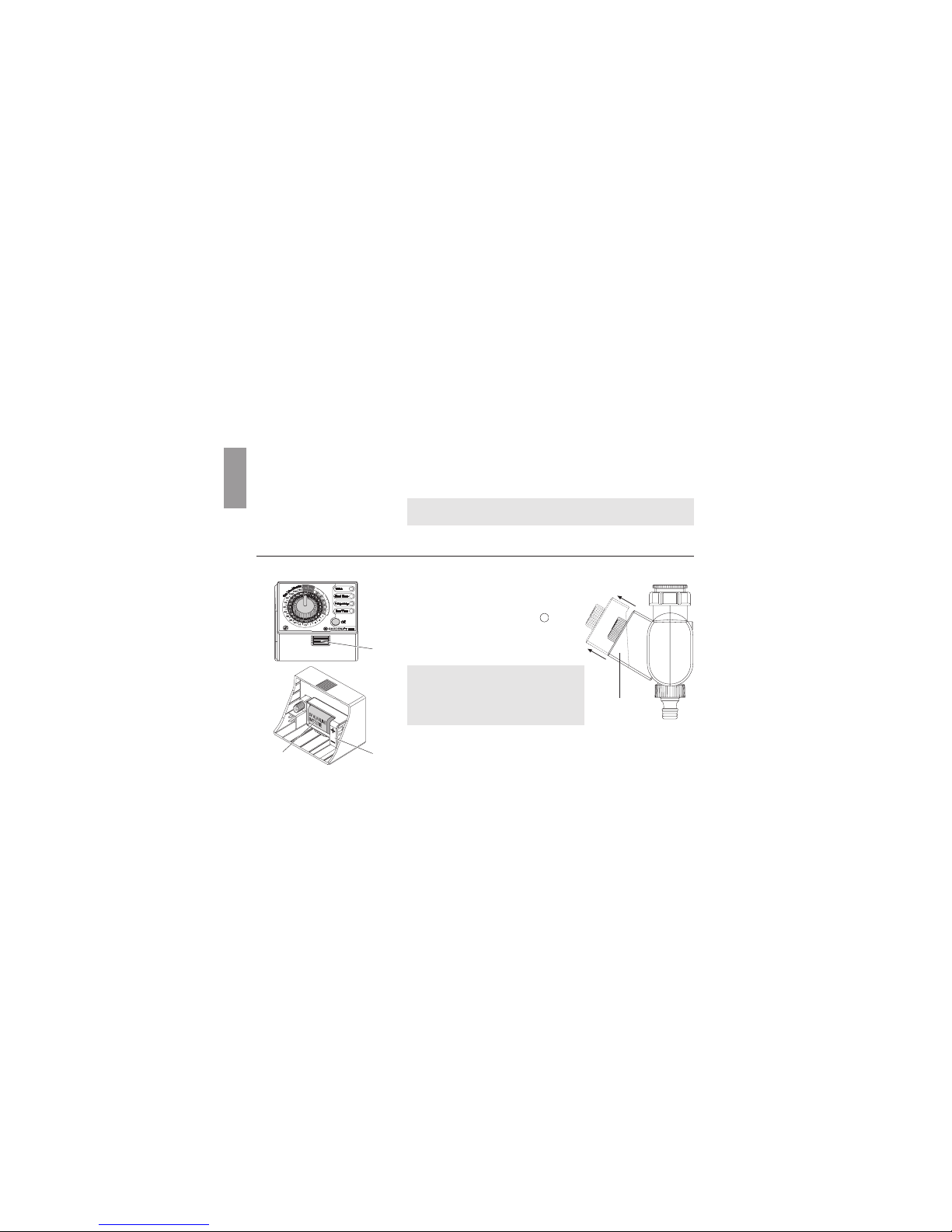
1. Press the release button 1and remove the control unit 2from
the housing of the Water Timer.
2. Insert the battery 3in the battery
compartment.
Pay attention to the polarity
(+/ – markings).
3. Re-attach the control unit 2to
the housing.
Make sure you exchange the battery
at the right time to prevent the Water
Timer failing due to a low battery when
you are away for longer periods of
time.
Make sure that the time the battery has been in operation and the
time you are planning to be away does not add up to more than
a year.
Inserting the battery:
2
3 z
P
P
1

7
GB
Even if the battery is almost empty, the Water Timer ensures
that an open valve is always closed since less energy is requi-
red to close the valve than to open it.
The Water Timer is fitted with a sleeve nut 4for taps with a
33.3 mm (G1”) thread. The adapter supplied 5allows the Water
Timer to be connected to taps with a 26.5 mm (G¾”) thread.
Connecting the Water Timer to taps with a 33.3 mm (G1”)
thread:
1. Screw the sleeve nut 4of the Water Timer onto the thread
of the tap by hand (do not use pliers).
2. Screw the threaded tap connector 6onto the Water Timer.
Connecting the Water Timer to taps with a 26.5 mm (G¾”)
thread:
1. Screw the adapter 5onto the tap by hand (do not use pliers).
2. Screw the sleeve nut 4of the Water Timer onto the thread
of the adapter 5by hand (do not use pliers).
3. Screw the threaded tap connector 6onto the Water Timer.
Connecting your Water Timer:
6
5
4

8
GB
To protect your Water Timer against theft, the GARDENA Anti-
Theft Protection Art. No. 1815-00.791.00 is available from the
GARDENA Service.
1. Fasten the bracket 7to the back of the Water Timer using
the screw 8.
2. The bracket can be used to attach a chain, for example.
The screw cannot be loosened once it has been screwed in.
5. Operation
The Water Timer control unit 2can be removed. This allows
you to set the watering program somewhere other than where
the Water Timer is to be used.
The time of day and watering starting time are entered to the
nearest hour.
1. Turn the control knob to OFF and confirm by pressing the
OK button.
The program stored in the memory is overwritten.
The Time LED flashes.
Installing the anti-theft
protection (optional) :
Setting the watering program:
1.
8
7

9
GB
Setting the time of day:
2. Set the time on the inner black scale by turning the control
knob and confirm the time you have selected by pressing the
OK button (e.g.: 10:00 am).
The Start Time LED flashes.
Setting the watering starting time:
3. Set the watering starting time on the inner black scale
by turning the control knob and confirm the time you have
selected by pressing the OK button (e.g.: 20:00).
The Frequency LED flashes.
Setting the Watering Cycle:
4. Set the watering cycle on the outer grey scale (Frequency
Hours / Days) using the control knob and confirm your
selection by pressing the OK button (e.g.: 12 hour cycle).
The Run Time LED flashes.
2.
3.
4.

10
GB
GB
Setting the Watering Time:
5. Set the watering time on the outer white scale (Run Time
Minutes) using the control knob and confirm your selection
by pressing the OK button (e.g.: 30 minutes).
The program you have selected is now active.
On hot or cooler days you can change the watering time before the
program starts without having to re-enter the time of day, watering
starting time or watering cycle.
1. Select the changed watering time on the outer white scale
(Run Time Minutes) by turning the control knob.
(e.g.: 20 minutes).
The
Run Time
LED flashes.
2. Confirm the watering time you have selected by pressing the
OK button.
The changed watering time is now active.
5.
Changing the watering time:
Ce manuel convient aux modèles suivants
1
Table des matières
Autres manuels Gardena Minuteur


