
GAME ELF 412 in 1 Manuel utilisateur

ELF 412 in 1
Arcade Game Board
Manual

Contents
Paragraph Page
1 Connector Layout 1
2 Operation Instructions 2
2.6/7 Returning to Game List 3
3 System Settings Con iguration 4
3.1 1. Exit 4
3.2 2. JAMMA I/O Test 4
3.3 3. MY Cabinet Type = Upright 4
3.4 4. MY Cabinet Type = Cocktail (De ault) 4
3.5 5. Show Serial Number 5
3.6 6. Service (Sub Menu) 5
3.6.1 6.1 Display 5
3.6.2 6.2 System Mode 6
3.6 6.3 Game Mode (All Games / Edit {Para4,5 ,6) 5
3.6 6.4 Free Browse (On O ) 5
3.6 6.6 Stop Timer (On O ) 5
3.6 6.7 Music(On O ) 5
3.7 7. Coin Setting 6
3.7.5 Free Play 7
3.8 8. Show Coins Counter 7
3.9 9. Flip Screen 7
4 Edit Game List (Para 3.6 Edit select) 8
5 Single Game Setting (Para 3.6 Edit select) 10
6 Game Di iculty & Lives Set (Para 3.6 Edit select) 10
7 Game Con iguration Settings 11
7.1 Method 1 Game Con iguration 11
7.2 Method 2 Game Con iguration 12
8 Test or S1 Button Function 12
9 Common Problems and Solutions 12
10 JAMMA Wiring MAP 13
SPECIAL NOTE -- Software 14
Attachment: Game List
ii

1. CONNECTOR LAYOUT.
Figure 1 :: Game board Layout
CAUTION: The unction o JAMMA connector power and J2 power is same; do not use
them BOTH together as that WILL destroy the game board.
Please connect the trackball 1P (A) and 2P (B) to J6 connector as shown.
1
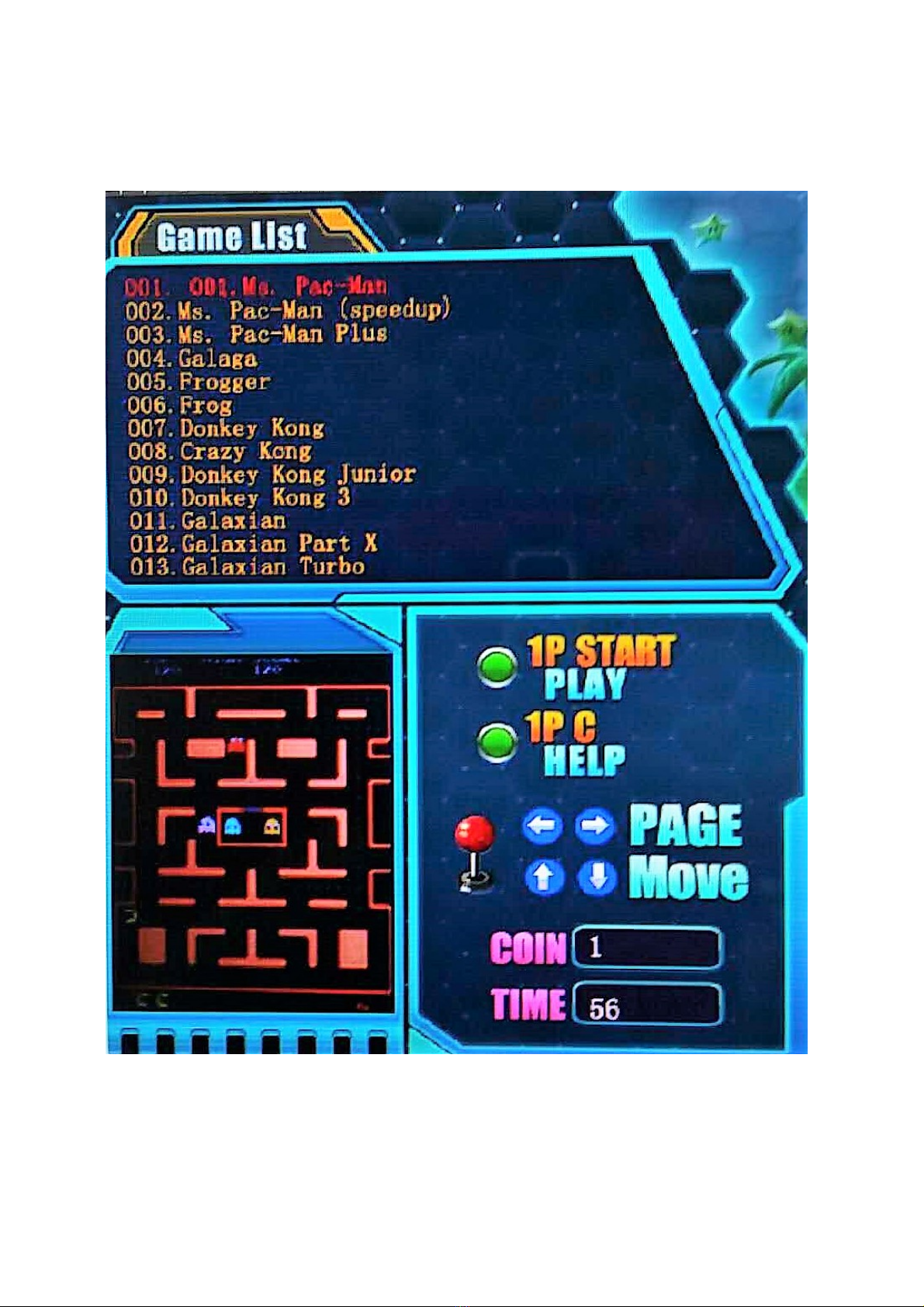
2. OPERATION INSTRUCTION.
Connect the game board and switch on the machine power, a ter the logo o the “GAME
ELF” appears, the machine will enter game list menu (about 20s-40s).
Figure 2 :: Game Menu Layout Note:: Press 1P-C or Help
1. Insert coins irst and select game. (No coins or Free play or ree browse).
2. Select game by moving 1P joystick up or down (si gle step), and le t or right (Page
Shift) to view game list.
2

3. Press 1P- START button to enter game.
4. I Coin recycling is set to“No”, a ter entering the game, all coins the player inserts will
be added into the game automatically. I Coin recycling is set to“Yes”, Press 1P START
button or 3~5seconds to pop up menu, and select “continue” to insert coins.
5. All games on Cocktail mode and some games on Upright mode need 2 coins (or more
coins) and press 2P-START butto first to e able 2 players mode. I Coin recycling
is set to “Yes”, or these games. Press 2P-START to trans er and add coins to new
game.
6. Press 1P-START butto for 3 seco ds, “Release Now” is displayed,
to display a pop up me u, a d select “exit” to retur to the Game List
(as figure 2) or “co ti ue” to resume i same game.
7. Press 1P-START for 3 seco ds to retur directly game list .
8. SYSTEM SETTINGS CONFIGURATION.(E teri g Co fig. / Edit Mode)
1. Switch on the machine power, when the string “Press TEST butto to setup”
appears, press TEST or S1 button to enter the System Settings Menu.
Figure 3 :: System Settings Menu.
2. Select item by moving 1P joystick up or dow and press 1P-START to enter.
3. According to the screen display prompts, per orm the operation.
4. Select “Exit” to quit and re-enter to the game list (see Figure 2).

3
3.1 Exit.
3.2 JAMMA I put / Output(I/O) Test. (sub Me u)
Check input/output buttons unction is 1 or zero(0).(It is invalid or amily mode.)
*【TEST】=【S1】*【SERVICE】= COIN
3.3 MY Cabi et Type = Upright
According to the screen display prompts, per orm the operation step by step. All game
con igurations are reset to actory de aults and loaded in Upright mode. Prompt(DEFAULT)
will be displayed a ter a success ul setting. Otherwise please per orm again.
3.4 MY Cabi et Type = Cocktail (Factory Default)
According to the screen display prompts, per orm the operation step by step. All vertical
con igurations o games are loaded in Cocktail mode. Prompt(DEFAULT) will be displayed
a ter a success ul setting. Otherwise please per orm again.
3.5 Show Serial Number
This serial number is only marked number, we suggest that our customers note this
number and be convenient or getting service in the uture.
Elf 412 i 1 Serial ....................................................................................................

4

3.6 SERVICE (sub Me u)
1. On the System Setting Menu, select item “6. Service” and press 1P-START to
enter the Service Menu.
Figure 4 :: Service Menu
NOTE:: The Dark Blue text is very difficult to read
2. Moving 1P joystick up or down to choose item, then 1P-C to modi y item.
3. SW1 switch on game board adjust Display Mode. See Remark para 3.6.1..
4. A ter inishing modi ication, press 1P-START to save setting(as igure 5), then
press 1P-A to retur System Me u.
5. Select "1. Exit" to exit, the new con iguration is valid a ter system automatically
restarts.
Figure 5:: Saving Text
3.6.1 Display Mode (Setti g Switch SW1)
1. Display mode
This game board support both VGA and CGA display modes, see below or
settings.
VGA mode (31.5Khz): Be ore switching on the machine power, set BIT1 o SW1
ON. Connect the VGA monitor to the VGA output connector. The output resolution
is 800x600.
CGA mode (15.75KHz): Be ore switching on the machine power, set BIT1 o SW1
OFF to use a regular JAMMA cabinet. The VGA port output is i valid.
Remark: Do ot operate SW1 with power applied. This may cause the special
electro ic smoke to leak out affecti g ormal operatio !

5
3.6.2 System Mode
In order to edit the “Game list/ Game difficulty/ Lives setti g/ Game
co figuratio ” it is necessary to enter the “Co fig/Edit Mode”. I you don’t need to
adjust these items, please set to “Game Mode (Normal play mode)” or normal
operation.
3.7 Coi Setti gs.
1. On the System Me u, select item “7.Coi setti gs” to enter Coin Settings.
Figure 6 :: Coin Settings (Menu)
1. Moving 1P joystick up or down to select item, then use 1P-C modi y the item.
2. Press 1P-START button a ter inishing the setting and ollow the instruction to save.
3. Coin mode: to modi y all games’ coin setting.
4. Coin recycling:Select Coin recycling to “Yes” or “No”.
1. “Yes”:Coins which don’t be inserted into game can be returned to the player
a ter quitting the game. Press 2P-START to trans er coins to next game.
2. “No”:All coins will be inserted into the game, so no coins can be returned to the
player a ter quitting the game.
Remark: I si gle game mode, cha ge to "NO" i the coi recycli g.
Figure 7:: Coi Setti g Subme u.
NOTE:: The Dark Blue text is very difficult to read
Yes/no

6
3.7 Free play:
1. Free play (ON): Play all games or ree.
2. Free play (OFF): Disable or ree play.
3.8 Show coi s cou ter
1.Show the number o coins in the current mode o operation (The unction is invalid or
Free play mode and home mode).
3.9 Flip scree
1. Flip screen: Game screen lip 180 degree.
Table des matières
Manuels Jeu populaires d'autres marques


Fundex Games
Fundex Games Timber Tumble Manuel utilisateur

Go! Gater
Go! Gater 1-1-16453-TP02 Manuel utilisateur

Smoby
Smoby BBF Challenger Manuel utilisateur

Hathaway
Hathaway BG2019SK Manuel utilisateur

Roberto Sport
Roberto Sport INGLESE Manuel utilisateur

Beleduc
Beleduc XXL Witches' Kitchen Manuel utilisateur

Koala Technologies
Koala Technologies KoalaWare Spider Eater Manuel utilisateur

Tomy
Tomy The Magic Oven Manuel utilisateur

Sega
Sega GAME SHOW Manuel utilisateur

Tiger Electronics
Tiger Electronics Last Out 7-584-0 Manuel utilisateur

Fisher-Price
Fisher-Price RollOverRover Manuel utilisateur

Mattel
Mattel World Championship Football Manuel utilisateur