FTE Maximal MAX T115 HD+ Manuel utilisateur

MAX T115 HD+

PAG. 2
rev 1.0
ENGLISH
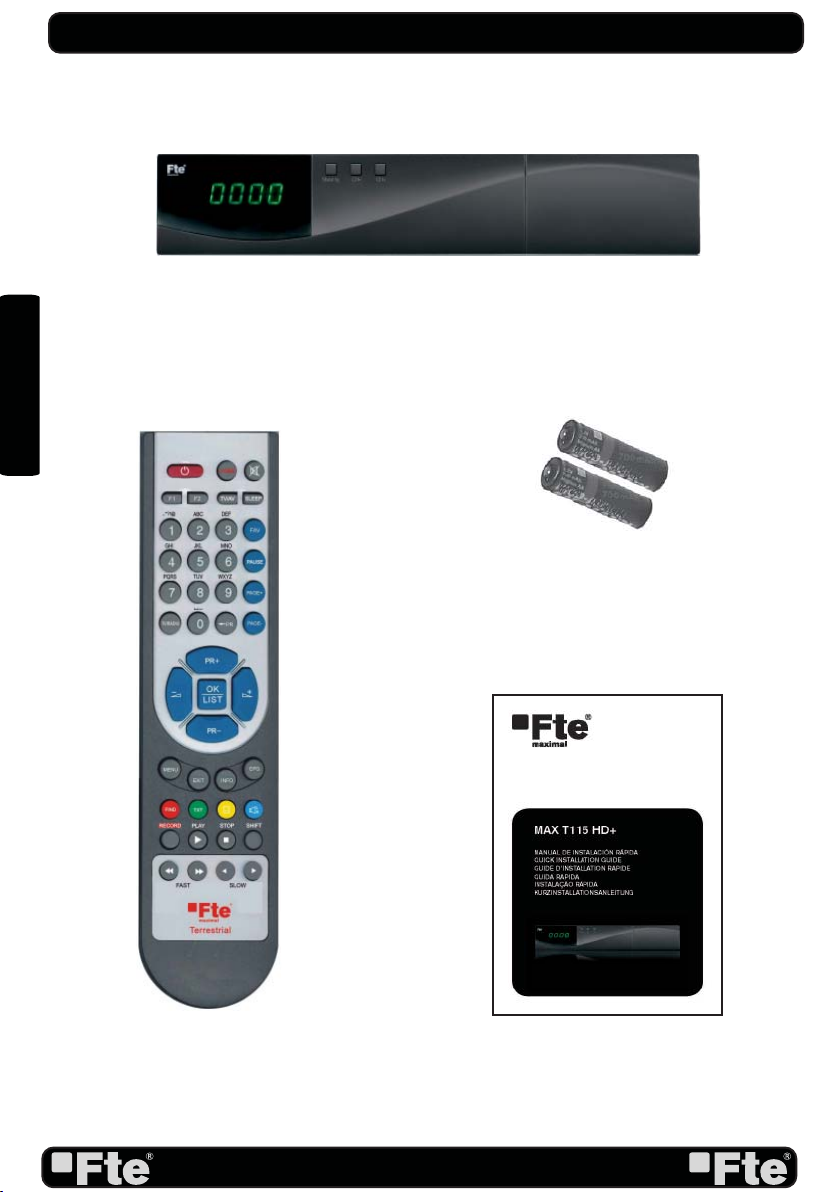
RECEIVER
REMOTE CONTROL
BATTERIES X 2
USER’S MANUAL
CONTENT

PAG. 3
rev 1.0
ENGLISH
QUICK INSTALLATION GUIDE
Warning:
-The apparatus shall not be exposed to dripping or splashing and that no objects filled with liquids, such as vases, shall be
placed on the apparatus.
- Do not place naked flame sources, such as lighted candles on the apparatus; otherwise, there is the danger of fire.
- The unit should be connected to a power supply only of the type described in the operating instructions or as marked on
the unit. If you are not sure of the type of power supply (for example: 120 or 230V) to your home, consult your local dealer
or local power company.
- Do not open the cabinet or touch any parts in the inner mechanism. Consult your local dealer for technical service if the
opening is required.
- The mains plug is used as the disconnect device, the disconnect device shall remain readily operable.
- Take attention to the environmental aspects of battery disposal. The battery of remote control should not be exposed
excessive heat such as sunshine, fire or the like.
- Maintenance man must use the appointed screw in the rear plate.
- Ensure a minimum distance of 5 cm around the apparatus for sufficient ventilation.
- Ensure that the ventilation is not impeded by covering the ventilation openings with items such as newspapers, table-cloths,
curtains, etc.
- Use the apparatus only in moderate climates (not in tropical climates).
- Do not open the cabinet to avoid the unit direct exposure to radiation.
Unit Cleaning: After the unit power is turned off, you can clean the cabinet, panel and remote control with a soft cloth lightly
moistened with a mild detergent solution.
Attachments: Never add any attachments and/or equipment without the manufacturer consent; as such additions may
result in the risk of fire, electric shock or other personal injury.
Locating: Slots and openings in the cabinet are provided for ventilation to protect it from overheating. Do not block these
openings or allow them to be blocked by placing the STB on a bed, sofa or other similar surface, nor should it be placed
over a radiator or heat register.
Power-Cord Protection: Place the power-supply cord out of the way, where it will not be walked on. Please take special
attentions to cords at plugs, convenience receptacles and the point where they exit from the unit.
Object and Liquid Entry: Never put objects of any kind into this STB through openings, as they may touch dangerous
voltage points or short-out parts that could result in a fire or electric shock. Never spill any liquid on the STB.
Note: Moisture may be formed inside the unit in the following conditions:
When the unit is suddenly moved from a cold environment or an air-condition room to a warm place.
Immediately after a heater has been turned on.
In a steamy or very humid room.
If the moisture forms inside the unit, it may not operate properly. To correct this problem, turn on the power and wait about
two hours for the moisture to evaporate.
Parts Replacement: When the unit parts need to be replaced, user should make sure the service technician use the
replacement parts specified by the manufacturer or having the same characteristics as the original part. Unauthorized
replacement may put the unit in the risk of fire, electric shock or other hazards.
Safety Check: After all the maintenances and repairs are done, user is required to request the service technician to conduct
the overall safety check to ensure the machine is in the proper condition.
The lightning flash with arrowhead
symbol, within an equilateral triangle,
is intended to alert the user to
“dangerous voltage” and to prevent
from a risk of electric shock
Warning: To reduce the risk of electric
shock, don’t open the cabinet. Refer
servicing to qualified personnel only.
The exclamation point within an
equilateral triangle is intended to
alert the user to important operating
and maintenance (servicing).

PAG. 4
rev 1.0
ENGLISH
QUICK INSTALLATION GUIDE
Follow next steps for the correct installation of this receiver.
STEP 1: OUTPUT VIDEO CONFIGURATION
In order to correctly visualise the reception signal on TV, you must configure the mode of the video
output. By pressing the [V-FORMAT] key you can configure the output format. Options: (480i / 480p
/ 576i / 576p / 720p_50 / 720p_60 / 1080i_25 / 1080i_30 / 1080p_24 / 1080p_25 / 1080p_30
/ 1080p_50 / 1080p_60).
STEP 2: CONNECTIONS
Connect a coaxial cable from the output socket to the “Ant In” connector. Connect a coaxial cable from
the “Loop” connector at the receiver to your TV input connector as it is shown in Scheme1.
This receiver has not built in modulator so it has to be connected to the TV through a HDMI or SCART
cable.
QUICK INSTALLATION GUIDE
EXAMPLE 2
EXAMPLE 3
EXAMPLE 1

PAG. 5
rev 1.0
ENGLISH
STEP 3: BASIC CONFIGURATION OF THE
RECEIVER
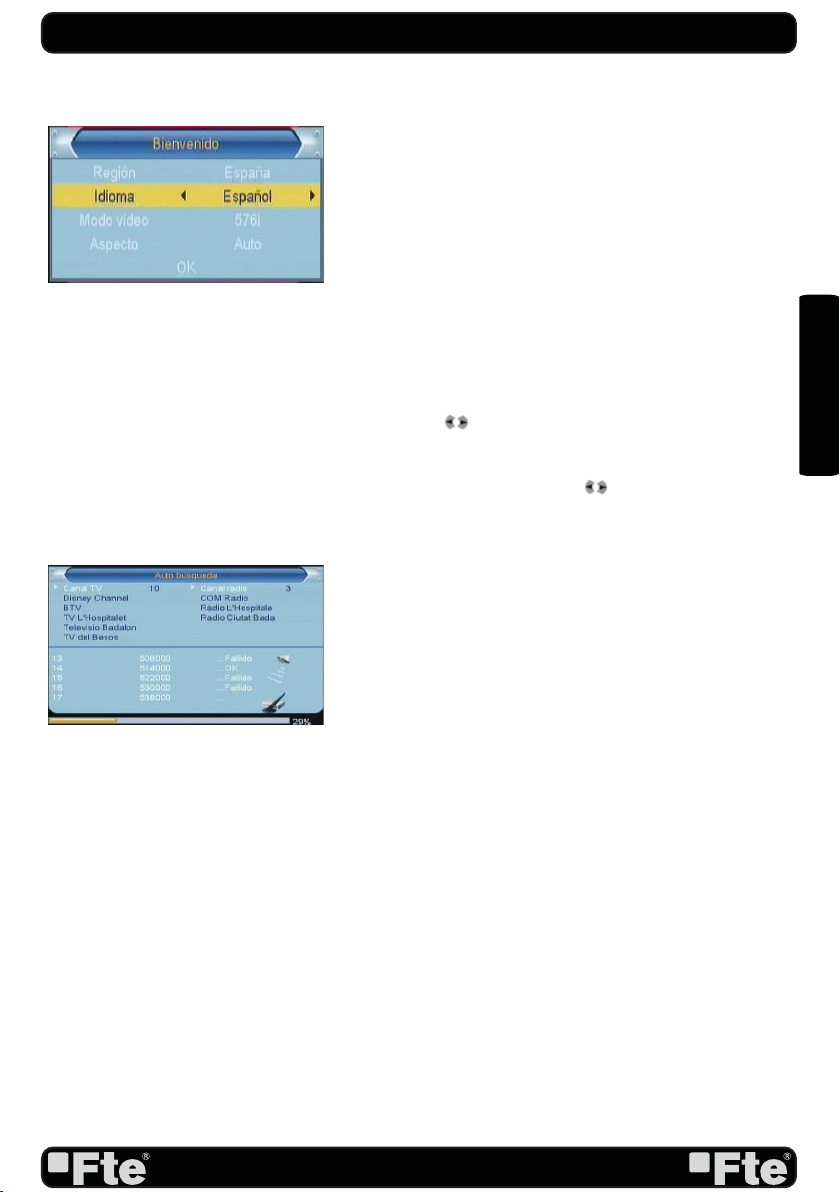
The receiver includes an installation assistant that will help
you to setup the different parameters.
When the receiver is turned on at first time (using the button
at the rear panel of the receiver), the next menu is shown on
the TV:
In order to move through the different options of this menu,
please use the keysof the remote control.
- Region: select your country using keys.
- OSD Language: select the language of the menu and other
information of the receiver. To choose between the different
languages, use keys of the remote control.
- Output Video Mode: is used to switch the display mode. You
can press [ ] key to select mode output video.
- Aspect Mode is used for switching the screen aspect ratio
mode. Now we provide below options: 4:3 PS / 4:3 LB /
16:9 / AUTO. You can press [ ] key to select each mode
circularly.
- Auto Scan: before making an auto scan (press [OK] button)
be sure that the data of the Region option (Image 1) is
correct, in other case the search of channels will be made
wrongly. Once the Region option is confirmed, please press
[OK]. ( image 2)
Don’t make any action with the receiver until the Auto scan
has finished. For more information about this option, please
read point 4.1 of the complete manual.
IMAGE 1
IMAGE 2
QUICK INSTALLATION GUIDE

PAG. 6
rev 1.0
ENGLISH
TV Channel List: This option shows the list of TV stored channels.
Radio Channel List: This option shows the list of Radio stored channels.
Delete All Channels: This option deletes all TV and Radio stored channels.
Auto Scan: This option make a full scan of all TV and Radio channels received.
Channel Scan: This option make a compete scan of only one Multiplex.
Tunner Setting: This option allows turns on or off 5V feeding throughcoaxial cable.
LCN: This option can control the channel whether sort by the information in the
streams.
QUICK INSTALLATION GUIDE
CHANNEL
INSTALLATION
OSD Language: This option allows selecting different menu and options languages.
TV System: This option allows choosing the video Standard and other parameters of the
screen.
Region and Time: In this option, the time of the receiver and user region or country can
be configured.
Timer Setting: Timer setting menu.
Parental Lock: In this option, user can lock the access to the menu and change the
password of the receiver.
OSD Setting: In this option, the subtitles of the channel information can be configured.
Favorite: It allows changing the name of the favourite groups.
Auto Standby: In this menu you can configure the automatic standby function.
SETUP

PAG. 7
rev 1.0
ENGLISH
Information: This option shows all the technical information for the receiver
Load Factory Default: If this option is selected, a reset of the receiver will be done and it
will load the factory default values.
Software Upgrade: To update the receiver by OTA or USB
Multimedia player: Allows reproduce music, image and video
Remove USB device: Allows remove USB device of safety way.
QUICK INSTALLATION GUIDE
TOOLS
Record Management: Allows to reproduce, to block and to delete recordings
Disk Information: You can see the capacity of the hard disk.
Format HDD: Allows to configure the hard disk options and to format it.
DVR Configuration: It allows configuring the Timeshift activation.
Jump Configuration: It allows configuring the jump period that can be used by default in
a recording.
REC
Othello
Sudoku
GAMES

PAG. 8
rev 1.0
ENGLISH
INDEX
1. Remote control & panel description
1.1.Front panel description.................................................................................10
1.2.Rear panel description.................................................................................10
1.3.Remote control description........................................................................11
2. Hotkey
2.1.Standby........................................................................................................12
2.2.PR+/PR-......................................................................................................12
2.3.Vol+/Vol-........................................................................................................12
2.4.Number...........................................................................................................12
2.5.TV/RADIO....................................................................................................12
2.6.Channel list.........................................................................................12
2.7.Audio.............................................................................................................12
2.8.EPG...............................................................................................................12
2.9.Subtitles.......................................................................................................13
2.10.EXIT.............................................................................................................13
2.11.Menu...........................................................................................................13
2.12.Mute............................................................................................................13
2.13.Back..........................................................................................................13
2.14.Information..................................................................................................13
2.15.Teletext..........................................................................................................13
2.16. Favourites.................................................................................................13
2.17. Fast recording.................................................................................................13
2.18. Timeshift.................................................................................................14
2.19. Video Format............................................................................................14
2.20. Sleep Timer.................................................................................................14
2.21. Find.................................................................................................14
3. Channel
3.1 TV Channel List.....................................................................................15
3.1.1. Favourite.......................................................................................15
3.1.2. Lock.......................................................................................15
3.1.3. Skip.......................................................................................15
3.1.4. Move.......................................................................................16
3.1.5. Edit channels.......................................................................................16
3.1.5.1. Sort...............................................................................16
3.1.5.2. Rename.........................................................................16
3.1.5.3. Delete...........................................................................16
3.2 Radio channel list..............................................................................17
3.3. Delete all channels..............................................................................17
4. Installation
4.1. Auto scan..............................................................................................18
4.2.Channel scan.....................................................................................18
4.3.Aerial adjustment........................................................................................ 18
4.4.LCN.............................................................................................................19

PAG. 9
rev 1.0
ENGLISH
INDEX
5. System setup
5.1.OSD language....................................................................................20
5.2.TV system................................................................................................20
5.3.Local time settings...............................................................................21
5.4.Timer setting.....................................................................................21
5.5.Parental lock....................................................................................22
5.6.OSD setting..........................................................................................23
5.7.Favorite........................................................................................................23
5.8.Auto Standby............................................................................................23
6. Tools
6.1.Information.....................................................................................................24
6.2.Load factory default..................................................................................24
6.3.Software upgrade by OTA.........................................................................24
6.4.Software upgrade by USB.........................................................................24
6.5.Media Player.........................................................................................25
6.5.1.Adding a new file to the list..............................................................26
6.5.2. Configure the slide show.............................................................26
6.5.3. Audio .MP3 player..........................................................................26
6.5.4. Picture viewer................................................................................26
6.5.5. Sort file....................................................................................27
6.6.Remove USB device...........................................................................27
7. Games
7.1.Othello.........................................................................................................28
7.2.Sudoku.........................................................................................................28
8. Rec
8.1.Recording management.....................................................................................29
8.1.1.How to reproduce a recording...............................................................29
8.1.2.How to rename a recording..................................................................29
8.1.3.How to block a recording........................................................................29
8.1.4.How to delete a recording.......................................................................30
8.2. HDD Information..........................................................................................30
8.3.HDD Format.....................................................................................30
8.4.DVR configuration....................................................................................30
8.5. Jump step value.........................................................................................31
9.Technical specification
9.Technical specification......................................................................................32
10.Conformity declaration CE
10.Conformity declaration CE...............................................................................33

PAG. 10
rev 1.0
ENGLISH
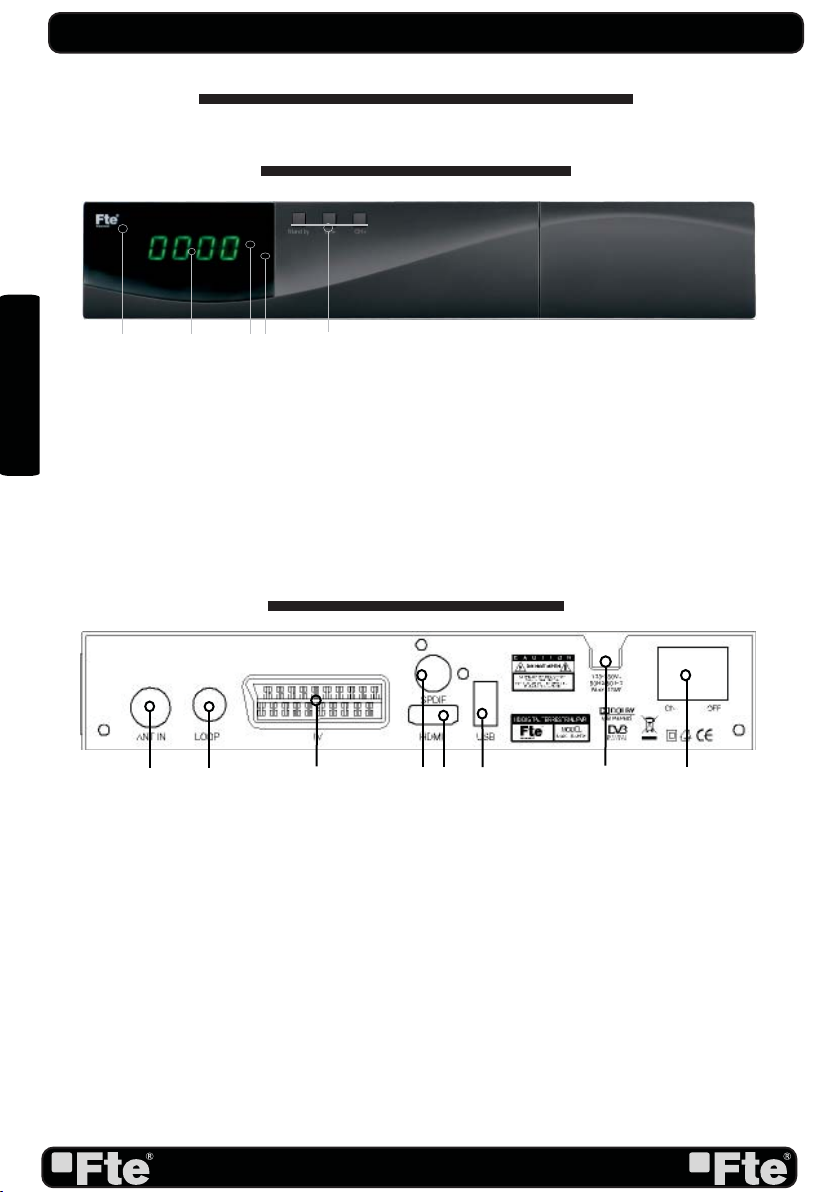
1. PANEL & REMOTE CONTROL DESCRIPTION
1.1. FRONT PANEL DESCRIPTION
REMOTE CONTROL & PANEL DESCRIPTION
1. IR-SENSOR: Reception sensor for the IR remote control signals.
2. DISPLAY: 4 Digits to display the program numbers.
3. STAND BY LED: Shows the state of the receiver.
4. LOCK LED: Indicates a sufficient signal level at the ANT IN input.
5. BUTTONS: These buttons allow controlling some functions of the receiver.
1. ANT IN: Input of the digital tuner.
2. LOOP: Ouput for cascading to others devices.
3. TV: Output SCART for the connection to a TV set.
4. COAXIAL S/PDIF: Coaxial output for digital audio (AC3)
5. HDMI: HDMI output for connecting to a TV
6. USB: USB Connector 2.0
7. AC IN: Mains input cable.
8. POWER ON/OFF: Allows to completely switching off the receiver.
1.2. REAR PANEL DESCRIPTION
1 2 35
4
2
157
3468
Table des matières
Autres manuels FTE Maximal Récepteur TV