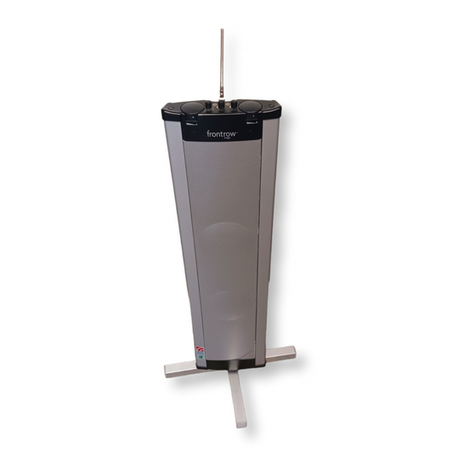
FrontRow To Go Manuel utilisateur

216MHz
USER GUIDE
920SR speaker
921T body-worn transmitter
922T handheld transmitter
923C charging stand
4750 FrontRow To Go User Guide 6/17/05 5:13 PM Page 2

contents
922T handheld transmitter
operation . . . . . . . . . . . . . . . . . . . . . . . .41-46
aux in – connecting to
TV, CD, VCR, etc. . . . . . . . . . . . . . . . . . . . . .47
aux out – connecting to
personal devices . . . . . . . . . . . . . . . . .48-49
additional system accessories . . . . . .50-51
troubleshooting . . . . . . . . . . . . . . . . .52-53
FrontRow To Go channel numbers and
corresponding frequencies . . . . . . . . . . . .54
product specifications . . . . . . . . . . . . .55-57
regulatory approvals and clearances . .58-61
introduction . . . . . . . . . . . . . . . . . . . . . . .1
understanding active learning . . . . . . . . .2
setup tips . . . . . . . . . . . . . . . . . . . . . . .3-5
daily operating tips . . . . . . . . . . . . . . . .6-8
parts and accessories included
with system . . . . . . . . . . . . . . . . . . . . .9-10
920SR column speaker features . . .11-14
921T body-worn transmitter features . .15-16
922T handheld transmitter features . . . .17
923C charging stand features . . . . . . . . .18
system setup and operation . . . . . .19-28
920SR speaker placement
and mounting . . . . . . . . . . . . . . . . . . .29-34
921T body-worn transmitter
operation . . . . . . . . . . . . . . . . . . . . . . . .35-40
4750 FrontRow To Go User Guide 6/17/05 5:13 PM Page 6

introduction
Congratulations on the purchase of your new FrontRow To Go™active learning system!
You may have heard the term ‘sound field’ used to describe technology that improves
classroom acoustics. Your FrontRow system fits under this category, but we call it an ‘active
learning system’ because the benefits affect so much more than just sound.
Active learning systems can help engage students, improve attentiveness to the teacher,
build learning success, reduce the achievement gap, foster control and orderliness, improve
test scores, and reduce vocal strain and fatigue for teachers. Numerous studies show that
classrooms using active learning enjoy better student comprehension, increased student
participation, better grades and fewer behavioral referrals.
Read this manual carefully to become familiar with your system and to get the most out of
its many features and options.
1
4750 FrontRow To Go User Guide 6/17/05 5:13 PM Page 7

2
understanding active learning and its benefits
?
• distance
• noise
• echo
cough!
• distance
• noise
• echo
?
without active learning
with active learning
4750 FrontRow To Go User Guide 6/17/05 5:13 PM Page 8

3
IMPORTANT!
Be sure you place your FrontRow To Go speaker and transmitter units on their charger
overnight – for a minimum of 12 hours – before turning the power on and/or using them
for the first time. Failing to do so can reduce battery capacity.
Basic setup tips
First – Identify a front corner of the room – the location from where the teacher
normally teaches.
Second – Take a good look around, paying close
attention to power outlet and other electronic
equipment locations. Ideally, the speaker should
be placed at a 5-foot distance from other elec-
tronic equipment, such as computers or radios.
Third – Determine whether to mount the
speaker on the wall as shown in diagram 1, or
place it on a sturdy surface using the T-bar table
setup tips
diagram 1
4750 FrontRow To Go User Guide 6/17/05 5:13 PM Page 9

4
setup tips (cont’d)
mount stand in diagram 2. In either case,
the speaker should be placed at a height of
3 feet/1 meter from the floor, or at level
closest to the listener‘s ears.
Fourth – Consider whether other FrontRow
To Go, FrontRow Tempo, or other radio-
based active learning systems are in use in
the building, and set transmitter and receiver
channels accordingly. Every transmitter in a
building should be on its own channel. See
diagrams in section 12 for guidance.
If placing the speaker on a table or surface top, consider the following:
•Choose a location that provides easy access for the teacher, and is out of
the way of students and main traffic areas. The speaker should be placed at
least 6 feet/1.8 meters away from where the teacher stands.
diagram 2
4750 FrontRow To Go User Guide 6/17/05 5:13 PM Page 10

setup tips (cont’d)
5
•Choose a table or surface top that is sturdy.
Make sure the table or cabinet is structurally solid, sturdy and out of the way of foot traffic.
•Properly mount and securely fasten the T-bar speaker stand onto the bottom
of the speaker. Make sure the stand is screwed on tightly, and that the speaker does
not wobble when in an upright position.
If mounting on the wall, consider the following:
•The power supply cord needs to reach the wall outlet. Make sure the power
supply is within reach of the speaker from its wall-mounted position.
•The teacher should be able to reach the controls located on top of the speaker
once it’s mounted. Once the volume is set at a comfortable level, the speaker power
switch located on the lower right side of the speaker can be easily accessed by the
teacher. Follow the instructions on page 28 for setting the volume at the proper level.
•Never mount the speaker upside down, or horizontally. The speaker unit must be
mounted such that the controls are located at the top of the unit.
4750 FrontRow To Go User Guide 6/17/05 5:13 PM Page 11

6
daily operating tips
In the morning –
•Turn transmitter power ’on’ and put microphone on.
•Turn speaker column power ’on’. The speaker should remain plugged into a wall
power outlet during the day – with the power in the ‘on’ position. Turn power switch
to the ‘off’ position at night after each use. The internal battery is not being used while
the speaker is plugged into a wall outlet.
•To operate using the internal battery as a portable system, simply unplug the
speaker before use and plug back in after use – making sure you return power switch
to ‘off’ position while plugged-in and charging. The battery takes 6 hours to reach a full
charge; at full charge, the speaker column battery will last up to 8 hours unplugged.
In the evening after each use –
•Turn transmitter power ’off’, and place it back onto the charging stand; confirm
that the ‘charge’ indicator light illuminates. Transmitters not in use should always be
placed on the charging stand – this is their home base station.
•Turn speaker column power ’off’. Leave speaker plugged into wall power outlet,
but confirm that the power has been turned ‘off.’
4750 FrontRow To Go User Guide 6/17/05 5:13 PM Page 12

7
daily operating tips (cont’d)
Battery care and maintenance tips –
• The speaker battery will last approximately 2 years depending on usage.
• When not in use, leave speaker plugged into wall outlet with power switch in
‘off’ position.
• Keep speaker away from heating units – use/store in a cool dry place.
• When using speaker battery power (unplugged from wall), always remember to return
power switch to ‘off’ position after use.
• Never mount/use speaker horizontally or upside down. Controls should be accessible
from top of unit.
• Plan on buying new NiMH batteries for your transmitter every 12 months. Alkaline
batteries can also be used as back-ups, however, the 923C charger will not recharge
alkaline batteries. Never attempt to recharge alkaline batteries – this will cause damage
to the unit and void the product warranty.
• Remember to charge all batteries overnight before initial use.
4750 FrontRow To Go User Guide 6/17/05 5:13 PM Page 13

8
daily operating tips (cont’d)
Do not coil the microphone – since it also acts as your antenna, coiling or wrapping the
cord will affect its range and may also reduce its life.
Speak at a normal level – the system is projecting your voice for you.
4750 FrontRow To Go User Guide 6/17/05 5:13 PM Page 14
Ce manuel convient aux modèles suivants
4
Table des matières
Autres manuels FrontRow Système de haut-parleurs
Manuels Système de haut-parleurs populaires d'autres marques

Sondpex
Sondpex Active Speaker System and Digital Music... Manuel utilisateur

JVC
JVC NX-PN7 Manuel utilisateur

Marshall Amplification
Marshall Amplification AR-DM61-BT Manuel utilisateur

Yamaha
Yamaha NX-A01 - Speaker Sys Manuel utilisateur

SE Audiotechnik
SE Audiotechnik I-LINE Manuel utilisateur

Gemini
Gemini WRX-843 Series Manuel utilisateur