
Float Plus PRO 2 Manuel utilisateur

PRO 2
Compact 2

• IP66 waterproof case:
• engine housing:
Anti-weed ring
PRO 2

Caution:
When using for the first time, connect the battery plug to the battery and charge the
system fully.
Make sure the remote control is correctly placed in the charging station.
PRO 2
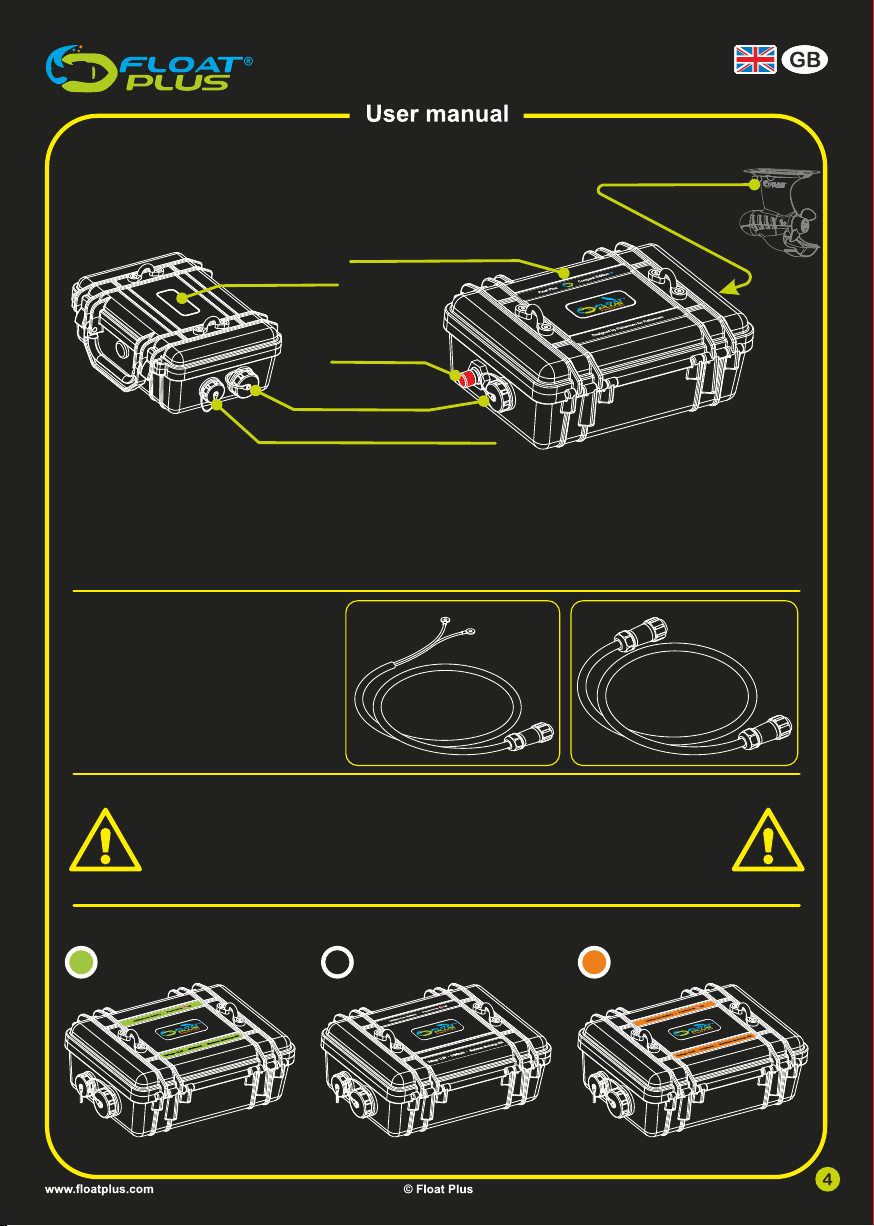
Peripheral device connection
Battery case
Motor control case
Kill switch
Battery connection
Motor connection
• Connecting the battery: FP 20101 FP 20102
A cable FP20101 with two rings is
supplied as standard for a battery.
A Float Plus battery requires a cable
with two waterproof connectors
(FP20102).
• Connecting the waterproof case:
• IP66 Waterproof Float Plus batteries:
12,6V 20800mAh 16,8V 31200mAh12,6V 41600mAh
FP 17024FP 17023 FP 17025
Connecting the motor:
Connect the motor plug to the motor connection on the side of the case. Make sure that the nut on the
plug is always screwed straight and firmly (hand tight) onto the thread of the plug.
Connecting the kill switch:
Insert the V-shaped hook of the safety cord under the red emergency switch button. This lifts the red
button and activates the motor control.
CAUTION: The system will not work if the hook is not positioned correctly under the red button.
WARNING:
All cases are IP66 water resistant.
This means that no water penetration can occur if sprayed (100L/min) at
any angle.
NEVER USE THE CASES IN OR UNDER WATER!
Compact 2

reverse for:
PRO 2
Compact 2
forward:
Indicator of the remaining
battery power of the engine
battery in the case
Indicator of the remaining
battery power of the remote
control
Indicator of the engine
power in percentages
Turn the control knob counter clockwise past the zero point to reverse.
Reversing is possible with the PRO 2 and Compact Edition 2.
Engine power and battery power consumption:
The number indicates the percentage of the engine power e.g., the number 50 indicates that
you are using 50% of the engine power. The engine power in the green zone is the most
efficient to use, the battery will than last longer. The engine power in the orange and red zones
strain the battery less efficiently. The result is that the battery will become empty much faster.

Setting menu:
In the Setting menu, you can select a language and select a battery. You can navigate to the
Setting menu from the main screen by pressing the push button for 8 seconds. After 3
seconds, the remote control will off and subsequently, the Settings menu will appear.

Language selection:
When you open the Setting menu for the first time, you will see a screen in which you can select your preferred
language. You can select your language by turning the rotary knob. To confirm your language selection, press
the push button once.
From now on, the flag of the country of your language selection will appear when you enter the Setting menu. If
you want to change your preferred language, you select ’Reset language’.
Battery choice:
You can select the battery by turning the control knob in the settings menu. Press the push button once to
confirm your battery choice. Your battery choice icon will now appear when you open the settings menu. If
you want to change your battery later, you can do this by selecting a different battery. The background
colour of the main screen changes after you select the battery.
Li-Ion Accu
12,6V 20Ah
Li-Ion
Li-Ion Accu
12,6V 42Ah
Li-Ion
Li-Ion Accu
16,8V 31Ah
Li-Ion
Pb-Accu
12 Volt
PB
Italia Sverige
Bluetooth:
The remote control works with a Bluetooth connection.
The Bluetooth connection is standard connected with the system.
In the Settings menu it is possible to connect a different remote to
the system. At first the BT sign will show, check if the system is
connected to a power source (battery), then push once on the
white push button. The remote will start to search the BT signal. As
soon as the system is found, a unique connection number will
appear under the BT sign. Press again on the white push button
and the connection will be made.
Calibrate magnet sensor:
If necessary, it is possible to calibrate the magnet sensor of the rotary knob.
Follow the instructions.
motor numberScanning ...
Calibrate sensor

Firmware update:
This function is only for Float Plus certified dealers.
Factory reset:
All settings will be reset to the default values with this function.
Factory reset
Firmware update

Charging the remote control battery:
Pro 2: Put the remote control into the charging station in
the case. Look whether the micro-USB plug is placed
properly (this is hidden).
Compact 2: use the separate usb cable.
The remote control is chargeable with every 5V USB
port or adapter. Check whether the display shows a
message that charging is taking place.
As soon as the battery is charged, a message will
appear that 'charging is completed'.

Ce manuel convient aux modèles suivants
1
Manuels Équipement nautique populaires d'autres marques



Dowco
Dowco V322 CC - 2019 Manuel utilisateur

Humphree
Humphree HCS-5 Manuel utilisateur

Vetus
Vetus BOW4512D Fiche technique

Dock Doctors
Dock Doctors SLIDING BOARDING STEP Manuel utilisateur

Mastervolt
Mastervolt Mass Combi 12/2000-100 Instructions d'utilisation d'origine

Zattini Group
Zattini Group bamar BOXTRON E14S Guide de l'utilisateur


