FLIR ONE Manuel utilisateur

TM
TM Cover. Table Of Contents. / User Manual. / 1
© 2014 FLIR Systems, Inc. All rights reserved.
Document #: 435-0001-01-10
FLIR ONE™ ANATOMY
CHARGING THE FLIR ONE
ASSEMBLING FLIR ONE
FLIR ONE APP
MODE SWITCH
TUNING THE FLIR ONE
TAKING SNAPSHOTS
TAKING VIDEO
FLIR LIBRARY
CHANGING COLOR PALETTES
CONTROL PANEL
SPOT METER
LIGHT
SETTINGS MENU
EMISSIVITY
SAVE GPS LOCATION
SAVE TO CAMERA ROLL
TEMPERATURE UNIT
HELP & SUPPORT
TROUBLESHOOTING
FLIR ONE NOT DETECTED
TEMPERATURE READINGS NOT
ACCURATE
LEGAL
PRODUCT AND SAFETY INFORMATION
BATTERY AND CHARGER
TAKE CARE OF YOUR DEVICE
RECYCLE
02 |
03 |
04 |
05 |
06 |
07 |
08 |
08 |
08 |
09 |
10 |
10 |
10 |
11 |
11 |
11 |
11 |
11 |
12 |
12 |
12 |
12 |
13 |
14 |
14 |
15 |
15 |
The FLIR ONE™ allows you to see the world in a whole new
way, with a unique blend of thermal and visible imaging.
This user guide provides brief information on how to use the
FLIR ONE. Additional information is available directly from
the FLIR ONE app in the Settings menu.
TABLE OF CONTENTS
USER MANUAL

TM
TM USER MANUAL
Diagram. / User Manual. / 2
© 2014 FLIR Systems, Inc. All rights reserved.
Document #: 435-0001-01-10
OPERATION INDICATOR LIGHT
VISIBLE CAMERA
THERMAL CAMERA
MICRO USB
MODE SWITCH/LENS COVER
CLOSED
OPEN
TUNE
BATTERY INDICATOR LIGHT
FLIR ONE™ Anatomy. / User Manual. / 2
IPHONE CAMERA / FLASH
CHARGING
CAMERA READY
CHARGED
CAMERA ACTIVATING

Iron Gray RainHottestColdest
43 Photos, 2 Videos
FLIR Library
Today
Done Select
Iron Gray RainHottestColdest
Iron Gray
Rain
Hottest
Coldest
App Store
Iron Gray RainHottestColdest
43 Photos, 2 Videos
FLIR Library
Today
Done Select
Iron Gray RainHottestColdest
Iron Gray
Rain
Hottest
Coldest
App Store
TM
© 2014 FLIR Systems, Inc. All rights reserved. TM USER MANUAL
User Manual. / 3
Document #: 435-0001-01-10
The power/status indicator will blink while the device is
charging. The FLIR ONE requires 2-4 hours for a full charge,
depending on the power source. When the device is fully charged,
the Power/Status indicator will be on continuously.
Note: The iPhone will not charge when
the FLIR ONE is charging. Also, it is not
possible to use the iPhone cable to charge
the FLIR ONE.
Plug the Micro USB end of the
power cable into the FLIR ONE
and plug the other end into a
USB power source.
CHARGING THE FLIR ONE™
Charging the FLIR ONE™. /

Iron Gray RainHottestColdest
43 Photos, 2 Videos
FLIR Library
Today
Done Select
Iron Gray RainHottestColdest
Iron Gray
Rain
Hottest
Coldest
App Store
Iron Gray RainHottestColdest
43 Photos, 2 Videos
FLIR Library
Today
Done Select
Iron Gray RainHottestColdest
Iron Gray
Rain
Hottest
Coldest
App Store
Iron Gray RainHottestColdest
43 Photos, 2 Videos
FLIR Library
Today
Done Select
Iron Gray RainHottestColdest
Iron Gray
Rain
Hottest
Coldest
App Store
TM
© 2014 FLIR Systems, Inc. All rights reserved. TM USER MANUAL
User Manual. / 4
Document #: 435-0001-01-10
The round opening in the slim case will align with the protrusion
on the FLIR ONE and help it stay attached to the iPhone.
When snapping the slim case onto the iPhone, it is recommended
to snap the volume button side first, to avoid damaging the iPhone.
Snap the included slim case on
the iPhone, and then slide the
iPhone into the FLIR ONE.
ASSEMBLE THE FLIR ONE™
Assembling the FLIR ONE™. /

Iron Gray RainHottestColdest
43 Photos, 2 Videos
FLIR Library
Today
Done Select
Iron Gray RainHottestColdest
Iron Gray
Rain
Hottest
Coldest
App Store
Iron Gray RainHottestColdest
43 Photos, 2 Videos
FLIR Library
Today
Done Select
Iron Gray RainHottestColdest
Iron Gray
Rain
Hottest
Coldest
App Store
TM
© 2014 FLIR Systems, Inc. All rights reserved. TM USER MANUAL
User Manual. / 5
Document #: 435-0001-01-10
The latest version of the FLIR ONE app is available on the
Apple App Store. If the FLIR ONE is turned off, the app will
tell you to attach your FLIR ONE camera and open the shutter.
The iPhone iOS version must be 7.1.1 or higher.
Download and install the app,
then start it.
FLIR ONE™ APP
FLIR ONE™ App. /

Iron Gray RainHottestColdest
43 Photos, 2 Videos
FLIR Library
Today
Done Select
Iron Gray RainHottestColdest
Iron Gray
Rain
Hottest
Coldest
App Store
TM
© 2014 FLIR Systems, Inc. All rights reserved. TM USER MANUAL
User Manual. / 6
Document #: 435-0001-01-10
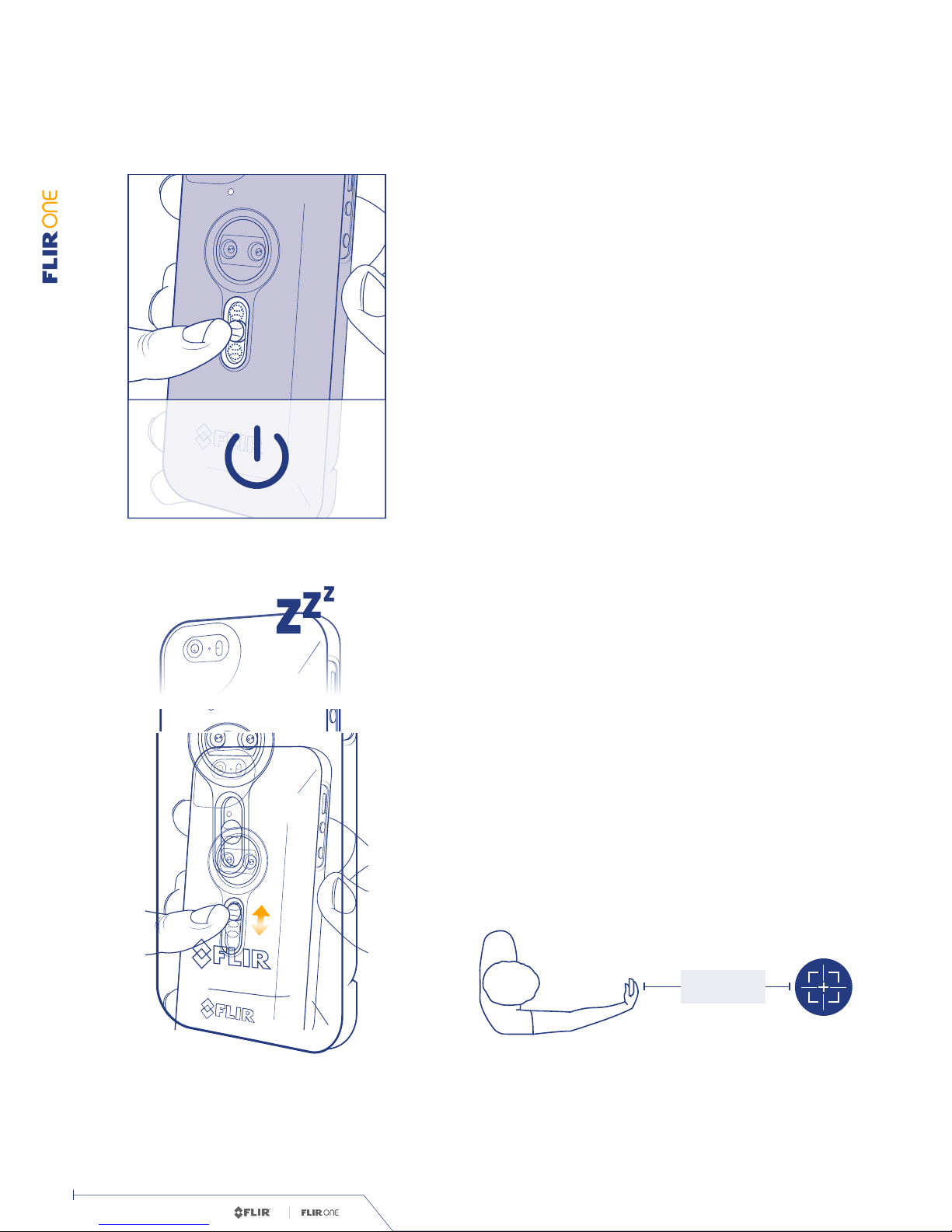
When it is in the up position, the device is turned off. When it
is in the middle position, it is turned on. When it is pulled down
to the bottom position, the device does an automatic tuning
operation, which is described below. When it is released it will
go back to the middle position.
To conserve the battery when the FLIR ONE APP is not the
focus, your FLIR ONE will automatically go into ‘Sleep Mode’.
To wake your FLIR ONE, momentarily close the MODE SWITCH
and return it to the open position.
The mode switch has three
positions.
Your FLIR ONE will go into
‘Sleep Mode’ automatically.
MODE SWITCH
SLEEP MODE
Mode Switch. /
OPTIMIZED
+1 METER
OPTIMIZED
+1 METER
OPTIMIZED
+1 METER
FLIR ONE uses two camera apertures and an exclusive image
blending process to ensure you always know what you’re look-
ing at. Position the camera at least an arms length or more
from your subject for optimal photos.
OPTIMIZE YOUR PHOTOS

Iron Gray RainHottestColdest
43 Photos, 2 Videos
FLIR Library
Today
Done Select
Iron Gray RainHottestColdest
Iron Gray
Rain
Hottest
Coldest
App Store
3 SEC.
Tuning The FLIR ONE™. /
This causes the device to do a self-calibration and allows
the thermal imager to present an optimized image and a
more accurate temperature calculation (see Spot Meter for
additional information).
Periodically it may be necessary
to perform a Tuning operation
on the FLIR ONE.
TUNING THE FLIR ONE™
TM
© 2014 FLIR Systems, Inc. All rights reserved. TM USER MANUAL
User Manual. / 7
Document #: 435-0001-01-10

Iron Gray RainHottestColdest
43 Photos, 2 Videos
FLIR Library
Today
Done Select
Iron Gray RainHottestColdest
Iron Gray
Rain
Hottest
Coldest
App Store
Iron Gray
Rain
Hottest
Coldest
43 Photos, 2 Videos
FLIR Library
Today
Done Select
Iron Gray RainHottestColdest
Iron Gray
Rain
Hottest
Coldest
App Store
Iron Gray RainHottestColdest
43 Photos, 2 Videos
FLIR Library
Today
Done Select
Iron Gray RainHottestColdest
Iron Gray
Rain
Hottest
Coldest
App Store
OPTIMIZED
+1 METER
TM
© 2014 FLIR Systems, Inc. All rights reserved. TM USER MANUAL
User Manual. / 8
Document #: 435-0001-01-10
Tap the round blue button at the bottom of the screen to save
a snapshot. The images are saved to the FLIR Library.
In the bottom right corner,
swipe the blue camera icon to
the left to select photo mode.
TAKING SNAPSHOTS
Then tap on the red button to begin video capture. Tap on the
red button again to stop the video capture.
Images and videos may be shared through text messaging or
email and may be edited by changing the color palette or the
temperature scale.
Swipe the blue camera icon to
the red video camera icon on the
right to select video mode.
Captured images and video may
be viewed and edited by selecting
the thumbnail image in the lower
left corner of the screen.
TAKING VIDEO
FLIR LIBRARY
Snapshots. Video. FLIR Library. /

TM
© 2014 FLIR Systems, Inc. All rights reserved. TM USER MANUAL
User Manual. / 9
Document #: 435-0001-01-10
The color palettes are described in more detail in the Help
and Support feature of the app (see Settings Menu).
On the display (the live image),
swipe left or right to select a
different color palette and change
how the image is displayed.
CHANGING COLOR PALETTES
Changing Color Palettes. /

TM
© 2014 FLIR Systems, Inc. All rights reserved. TM USER MANUAL
User Manual. / 10
Document #: 435-0001-01-10
The Control Panel allows the user to turn on or off the Spot
Meter, turn on or off the Light, or access the Settings menu. It also
provides an indication of the battery charge level. Tap the blue
gear icon to close the panel.
Select the gear icon in the upper
left to open the Control Panel.
CONTROL PANEL
When the Spot Meter is enabled (indicated by an icon with
white background), the FLIR ONE™ will display a temperature
estimate (in degrees C or F) on the image for approximately
20 seconds after the Tuning operation has been done. The
accuracy of the Spot Meter depends on a great many factors,
including the distance from the object, the ambient tempera-
ture, and the emissivity of the material being observed. Users
are encouraged to learn more about the science of thermography
from http://infraredtraining.com/.
Multi Spectral Imaging (MSX ®
) is a patented technology
which makes use of the visible camera in the FLIR ONE to
maximize detail and image sharpness. This feature requires
some amount of visible light, so in dark environments turn on
the light to enhance the image detail. This feature makes use
of the light that is built into the iPhone.
SPOT METER
LIGHT
Control Panel. /
Autres manuels pour ONE
3
Table des matières