
Fitness Technoligies Uwater Manuel utilisateur

3
2
Owner’s Manual
Thank you for purchasing the Uwater waterproof MP3 Player.
This manual provides operating instructions to help you enjoy your music
and audio books in water environment quickly and easily.
Please read manual carefully before using the Player.
Warnings
1. ALWAYS screw down firmly the earphone jack onto the Player before
entering the water.
2. NEVER unscrew or detach earphone jack while in the water.
3. Player complies with IEC 60529 IPX8 waterproofing standards thus
functional up to 3 meters (10 FT) underwater for up to 30 minutes.
However, it is not recommended to use Player in diving.
45
A.Charge battery for 2 HRS (use USB cable)
B.Download songs (use USB cable)
C.Listen To Music:
1. Connect earphone(screw down jack firmly)
2. Switch ON by press and hold control #7
(5-6 seconds)
3. Press PLAY ( ). Adjust VOLUME (+/-) .
Navigate FORWARD ( ) and
BACKWARD ( ) as needed.
4. Short press Control #7 to change play mode
from NORMAL to SHUFFLE. Short press again
to return to NORMAL.
5. Switch OFF by press and hold control #7
(5-6 seconds).
D. LED Indications (Control#7):
Steady RED: charging
Steady BLUE: fully charged
Blinking RED: Normal (A-B) Mode
Blinking BLUE: Shuffle Mode
E. Auto shutoff:
When player is unplugged from PC or
power source.
Quick Start Guide
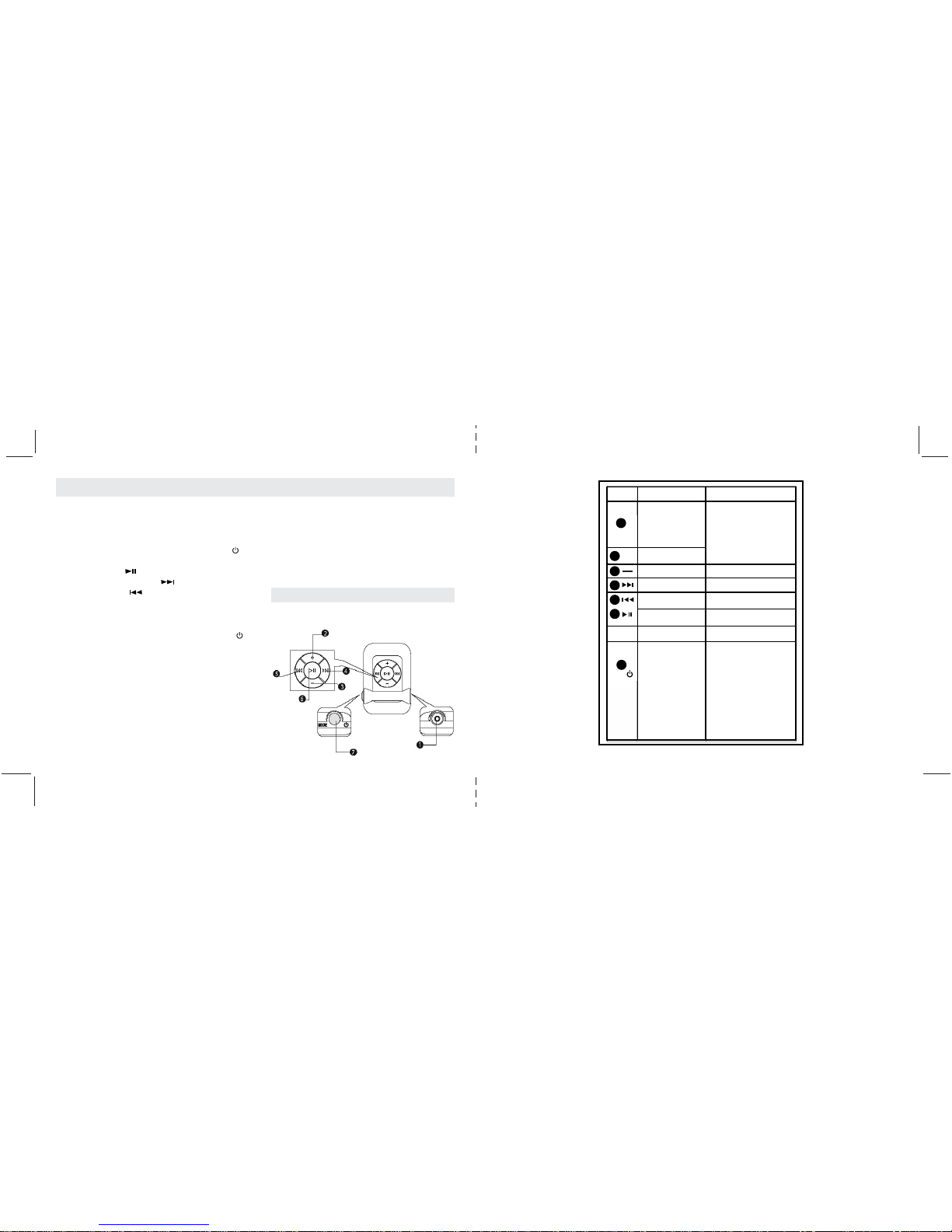
Appearance and Function Keys
“ ”
“ ”
Earphone plug
(USB Port/Changer Socket)
Volume Up
Play
Power/Mode
LED indicator
Volume Down
Selecting a Track
(Forwards)
Selecting a Track
(backwards)
• Power ON/OFF:press and
hold for 5 sec.
• Change Playback
Modes:short-press to switch
modes (blinking RED in
NORMAL mode, blinking
BLUE in SHUFFLE mode).
• Recharging: steady RED
during battery recharging.
Turns to steady BLUE when
battery is fully charged.
• For earphones connecting to
the player
• For extension cable
connecting to the player
• For USB cable connecting
to PC and recharging the
built-in battery.
• Press the button to increase
volume.
• Press the button to reduce
volume.
• Press the button to forward
to the next track.
• Press the button to backward
to the previous track.
• Playback start/pause.
1
2
3
4
5
6
7
MODE
+
No. Name Function Descriptions
Operational Instructions
67
Copying MP3 Files from PC to the MP3 Player
• Connect the player to the USB port of your
PC using the USB cable.
•A ” “icon appears at the right bottom of the
Tool Bar. A “Removable Disk” icon also
appears in “My Computer”.
• Use the File Manager function to copy files to
the player.
• Then double-click the “ “ icon at the right
bottom of the Tool Bar to disable the “
Removable Disk”. When the “This Disk Has
Been Disabled Successfully” dialog box
appears, disconnect the player from the USB port.
Recharging the Battery
•To recharge the battery via USB port of your
PC, simply connect the player using the USB
cable to your PC to recharge the battery.
•To recharge the battery using the USB charger
(optional), simply connect the player to the
charger using the USB cable, then connect the
charger to the power supply.
*Note: When disconnected from the USB port
after recharging or file uploading, the player
switches off automatically.
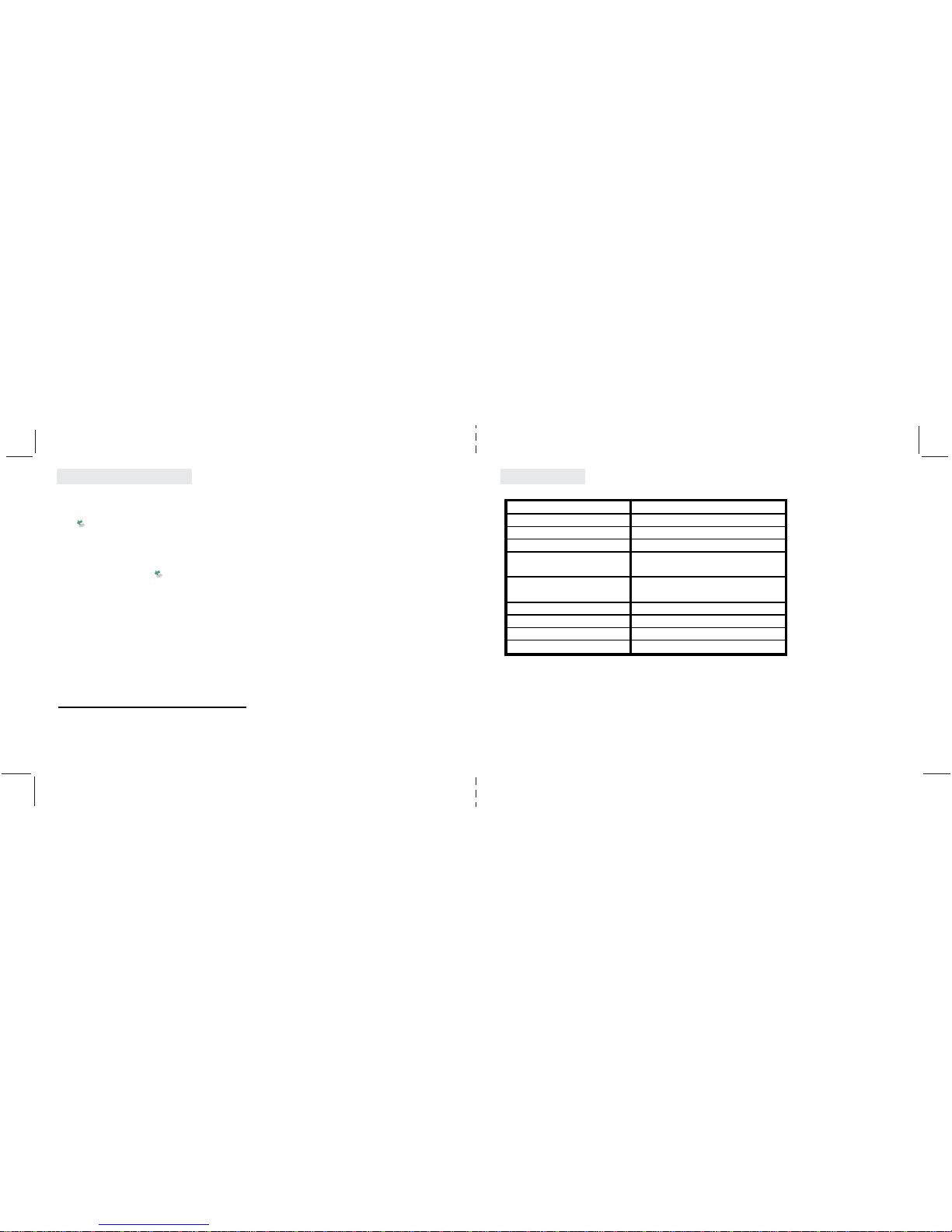
Specifications
Features:
Audio Format
Bit Rate
Internal Memory
Built-In Rechargeable battery
USB interface
Playback Mode
Operating system
Storage Temperature
Operating temperature
Dimensions(LxWxH)
Net Weight
MP3, WMA
32Kbps-320Kbps
built-in 1 GB/2GB/4GB
6hrs Continuous Playing Time
USB 2.0 High Speed
Normal, Random
Win XP, Win2000, WinME, Linux2.4
and above. MAC OS 9.0 and higher
10°C~+50° C
-5°C~+40° C
56.5 x 32.5 x 16mm
21 grams(not including earphones)
89
Important Notice
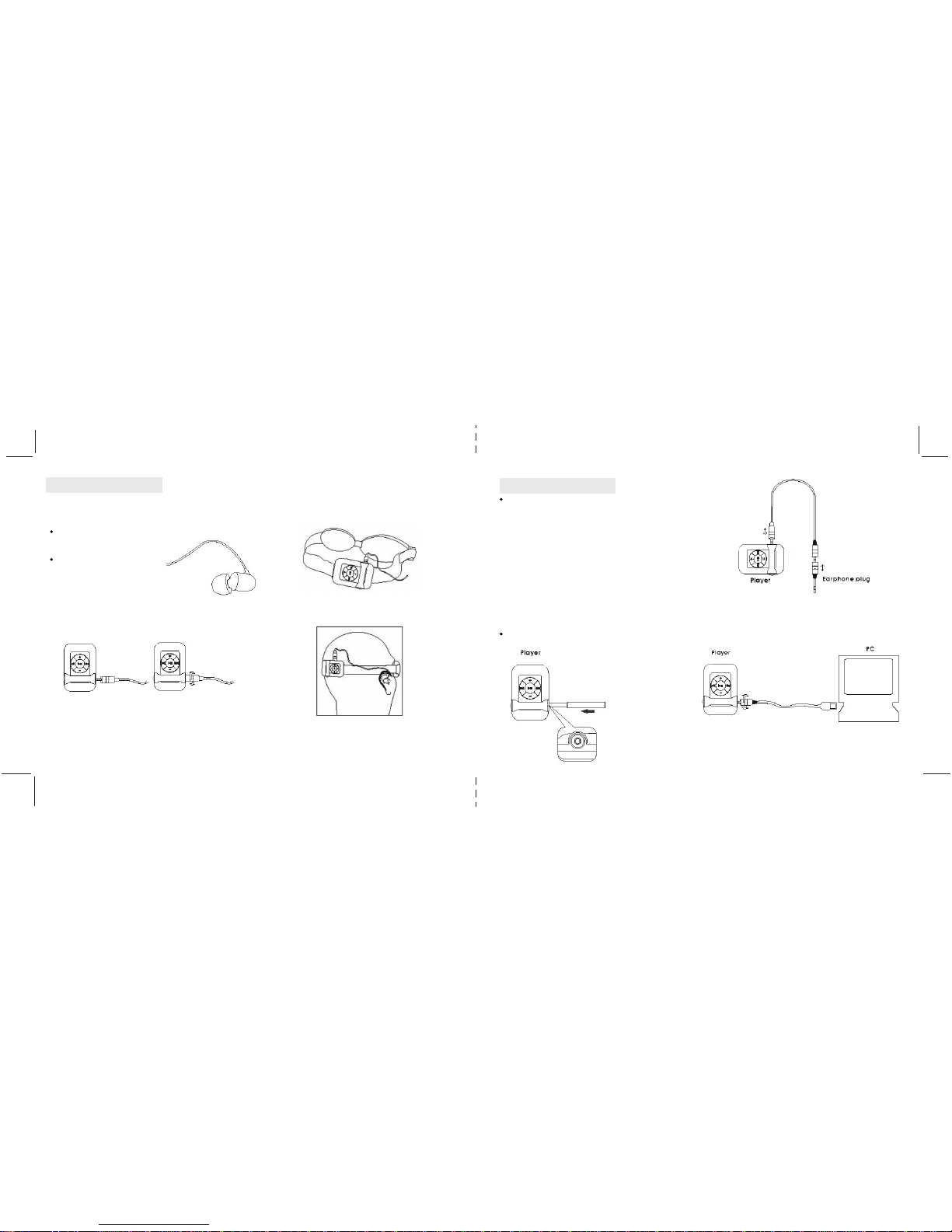
Please follow the steps below to ensure the waterproof
protection before entering the water.
waterproof earphones must be used for swimming:
Step 1:
Step 2: Step 3:
Step 4:
waterproof earphones
must be used for swimming:
Eartips must be assembled.
Screw the earphone plug tightly into the earphone jack
on the player.
Clip the MP3 player onto the goggles,
headband. (For swimming)
Appendix
• Both waterproof earphones and normal earphones (included) and
normal earphones (available separately as accessory) are suitable
for general applications.
8.2 Resetting the player
• Using the reset pointer to plug into the earphone
jack to reset the player
8.3 Recharging/Uploading MP3 player
General Applications
Extension cord.
Reset pointer.
10 11
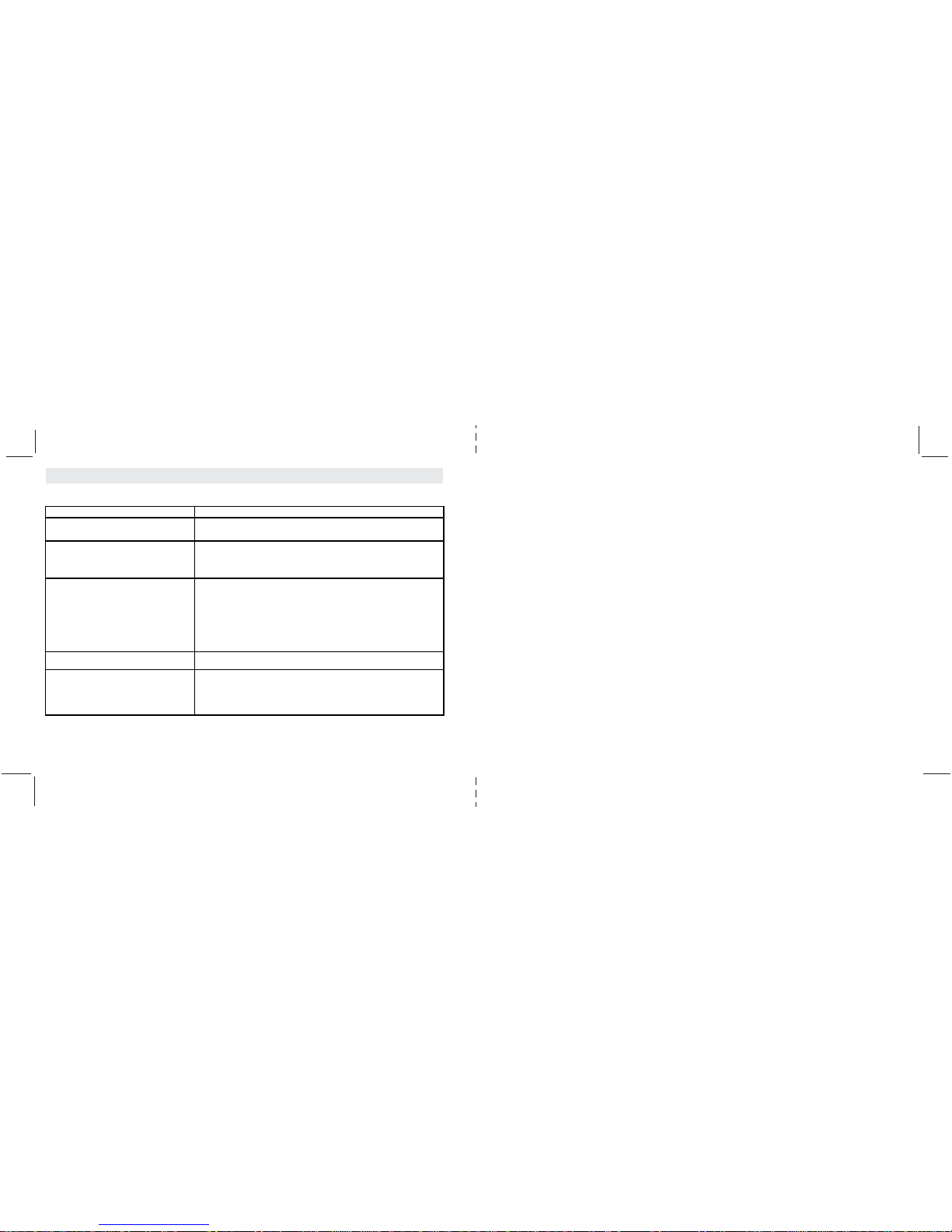
Problem Remedy
I can’t turn on my Player • Connect to your PC for recharging.
After I turn ON my Player, • Possibly low battery level. Connect to your PC for recharging.
it shuts down immediately.
I can’t use the USB cable to recharge My Player. • Make sure you are using the original USB cable provided in package.
• Connect Player to PC using USB cable and check that the Operating system
is recognizing Player.
• Reset Player (see Reset Instructions).
There is no sound while Player is ON. • make sure Player is charged.
• Make sure earphones are properly plugged in.
• If you are using the waterproof earphones,
make sure earphone plug is screwed down firmly.
• Adjust VOLUME.
• Make sure water did not penetrate earphones.
If they did, remove ear-tips, rinse and dry.
• Reset Player (see Reset Instructions).
Player doesn’t work but LED is ON • Reset Player (see Reset Instructions)
I can’t connect my Player to PC • make sure Player is connected appropriately using original USB cable.
• Make sure USB cable was connected to player before it was connected to PC.
A reverse plugging sequence may result in failure of connection between
the player and your PC.
Troubleshooting
Table des matières
Autres manuels Fitness Technoligies Lecteur MP3

Manuels Lecteur MP3 populaires d'autres marques

Blaupunkt
Blaupunkt Compact Drive MP3 Manuel utilisateur

Memorex
Memorex MMP9008 - 8GB USB 2.0 Manuel utilisateur

Meizu Electronic Technology
Meizu Electronic Technology E5 Manuel utilisateur

Naxa
Naxa NMV-173NX Manuel utilisateur

Philips
Philips PSA250 Manuel utilisateur

Zipy
Zipy go! Waving Manuel utilisateur


