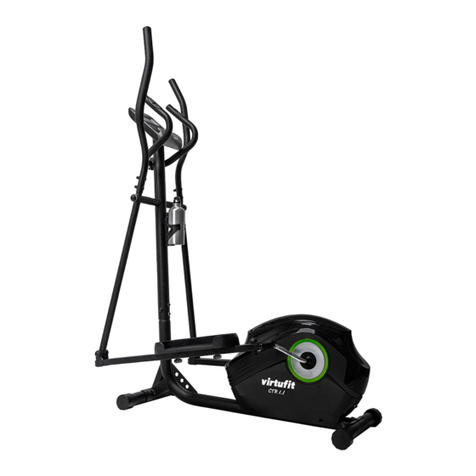
FitLux 5200 Manuel utilisateur

FitLux 5200
ELLIPTICAL TRAINER
Owner's Manual
Made in Taiwan

INDEX
IMPORTANT NOTICE . . . . . . . . . . . . . . . . . . . . . P. 1
ASSEMBLY PARTS LIST . . . . . . . . . . . . . . . . . . . P. 2
ASSEMBLY INSTRUCTION . . . . . . . . . . . . . . . . . . P. 3-6
COMPUTER INSTRUCTION . . . . . . . . . . . . . . . . . P. 7-17
EXPLODED DRAWING .. . . . . . . . . . . . . . . . . . . . P. 18
PARTS LIST. . . . . . . . . . . . . . . . . . . . . . . . . . . P. 19
DANGER Check that all items are complete and in
good condition.
WARNING In the assembly of the bolts, it is
recommended that one should use ones
hand in tightening the bolts prior to its
completion. Once completed remember
to have all the bolts securely fastened to
prevent accident.
ATTENTION Be sure to carefully follow all the steps in our
assembly instruction.
CAUTION:
!
!
!

1
IMPORTANT NOTICE:
THIS EQUIPMENT IS ONLY FOR HOME USE,
NOT FOR COMMERCIAL PURPOSE.
USER'S WEIGHT SHOULD BE LIMITED ONLY TO 150 KGS.
1. Before proceeding into any type of exercise program, it is
recommended that one should first consult a physician.
2. Be sure to inspect that every part of the machine that has bolts
on it are secured.
3. Do not expose to humidity as it may caused malfunction to
the equipment, any malfunction or injuries caused due to the
aforementioned we would not be held liable for this.
4. Wearing of sneakers and sport garments before initiating an
exercise program is recommended.
5. Initiate any type of exercise 40 minutes after each meal.
6. Warm up before an exercise would prevent injuries.
7. People suffering from fatigue, fever or high blood pressure
should first consult a doctor or physician prior to an exercise.
8. This exercise equipment is for ADULT use only.
9. Proper attention, guidance and supervision should be given to
some aged people, children or handicapped persons.
10. Please do not insert any foreign objects unto any part of the
machine for it would damage the unit.

2
Assembly No. Llist
ASSEMBLY PARTS LIST
1. MAIN FRAME. . . . . . . . . . . . 1
2. BOTTOM FRAME . . . . . . . . . 1
3. PEDAL SUPPORT (R+L). . . . . . 2
4. SWING HANDLEBAR (R+L) . . . . 2
5. HANDLEBAR POST . . . . . . . . 2
6. PULL ROD . . . . . . . . . . . . . 1
7. TOP JOINT COVER & SCREW . 4+8
8. COMPUTER . . . . . . . . . . . . 1
9. DECORATION COVER & SCREW
. 2+3
10.WHEEL COVER & SCREW . . . 2+4
11.JOINT COVER & SCREW . . .4+4+4
12.SPACER . . . . . . . . . . . . . . 2
13.ADAPTER . . . . . . . . . . . . . 1
10 11
12 13
2
8
1
5
4
6
7
9
3
AB C D E FG H
A. SCREW. . . . . . . . . . . . . . . 4
B. BOLT & NUT . . . . . . . . . . . 2+2
C. SCREW & WASHER . . . . . .4+4+2
D. SHAFT & SCREW & WASHER
. .2+2+2
E. BOLT & NUT . . . . . . . . . . . 2+2
F. BOLT & NUT . . . . . . . . . . . 2+2
G. SCREW & WASHER . . . . . . . 2+2
H. TOOLS . . . . . . . . . . . . . . . 2

3
Assembly Instruction
Step 1.
Attach Bottom Frame (2) to Main Frame
(1), secure by Screw(A), Bolt & Nut (B).
Step 3.
Insert Handlebar Post (5) into Main Frame
(1), secure by Screw & Washer (B). 2
curve washers are for the front side and 4
flat washers are for right and left side. Be
careful not to cut the wire.
Step 4.
1. Place Spacer (12) on two ends of the
axle on the Handlebar Post (5)
2. Add some oil on the axle for lubrication.
3. Attach Swing Handlebar (4) to both
ends of axle, secure by Screw and
Washer (11).
Step 2.
1. Remove the bolts at the front top of
Main Frame. Please keep the Computer
Wire outside of tube for further
assembly.
2. Well connect the wires from Handlebar
Post (5) and Main Frame (1).

4
Assembly Instruction
Step 5.
1. For the convenience of users, Shaft
(D) has been inserted to connect
Pedal Support (3) and Pull Rod (6)
and secure by Screw & Washer
(D). All you need is to choose the
set with sticker shown L to place on
the left side of Main Frame (1) and
place the wheel on one end of Pull
Rod (6) on the rail of Bottom Frame
(2).
2. Then attach another end of Pull
Rod (6) to the bracket of the crank,
secure by Bolt & Washer (E). Please
do not over-tighten and leave some
space for turning around of Pull Rod
(6).
3. Then attach the end of Pedal
Support (3) to the Swing Handlebar
(4), secure by Bolt & Washer (F).
Please do not over-tighten and
leave some space for turning around
of Pedal Support (3).
4. Then assemble another set with
sticker R on the right side of Main
Frame.

5
Step 6.
Well connect wire and cable from
Handlebar Post (5) and Computer (8).
Step 7.
Place Computer (8) at the top of Handlebar
Post (5) then push all cable and wire inside
handlebar post and secure by the screws
provided by the computer. Be careful not to
cut the wire and cable.
Step 8.
Plug Audio Wire and insert Book Rack into
Computer (8)
Step 9.
Use Wheel Cover (10) to cover the wheel in
Pull Rod (6), secure by Screw (10).

6
Step 12.
Place Decoration Cover (9) on the
Handlebar Post (5), secure by Screw (9)
Step 13.
Plug Adapter (13) into the socket at the
front bottom of Main Frame (1)
Specification of Adapter: OUTPUT: 9VDC
1000MA
Assembly Instruction
Step11.
Attach Top Joint Cover (7) to the Swing
Handlebar (4), secure by Screw (7)
Step 10.
Attach Joint Cover (11) to the bottom
joint of Swing Handlebar (4), secure by
Screw (11). Firstly do the assembly on
the left side of Main Frame. Please firstly
use flat screws to fix these Joint Covers
to the Swing Handlebar then use sharp
screws to fix two joint covers. Follow
same procedures to assemble another set
of Joint Cover on the right side of Main
Frame.

7
Computer Instruction
The monitor is designed for programmable
magnetic bikes and introduced with the
following categories:
• Key Functions
• About Displays
• Operating Ranges
• Things You Should Know Before Exercising
• Operation Instructions
• Key Functions
There are total 6 keys including START/STOP,
ENTER, MODE, UP, DOWN, and RECOVERY.
A. START/STOP: Starts or stops the program
chosen. And, resets the monitor by pressing and holding for 2 seconds.
B. ENTER: Chooses the functions from PROGRAMS, GENDER, TIME, HEIGHT,
WEIGHT, DISTANCE, WATT, TARGET HEART RATE, CAL, AGE, and 10 columns.
The chosen function shall flash. Please note that not all the functions can be selected
in every program according to the types of each program.
C. MODE: Changes the displays of the values between RPM or SPEED, DIST or ODO
and KJOULE/CAL or WATT. The values of RPM and WATT show at the same time, or
the values of SPEED and KJOULE/CAL do by pressing it.
D. UP (▲): Selects or increases the values of PROGRAMS, GENDER, TIME, HEIGHT,
WEIGHT, DISTANCE, WATT, TARGET HEART RATE, AGE, and 10 columns.
E. DOWN (▼): Selects or decreases the values of PROGRAMS, GENDER, TIME,
HEIGHT, WEIGHT, DISTANCE, WATT, TARGET HEART RATE, AGE, and 10 columns.
F. RECOVERY: Starts the function of PULSE RECOVERY.
• About Display
A. START: Indicates the program selected has started.
B. STOP: Indicates the program selected has stopped. And, users are free to change the
programs and the value of functions applied.

8
Computer Instruction
C. PROGRAM No.: Indicates the programs selected from PROGRAM 1 to PROGRAM 16
D. LEVEL No.: Indicates the level of loading selected from LEVEL 1 to LEVEL 16.
E. GENDER: Indicates the gender (Male or Female) selected.
F. TIME/HEIGHT/WEIGHT Display: Indicates only 1 value of TIME, HEIGHT, or WEIGHT
displayed depending on the programs.
G. RPM/SPEED/KMH (MPH) Display: Indicates only 1 value of RPM, SPEED, or KMH
(MPH) displayed depending on the programs.
H. DISTANCE/FAT% Display: Indicates only 1 value of DISTANCE or FAT% displayed
depending on the programs.
I. CAL/WATT/BMR Display: Indicates only one value of CAL, WATT, or BMR displayed
depending on the programs.
J. T.H.R./BMI/AGE Display: Indicates only one value of TARGET HEART RATE, BMI, or
AGE displayed depending on the programs.
Table des matières
Manuels vélo elliptique populaires d'autres marques

Weslo
Weslo Momentum 4.0 Elliptical Manuel d'utilisation et d'entretien

Progear Fitness
Progear Fitness Air elliptical pro 1307 Manuel utilisateur

Torque Fitness
Torque Fitness XPLLP Manuel utilisateur

Octane Fitness
Octane Fitness PRO3700C Manuel utilisateur

Xterra
Xterra FS5.8e Manuel utilisateur

Bodyguard
Bodyguard E-40 Manuel utilisateur

Bonn Germany
Bonn Germany Concept 2.2 Manuel utilisateur

Precor
Precor Resolute RSL 620 Manuel utilisateur

NordicTrack
NordicTrack E 9.2 Elliptical Manuel utilisateur

Vision Fitness
Vision Fitness X6600iNetTV Manuel utilisateur

Matrix
Matrix MX-A5x Manuel utilisateur

SportsArt Fitness
SportsArt Fitness ECO-NATURAL Elite E874 Manuel utilisateur