Firecom 110 Manuel utilisateur

MODEL 110
RADIO COMMUNICATION SYSTEM
INSTALLATION & OPERATION MANUAL


TABLE OF CONTENTS
Overview . . . . . . . . . . . . . . . . . . . . . . . . . . . . . . . . . . . . . . . . . . . . . . . . . . . . . . . . . . . . . . . . . . . . . . . . . . . . . . . 2
Features . . . . . . . . . . . . . . . . . . . . . . . . . . . . . . . . . . . . . . . . . . . . . . . . . . . . . . . . . . . . . . . . . . . . . . . . . . . . . . . . 3
Installation . . . . . . . . . . . . . . . . . . . . . . . . . . . . . . . . . . . . . . . . . . . . . . . . . . . . . . . . . . . . . . . . . . . . . . . . . . . . . 4
System Wiring . . . . . . . . . . . . . . . . . . . . . . . . . . . . . . . . . . . . . . . . . . . . . . . . . . . . . . . . . . . . . . . . . . . . . . . . . . . 5
Overview . . . . . . . . . . . . . . . . . . . . . . . . . . . . . . . . . . . . . . . . . . . . . . . . . . . . . . . . . . . . . . . . . . . . . . . . . . 5
Power Connections . . . . . . . . . . . . . . . . . . . . . . . . . . . . . . . . . . . . . . . . . . . . . . . . . . . . . . . . . . . . . . . . . . 6
CA Cable Routing . . . . . . . . . . . . . . . . . . . . . . . . . . . . . . . . . . . . . . . . . . . . . . . . . . . . . . . . . . . . . . . . . . . . 6
Headset Module Installation . . . . . . . . . . . . . . . . . . . . . . . . . . . . . . . . . . . . . . . . . . . . . . . . . . . . . . . . . . . 6-7
Foot Switch (optional) . . . . . . . . . . . . . . . . . . . . . . . . . . . . . . . . . . . . . . . . . . . . . . . . . . . . . . . . . . . . . . . . . 7
Radio Connections . . . . . . . . . . . . . . . . . . . . . . . . . . . . . . . . . . . . . . . . . . . . . . . . . . . . . . . . . . . . . . . . . . . 8
Settings . . . . . . . . . . . . . . . . . . . . . . . . . . . . . . . . . . . . . . . . . . . . . . . . . . . . . . . . . . . . . . . . . . . . . . . . . . . . . . . 8-9
Operation . . . . . . . . . . . . . . . . . . . . . . . . . . . . . . . . . . . . . . . . . . . . . . . . . . . . . . . . . . . . . . . . . . . . . . . . . . . . . . 9
Troubleshooting . . . . . . . . . . . . . . . . . . . . . . . . . . . . . . . . . . . . . . . . . . . . . . . . . . . . . . . . . . . . . . . . . . . . . 10-11
Options and Accessories . . . . . . . . . . . . . . . . . . . . . . . . . . . . . . . . . . . . . . . . . . . . . . . . . . . . . . . . . . . . . . . . . 12
Specifications . . . . . . . . . . . . . . . . . . . . . . . . . . . . . . . . . . . . . . . . . . . . . . . . . . . . . . . . . . . . . . . . . . . . . . . . . . 12
Appendix A-Wiring Diagrams . . . . . . . . . . . . . . . . . . . . . . . . . . . . . . . . . . . . . . . . . . . . . . . . . . . . . . . . . . 12-13
Appendix B-RJ-12 Connector Assembly . . . . . . . . . . . . . . . . . . . . . . . . . . . . . . . . . . . . . . . . . . . . . . . . . . . . 14
Warranty . . . . . . . . . . . . . . . . . . . . . . . . . . . . . . . . . . . . . . . . . . . . . . . . . . . . . . . . . . . . . . . . . . . . . . . . . . . . . . 15
1

2
OVERVIEW
Firecom’s 110 radio interface is designed for use in rugged, demanding environments. When used with Firecom
noise attenuating headsets, the system provides protection from hearing loss that occurs from exposure to high
noise levels while offering a 2-way radio communication interface. The 110 radio interface is a durable solution
for vehicles and other high-noise environments requiring radio communications.
When properly installed, the user will hear radio traffic and transmit over the radio when the Push-To-Talk (PTT)
button is activated.

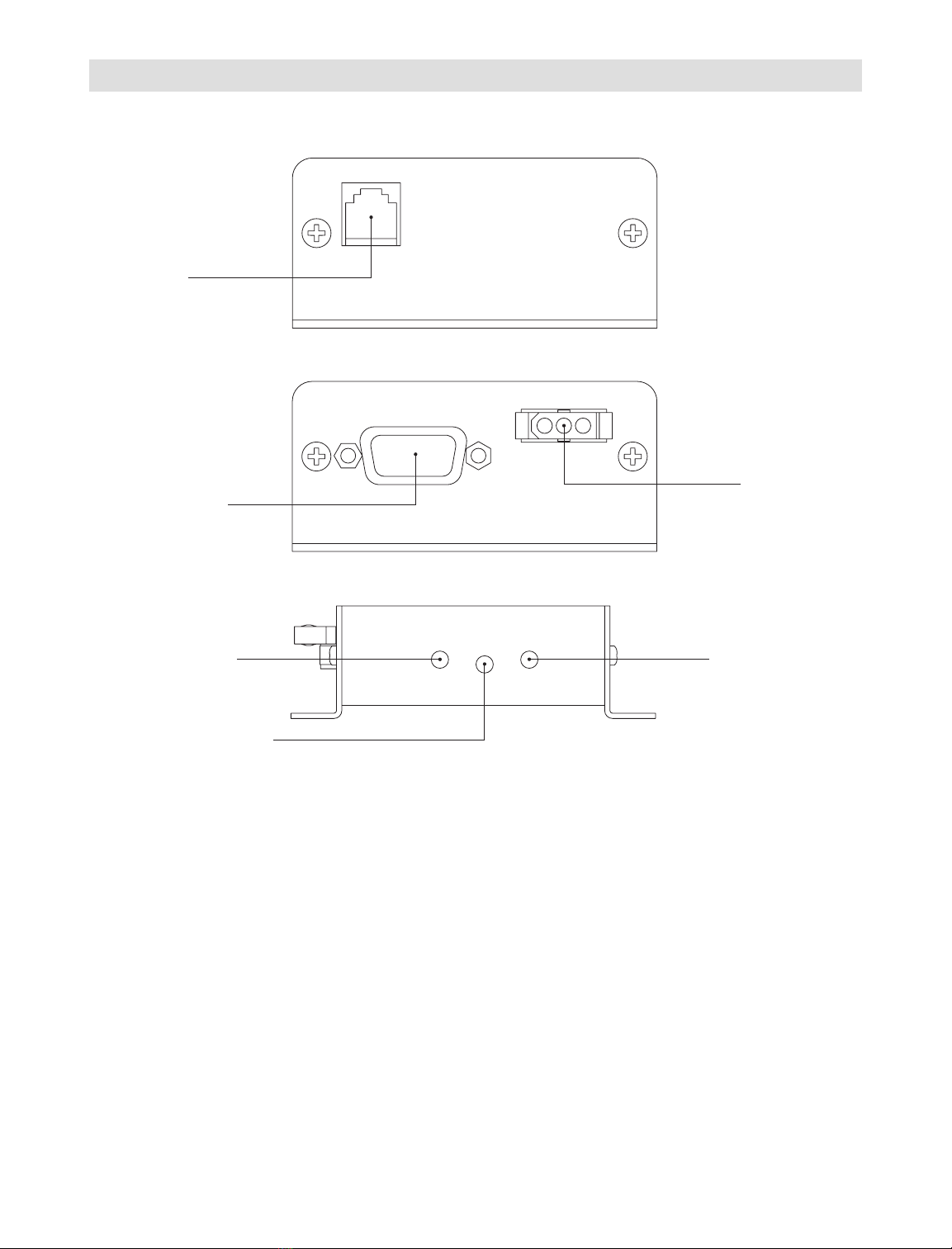
Modular Jack
The modular jack is the connection point for the CA cable leading from the 110 radio interface to the headset
module.
Radio Interface Jack
The 9-pin D-Sub connector is an attachment point for the included mobile radio (MR) interface cable.
Power Connector
The 3-pin connector is the attachment point for vehicle power. A power connection cable is provided.
Receive Audio Adjust
A rotational adjustment for setting the level of audio received to the intercom from a mobile radio.
Transmit Audio Gain Jump/Intercom Audio Gain Jump
Two dip switches are provided for incremental gain increases of both the radio transmit audio and the
intercom audio.
Transmit Audio Adjust
A rotational adjustment for setting the level of audio transmitted to an appropriate level for a mobile radio.
3
HEADSET
FEATURES
RADIO POWER
Rx T/G Tx
Modular Jack
Radio Interface Jack
Power Connector
Receive Audio Adjust Transmit Audio Adjust
Transmit Audio Gain Jump
Intercom Audio Gain Jump
Front View
Back View
Side View

4
INSTALLATION
Mounting the Radio Interface Unit
Mount the interface unit to a flat surface by drilling four mounting holes and installing the enclosed #6 fasteners.
Mounting hole and intercom dimensions are shown below. The unit is designed for vehicle interiors and indoor
use. Do not mount outdoors.
Assembly Shown without Jacks
Units: Inches [millimeters]
Scale: None

5
SYSTEM WIRING
Overview
Once the radio interface unit is installed, the system is ready for wiring. A headset module can be connected to
the headset port using a RJ-12 connector and CA cable as shown in the figure below. See “CA Cable Routing”
in the Installation section of this manual before wiring. The 2-way radio is added using the 9-pin D-Sub connector.

6
SYSTEM WIRING
Power Connections
Power is wired to the unit using the power supply cable with in-line fuse (included). When routing the power
cable, the in-line fuse should be easy to access.
Warning
Before making power connections, make sure the power source is turned off.
Important
Use a dedicated ground for the (-) power connection. Do not ground to the chassis.
Important
We recommend connecting the intercom power to the same power busses as the 2-way radio.
CA Cable Routing
There are several important considerations when routing the CA cable:
• Do not bundle extra cable. The cable should be cut to length at installation, especially when radios
are used.
• Route CA cables away from hot surfaces including vehicle exhaust systems.
• When routing CA cables through bulkheads or other sheet metal, use a grommet in the hole to
prevent damage to the cable.
Headset Module Installation
The following steps are recommended for installing a HM-10 or PP-20 headset module.
• Identify where the headset module is to be mounted and use the module as a template to locate the
two mounting holes as shown in figure above. Drill two holes for the #6 hardware provided.
• If you are installing a PP-20 module, route the CA cable as outlined in “CA Cable Routing” on this
page and install an RJ-12 connector at the intercom end of the cable as outlined in Appendix B “RJ-12
Connector Assembly.”Always make sure the printed side of the cable is facing the release tab
on the RJ-12 modular plug. If you are installing an HM-10 module, continue with the following steps.
HM-10 PP-20

7
SYSTEM WIRING
Headset Module Installation
• With the CA cable routed from the intercom, cut the cable to length at the headset module and slide
the bend relief grommet over the end of the CA cable as shown in the figure above.
• Attach a RJ-12 connector to the end of the cable –see Appendix B “RJ-12 Connector Assembly.”
Always make sure the printed side of the cable is facing the release tab on the RJ-12
modular plug.
• Open the headset module assembly by removing the screws labeled “A” in the figure on page 6.
Install the plug and bend relief grommet as shown in the figure above. If the CA cable is going
from the intercom to the headset module it MUST be inserted on the same side of the
HM-10 as the “Firecom” label. Replace the headset module cover and mount the assembly with
the hardware provided.
Foot Switch (optional)
A radio Push-to-Talk (PTT) foot switch option is available from Firecom when a headset radio PTT is not desired.
Depressing the foot switch will initiate radio transmissions of the headset plugged into the headset module
where the foot switch is installed.
The foot switch is installed to the headset module using a CA cable and RJ-12 connector. You will need to open
the headset module and remove the plastic tab which covers the access hole to the second modular jack.
Warning
The CA cable from the intercom should always be plugged into the headset module on the
“Firecom” label side.

8
SYSTEM WIRING
SETTINGS
Side View
Rx T/G Tx
Radio Connections
The mobile radio is connected to the intercom by using the radio port on the back of the unit. A MR interface
cable, with an un-terminated end, is supplied with the intercom. For independent wire descriptions, see
Appendix A.
Warning
To ensure proper operation, the connection to the radio should be performed by a qualified
radio technician.
Some radio specific interface cables are available for common model radios. For a list of interface cables, please
visit www.firecom.com and click on the Product Support section of our web site or contact our service department
at 800-527-0555.
When installing an MR cable, tighten the two screws on the plug of the cable.
Warning
If the screws are not properly tightened, the 9-pin plug may vibrate and cause problems with
transmission, reception, or other radio functionality.
Receive Audio Adjust Transmit Audio Adjust
Transmit Audio Gain Jump Intercom Audio Gain Jump
Several adjustments to the 110 Radio Interface are required. When connecting to the mobile radio, it will be
necessary to make both transmit and receive audio adjustments.
Warning
These adjustments must be performed by a qualified radio technician. Failure to perform
these adjustments may result in problems hearing or transmitting radio signals when using
the intercom system.
Table des matières
Autres manuels Firecom Système de conférence
Manuels Système de conférence populaires d'autres marques

Kramer
Kramer VIA GO Manuel utilisateur

AVT
AVT MAGIC AC1 Go Manuel utilisateur

ProSoft Technology
ProSoft Technology AN-X4-AB-DHRIO Manuel utilisateur

Sony
Sony PCS-I150 Manuel utilisateur

Middle Atlantic Products
Middle Atlantic Products VTC Series Manuel utilisateur

Prentke Romich Company
Prentke Romich Company Vanguard Plus Mode d’emploi