
Film-Tech TM-1 Mode d’emploi

Film-Tech
The information contained in this Adobe Acrobat pdf
file is provided at your own risk and good judgment.
These manuals are designed to facilitate the
exchange of information related to cinema
projection and film handling, with no warranties nor
obligations from the authors, for qualified field
service engineers.
If you are not a qualified technician, please make no
adjustments to anything you may read about in these
Adobe manual downloads.
www.film-tech.com

Installation & User Manual for
the Model TM-1 Sound Monitor
Odyssey Products, Inc.

Page 2 of 11
ATTENTION INSTALLER:
These TM-1 Monitors are equipped with a new switch latching circuit. It replaces the mechanical latch
mechanism built into older push buttons with an electronic equivalent.
The operation of the switches remains the same. The only difference will be that Left, Center, and Right
channels will be selected each time the TM-1 Monitor is powered up.
These units are designed with a sticker that reads “TM1-EL”
Page 3 of 11
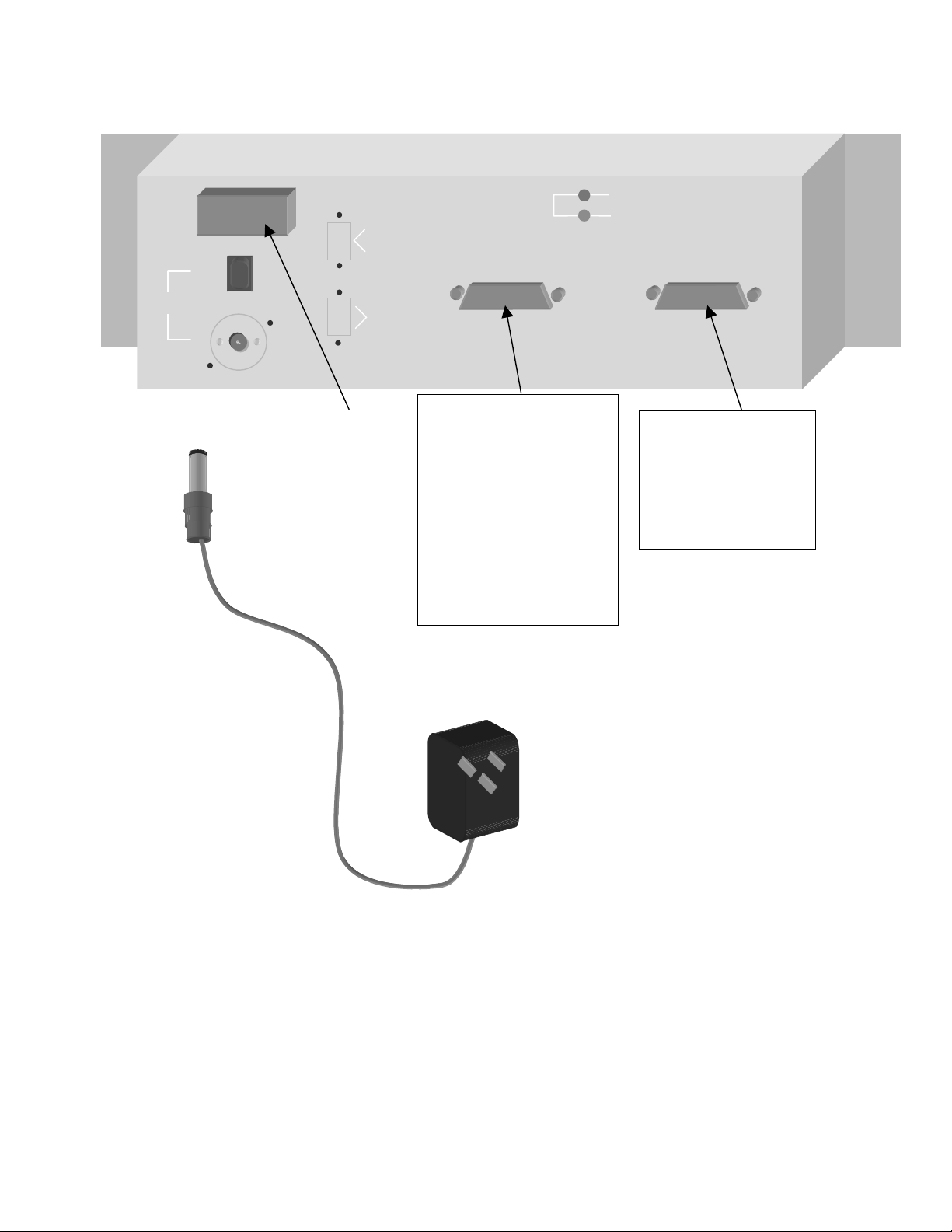
TM-1 Monitor Back View
F
F
FU
U
US
S
SE
E
E
A
m
p
lifier In
p
uts
Processor Inputs
Power
AMP GAIN
PRO GAIN
Fuse Holder
(
1.5 Am
p
Fuse
)
DB25 Processor Input
Connector (THX pin-out)
Accepts Odyssey Input 25
card or the TM1-BI card)
**Can be connected directly
to the output of Sony
Processors.
Also accepts the 25/5
parallel input card.
DB37 Amplifier Input
connector. Also
contains the Hearing
Impaired output.
Accepts the Odyssey
TMAMP37 Card
Data Port 1
Data Port 2

Page 4 of 11
TM-1 Sound Monitor
This product is intended for commercial use and for installation in an equipment cabinet designed for
commercial use. This installation manual is for use by qualified personnel only. Do not open the unit or
perform any servicing unless you are qualified to do so.
Connect the Power Con power connector to the monitor before plugging into the power receptacle. For
protection against electric shock, a three-pin, correctly wired and earthed power outlet must be used. Do
not us a ground-lifting adapter and never cut the ground pin on the three-prong plug.
Check that the correct fuse has been installed. To reduce the risk of fire, replace with fuse only with the
same type and rating.

Page 5 of 11
Input DB25 Board Configuration
(Compatible with THX and Sony Pin-outs)
Channel Terminals On Card DB25 Pin
Left Shield SH 1
Left Plus L+ 2
Left Minus L- 14
Center Shield SH 4
Center Plus C+ 5
Center Minus C- 17
Right Shield SH 7
Right Plus R+ 8
Right Minus R- 20
Left Surround Shield SH 9
Left Surround Plus LS+ 23
Left Surround Minus LS- 10
Right Surround Shield SH 22
Right Surround Plus RS+ 24
Right Surround Minus RS- 11
Subwoofer Shield SH 13
Subwoofer Plus SW+ 25
Subwoofer Minus SW- 12
Left Extra Shield SH 15
Left Extra Plus LE+ 16
Left Extra Minus LE- 3
Right Extra Shield SH 18
Right Extra Plus RE+ 19
Right Extra Minus RE- 6

Page 6 of 11
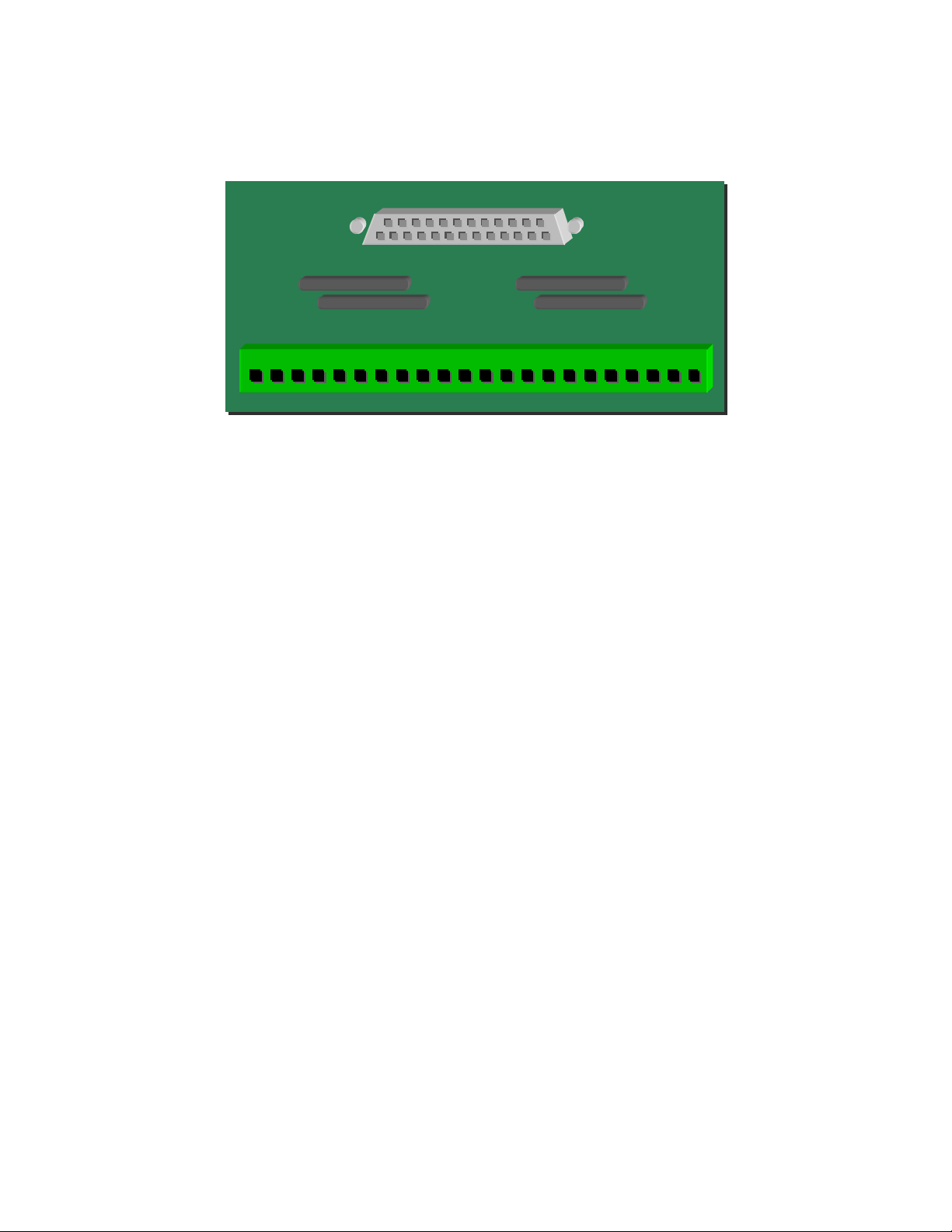
Pin-outs of the TMAMP37 Card
When used on the back of the Model TM-1 Monitor
Screw Terminals (on card) DB37 Pin
1LeftLow1
2LeftMid20
3LeftHigh2
4 Left Minus (-) 21, 3
6CenterLow22
7CenterMid4
8CenterHigh23
9 Center Minus (-) 5, 24
11 Right Low 6
12 Right Mid 25
13 Right High 7
14 Right Minus (-) 26, 8
16 Left Surround + 27
17 Left Surround - 9
18 Right Surround + 28
19 Right Surround - 10
20 Subwoofer 29
21 Subwoofer- 11
22 Earth 30
23 Earth 12
24 Left Extra Low 31
25 Left Extra Mid 13
26 Left Extra High 32
27 Left Extra Minus (-) 14, 33
29 Right Extra Low 15
30 Right Extra Mid 34
31 Right Extra High 16
32 Right Extra Minus(-) 35, 17
36 Hearing Impaired Sum + 37
37 Hearing Impaired Sun – (earth) 19
Page 7 of 11
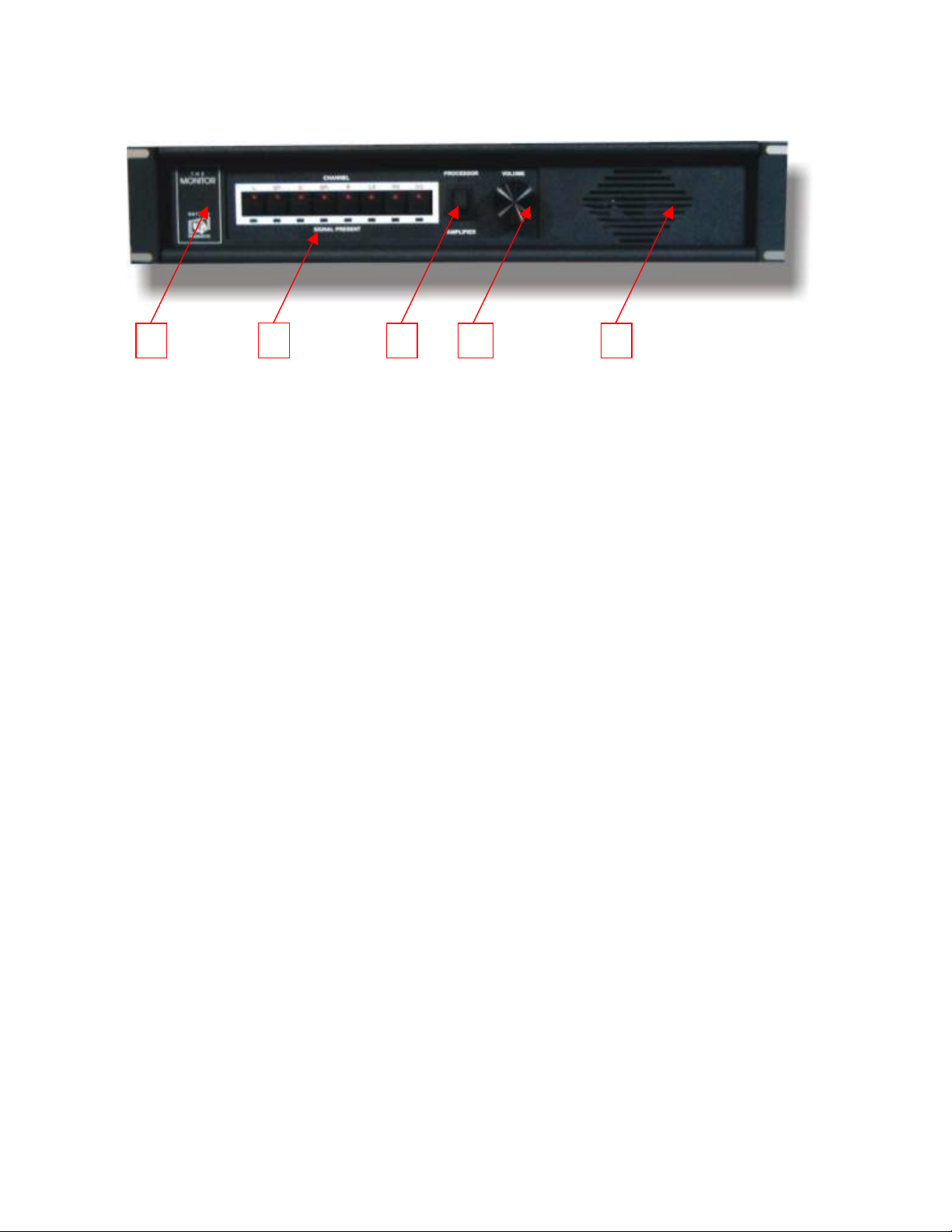
The Odyssey Products TM1-BI Bi-Amp Processor
Input Adapter Card for the Odyssey TM-1 Monitor
1. Plug the TM1-BI card into the DB25 Processor Input connector on the back of the Odyssey TM-1
Monitor.
2. Connect the bi-amped outputs from the processor to the screw-type connector on the TM1-BI card.
3. Connection is made to the 3.5-mm spacing connector on the TM1-BI board as follows.
L.H - Left Channel High Frequency L.L - Left Channel Low Frequency
L- - Left Channel Minus (Ground from CP500) C.H - Center Channel High Frequency
C.L - Center Channel Low Frequency C- - Center Channel Minus
R.H - Right Channel High Frequency R.L - Right Channel Low Frequency
R- - Right Channel Minus SH - Audio Shield (if necessary)
LS+ - Left Surround Plus LS- - Left Surround Minus
RS+ - Right Surround Minus RS- - Right Surround Minus
SW+ - Subwoofer Plus SW- - Subwoofer Minus
LE.H - Left Extra High Frequency LE.L - Left Extra Low Frequency
LE- - Left Extra Minus RE.H - Right Extra High Frequency
RE.L - Right Extra Low Frequency RE- - Right Extra Minus
PT# TM1-BI ODYSSEY PRODUCTS 770.825.0243 Fax: 770.825.0245
LH LL L- CH CL C- RH RL R- LS+ LS- RS+ RS- SW+ SW- SH LEH LEL LE- REH REL RE-
Page 8 of 11
User Manual for the TM-1 Sound Monitor
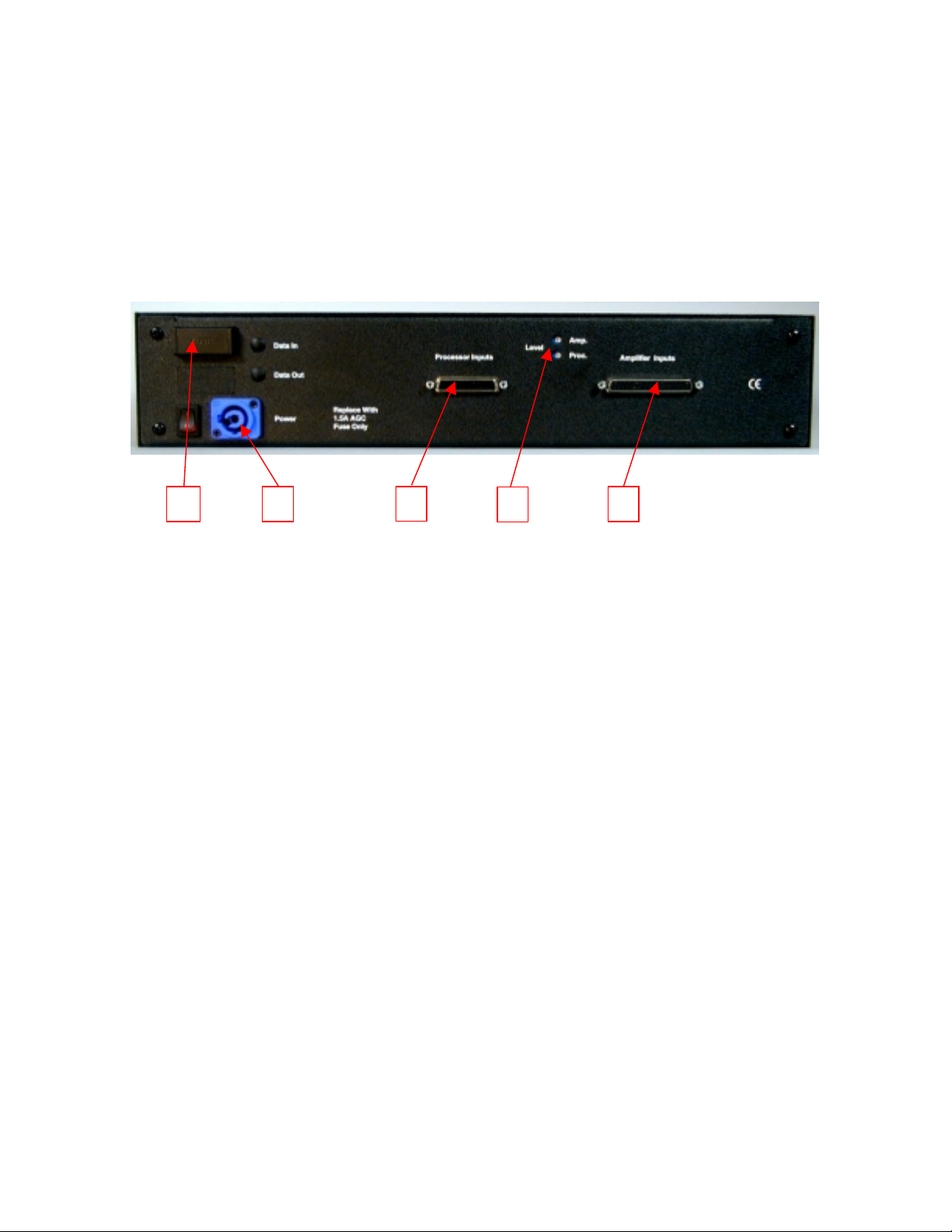
Front Panel Features
1. Channel Select Buttons – Select one or all of the monitored channels.
2. Signal Present Indicators – Indicates audio information on amplifier channels.
3. Processor/Amplifiers Selector Switch – Selects whether processor or amplifier inputs.
4. Volume Control – Controls the volume of the internal speaker.
5. Speaker
The TM-1 Monitor provides monitoring of the following channels:
•L, C, R (Left Channel, Center Channel, and Right Channel)
•SP1 and SP2 (Special 1 and Special 2) – can be used to monitor Left Center and Right Center
Channels, or Left EX and Right EX Surround Channels.
•LS, RS, SW (Left Surround, Right Surround, Subwoofer or Sub-Bass)
Select the channel to be monitored by pushing the appropriate Channel Select button on the TM-
1. Once the button is pushed that channel remains selected until the button is pushed again. A red LED
on the button will light when the button is activated. Pushing all eight Channel Select buttons will
cause all channels to be heard simultaneously on the monitor speaker.
The Signal Present LED’s under each switch indicate audio information on the amplifier
channel. These LED’s are independent of the Channel Select buttons, and the Processor/Amplifier
switch.
123 4 5
Page 9 of 11
The Processor/Amplifier switch selects between the signals coming from the Analog Processor,
and the signals coming from the output of the power amplifiers.
The Volume control varies the level of the internal speaker, but does not change an input levels,
or the Hearing-Impaired output level.
For bi-amplified and tri-amplified sound systems: When monitoring a stage channel in amplifier
mode, what is monitored is a sum of the low, mid and high frequencies.
Back Panel Features
1. Fuse Holder – accepts fuses 1 ¼” X ¼” AGC fuses
2. Powercon Power Connector – Connector for the external plug-in transformer.
3. Processor Inputs Connector – DB25 female connector, accepts Odyssey Breakout Boards.
4. Input Level Adjustment Potentiometers – 1 each for processor level and amplifier level.
5. Amplifier Inputs Connector – DB37 female connector, accepts Odyssey Output 37 Card.
The external power pack is terminated with a blue Powercon connector. It is unplugged from the
TM-1 by pulling back on the metal tab and twisting the connector counter-clockwise slightly. Pull the
connector straight out of the socket. The powercon connector is plugged in by inserting it straight into
the socket, then twisting clockwise slightly until the metal tab slicks forward and locks.
To remove the fuse, pull the fuse holder cover down until it unlocks. Slide the cover out like a
drawer. Remove the fuse from the clip. To close the fuse holder, push the cover in and then up slightly
until is clicks into place. The correct fuse is a 1 ¼” X ¼” AGC Normal Blow Fuse (1.5 Amps)
The processor Inputs connector is a DB25 female. It has the same pin configuration as a THX
monitor. It will accept the following Odyssey breakout cards:
•Model Input 25 – wires from a passive processor are terminated to the on-board terminal strip.
5
3
21 4
Table des matières
Manuels Intervenants populaires d'autres marques


Bowers & Wilkins
Bowers & Wilkins 4 Manuel utilisateur

Sonance
Sonance SONOS OUTDOOR Series Manuel utilisateur

Electro-Voice
Electro-Voice EVID FM4.2 Manuel utilisateur

Pioneer
Pioneer XW-HTD630 Manuel utilisateur

Onn
Onn BWA16AA002 Manuel utilisateur

HP
HP GL313AA - USB Speakers PC Multimedia Manuel utilisateur