Fermax DUOX Manuel utilisateur

Extra Loft Duox Telephone
PROGRAMMING & INSTALLER’S MANUAL

Page 2
Code 97717Ic V03_18
CONGRATULATIONS ON PURCHASING THIS QUALITY PRODUCT!
Fermaxelectronicsdevelopsandmanufacturesrenownsystemsthatmeetthehighestdesign
and technology standards.
Your FERMAX telephone will allow you to communicate with the entry panel and open the
front door if you wish. We hope you enjoy its range of functions.
www.fermax.com.
Technical publication of an informative nature published by FERMAX ELECTRONICAS.A.U.
As part of its constant improvement policy, FERMAX ELECTRONICA reserves the right to
modify the content of this document and the characteristics of the products referred to in it at
any time and without prior notice.
Any modification will be reflected in subsequent editions of this document.
This product is protected with the following patents and utility models:
PATENTS: US 9215410, US 9762852, BE1023440, AU2014203706.
UTILITY MODELS: ES1187384U, ES1141495U, FR3038192, DE202016000632U1,
CN205987229(U).

Page 3
INDEX
EXTRA LOFT DUOX TELEPHONE
Installation 4
Connections 4
Diagrams 4
Technical Characteristics 6
Available Functions 7
Capacity 7
Telephone Programming 7
- a) From the entry panel 8
- b) From the doorbell 9
Telephone settings 10
- Ringtone Selection 10
* From the panel 10
* From Reception 10
- Call Volume Controller 11
- Auxiliary function F1 11
- Auxiliary function F2 12
- Resetting Parameters 12
Operation 13
- Buttons 13
* Lock-Release Button/Call to Guard 13
* F1-F2 Additional Functions Button 13
- Operation 13
* F1 and F2 (additional functions) 13
* Answering a call. 14
·Audio activation 14
·Hang-Up 14
·Auto-Start 15
* Opening the door 15
·In conversation 15
·Upon receiving the call 15
* Call to the guard unit 16
* Muting ringtone (do not disturb function) 16

Page 4
CONNECTIONS
B, B : Bus DUOX: Power, data and audio .
T, -: Connection House entrance „door bell.“ (P1).
A, -: Call extension connection or light and bell activator.
F1: Button for additional functions. It provides a negative upon being activated. You will find
more details in „LOFT Telephone Operation - Auxiliary function F1“.
Connection
DIAGRAMS
TELEPHONE Installation
3 4 5
12
Wiring: 2 non-polarised wires.
B
B
B
B
SW5
A
B B T F1
SW5
A
B B T F1
SW5
A
B B T F1
P1 (T, -):You can place an external button to make a call to the „Door bell“ (this bell would
replace the ding-dong of the home entrance).
Notes:
- The doorbell can not be changed and is different from those selected for entry panels or
guard unit.
- The do not disturb function silences this tone.
-Youcan programthe phone´saddress withthisbutton. Seechapter: Programmingthe phones
address via the doorbell.

Page 5
B
B
B
B
SW5
A
B B T F1
P1 Call extension
-A+A Red
F1 2A
2A.
Max. 2A
+A -A
110-240Vac
50-60Hz
REF. 2438
ADS IGHT COMMANDER
ACTIVADOR DE UCES ADS
110-240Vac
110-240Vac
SW5
A
B B T F1
B
B
A, -: The telephone has these terminals for connecting a call extension ref. 2040 or a light
and doorbell activator. 2438 it is activated when a call is received from the entry
panel, reception and the home´s door.
Note: If the call disconnection (do not disturb mode), is activated, the terminal will continue
working. Through this, the same tone sounds as that configured for the call answering tone
from the panel, guard unit or doorbell.

Page 6
TECHNICAL FEATURES
Dynamic resist. 50
Call Ring tone Selection
Microphone: Electret
Operating Temperature
Power supply (non-polarised)
Consumption (±5%)
in standby + led
maximum
Loudspeaker
Maximum number of terminals per residence
Telephone address: 6 decimal digits
Number of conversation channels: 2 per BUS. (Only audio installations)
-5º, +40ºC
1.75“ 16
3
000001...999999
18 Vdc
< 15 mA
190 mA.

Page 7
PROGRAMMING THE LOFT DUOX EXTRATELEPHONE
AVAILABLE FUNCTIONS
CAPACITIES
·Number of terminals per residence: maximum 3. Properly suit consumption to the power
source.
· Number of terminal addresses per sub-block: 99.
· Number of terminal addresses per block: 9999.
· Number of blocks: 99.
· Address for each telephone: 6 decimal digits: 000000 .. 999999. The address 000000 is the
default address and the telephone does not work.
· Number of conversation channels: 2 per BUS. (If the installation only has audio amplifiers).
· Wiring: 2 non-polarised wires, depending on the wire, distances and terminal charges are
stipulated.
· Number of different optional ringtones: 5.
· Call Volume Regulation.
· Input and output audio volume regulation.
· Maximum conversation time. 90 seconds
· Maximum time to pick up on receiving the call: 30 seconds
· Maximum time to programme the telephone: 2 minutes.
There are two options to program the phone:
a) From the Panel.
b) From the Doorbell.
The functions available on the DUOX Extra telephone are summarised in the following list:
·Call Reception
·Open door
·Call to reception
·Ringtone selection
·Programming from the panel or from the doorbell
·Audio connection upon picking up
·Volume regulation
·Auxiliary F1
·Auxiliary F2 function
·Doorbell
·Light and Doorbell Activation

Page 8
Programming Button
a) Programming a telephone address from the entry panel (main).
LED
< 2,5 min
5
A
5
A
2
1
1. With the telephone connected and hung-up, press the programming button (you will hear
a beep). Upon releasing it, you will hear the entrance into programming.
*Ifthe telephonereceiver ispicked-up, communicationis establishedwith theentry paneland youcan
indicate in which room the operator is. You can also open the door. If the telephone is picked-up,
hang-up before performing point 2 of programming.
2. Press the call-to-residence button. A programming confirmation is produced.
* If the new programmed address coincides with the old one, no programming confirmation tone
sounds, but the ringtone from the panel is heard.
Notes:
- The telephone will not function until it has been programmed.
-You can check that the telephone does not have a programmed address because the led blinks.
-You can also check that the telephone does not have a programmed address by picking up the
receiver and hanging it up again, upon hanging it up you hear a beep.
- Programming must always be done via the panel activated as MASTER. The panel’s default is to be
programmed as SLAVE. Remember that it must be programmed as MASTER before programming
the telephone.An entry panel is configured as a MASTER via the SW1 amplifier button. If the SW1
button is pressed 3 times quickly, it is activated as a MASTER panel and a confirmation tone sounds
(beep-beep).Youcanalsoconfigureit viaa codeon thekeypad.For moreinformation seethe DUOX
Panel Settings at www.fermax.com.
- The panel deactivates itself from master mode following the same activation procedure: 3 quick
presses of the SW1 button. A deactivation tone sounds (beep-bop). You can also configure it via a
code on the keypad. For more information see the DUOX Panel Settings at www.fermax.com.
- If there is a guard unit, it must be in night mode.

Page 9
b) Programming the phones address via the doorbell
Note: Only if the phone has not been previously programmed, that is, if no address has been saved.
Telephone not yet programmed, red LED blinks.
With the telephone connected and hung-up: 1. Press the door bell or short terminals “T”
and “-”.
Upon performing this operation you hear a
doorbell.
Note: Optional: pick up the telephone to establish
communication with the entry panel and you can
inform the operator which residence s/he´s in.
B
SW5
BTA F1
5"
¸
B
SW5
BTA F1
2. After 5 seconds short or maintaining the
door bell pressed, the entering program-
ming tone sounds.
After this moment you can stop shorting or
pressing the door bell. While in this mode:
3. Press the button/residential call code from
the panel. A confirmation tone will sound
on the telephone. The telephone is pro-
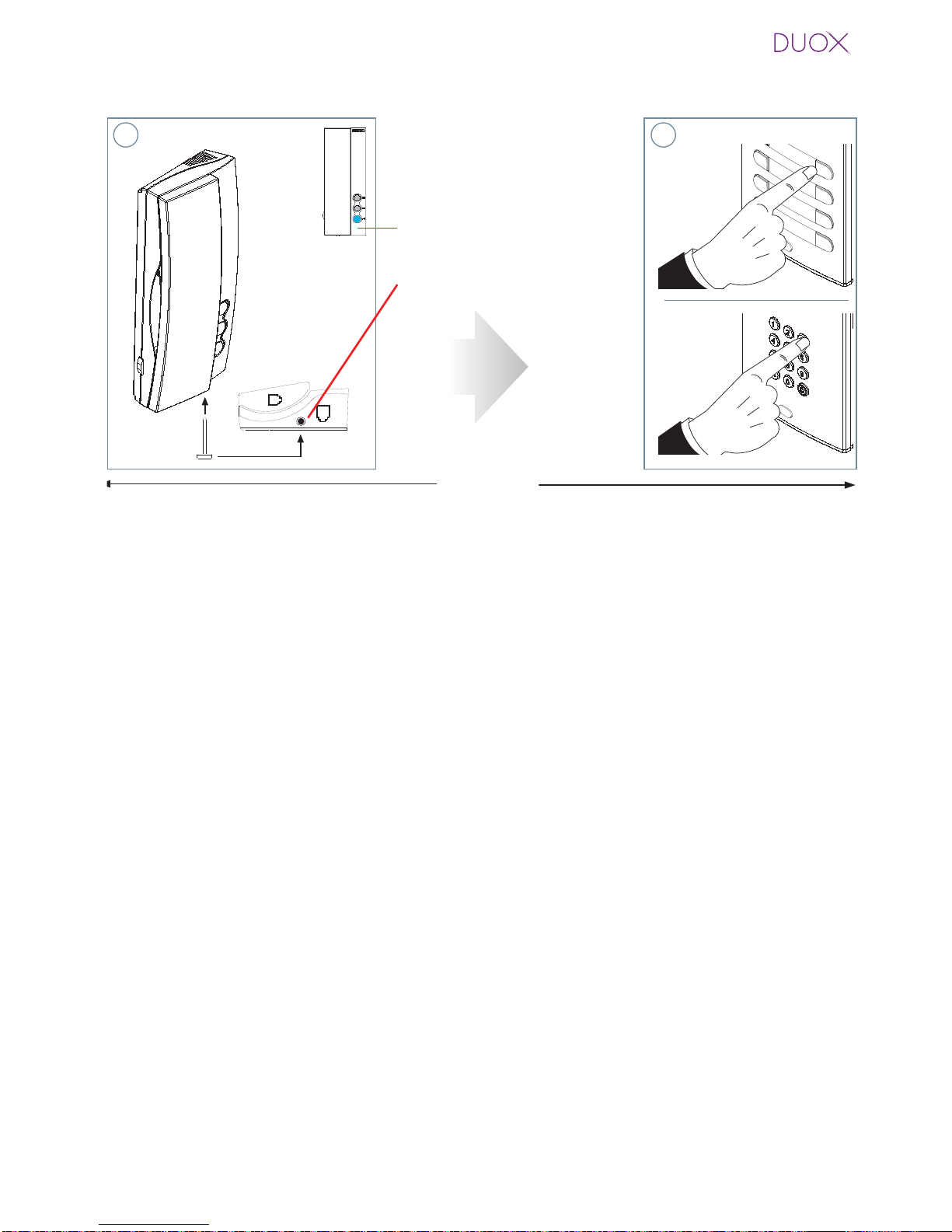
grammed, (red led off)
Note: - The time from which you hear the confirma-
tion beep for entering in telephone programming,
and the call is made from the panel to program
the phone´s address, must be less than 2 and half
minutes.
Doorbell
Doorbell

Page 10
LOFT DUOX EXTRATELEPHONE SETTINGS
Ringtone Selection.
The telephone allows you to select different ringtones for calls from the entry panels and
calls made from reception.
Accessing „Ringtone Selection“ Mode
We can select from 5 ringtones.
1. From panel: With the telephone in standby and hung-up, press the F2 button (you will
heara beep), if maintained pressedfor5secondsyou will hear the currentmelody.Every
time you perform a new short pulsation in F2, you pass on to the next melody. Upon
arriving at the 5th melody, it returns to the 1st one.
2. From reception (guard unit): With the telephone in the ringtone selection menu from
the panel, if you maintain the F2 button pressed for 5 seconds you will hear the current
ringtone from the reception. Every time you perform a new short press of F2, you pass
on to the next ringtone. Upon arriving at the 5th ringtone, it returns to the 1st one.
- You can also exit the reception ringtone menu after inactivity for
10 seconds (storing the last ringtone played). The exit is confirmed with a single
beep.
BEEP
F2 F2
5" ¸
F2
F2
F2
5" ¸
F2
F2
BEEP
10"
¸
Exit Exit
10" ¸
- You can also exit the reception
ringtone menu from the panel, after
inactivity for 10 seconds (storing
the last ringtone played). The exit is
confirmed with a single beep.
- If you maintain
the F2 button
pressed for 5
seconds you
will exit the re-
ception ringtone
menu, returning
to standby and
storing the se-
lected ringtone.
The exit is confirmed with a double
beep.
Notes:
F2
5"
¸
BEEP BEEP
Autres manuels pour DUOX
13
Table des matières
Autres manuels Fermax Téléphone

Fermax
Fermax MDS DIRECT GUARD UNIT Manuel utilisateur

Fermax
Fermax DUOX PLUS Manuel utilisateur

Fermax
Fermax DUOX PLUS VEO MONITOR Manuel utilisateur

Fermax
Fermax iloft Manuel utilisateur

Fermax
Fermax iLoft VDS Dominium Manuel utilisateur

Fermax
Fermax iLOFT Lynx Manuel utilisateur

Fermax
Fermax LOFT UNIVERSAL Manuel utilisateur

Fermax
Fermax DUOX MEMOPHONE CITYLINE Manuel utilisateur

Fermax
Fermax iL OFT Manuel utilisateur

Fermax
Fermax DUOX plus iLoft Manuel utilisateur


