
FARM SCAN 7000 Series Manuel


TABLE OF CONTENTS
Introduction .......................................................................................................................................................... 2
Technical Specifications ........................................................................................................................................ 3
7500 Seed Rate Controller .................................................................................................................................... 4
Start Guide ............................................................................................................................................................ 5
7500 General Overview ........................................................................................................................................ 6
Device Menu Overview ......................................................................................................................................... 9
Machine Setup .................................................................................................................................................... 15
Tank Setup ........................................................................................................................................................... 33
Fine Tuning Calibration Factors .......................................................................................................................... 53
Jobs (2) ................................................................................................................................................................ 54
Alarms (3) ............................................................................................................................................................ 60
Maintenance > System (4-1) ............................................................................................................................... 65
Maintenance > Users (4-2) ................................................................................................................................. 71
Maintenance > About (4-3) ................................................................................................................................. 74
Maintenance > Test (4-4) .................................................................................................................................... 75
Screen & Layout Setup ........................................................................................................................................ 76
Display ................................................................................................................................................................. 80
Front Screen Control ........................................................................................................................................... 83
7500 Menu Layout (Tank) ................................................................................................................................... 84
7500 Menu Layout (Machine) ............................................................................................................................ 85
7500 Menu Layout (Display) ............................................................................................................................... 86

March 2020 www.farmscan.com.au AM-7500-5
2
Introduction
INTRODUCTION
ABOUT THE 7000
The 7000 series is a versatile monitoring and control device that is capable of interfacing with many
agricultural systems.
A 4.3” colour touch screen provides a simple but powerful interface for operators as well as providing the
ability to monitor multiple inputs at once.
The display is fully configurable to show any combination of monitored values in both metric and imperial
units. It is also configurable to let the operator control the system outputs by selecting onscreen buttons.
The 7000 series devices have connections for a monitoring camera as well as many different input and
output connections depending on the system configuration. Inputs and outputs to the 7000 series devices
can all be set with alarms to notify the operator if anything goes beyond set low/ high/ proportional
thresholds.
The 7000 terminals can be used in many agricultural applications including but not limited to:
• Spray Controller Model 74V1
• Variable Rate Controller Model 7500
• Spreader Rate Controller Model 7300
ABOUT THIS GUIDE
Read this operating manual before commissioning the 7000 terminals. Keep this operating manual where it
is accessible to all users at any time. Every person who is assigned to commission or operate the 7000 must
have read and understood the operating manual and the safety instructions in particular!
This operating manual contains instructions that must be complied with for your personal safety and in
order to avoid damage to property.
Failure to follow these safety instructions could result in fire, electric shock, or other personal injury or
damage to the 7000 terminal or other property.

March 2020 www.farmscan.com.au AM-7500-5
3
Technical Specifications
TECHNICAL SPECIFICATIONS
Housing
RAM Style mount, orientation landscape
Approx. W 142 x H 98 x D 49 mm, excl. connectors
and cables Weight < 1 kg
Display
4.3”, 16:9, TFT, trans missive, 480 x 272 pixels
400 cd/m² max brightness, 400:1 max contrast
H ±60°, V ±55° max viewing angle, resistive touch
screen
Processor & Memory
32-bit, 532 MHz, I.MX35
256 MB DDR2, 1 GB Mass Storage, 32 kB serial
EEPROM
Interfaces
• 2 CANbus ISO 11898,
• CAN specification 2.0 B active
• 1 RS-232 (RxD, TxD, GND only),
EIA-level
• Optional 4 analog or digital inputs
(selectable via software), 3 digital outputs
• 1 USB 2.0 full speed on main connector
• Optional Ethernet 10/100 Mbit.
Video
Optional 1 Composite CCITT video input
Connectors
• Main: AMP Seal, 26 pin
• Analog/Digital I/O: On main
connector
• USB: On main connector
• Ethernet: 4-pole round connector,
• M12, D-coded
• Video: 5-pole round connector,
• M12, B-coded
Power Supply
Max tolerable 8 – 36V DC
Environmental Conditions
• Temperatures
• Operating –30° to +75°C
• Storage –40° to +80°C
• Protection IP 67 and IP 65
• True outdoor.
• Vibration 5g @ 57 – 2000 Hz, 150 h per axis
• Shock 30g, 11ms, 10 times per axis
Operating System
Embedded Linux®
Copyright© 2010, Wachendorff Elektronik GmbH & Co. KG and Wachendorff Electronics USA, Inc. All rights reserved.
All details are without guarantee. Errors and omissions excepted.
CANopen® is a registered community trade mark of CAN in Automation e.V.
Linux® is a registered trademark of Linus Torvalds in the United States and other countries.

March 2020 www.farmscan.com.au AM-7500-5
4
7500 Seed Rate Controller
7500 SEED RATE CONTROLLER
OVERVIEW
The Farmscan Seed Rate controller 7500 was developed to provide advanced seed rate control capabilities
whilst maintaining an extremely simple Tile & Tab user interface.
The controller has a variety of selectable display and control options that can be configured to suit a
specific application or user preference. The controller options and calibration setup can also be locked to
limit operator access.
The optional switch box controller incorporates 6 Bin/Tank control switches, master on/ off control and
up/ down rate control.
The 7500 can control hydraulic, electric drive or linear actuators.
A large colour LCD (Liquid Crystal Display) touch screen provides all the information required to operate
the device in one view including direct readouts for rate, speed, tank level, trip area, trip volume, time and
pressure (optional when used with liquid). Special icons indicate active control options.
Seed records are maintained for virtually an unlimited number of paddocks (memory dependent) in the
Jobs screen and may be exported in CSV format via USB to a Windows or Apple-based record keeping
program.
The controller may be operated in automatic, manual or GPS (Slave/ Task) mode - variable rate map (VRC
control via Shape File). In Automatic and Slave mode, the control drive responds automatically to speed to
maintain the target rate. Manual increment and decrement of the target rate is also possible.
In Slave/ Task mode, the controller will accept rate commands from a separate guidance/ task computer
linked to GPS and simultaneously report back on rate applied for the purpose of rate mapping and
verification of seeded area. (NB. Some of these features are still under development)
In the event of an error, an audible warning alerts the operator by displaying a red tile (assuming that this
function has been selected on the display) text on a tab which can then be selected to explain the fault.
The 7500 terminal is connected via CANbus to provide drive control and sensor feedback
A standard wheel sensor can be supplied for ground speed pickup or a radar speed sensor may be
connected using the inbuilt radar interface. Alternatively, a GPS can be used to provide ground speed.

March 2020 www.farmscan.com.au AM-7500-5
5
Start Guide
START GUIDE
The 7500 will be set up with basic screens and layouts provided by factory defaults.
NB: Factory defaults may differ if the 7500 is setup OEM specific.
For optimal setup of the 7500, the steps below should be performed in the following order:
• Set up CANbus/UniPOD (If Auto Detect does not work) Page 31
• Set up your machine Page 15
• Set up your implement/section width Page 25
• Set up your speed (wheel/GPS) input Page 27
• Set up your tank Page 33
• Set up your metering drives/valve Page 37
• Set up your jobs Page 54
• Set up your alarms Page 60
• Set up/change your screen layout Page 76
SAVE YOUR SETTINGS & BACKUP TO DEVICE & USB – PAGE 69

March 2020 www.farmscan.com.au AM-7500-5
6
7500 General Overview
7500 GENERAL OVERVIEW
The following pages are intended to provide a brief overview only.
Setup instructions can be found by following the page number directions.
LED STATUS LIGHTS - OVERVIEW
The 7000 has two (2) status indicators on the right-hand side of the screen.
These indicators can be useful for troubleshooting and are described below:
Colour
Status
Explanation
Red
Flashing
Software crash (screen freezes)
Red
Solid
Alarm is on and has not been reset
White/Light Blue
Solid
No connection to UniPOD
Blue
Solid
Seeder in manual RUN mode
(Control valve/drive or rate is being
calibrated/tested/manually controlled)
Green
Solid
Seeder in normal RUN mode
(Control valve/drive or rate is being
calibrated/tested/manually controlled)
Green
Flashing
Seeder in HOLD mode

March 2020 www.farmscan.com.au AM-7500-5
7
7500 General Overview
FRONT SCREEN - OVERVIEW
1. Settings Menu
a. Select the Settings tab (represented by the Settings icon which looks like a gearwheel) once
to display the Settings menu.
b. Select an option by pressing one of the icons in the Settings menu.
2. Display Tiles
a. A display tile can show a value, unit and title for any given recorded data
(speed, pressure, tank levels, Bin Rate etc.).
b. Individual display tiles can be connected to create larger tiles (for instance, similar to the
tank control widget).
c. Display tiles can be edited by holding down a finger for 1 second on the tile.
3. Front Screen Tabs
a. Different tabs display different sets of display tiles to the left of the screen. (In the example
above 4 customisable tabs and 6 tiles are displayed.
NB: the bottom right tile is used to display the “Tank Control” widget)
b. Selecting each tab will change the Front Screen display to show the available tiles for that
tab.
2
3
1

March 2020 www.farmscan.com.au AM-7500-5
8
7500 General Overview
SETTINGS MENU - OVERVIEW
The Settings menu allows for the setup of the 7500.
Select the Settings tab (5th tab) from the Front Screen (it looks like a cog).
1. Setup Menu
• Select the Setup Menu icon to open the Setup & Settings menu.
2. Jobs Menu
• Select the Jobs Menu icon to open the Jobs menu.
3. Alarms Menu
• Select the Alarms Menu icon to open the Alarms menu.
4. Maintenance Menu
• Select the Maintenance Menu icon to open the Maintenance menu.
1
2
3
4
March 2020 www.farmscan.com.au AM-7500-5
9
Device Menu Overview
DEVICE MENU OVERVIEW
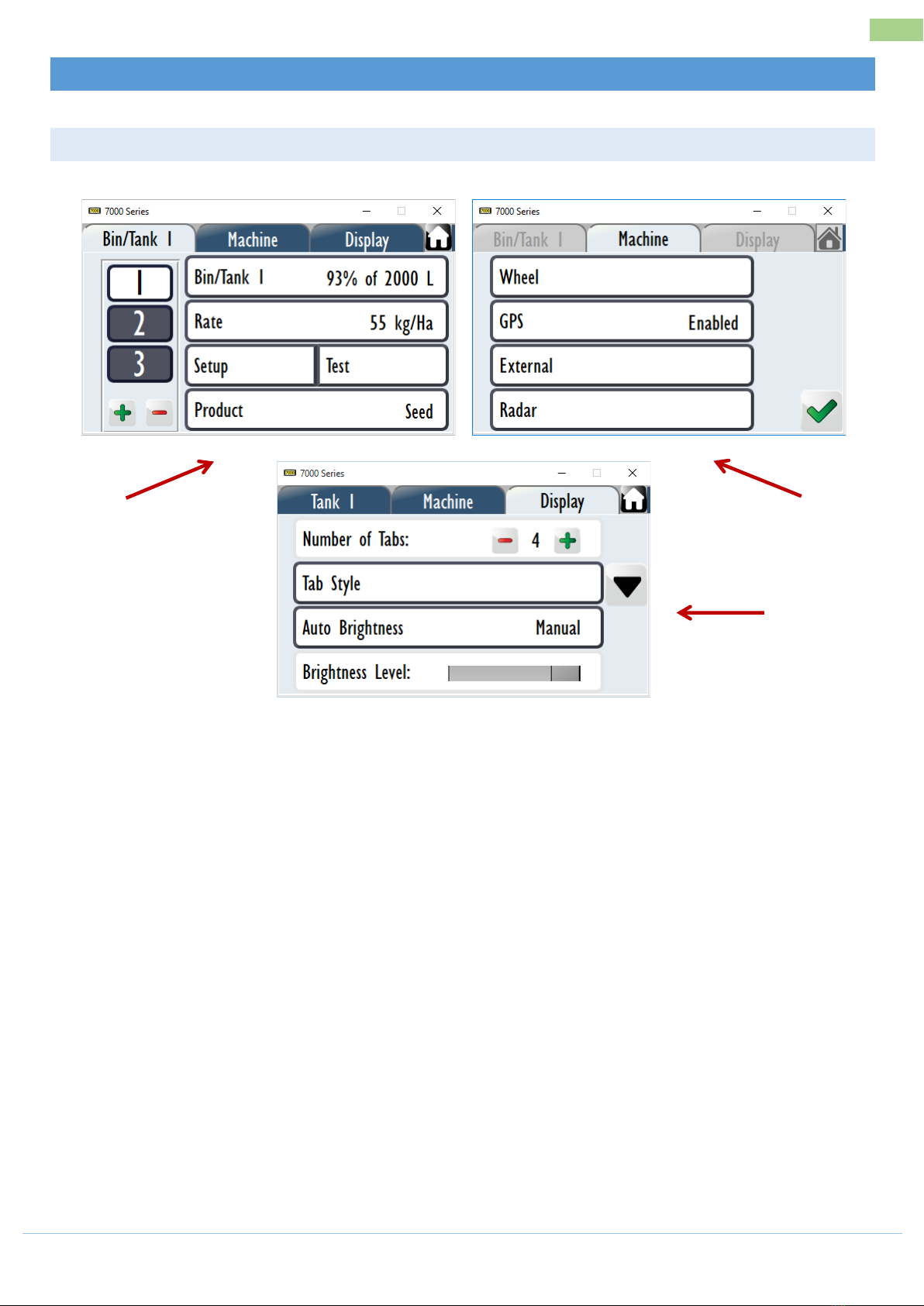
SETUP (1) – OVERVIEW
1. Bin/Tank Tab
a. This tab contains settings for the Bin/Tank, any products associated with the tank and
enables product calibration. This also defines the number of tanks the 7500 is controlling.
2. Machine Tab
a. This tab contains settings for implement width, drive control type, speed input, pressure,
fan, depth, wireless (under development), Mapping, Blockage (under development) UniPOD
setup and CANbus status.
3. Display Tab
a. This tab contains the setting for the number of Front Screen tabs, how each Front Screen
tab is set up, the brightness of the display, units of measure & enable/disable day/night
mode.
3
1
2
Ce manuel convient aux modèles suivants
3
Table des matières
Autres manuels FARM SCAN Contrôleurs


