
Fametech BT-650-M Manuel utilisateur

User Manual
BT-650 Series
Wireless Bluetooth Barcode Scanner
BT-650-M/BT-650-N/BT-650-C
Ver. 1.0
© Copyright Fametech Inc. (TYSSO), 2012


-1-
Contents
Contents......................................................................................... 1
Introduction ................................................................................... 3
Features...............................................................................................3
Specifications.......................................................................................4
Package ...............................................................................................5
Before Use..................................................................................... 6
Safety Precaution.................................................................................6
Product Description..............................................................................7
Getting Started .............................................................................. 9
Charging the Battery............................................................................9
Establishing the Wireless Connection................................................11
Operating Your Scanner ............................................................. 12
Perform Scan.....................................................................................12
Operation Mode .................................................................................13
Configuring Your Scanner.......................................................... 15
Utility installation ................................................................................16
Scanner Configuration .......................................................................20
File.............................................................................................21
Setting .......................................................................................22
Transmit.....................................................................................32
Appendix...................................................................................... 34
Scan Zone..........................................................................................34
Status Indicator ..................................................................................35

-2-

-3-
Introduction
The BT-650 series handheld barcode scanner is designate for long distance
data scan applications. Incorporating Bluetooth wireless technology, BT-650
scanner offers the users up to 50 meters of transmission range from the
receiver (recharge/communication cradle). Even the radio link breaks, the
Bluetooth radio link can still attempt to connect with the receiver.
With the highly sensitive scan module, BT-650 can capture barcodes easily
even the barcodes are in poor condition. This feature ensures BT-650
capable of fast-capture and process demands.
By adapting exceptional power saving design, the BT-650 wireless barcode
scanner can operate much longer than ordinary scanners and ensure the
high grade reliability. Furthermore, the user-friendly operation and large
memory capacity characteristics enable BT-650 be a cost-effective yet
reliable data-scan solution.
Features
Light-weight and easy to operate
Scan Speed: 100 scans/sec
Integrated recharge/communication cradle with
Bluetooth class 1 receiver
Wireless Transmission Range: up to 50 meters (open space)
High barcode readability
Multiple operating modes selectable
(On-line/Batch/Recapture)
Various barcode standards support
Large memory capacity (up to 15,000 scans/EAN 13 barcode)
USB HID Interface

-4-
Specifications
Model No.
BT-650-M / BT-650-N
BT-650-C
General
Scan Rate
100 scans/sec
100 scans/sec
Sensor Type
Laser diode
CCD
Wavelength
650nm±20nm
660nm ± 10nm
Maximum Pitch Angle
±65 degrees
Minimum Skew Angle
±50 degrees
Minimum Barcode Width
0.1 mm (4 mil)
Depth of Field
3~55 cm
3~46 cm
Contrast Ratio
30%
45%
Scan Patten
Single scan line
Resolution
0.1mm (4 mil)
System Interface
USB Keyboard Wedge
Indicator
Buzzer and LED illumination
Buffer Capacity
192KB or approx. 15,000 scans (EAN 13 )
RF Frequency Band
2.4~2.4835GHZ, unlicensed ISM band
Transmission Range*
Max. 50m, possibly over 70m in open spaces
Readable Bar Code
Symbologies
RSS Codes, EAN, UPC, I 2 of 5, Codabar,
Code 39, Code 128, China Postage, Code 93, Code 11,
MSI-Plessy, Code 4
Configuration Utility
Windows-base, 2000/XP/Vista/Windows 7
Electrical
Power Input
5VDC ±5% (Scanner) / 5VDC ±5% (Cradle)
Power Consumption
(Operation Mode)
120 mA (BT-650-M,
Bluetooth On)
70 mA (BT-650-N,
Bluetooth On)
85 mA (Bluetooth On)
110 mA(BT-650-M,
Bluetooth Off)
60 mA (BT-650-N,
Bluetooth Off)
75 mA (Bluetooth Off)
Power Consumption
(Sleep Mode)
10 mA (Bluetooth On)
10 mA (Bluetooth On)
0.7 mA (Bluetooth Off)
0.7 mA (Bluetooth Off)
Battery
Battery Type
Rechargeable Lithium-ion Battery
Battery Capacity
2200mAh
Recharge Time
6-8 Hours (approx.)
Recharge Connection
Battery charge with
Recharge/Communication Cradle

-5-
Others
Operating Time
> 8 Hour (approx.)
(approx. 40,000 scans/per charge)
Material
ABS
Color (Upper Cap/Handgrip)
White/Grey, Black/Black
Compliance
FCC class A
Weight
Scanner: 170g / Cradle: 190g
Dimension
167.5 x 72 x 78 mm (Scanner Unit)
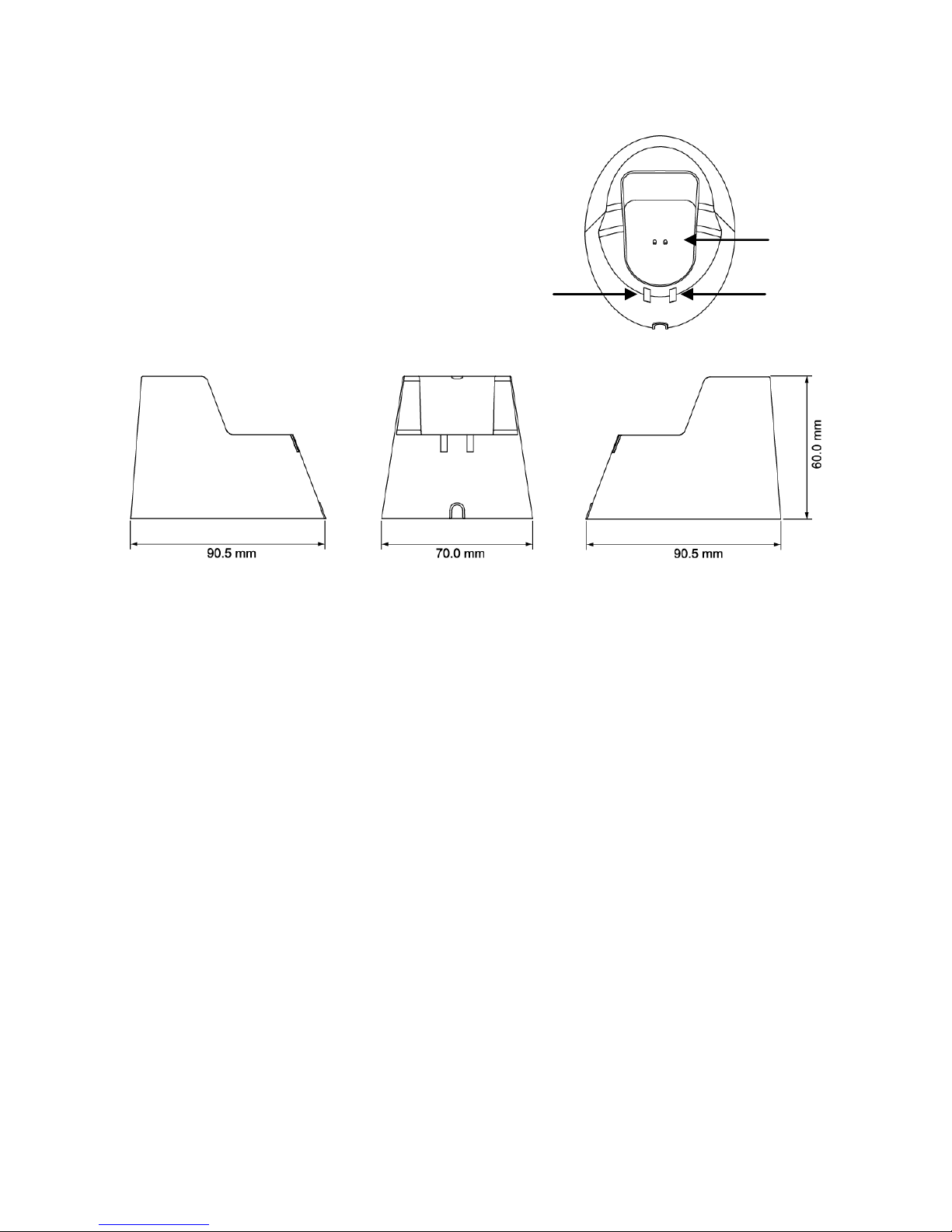
90.5 x 70 x 60 mm (Cradle)
Ambient Light
3000 lux ~ 8000 lux
4500 lux
Operating Temperature
0°C~40°C
0°C~40°C
Operating Humidity
20% - 80% RH,
non-condensing
20% - 80% RH,
non-condensing
Storage Temperature
-20°C~ 65°C
-20°C~ 65°C
Storage Humidity
5% - 95% RH,
non-condensing
5% - 95% RH,
non-condensing
* The transmission range may vary due to local conditions.
** The specifications may be changed/updated without prior notice.
Package
Standard Package
Scanner x 1
Utility CD x 1
Recharge/Communication Cradle x 1

-6-
Before Use
Safety Precaution
1. Read the manual before use and always keep in proper location for
references.
2. Install in accordance with the instructions.
3. Heed all warnings messages and notifications to avoid injury to self or
people; misuse may cause malfunction or damage to the product
4. Do not operate the product and accessories near water, moisture, or
dusty location; it may cause electrical shock injury or fire.
5. Do not place or operate the product near any heat sources such as
radiators, heat registers, stoves, or other apparatus that produce heat. It
may expose the product to the danger of Fire and Explosion.
6. Clean only with dry cloth.
7. Use ONLY supplied or accessories specified by manufacturer. Use of
anything other than supplied or approved accessories will void the
warranty, may cause malfunction and, and may put the User or other
person at risk of injury.
8. DO NOT aim the product at eyes of people or animals. Some product
models use a LASER as a scanning aid may cause serious eye injury.
9. Protect the power cord from being walked on or pinched particularly at
plugs, convenience receptacles, and the point where they exit from the
apparatus.
10. Unplug this apparatus during lightning storms or when unused for long
periods of time.
11. The Service is performed by qualified service personnel only. Servicing
is required when the product and/or the accessories have been
damaged in any way, such as power cable or plug is damaged, liquid
has been spilled or objects have fallen into the product, the product has
been exposed to rain or moisture, does not operate normally, or has
been dropped.
12. DO NOT dissemble or modify the product, accessories, and the
components (i.e. the pre-installed rechargeable battery). It should cause
damage to the product and injury to people and the warranty is
terminated.

-7-
Product Description
Scanner Unit
1. LED Indicator
2. Audio Alarm
3. Scan Window
4. Scan Trigger
-8-
Recharge/Communication Cradle
5. Connector for Scanner Unit
(Recharge and Communication Cradle)
6. Communication Status Indicator
7. Bluetooth Pairing Indicator
Ce manuel convient aux modèles suivants
2
Table des matières
Autres manuels Fametech Lecteur de codes-barres

Manuels Lecteur de codes-barres populaires d'autres marques

POSMicro
POSMicro Datalogic PowerScan D7100 Manuel utilisateur

Marson
Marson MT780 Guide de configuration rapide

NCR
NCR RealPOS Manuel utilisateur

Motorola
Motorola SE3300 Guide de configuration rapide

Element
Element P130BT Manuel utilisateur

Motorola
Motorola Symbol LS3008 Manuel d'installation et d'exploitation


