
FAME DD-Lite V2 Manuel utilisateur

Congratulations on your new
FAME
DD-Lite V2!
Thank you for choosing a
FAME
product. Thanks to efcient development and economical produc-
tion,
FAME
makes high-quality products at a fantastic price possible.
Please read these operating instructions carefully to be informed about all functions of this pro-
duct and keep them for future reference
Have fun with your new product!
Your
FAME
Team
Guarantee:
The current general terms and conditions and guarantee
conditions of Music Store professional GmbH apply.
Can be viewed under: www.musicstore.de
If you have any questions or suggestions,
please contact us:
Music Store professional GmbH
Istanbulstr. 22-26
51103 Köln
Managing Director: Michael Sauer
WEEE-Reg.-Nr. DE 41617453
Tel: +49 221 8884-0
Fax: +49 221 8884-2500
Scope of delivery:
Quantity Content
1x Digital Drum Set
1x
Manual
Intended use:
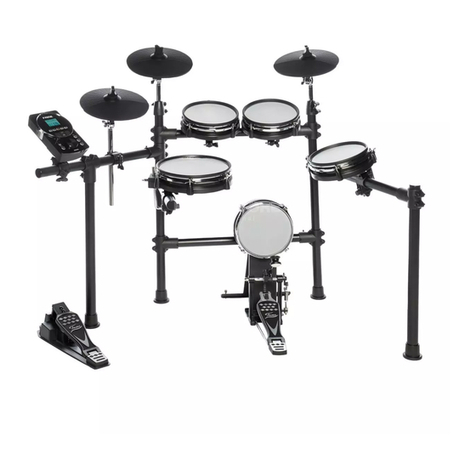
The product FAME DDLite V2 was designed for use as an electronic drum set. By striking the
pads, an electronic module simulates an articial drum sound in various forms and can optionally
be played via headphones or external speakers. Incorrect use of the product is considered
improper and can lead to physical injury or property damage.
Damage resulted by improper use is not liable.
It must be ensured that the device is operated exclusively by trained and expert users who are
in full possession of their mental, physical and sensory abilities. Use of other persons is expressly
permitted only at the request of a person responsible for their safety who instructs or supervises
the use.
Attention!
Please tighten the mesh heads properly after assembly!
20
DEUTSCHENGLISH
21
DEUTSCH ENGLISH
Important safety instructions! Please read before connection!
CAUTION! (Electro Magnetic Interference)
The normal function of the product may be disturbed by Strong Electro
Magnetic Interference. If so, simply reset the product to resume normal
operation by following the owner‘s manual. In case the function could not
resume, please use the product in other location.
DANGER! (For babies and children)
Dispose of or store any packaging material properly! Packaging material must
be kept out of the reach of babies and children due to the
danger of suffocation.
Make sure that children never use the device unattended! In addition, make
sure that children do not remove (small) parts from the device, as they could
suffocate by swallowing parts!
DANGER! (Electric shock due to high voltages in the device)
The housing must not be removed! There are no parts to be maintained in the
device. Inside the unit there are components which are under high electrical
voltage.
Before each use, check the device for damage or the absence of components,
protective devices or housing parts. If this is the case, do not use the device!
Leave maintenance and repair work to a qualied service workshop or contact
your dealer.
DANGER! (Electric shock due to short circuit)
Modications to the power cord or plug are prohibited. If the power cord is
damaged, it must be replaced immediately with an original spare part from the
manufacturer. Failure to do so may result in re or death due to electric shock!
WARNING! (Damage to hearing)
The unit may generate volumes that may cause temporary or permanent
hearing loss. Over time, even seemingly uncritical levels can cause hearing
damage. Reduce the volume immediately if ear noise or hearing loss occurs.
If this is not possible, keep a greater distance or use adequate
hearing protection.
Hint! (Fire hazard due to overheating)
The maximum permissible ambient temperature of this device is 40°C.
Ensure that the unit is placed in a place with adequate ventilation, out of the
reach of direct heat sources, naked ames and combustible
materials and liquids.
The ventilation slots of the device must not be taped or covered.
Hint! (Operating)
All connections of the device should be made before switching on. Use only
high quality cables for the connections.

Hint! (Operating conditions)
Due to its structural characteristics, the device is designed for indoor operation
(IP20). Never expose the device to rain, moisture or liquids as this may cause
damage.
Vibrations, dust or solar radiation can also lead to damage, avoid them!
Do not apply excessive force to the switches or controls.
Do not let paper, metallic, or other objects into the instrument. If this hap-
pens, remove the electric plug from the outlet. Then have the instrument
inspected by qualied service personnel.
Disconnect all cables before moving the instrument.
Hint! (Power supply)
It is essential that you check that the device voltage matches your local mains
voltage. It is highly recommended that you fuse your mains socket with a
residual current circuit breaker (FI).
Please connect the designated AC adaptor to an AC outlet.
If you do not use your device for a longer period of time, disconnect it from
the power supply in order to minimize danger. The same applies to storm
conditions such as thunderstorms, oods, etc.
Hint! (Using racks)
As soon as the unit is mounted on a rack, it must always be ensured that it is
stable and secure.
Hint! (Possible damage due to magnetic elds)
Loudspeakers generate a static magnetic eld. Please keep an appropriate
distance from other equipment that may be affected or damaged by an
external magnetic eld.
Hint! (Installation)
Be sure to inspect the device for damage before using. Optimum use of the
original packaging or suitable transport or storage packaging to protect the
product when not in use optimally against inuences such as
dust or moisture, etc.
Hint! (Interferences with other electrical devices)
Radios and televisions placed nearby may experience reception interference.
Operate this unit at a suitable distance from radios and televisions.
If this equipment does cause harmful interference to radio or television
reception, which can be determined by turning the equipment off and on, the
user is encouraged to try to correct the interference by one
or more of the following measures:
• Reorient or relocate the receiving antenna.
• Increase the separation between the equipment and receiver.
• Connect the equipment into an outlet on a circuit different from that to
which the receiver is connected.
• Consult the dealer or an experienced radio/TV technician for help.
DEUTSCHENGLISH
22

DEUTSCH ENGLISH
23
THE FCC REGULATION WARNING (for USA)
This equipment has been tested and found to comply with the limits for a
Class B digital device, pursuant to Part 15 of the FCC Rules.
These limits are designed to provide reasonable protection against harmful
interference in a residential installation. This equipment generates, uses, and
can radiate radio frequency energy and, if not installed and used in accordance
with the instructions, may cause harmful interference to radio
communications. However, there is no guarantee that interference will not
occur in a particular installation.
If this equipment does cause harmful interference to radio or television
reception, which can be determined by turning the equipment off and on, the
user is encouraged to try to correct the interference by one or more of
the following measures:
• Reorient or relocate the receiving antenna.
• Increase the separation between the equipment and receiver.
• Connect the equipment into an outlet on a circuit different from that to
which the receiver is connected.
• Consult the dealer or an experienced radio/TV technician for help.
• Unauthorized changes or modication to this system can void the user‘s
authority to operate this equipment.
Symbols on device and packaging:
The lightning ash symbol warns the user about non-insulated current and the
risk of electrocution
The exclamation mark symbol warns the user about important maintenance
and operating instructions in the manual
Intended for indoor use
Read manual

DEUTSCHENGLISH
Contents:
24
PRODUCT FEATURES...............................25
PANEL & FUNCTION DESCRIPTION
Front panel...................................................26
Pedal Adjust..................................................27
Other Buttons Pattern Function......................27
Drum Kit......................................................27
Playing Techniques........................................28
SETUP
Connecting the Pads and Pedals.....................29
Setup Manual................................................30
SPECIFICATIONS......................................33
TROUBLESHOOTING.................................34
CLEANING..................................................35
ENVIRONMENTAL PROTECTION..............35
MIDI IMPLEMENTATION CHART..............36

DEUTSCH ENGLISH
25
Product Features:
Enjoy Playing
Connect the DD-Lite V2 electronic kit to drum amp. Adjust the sound level and choose different
sound patterns. Play quietly with headphones connect. Enjoy playing alone and not disturb others.
Updated Mesh Drum Head
All the Tom drums and Snare use mesh heads, which are feeling much better and quieter.
Simplied Control Panel Design
The DD-Lite V2 host machine control panel is designed to make everything simple, with only one
volume knob, two drum sound switch buttons and one metronome button.
Metronome inside
With a click function, tempo adjustable.
Easy Assembly
Only 8 steps to assemble the DD-Lite V2 electronic drum kit. Please follow the assembly directory
to assemble your drum kit.

26
DEUTSCHENGLISH
Panel and Function Description:
1
2
3
4
5
6
7
8
1. [POWER] Knob
Press to turn On power/ Press and hold to
turn Off power.
2. [VOLUME] Knob
Adjust the output volume level.
3. [][] Button
Choose different drum Sound Kits/ Adjust
metronome tempo.
4. [METRONOME] Button
Press Button to start metronome. Press
[] and [] buttons to choose the ideal
click tempo. Press button again to stop the
metronome.
5. USB MIDI port
Connect the USB host with audio devices.
(Only transmit MIDI data.)
6. AUX IN Jack (3.5mm)
For connecting an extra audio player, for
example MP3 and so on via stereo plug. You
can enjoy playing the drum along with your
favorite song.
7. PHONES Jack (3.5mm)
Connect stereo headphones here.
8. OUTPUT Jack (3.5mm)
Connect to your audio system or ampli er.
9. DC9V Jack
Connect to DC9V power adapter.
9

27
DEUTSCH ENGLISH
Pedal Adjust:
Other Button Pattern Functions:
In uenced by humidity and temperature, the sensitivity of the pedals might differ. If this
happenes, adjust the sensitivity by following steps.
When power OFF, press and hold [POWER] and [METRONOME] buttons to enter the pedal adjust
mode. When the Display shows „bdF“, stamp down the bass drum pedal and hold.
The [metronome] button lights up green and orange until the bass drum pedal setup is nshed.
Then release the bass drum pedal.
When the Display shows „HHF“, stamp down the Hi-Hat Pedal and hold. The [metronome] button
lights up green and orange. If it lights up red, the system setup is nished.
1. When the power is Off, press and hold the [POWER] and [] button to enter the USB Soft-
ware update function. When the Display shows „UPG“, use a USB cable connecting to your
computer to update the host machine system.
2. When the power is Off, press and hold [POWER] and [] to enter Factory Reset.
The Display shows „CLr“
3. When the power is ON, press and hold the [METRONOME] button for 3 seconds to refer to
the system version information.
Drum Kit:
The preset drum sound kit is the Rock Kit. Press the [] and [] buttons to choose different
sound kits.

28
DEUTSCHENGLISH
Playing Techniques:
This section introduces various performance functions to make
your performance professional. Similar to an acoustic drum kit,
the digital drum responds differently to various playing tech-
niques and dynamics. All the pads are velocity sensitive. And
some voices change timbre depending on the striking force.
Pad
Only the snare drum can detect both head shot and rim shot.
Head Shot
Strike only the head of the pad.
Rim Shot
Strike the head and the rim of the pad simultaneously. Or you
can only strike the rim of the pad.
Cymbal
Cymbal Bow shot
Playing the middle area of the cymbal.
Choke Play
Both Ride and Crash cymbals have cymbal choke. But hi-hat
don‘t have the cymbal choke.
Choking the crash/ride edge with the hand immediately after
hitting the crash/ride mutes the crash/ride sound.
Hi-Hat
Hi-Hat Pedal Change
With different positions the pedal pressed down, the voice of
pad varied while you are striking the Hi-Hat pad. And this is
similar to an acoustic drum.
Open Hi-Hat
Strike the Hi-Hat pad without pressing the pedal.
Closed Hi-Hat
Strike the Hi-Hat pad with the pedal pressed completely down.
Hi-Hat Pedal
Press down the hi-hat controller’s pedal to create a foot-close
sound without having to strike the hi-hat pad.
Splash
Playing the hi-hat with the pedal fully pressed and then
instantly
opening it.

29
DEUTSCH ENGLISH
Setup:
Caution!
To prevent electric shock and damage to the device, make sure the power is
switched OFF
on the drum and all related device before making any connection.
Connecting the Pads and the Pedals
Standard conguration:
KICK, SNARE (dual-zone trigger), TOM 1~3 (dual-zone trigger), CRASH (dual-zone trigger with
choke), RIDE (triple-zone trigger with choke), HI-HAT (dual-zone trigger), PEDAL(HI-HAT).
Note:
1. Use the cables provided to connect the pads to the trigger input jack on the rear panel of the
module, make sure each pad is connected to its corresponding trigger input jack.
2. For details on assembling the drum stand, attaching the digital drum and connecting the
pads, please refer to the Setup manual.
Table des matières
Autres manuels FAME Tambour
FAME
FAME DD6600 Manuel utilisateur

FAME
FAME DD-350 Manuel utilisateur

FAME
FAME DD-One Simon Philips Manuel utilisateur

FAME
FAME DD-5500 PRO Manuel utilisateur

FAME
FAME DD 6500 Manuel utilisateur

FAME
FAME Pro Trigger Pack Manuel utilisateur

FAME
FAME Simon Philipps Edition DD-ONE XT Manuel utilisateur

FAME
FAME Padronome Manuel utilisateur


