Facit N4000 Manuel utilisateur

Facit N4000
Punch/Reader-Punch
User's Manual

Contents Page
1 Introduction/How to get started 3
2 Design and Construction 11
3 Operation 15
4 Keyboard Controls 19
5 Program Mode 23
6 Interface connections 33
7 Technical Specification 35
Appendix 1 (Conversion chart,ASCII to Telex)
Appendix 2 (Conversion chart,ASCII to Telex)
Appendix 3 (Conversion chart,ASCII to EIA)
Appendix 4 (Conversion chart,ASCII to RS358)
Appendix 5 (Code conversion)
Appendix 6 (Telex Tape Formatting)
Appendix 7 (Test Mode)
Copyright, Facit AB Sweden, 1989.01/3500

1 Introduction
The Facit N4000 comes in two versions, a paper
tape punch and a reader/punch combination.
The paper tape punch, punches 5 to 8 track tapes.
Five track is normally used to punch telextapes
and eight track mostly for punching NC-programs.
The punching speed is 30, 62 or 75 characters
per second, operator selectable.
The reader/punch combination can read and punch 5
to 8 track tapes.
The reading speed is 200/500 characters per
second, operator selectable.
Both units are designed as stand alone units for
table top mounting. Two standard I/O ports are
available with CCITT V.24/RS-232-C serial
interface.
Facit N4000 has a buffer of~ 9 K capacity.
Code conversion can be performed. The codes
included are the two used NC codes ISO and EIA and
the national versions of the telexcode.
A small keyboard and status display are
incorporated at the top of the unit; with this all
operating system parameters may be quickly and
easily entered with no necessity to change PC
board DIP switch settings. The status display
clearly indicates the unit's current operating
status, and also shows simple error messages.
How to get started
Mains connection
- Check that the mains voltage selector on the
rear panel, see Fig. 6.1, shows the actual
mains voltage.
- Connect the mains cord to rear panel mains inlet
and to the mains.
- Switch the ON/OFF switch on the rear panel to
ON.
- Check that the status display, see Fig. 4.1,
shows OFF.

Punching
Punch tape loading
Load the tape according to section 1.2 Punch Tape
Loading.
Punching instruction
- Connect the NC/Computer cable plug to the
CHANNEL 1 I/O PORT connector on the rear panel,
see Fig.6.1.
- Depress the key ON L on the operator keyboard.
The status display shows LINE.
- Start the punching from the NC/Computer.
- Tear off the tape when the punching is ready.
If required, blank tape can be fed by depressing
OFF L and FEED before tearing off the tape.
Note
The data transmission should be made at 600 bit/s.
Reading
Reader Tape Loading
Load the tape according to section 1.5 Reader Tape
Loading.
Reading instruction
- Depress the ON L key on the operator keyboard.
The status display shows LINE.
- Clear the NC/Computer for reading.
- Depress the START key to start the reading.
- Depress the STOP key to stop the reading.
- Depress the START key to restart the reading.
Note
The data transmission should be made at 600 bit/s.
Because reading is faster than transmission, the
reader can stop before the whole tape is read. The
reader will restart automatically and continue
until the whole tape is read.

The tape can be run quickly through the reader
either forwards or reverse, without data being
read, by depressing the FF or FB key respectively.
The equipment must be off line.
When data is sent over the line, by reading or
punching, a special sign ( at reading, at
punching) is shown in the display to indicate
communication. At punching the display returns to
"Line", when data has been sent. At reading, when
the communication stops by any reason, the display
shows "data" if there is data in the buffer. The
buffer can be cleared by pressing the Stop key <*>
and the display goes back to "Line".
If punching is started after reading and there
still is data in the buffer, the buffer is
automatically cleared. By sending to N4000 for
punching, the display switches from "data", if the
buffer is not cleared, to the special line
communication sign.
Tape copying
Tape copying instruction
- Depress the OFF L key on the operator keyboard.
The status display shows OFF.
- Depress the COPY key.
The status display shows COPY.
- Put the tape in the reader.
- Depress the START key.
Copying will start.
- Depress the OFF L and ON L keys when copying is
finished.
If the raeder stops during copying, it is due to
the fact that the reader is faster than the punch.
The copying will restart automatically and
continue until the whole tape is copied.

1.1 Punch Tape Handling
The tape path through the punch is shown in Fig.
1.1. The blank tape leaves the spool and passes
around a pulley on the tape guide arm. The guide
arm applies a progressively acting brake which
operates on the tape bobbin. This operates to
ensure that tape fed through the punch is
maintained at a constant tension to ensure
accuracy and consistency of punching.
Tape Low and Tape End
When the punch tape supply is low, the error
message 'Lo' appears on the display. When the tape
is exhausted, or if a jam occurs in the feed
mechanism, the message 'Err' blinks on and off on
the display.
1.2 Punch Tape Loading
With mains power switched OFF, load tape onto the
punch tape holder as follows (see Fig. 1.1).
(1) Move the tape guide arm until it touches the
magnetic catch. This action applies the brake
to the tape bobbin and frees the tape feed and
punch mechanism.
(2) Pull out 2 metres (6 feet) of tape from the
new reel and place the reel onto the bobbin.
(3) Lock the bobbin by pushing the centre section
downwards by hand as far as possible (see Fig
1.1).
(4) Push upwards the two punch opening pegs
(located one at each side of the punch housing
- see Figs. 2.1 and 2.2), and pull forward the
punch assembly to open the tape feed and punch
slot (see Fig. 1.1).
(5) Lead the tape around the guide pulleys and
drop it into the tape feed and punch slot.
(6) Push back the punch assembly to close the tape
feed and punch slot.
(7) Release the tape guide arm from the magnetic
catch.
(8) Switch the power ON and depress the FEED key
until the tape is taut, and feeding correctly
from the spool.

GUIDE
PULLEYS BOBBIN BLANK TAPE SPOOL TAPE LOW DETECTOR
□DD
DDD
odd
ODD
TAPE FEED AND
PUNCH SLOT
i
GUIDE
PULLEY
MAGNETIC
CATCH TAPE GUIDE ARM
LOCK ELEASE
BOBBIN LOCK
Fig. 1.1 Punch Tape Loading

8
1.3 Punching Accuracy
The accuracy of punching can be checked by using
the Facit template part no. 1114 00 50-00/0 as
shown in Fig. 1.2. It is recommended that this
check is carried out approximately every 50th tape
reel used.
(1) Lay the punched tape on the template as shown
in Fig. 1.2, with a feed hole accurately
centered on the leftmost vertical line.
(2) Examine the 50th feed hole on the rightmost
vertical line. If this line is visible within
the hole, (i.e. within +-0.5 %), the punch
accuracy is acceptable.
(3) If the vertical line is not visible (i.e.
outside +-0.5 %) the punch mechanism requires
servicing.
c- 50 Characters = 127mm = 5 inches -
I H'il l.t-H *-+]
I ' t
t1-rt'H-4~f
T*T
—t-l 4 -I- +4- +-h+ 4—n
FACIT
FEED HOLE
CENTRED
ON GRID
e
i
e
©
0 5OTH FEEDHOL E (ACCURATE)
O - 0 . 5 % I A C C E P TA B L E
& LIMITS
+ 0.5% I
Fig. 1.2 Check Intercharacter Spacing

1.4 Reader Tape Handling (Facit N4000 Combination
only)
The tape path through the reader is shown in Fig.
2.5. The tape passes under the entry guide wire,
through the tape width selector (adjustable to
suit 5, 6/7 and 8 channel tapes), past the reader
head and over the drive sprocket. The drive
sprocket teeth engage in the tape feed holes to
pull the tape past the head.
An indicator lamp on the reader head is lit to
show that the optical reader lamp is on.
The tape can be run quickly through the reader
either forwards or backwards, without data being
read, by depressing the FF or FB key
respectively.
Reader Error
A malfunction of the tape reader mechanism stops
the transmission of data and the message 'Err'
blinks on and off on the display.
To clear, press <*> key.

10
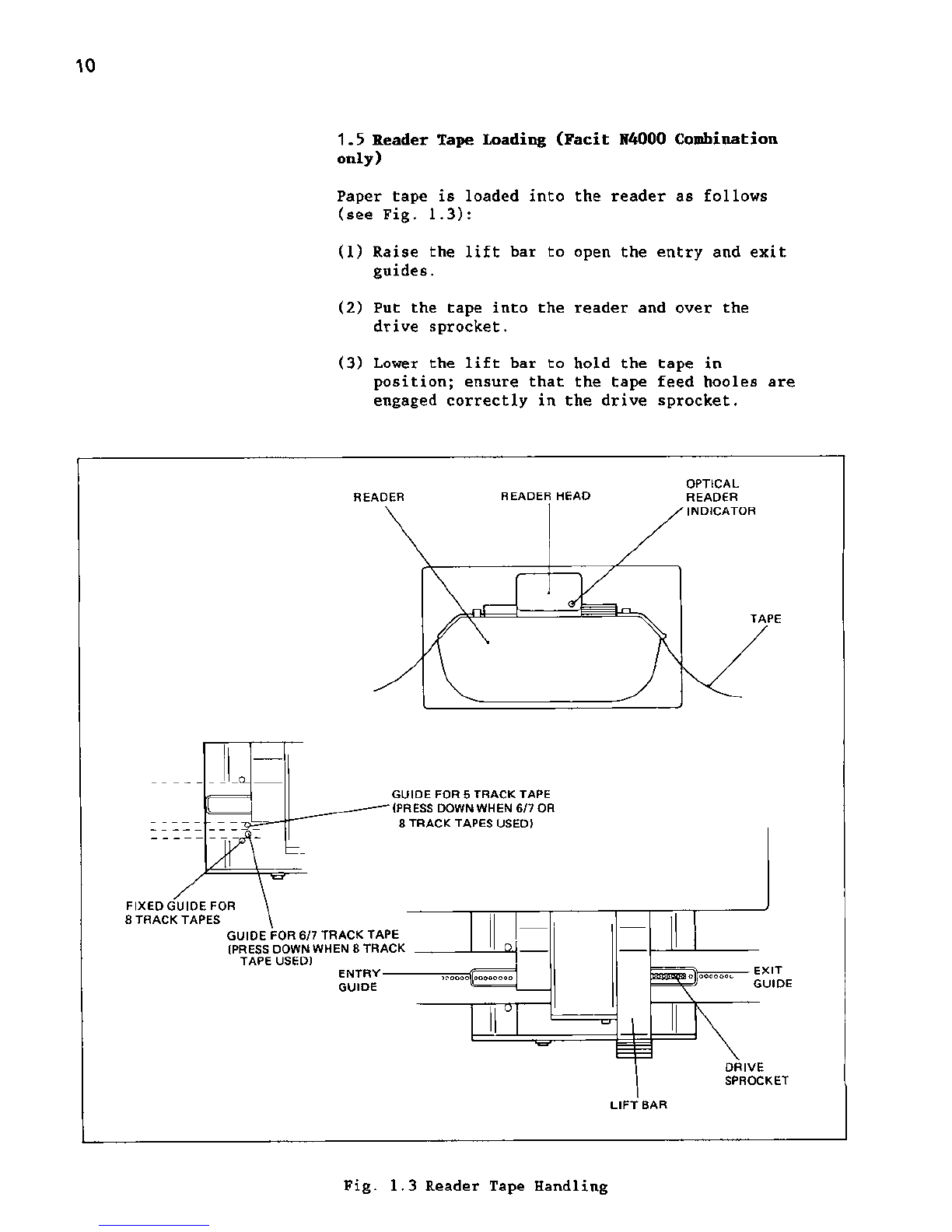
1.5 Reader Tape Loading (Facit N4000 Combination
only)
Paper tape is loaded into the reader as follows
(see Fig. 1.3):
(1) Raise the lift bar to open the entry and exit
guides.
(2) Put the tape into the reader and over the
drive sprocket.
(3) Lower the lift bar to hold the tape in
position; ensure that the tape feed hooles are
engaged correctly in the drive sprocket.
READER READER HEAD
OPTICAL
READER
INDICATOR
TAPE
GUIDE FOR 5 TRACK TAPE
(PRESS DOWN WHEN 6/7 OR
8 TRACK TAPES USED)
FIXED GUIDE FOR
8 TRACK TAPES
GUIDE FOR 6/7 TRACK TAPE
(PRESS DOWN WHEN 8 TRACK
TAPE USED)
ENTRY-
GUIDE
^cooooloooooooo olooooooo EXIT
GUIDE
DRIVE
SPROCKET
LIFT BAR
Fig. 1.3 Reader Tape Handling
Table des matières