Exposure MaXm-D Manuel utilisateur

Design & Print by PPG Print
Printed Nov09. All specifications correct at time of print, subject to change and improvement. Check www.exposurelights.com
Toro
Strada
MaXx-D
Joystick
2010 Owner’s Manual
Exposure Lights Features
•CFD Cable Free Design
•Super LED range
•Li-ion batteries
•Hardwired batteries
•Smart Port Technology
•Smart recharging
•PiggyBack plug in battery option
•Remote switch available
• WhiteEyeaccessory
•RedEye rear light accessory options
•RedEye Micro rear light accessory
•Forged alloy quick release bracket
•One size fits all QR bracket
•Fuel gauge battery life indicator
•Light mode indicator
•Long burn times
•Reserve fuel tank
•Collimated lens technology
•Multi-faceted reflector technology
•Dual beam optics
•Lightest weights
•Smallest sizes
•Thermally protected
•Fully weatherproof
•CNC machined aluminium casing
•Anodised finish
•Laser graphics & rider information
•Soft-shell packaging case
•British design and manufactured
•2 year warranty
•Versatile & multisport

www.exposurelights.com
2
EXPOSURE LIGHTS SPECIFICATION
Recommended Operating Temperature Range: -15C / + 40C
0
1 2 3 4 5 6 7 8 9 10 11 12 13 14 15 16 17 18 19
200
400
600
800
1000
1200
1400
MaxxD
Diablo
Race
Toro
Spark
Strada
Joystick
Spark, Joystick, Race, Strada and MaXx-D Exposure Lights use collimated
design Lens technology with Dual Beam Optics. These high-tech resin
lenses are specifically designed to optimise light collection from each LED.
Dual Beam Optics means you get a great delivery of light from each Lens
that includes “flood” and “spot” beam combined – perfect!
Diablo and Toro Exposure Lights use multi-faceted reflector technology
with integrated diffuser. This system is specifically engineered for the new
P7 LEDs found in these models and delivers the best beam pattern and
“blend” of light available from these LEDs.
Test ride lights at your nearest Exposure demo dealer to see for yourself
and meet us at many night events throughout the year.
See www.exposurelights.com for details.
Luminous Intensity (lux) at 2 m
Light Spread (degrees from centre)
LED’s LED
Output
Battery
mAh High Medium Low
Weight
gms
Spark CR123A 1 220 2600 2.5 8 15 72
Spark RCR 123A 1 220 1400 1.5 4 10 72
Joystick 1 240 2450 3 10 24 76
Diablo 1 700 2450 1 3 10 102
Race 2 480 4900 3 10 24 190
Strada 2 480 4900 3 10 228
Toro 1 700 7350 3 10 24 276
MaXxD 4 960 9800 3 10 24 298
Mode - Hours

www.exposurelights.com
3
Please read all instructions before using your
EXPOSURE LIGHT
EXPOSURE LIGHTS - the lightest high output production sports lights.
Designed for high performance, EXPOSURE LIGHTS combine the latest
LED technology with a powerful Lithium Ion battery. Before using, please
familiarise yourself with this manual, so that you understand how to operate
and care for your EXPOSURE LIGHT.
Warning
EXPOSURE LIGHTS are a very powerful lighting system. Always use care
when operating. Do not look directly into the light. This may cause serious
injury. Do not shine directly at others.
EXPOSURE LIGHTS/USE Ltd. accept no liability for any injuries or other
damages arising from the use of this product in any circumstances.
Important Information
EXPOSURE LIGHTS are weatherproof under normal conditions but are NOT
waterproof.
DO NOT SUBMERGE UNDER WATER. If moisture does appear in the unit
do not use it and contact Exposure’s service department.
Never attempt to disassemble the light unit. This will invalidate your
warranty.
Do not attempt to use any other chargers or batteries with the unit. This will
cause damage and is dangerous.
Long periods of non-use will lower the voltage of the battery. Please follow
the charging instructions and top-up the charge monthly when not in use.
Warranty
Please register your EXPOSURE. Fill in the form at the back of this manual
or register online at www.exposurelights.com. IMPORTANT: keep your proof
of purchase from your retailer. You will require this should you have a claim.
EXPOSURE LIGHTS will give a 2-year warranty to the original owner for
the light unit, brackets and charger. This warranty covers material and
manufacture. Accidental damage and neglect are not covered by warranty.
Modifications or improper use also void the warranty.
All EXPOSURE LED’s are covered by lifetime warranty, in accordance with
proper use.
Warranty is valid from date of purchase, and to the original owner (proof of
purchase is required).
Exposure Lights service department :
Tel: +44 (0)1798 344471
E-mail: [email protected]

www.exposurelights.com
4
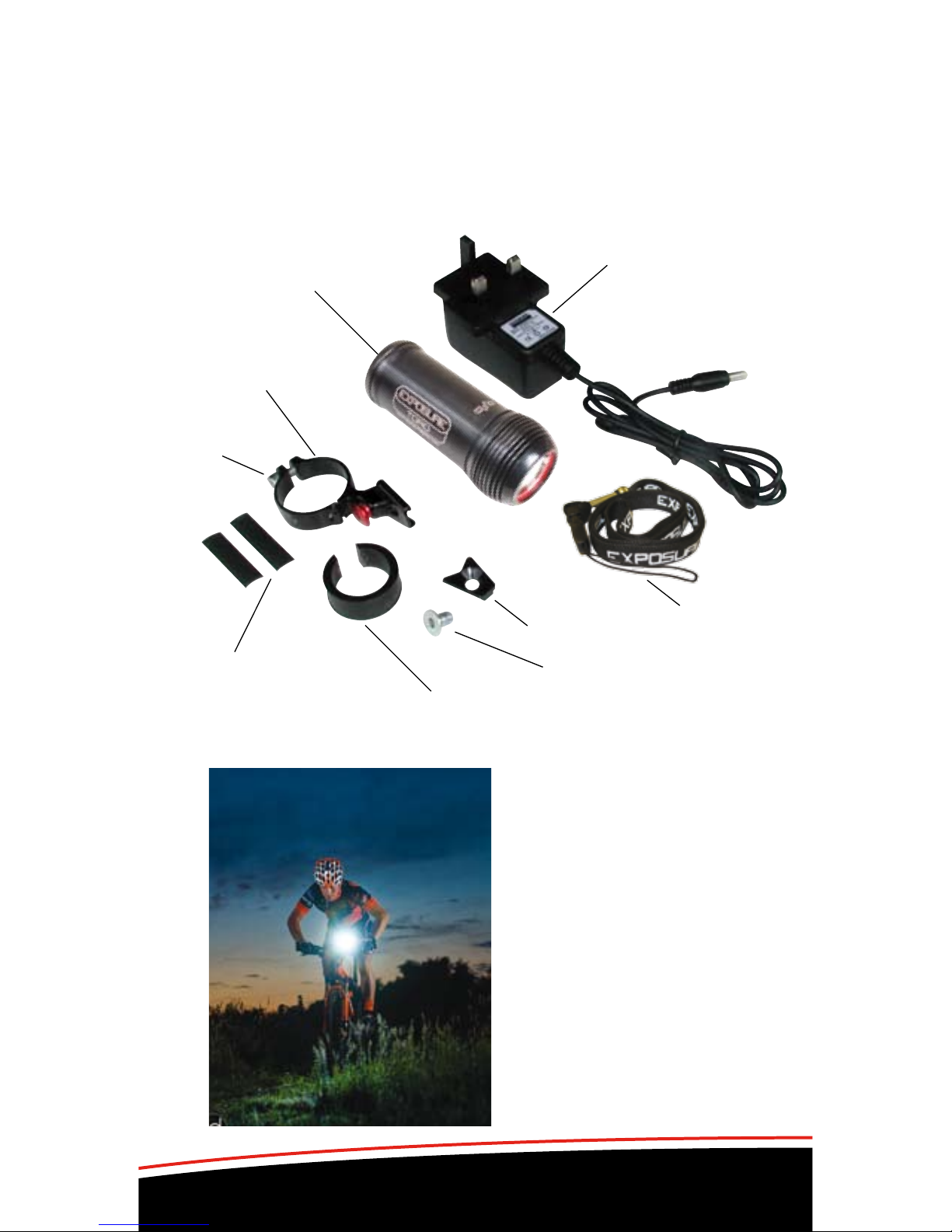
Light Unit
QR Handlebar bracket
Cleat
Cleat bolt
Smart Charger
25.4 – 26.0 spacer
Rubber strips
for 31.8
Bracket bolt
Soft Shell Pack Contents
Please ensure that the following contents are included with your purchase.
If any of the items are missing please contact your place of purchase.
MAXX-D, TORO, STRADA, RACE
Lanyard
Exposure Sponsored Team TORQ

www.exposurelights.com
5
JOYSTICK with helmet bracket
For 2009 models the Joystick is supplied with either the Helmet Bracket or
the Quick Release handlebar bracket and QR Clip. Additional brackets are
available from your place of purchase as accessories.
QR Handlebar bracket 25.4 – 26.0 spacerRubber strips for 31.8
Bracket bolt
Smart Charger
Smart Charger
Light Unit
Light Unit
Helmet bracket
upper
Helmet bracket
upper
Helmet bracket
lower disc
Helmet bracket
lower disc
Short & long
nylon blots
Short & long nylon blots
Accessories to consider: White Eye; RedEye micro; QR bracket set.
Accessories to consider: Piggyback battery; RedEye rear lights
DIABLO – both bracket types included
Lanyard
Lanyard
QR Clip

www.exposurelights.com
6
1
2
3
4
Quick Release Bracket – MaXx-D, Toro,
Strada (Diablo with clip), Race
The Exposure QR bracket is a triumph in design that brings to life the full
benefit of Exposure’s principle feature, Cable Free Design (CFD). The light
unit is easily and quickly attached and removed. The bracket stays with the
bike and the light will be in the perfect position every time it is attached.
• Mountingtoa31.8mmbar–Removethespacerfromthebracket.
Peel backing of the rubber strips and attach to the inside of the metal
bracket. Fit the bracket to the bar. Tighten the clamp with a 4mm hex key.
(Maximum 2.5Nm) DO NOT OVER TIGHTEN!
• Mountingtoa25.4or26mmbar-Cliptheplasticspaceroveryourbar,
attach the bracket over the spacer and tighten the clamp with a 4mm hex
key. (Maximum 2.5 Nm) DO NOT OVER TIGHTEN!
1 Attach the cleat to the light unit using
the provided bolt (Already fitted to
new lights).
2 Locate the cleat into the V section of
the bracket and slide forward until the
steel pin “clicks” into place
3 To adjust the angle of the light, loosen
the cleat bolt. A hole in the bracket
enables access to the bolt when the
light is in the bracket. Use a 4mm
hex key to adjust and tighten the bolt
securely (Maximum 2.5Nm)
4 To release the light from the bracket
push away and down on the red
button and gently pull back the light
with your hand. This is a simple
one-hand operation.
• Warning-Makesurethatbrake
and gear cables cannot catch on or
interfere with the light or the bracket or
release button.
•Warning:Racersbeware-check
number boards do not interfere with
bracket button. If the steel pin can
not pop-up fully the light will not be
fully engaged to the bracket and may
come off.
QR bracket also available as accessory:
EXPQRBK-10 Bracket Only (no cleat or bolt)
EXPQRBKSET Bracket with clip for Joystick/Diablo/Spark

www.exposurelights.com
7
Handlebar clip - Diablo, Joystick, (Spark)
The QR Clip allows you to mount your Joystick, Diablo or Spark light to the
Quick Release.
Simply press the light into the QR clip with
the point of the clip towards the front of the
light
Now engage the clip and light into the QR.
A simple cable tie handlebar bracket is also
available as an accessory, as supplied with
the Spark light.
Helmet Mount – Diablo, Joystick, (Spark)
The highly acclaimed Joystick helmet bracket works as a
ball joint. Follow these instructions for set up and position of the light for
riding. The clamp is made up of three parts: Lower clamp disc, upper
clamp with ball joint socket and a nylon clamp bolt.
• Puttheshorterplasticboltthroughthelowerclampdiscandalignwith
a selected vent on the inside of your helmet.
• Placetheupperclampthroughthetopoftheventtomeetthebolt.
•Tightenthebolt.Takecarenottodamage
your helmet.
Use the shorter bolt first and if not long enough
then go to the longer bolt. Do not use the long
bolt on thinner section helmets, as this will stop
the ball joint working or possibly pop it out.
•CliptheJoystickbodyintothetoppartof
the clamp
•TheJoystickcanbeadjustedbyrotatingthe
ball joint when holding the light and is easy to do when you are riding to
get the best position.
We suggest you attach a lanyard through the holes provided at the back
of the light unit and loop the lanyard through a vent in your helmet or
round the handlebar if using it there. This is for added security of your
light.
EXPOSURE LIGHTS/USE accepts no liability for any injuries or other
damages to person or equipment arising from the use of the clamps.

www.exposurelights.com
8
LIGHT OPERATION
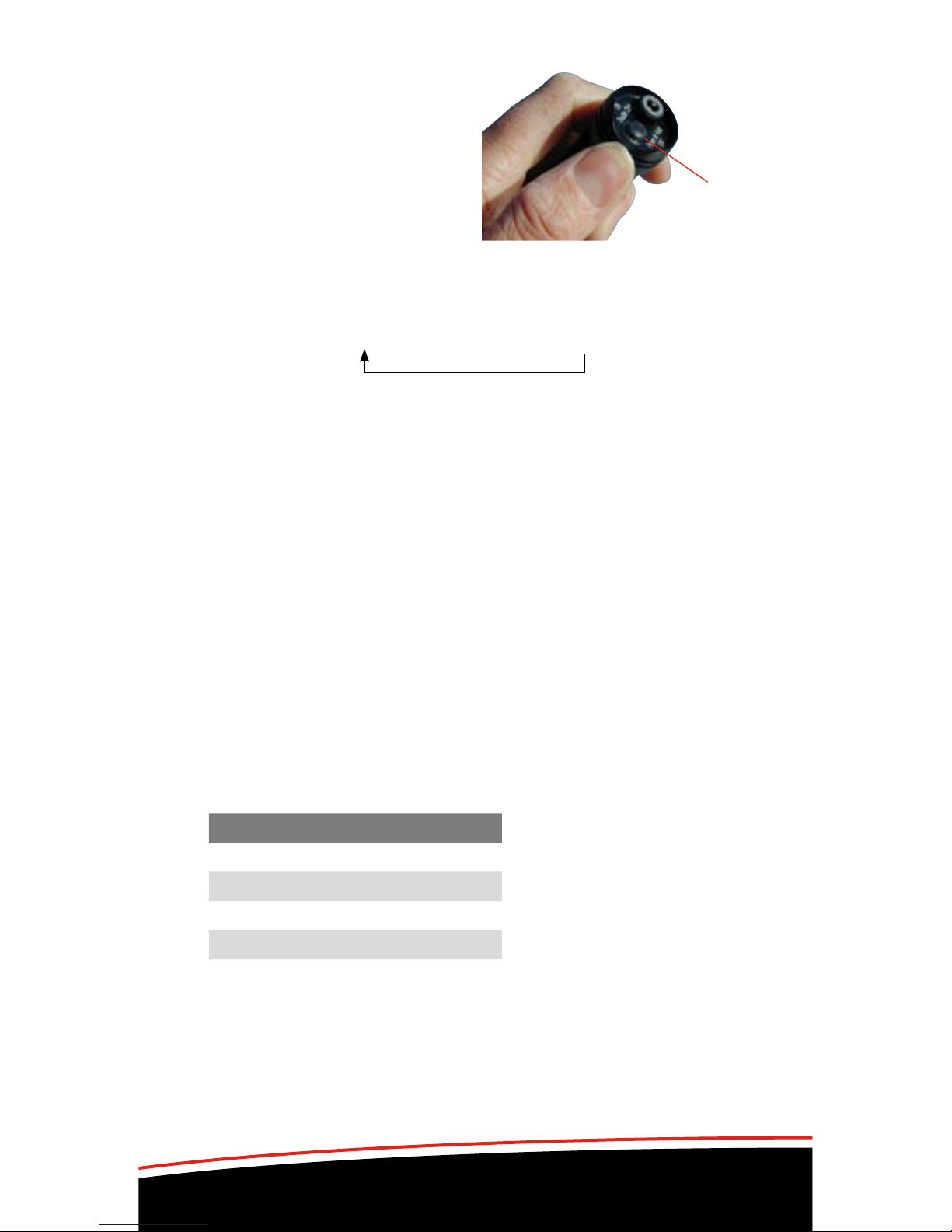
Multi Function Button
Located on the back of the light unit
is the function button (on top of body
for Spark light). This operates the
light unit and informs you of the mode
setting and the battery power status.
When the light is on and function button is pressed, the colour of the button
for the first two seconds informs you which mode has been selected.
Thereafter the colour of the button is your fuel gauge.
Green (High) – Amber (Medium) – Red (Low)
On the Strada model there are just two main modes
Green (High) – Red (Dipped)
Mode Function
• Toturnonthelight,doubleclickthebutton;thelightisnowoperatingin
the brightest Max mode.
• Toswitchbetweentheconstantsettings,pressthebuttononce.
• Toactivatetheashingmode,pressandholdthebuttonfor1ash
(approx 1 second) and release. The flashing mode can be activated from
any of the constant modes. To return to the Max mode, press the button
once.
• Toturnoffthelight,pressandholdthebuttondown.After2ashes
(approx 2 seconds) the light will turn off. The function button will rapid
flash red as the light shuts down.
Fuel Gauge Function
After two seconds the function button becomes the fuel gauge. The colour of
the button now indicates the approximate percentage of battery power left.
Button Battery
Green 100% - 50%
Amber 50% - 25%
Red 25% - 5%
Red Flash 5% - Empty
Function
button
When the battery has only 5% charge remaining in whichever mode, the light
will automatically switch to the low setting. Modes available are restricted to
Ride and Low. The function button will flash red. Light output will slowly dim
over 3 hours and this is the extended burn time on reserve power.
Mode and Fuel Gauge functions will operate as normal when using a
remote switch. When using a Piggyback Battery the function button will only
flash green to indicate the light is charging.

www.exposurelights.com
9
Smart Charging Exposure Lights
Before using your Exposure Light please charge it fully.
Use only genuine Exposure Lights chargers. International chargers are
available, also in-car charger and USB top-up cable.
EXPOSURE LIGHTS use the highest quality Lithium Ion batteries. This
allows them to be recharged at any point during the discharge cycle. Burn
times will not be affected by multiple re-charging.
Re-charging instructions
• Ensurethelightunitisturnedoff.
• PlugtheSmartChargerintothepowersupplyandswitchonthe
supply. The LED on the charger will show green (operational).
• Insertthechargerconnectionplugintothelight’schargeport,located
on the back of the light. The charger’s LED will show red when the light
unit is charging up to 90% full.
The function button on the light will continuously flash green to inform you
that the charger is connected and functioning.
From empty the light
unit will rapid charge
to approximately 90%
capacity - at this point the
LED on the charger will go
from red to green.
To 100% charge the light
leave the charger plugged in
and turned on for a further 1 to
4 hours depending on the model (see
below). You can leave the light on charge as long as you like (like your
mobile phone).
charge port
function button
Rapid
(red)
Trickle
(green)
90% Final 10%
Joystick 3 Hrs 1 Hrs
Diablo 3 Hrs 1 Hrs
Race 6 Hrs 2 Hrs
Strada 6 Hrs 2 Hrs
Toro 9 Hrs 3 Hrs
MaXx-D 12 Hrs 4 Hrs
Charge Capacity
Long periods of non-use will lower the voltage of the battery. If the unit
is being stored for long periods, please ensure the battery is periodically
charged. We suggest once per month.
All the Exposure Lights from 2008 (MaXx range) and 2009 (MaXx-2 range)
and 2010 use the same Smart chargers.

www.exposurelights.com
10
Piggyback
battery
single cell
Piggyback
battery
triple cell
Piggyback battery
single cell
BURN TIMES (hours approx) WITH PIGGYBACK BATTERIES
PIGGYBACK BATTERY
An outstanding feature of the Exposure range is the ability to extend
burn times with Piggyback batteries.
Piggyback batteries are available as single or triple cells and are
supplied with Velcro attachment strap and fitting block. They can be
mounted under the stem, to the helmet, on the light unit itself (walking)
or carried in your pocket or backpack.
Remote Recharging
When the light is switched off and the Piggyback battery is plugged in it will
pass charge into the light unit. The cells will average out the available power
between the light unit and the Piggyback battery.
Piggyback batteries give you peace of mind for safety and security by
extending your burn times.
If plugged in when the light unit is fully charged, all the light modes are
available. If the light’s internal battery is below 50% charge then only Medium
and Low settings will be available when the Piggyback battery is connected.
The Piggyback battery works by recharging the light as you use it.
When the Piggyback battery is plugged in, the fuel gauge will not be
operative; the function button will flash green as when charging.
Options available: EXPPB1 – Single cell Piggyback battery
EXPPB3 – Triple cell Piggyback battery
Mode CFD 1 Cell 3 Cell
Joystick High 3 6 12
Med 10 20 40
Low 24 48 96
Race High 3 4.5 7.5
Med 10 15 25
Low 24 36 60
Diablo High 1 1.5 2.5
Med 3 4.5 7.5
Low 10 20 40
Mode CFD 1 Cell 3 Cell
Toro High 3 4 6
Med 10 13.3 20
Low 24 32 48
Strada High 3 4.5 7.5
Dipped 10 15 25
MaXxD High 3 3.8 5.3
Med 10 12.5 17.5
Low 24 30 42
Ce manuel convient aux modèles suivants
2
Table des matières
Manuels Équipement d'éclairage populaires d'autres marques

Qazqa
Qazqa Suplux SL 3 Black 103062 Manuel utilisateur

Commercial Electric
Commercial Electric 54568141 Manuel utilisateur

CREE LIGHTING
CREE LIGHTING 304 Series Manuel utilisateur

Goobay
Goobay 49867 Manuel utilisateur

ECOMAN ITALIA
ECOMAN ITALIA LED T8 Manuel utilisateur

Alkalite
Alkalite Krypton KT-81 Manuel utilisateur