
Exibel KW-64MP3USB Manuel utilisateur

CD/MP3-spelare med USB • CD/MP3-spiller med USB
Cd/mp3-soitin, jossa on usb
Ver. 201004
English 3
Svenska 12
Norsk 21
Suomi 30
CD/MP3 Player with USB
Art.no. Model
38-3759 KW-64MP3USB

2

ENGLISH
3
CAUTION !
RISK OF ELECTRIC
SHOCK DO NOT OPEN
CLASS 1
LASER PRODUCT
CD/MP3 Player with USB
Art. no 38-3759 Model KW-64MP3USB
Please read the entire instruction manual before using the product and save it
for future reference. We reserve the right for any errors in text or images and any
necessary changes made to technical data. If you have any questions regarding
technical problems please contact Customer Services.
1. Safety Instructions
• The product should only be repaired by qualified service technicians.
• The product should not be taken apart or modified.
• Do not cover the product. Adequate ventilation with a distance of at least 15 cm
between ventilation openings and the surrounding area is necessary to prevent the
device from overheating.
• Remove the batteries if the device is not to be used for a long time. This should
prevent the batteries from leaking.
• The product should not be taken apart or modified. Certain parts inside the casing
carry dangerous currents. Touching these can lead to fire or electric shock.
• The product is designed for indoor use only.
• Never subject the product to high temperature, dust, heavy vibration, impacts,
humidity or moisture.
• Do not place the product where there is a risk of it falling into water or other liquid.
Do not place containers with liquid on the product e.g. flower vases, coffee cups,
fizzy drink bottles.
• Disconnect the device from the power supply by unplugging it from the wall
socket. The device’s plug should be easily accessible.
2. Pay attention to these safety symbols
Warning! Do not open the casing! Certain
uninsulated components inside the casing
carry dangerous currents. Touching these
can lead to fire or electric shock.
CLASS 1 LASER PRODUCT
Warning! Do not open the casing! The product con-
tains invisible laser beams that can cause eye damage.
Do not look directly into the laser beam or look directly
at it using an optical instrument.

ENGLISH
4
3
4
5 9
10
11
6
17 18 19
12
137
8
2
1
14
15
16
3. Presentation

ENGLISH
5
1. [VOLUME] volume control
2. PHONES – 3.5 mm headphone socket
3. AUX-IN – 3.5 mm external audio source input
4. [/+10] Press to select from folders or advance through MP3 tracks (10 at a time)
5. [PLAY/MODE] repeated playback of CD/MP3. Choose from:
Normal (No repetition)
Repeat (Repeat current track)
Repeat Album (Repeat all tracks in folder)
Repeat All (Repeat all tracks)
Random (repeats all tracks in random order)
6. [OPEN/CLOSE] Press to open or close the CD door.
7. Display
8. USB port for connecting USB memory sticks.
9. [►► / ►► I] Next track
Press once or several times to advance to the next track.
Press and hold to search forwards in the current track.
10. [I ◄◄ / ◄◄] Previous track
Press once or several times to return to previous track.
Press and hold to search back in the current track.
11. [►/II, CD/USB] Press to start or pause playback
12. [STOP] Press to stop playback of CD/MP3/USB.
13. Carrying handle
14. Telescopic aerial
15. Function selector, choose from:
CD/MP3 for listening to CD or MP3.
AUX IN for listening to an external sound source connected to the AUX IN socket.
FM or AM for listening to FM or medium wave radio.
16. Frequency control, select the desired signal modulation (AM/FM).
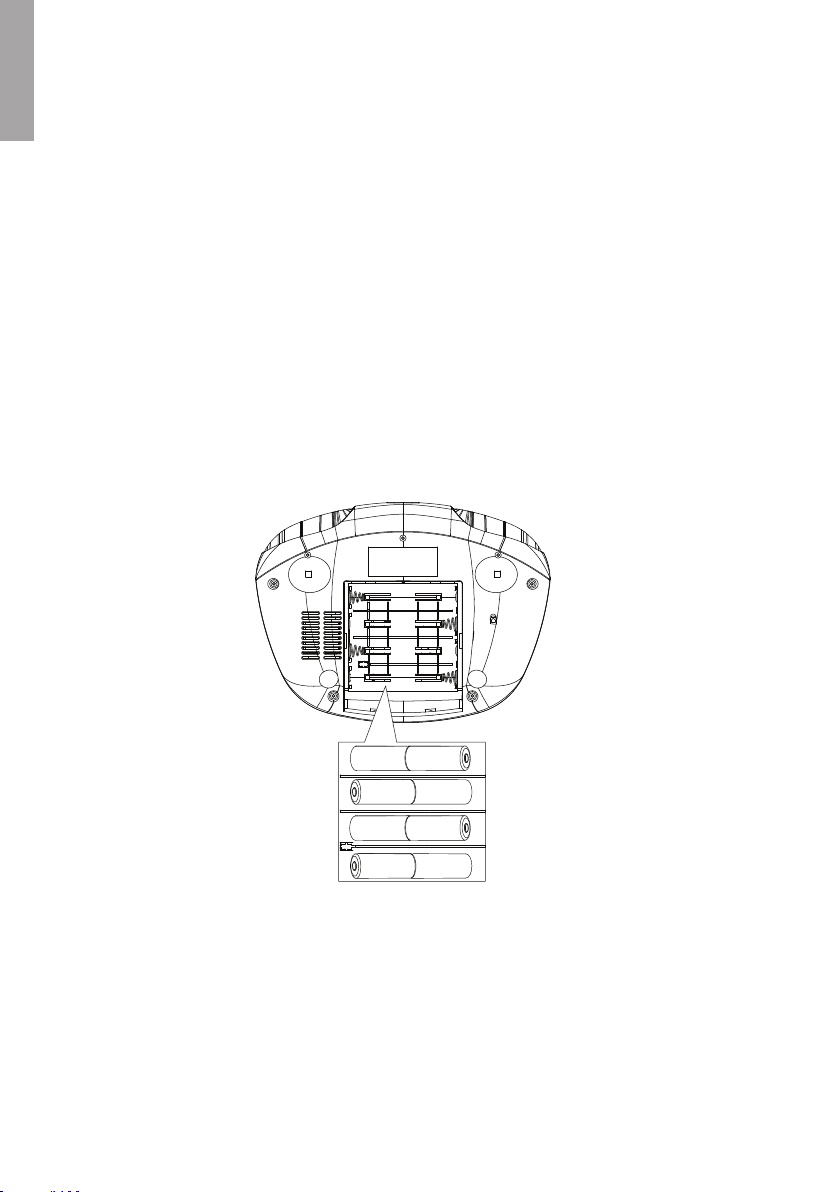
17. Battery compartment for 8 x LR14/C batteries.
18. AC INPUT Socket for mains lead
19. Power switch
ENGLISH
6
4. Power supply
Mains connection
1. Check that the voltage (V) which is shown on the rating plate on the back of
the device is the same as your local electrical power supply (230 V AC, 50 Hz).
Contact Customer Services if this is not the case.
2. Plug the power lead into AC INPUT (18) and to an electrical socket. The player is
now ready to be used.
3. Unplug the player from the electrical socket to cut off the power completely.
Unplug the device from the wall socket to protect it in case of lightning and
thunderstorms.
Inserting the batteries
Open the battery compartment (17) on the bottom and insert 8 x C/LR14 batteries.
Make sure to insert the batteries according to the markings in the battery compartment.

ENGLISH
7
5. Basic functions
Switch the player off to save power.
Always set the function selector to the AUX IN mode (if no external sound source is
connected) or to the CD/USB mode (if no compact disc or USB device is connected)
when the player is not in use to avoid unnecessary power consumption.
N.B. In this mode the batteries will still drain a little, take them out if the player is not to
be used for an extended period. If the player is plugged in to the mains supply, it can
be switched off using the power switch on the back (the power switch has no effect if
the player is running on batteries).
Power switch operation
Listening to the radio
1. Set the function selector (15) to the AM or FM mode.
2. Turn the frequency selector (16) to set the desired station.
FM: Pull out and adjust the telescopic aerial (14) for the best possible reception.
AM: For AM reception there is a built-in ferrite aerial. Redirect the whole player to
get the best reception.
3. Adjust the volume with the volume control (1).
4. Set the function selector (15) to AUX IN mode to turn the player off when
you have finished listening to the radio (this applies to battery operation).
5. Switch the player off using the power switch (19) if it is plugged into the mains.
Playing a CD/MP3
This CD player can play audio discs, CD-R, CD-RW and CDs with MP3 files.
1. Open the CD door by pressing and releasing on the edge marked OPEN/CLOSE
(6) on the top of the player.
2. Insert a CD, CD-R or CD-RW with the text up and then close the CD door by
pressing it down.
3. Set the function selector (15) to CD. On the display - - - is shown shortly before
the total number of tracks is displayed.
4. Press [►/II, CD/USB] (11) to start playback.
5. Press [►/II, CD/USB] (11) to pause playback. Press again to continue playback.
6. Push [STOP] (12) to stop playback.
N.B. The playing of CD or MP3 stops even:
- If you open the CD door.
- When you set the function selector (15) to AM, FM, CD/USB or AUX/IN.
- When the entire CD has been played.
On Off

ENGLISH
8
Play MP3 files from a USB memory
MP3 files can be played from a USB memory. The device supports USB 1.1 and 2.0.
1. Connect a USB memory to the USB connection (18) on the front of the device.
2. Set the function selector (15) to CD/USB.
3. Press and hold in [►/II, CD/USB] (11) for approx. 2 seconds to activate playback
from the USB memory. On the display - - - is shown briefly before the total number
of tracks on the USB memory is displayed.
4. Press [►/II, CD/USB] (11) to start playback.
5. Press [►/II, CD/USB] (11) to pause playback. Press again to continue playback.
6. Push [STOP] (12) to stop playback.
Choosing a different track
By pressing [I ◄◄ / ◄◄] (9) or [►► / ►► I] (10) during playback, you can choose
a particular track.
If a track has been selected whilst in the stop or pause mode, playback can be
restarted by pressing [►/II, CD/USB] (11).
1. Press [►► / ►► I] (10) once to advance to the next track, or press repeatedly
until the desired track number is shown on the display.
2. Press [I ◄◄ / ◄◄] (9) to return to the beginning of the current track.
3. Press the required number of times to return to a previous track.
Fast search
1. Press [I ◄◄ / ◄◄] (9) or [►► / ►► I] (10) and hold the button in. The CD should
now begin high speed playback at low volume.
2. Release [I ◄◄ / ◄◄] (9) or [►► / ►► I] (10) when you hear the section you are
searching for. Normal playback should now resume.
Repeat function
Press [PLAY MODE] (5) repeatedly to activate repeated playback.
The chosen function is shown on the display:
REPEAT 1 – the current track is repeated continuously.
REPEAT ALBUM – the entire CD/USB memory is played repeatedly.
REPEAT ALL – the entire CD/USB memory is played repeatedly.
RANDOM – repeats all tracks in random order.

ENGLISH
9
Programming tracks
You can store up to 32 tracks in any order. You can also programme the same track
more than once.
1. In stop mode, press [PLAY MODE] (5).
2. “PROG” and “P01” will flash in the display.
3. Select the desired folder by pressing [/+10] repeatedly. (applies to MP3 discs
or USB devices).
4. Press [I ◄◄ / ◄◄] (9) or [►► / ►► I] (10) to select the desired track.
5. Press [PLAY MODE] (5) once to save the selected audio file.
6. “PROG” and “P02” (track number) will flash on the display.
7. Repeat step 3 to programme more tracks on P02-P32.
8. Press [►/II, CD/USB] (11) to start playback.
Deleting programmed tracks
You can delete the memory contents by:
1. Opening the CD door.
2. Set the function selector (15) to AM, FM or AUX IN.
3. Press [STOP] twice during current playback or when the player is in stop mode.
Using an extra audio source (AUX IN)
It is possible to connect an external audio source such as an MP3 player.
1. Connect the audio source to AUX IN (3) (connection lead not included).
2. Set the function selector (15) to AUX IN.
3. Adjust the volume.
6. Care
General
Use a soft, dry cloth to clean the device. Do not use cleaning liquids that contain
alcohol, ammonia, petrol or abrasives as these can damage the casing.

ENGLISH
10
7. Proper handling of the CD player and CDs
• The lens of the CD player must not be touched!
• Sudden changes in the surrounding temperature can cause condensation and
the lens can be covered by a layer of moisture. In such cases it is impossible to
play a CD.
• Do not try to dry off the lens. Instead let the device stand in a warm room until the
moisture has evaporated.
• Always close the CD door to keep the CD compartment dust-free. Use a soft, dry
cloth to remove dust from the CD compartment if needed.
• If the CD needs to be cleaned it can be cleaned with a soft, lint-free cloth from the
middle out towards the edge in a straight line. Do not use cleaning liquid as it can
damage the CD.
• Never attach stickers to the CD.
8. Disposal
Follow local ordinances when disposing of this product.
If you are unsure of how to dispose of this product, please contact your local authority.
9. Specifications
Power supply: 230 V AC, 50 Hz or 8 x C/LR14-batteries
Power consumption: 14 W
Output power: 2 x 1 W RMS
Size: 295 x 220 x 130 mm
Radio
Frequency range AM 540 – 1600 kHz
FM 88 – 108 MHz
Table des matières
Langues :
Autres manuels Exibel Lecteur CD


