Evertech CCTV testerPRO Manuel utilisateur

USER’S MANUAL
CCTV TesterPro
Ver:STPV1.32
2009.5

CCTV testerPRO User’s Manual
Thank you for purchasing the CCTV security tester. Please read the manual before using the
CCTV testerPRO, and use properly.
For using the CCTV testerPRO safely, please first read theNjSafety Informationnjcarefully in the
manual.
The manual should be kept well in case of reference.
Keep the S/N label for after-sale service within warranty period. Product without S/N label will
be charged for repair service.
If there is any question or problem while using the CCTV testerPRO, or damages occurred on
the product, please contact our technical Department.
Ver: STPV1.32 Page.1.

CCTV testerPRO User’s Manual
Table of Content
1 Safety Information -----------------------------------------------------------------------------------3
2 Introduction----------------------------------------------------------------------------------------------4
2.1 Features --------------------------------------------------------------------------------------------------4
2.2 CCTV testerPRO Kits ---------------------------------------------------------------------------------5
2.3 Front Panel-----------------------------------------------------------------------------------------------6
2.4 Side View-------------------------------------------------------------------------------------------------8
2.5 Installing the Battery-----------------------------------------------------------------------------------9
3 Operation----------------------------------------------------------------------------------------------------10
3.1 Power on/off--------------------------------------------------------------------------------------------10
3.2 Menu & Functions-------------------------------------------------------------------------------------10
3.3 PTZ controller------------------------------------------------------------------------------------------12
3.4 Video setting -------------------------------------------------------------------------------------------15
3.5 Colorbar generator -----------------------------------------------------------------------------------15
3.6 Cable tester---------------------------------------------------------------------------------------------16
3.7 Data monitor -------------------------------------------------------------------------------------------16
3.8 Device setting------------------------------------------------------------------------------------------17
3.9 Address search----------------------------------------------------------------------------------------18
4 DC12V Power output------------------------------------------------------------------------------------20
5 Audio input test-------------------------------------------------------------------------------------------20
6 Specifications --------------------------------------------------------------------------------------------21
Ver: STPV1.32
Page.2.

CCTV testerPRO User’s Manual
1. Safety Information
Notice
The tester is intended to use in compliance with the local rules of the electrical
usage and avoid to apply at the places which are inapplicable for the use of
electrics such as hospital, gas station etc.
To prevent the functional decline or failure, the product should not be sprinkled
or damped.
The exposed part of the tester should not be touched by the dust and liquid.
During transportation and use, it is highly recommended to avoid the violent
collision and vibration of the tester, lest damaging components and causing
failure.
Don’t leave the tester alone while charging and recharging. If the battery is
found severely hot, the tester should be powered off from the electric source at
once. The test should not be charged over 8 hours.
Don’t use the tester where the humidity is high. Once the tester is damp, power
off immediately and move away other cables connected.
The tester should not be use in the environment with the flammable gas.
Do not disassembly the instrument since no component inside can be repaired
by the user. If the disassembly is necessary indeed, please contact with the
technician of our company.
The instrument should not be used under the environment with strong
electromagnetic interference.
Don’t touch the tester with wet hands or waterish things.
Don’t use the detergent to clean and the dry cloth is suggested to use. If the dirt
is not easy to remove, the soft cloth with water or neutral detergent can be
used., but the cloth should be tweaked sufficiently.
Ver: STPV1.32 Page.3.

CCTV testerPRO User’s Manual
2. Introduction
The CCTV testerPRO is developed for the On-Site installation and maintenance of video
monitoring system. It can be used for displaying video, controlling PTZ, generating images,
capturing data of RS485 and testing LAN cable etc. Its functions, easy operation, and portability
makes it simple for the CCTV technician to install and maintain CCTV system, improving work
efficiency and get the labor cost down.
2.1 Features
3.5"TFT-LCD , 960˄H˅×240˄V˅resolution.
Video Level testing, video signals measured in IRE or mV
DC12V 1A power output for camera
Audio input testing, testing the audio signal from pickup devices
PTZ control. Pan/tilts the P/T unit, zooms in/out the lens, adjusts the focus, aperture and sets
and calls the preset position
Video displaying. Automatically adapts and displays the video format of NTSC/PAL.
LCD Brightness/Contrast/Color Saturation are adjustable.
Video Generating, The PAL/NTSC multi-system colorbar video generator (seven-system
switchable, transmit/receive seven-system colorful imagines)
Data analyst. Captures and analyzes RS485 controlling data to help the technician to find out
the problem.
Cable testing. It is powerful in testing LAN cable, measuring the connecting status ˈdisplaying
the sequence of connection and the NO. of the LAN cable.
Multi-interface and Multi-baud rate. Support RS232 ,RS485 and RS422 interface; baud rate
ranging from 150, 600 to 19200bps.
Multi-protocol. Supports more than twenty PTZ protocols. For example, PELCO-P, PELCO-D,
SAMSUNG etc.
PTZ address scanning, search up the ID of PTZ camera.
Ver: STPV1.32
Page.4.

CCTV testerPRO User’s Manual
Lithium Ion Polymer Battery (3.7V DC3000mAh). The device employs advanced power control
and protection circuit. The device is high power-efficient, energy saving and environmental
protection. It can last 12 hours for normal use after charging for 4 hours.
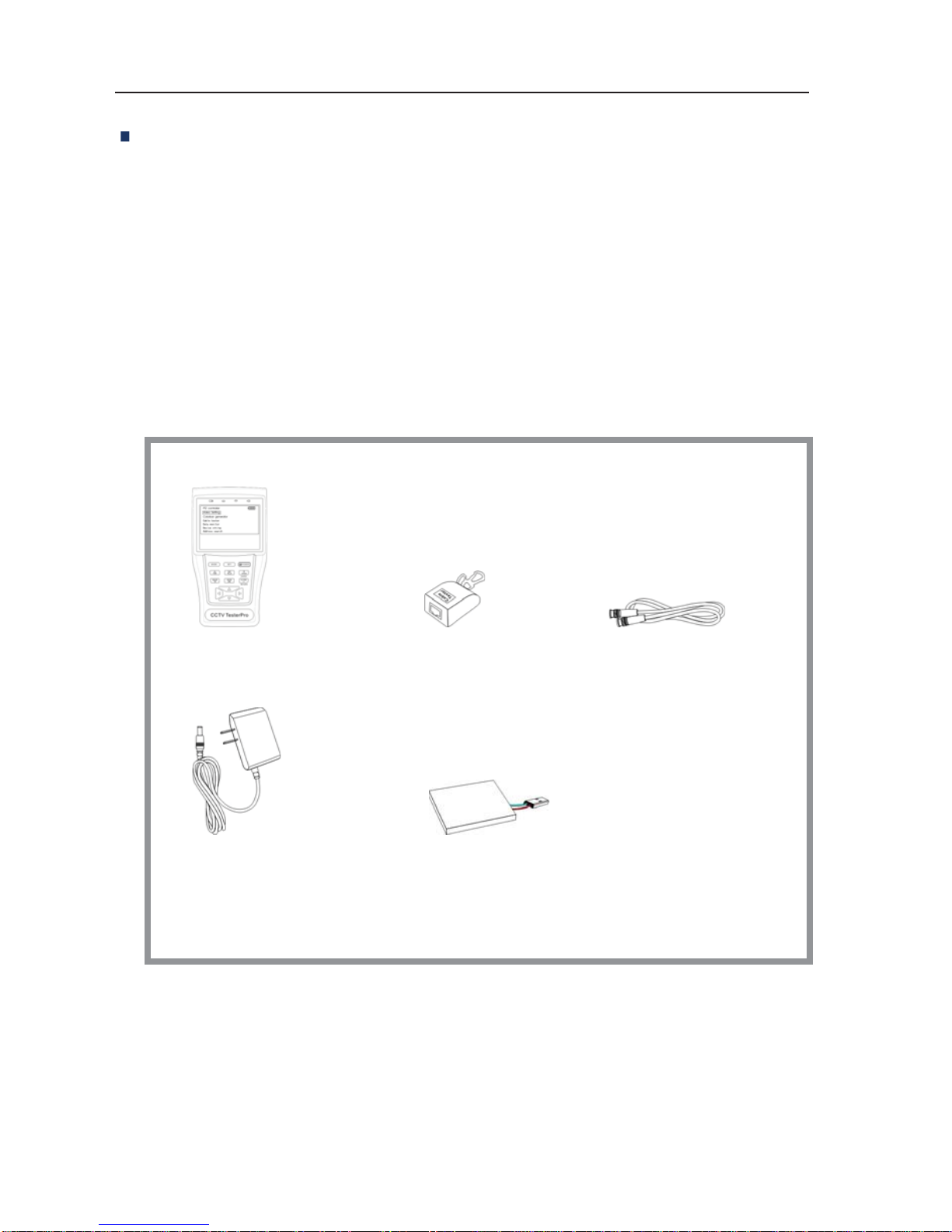
2.2 CCTV testerPRO Kits
Professional design, light and portability, video display and data control are deliberately
integrated, which makes the instrument so simple, practicable, easy for use that the training is
almost unnecessary for an operator to be skillful.
1.CCTVtesterPRO 3.LANCableTester 5.BNCCable
6.Safetycord
7. RS485 data cable
2. Power Supply (5V 2A) 4. Lithium Ion Polymer Battery 8. Instruction Manual
Ver: STPV1.32 Page.5.

CCTV testerPRO User’s Manual
2.3Front Panel
1The power indicator: it lights green while the tester is powered on.
2The data-reception indicator: it lights red while the data is being received.
3The data-transmission indicator: it lights red while the data is being
transmitted
4The charge indicator: it lights red while the battery is being charged. As
the charging is complete, the indicator turns off automatically.
5The display Icon of battery electricity: it displays the electric quantity
6Main-menu: it shows main functions of CCTV testerPRO.
Ver: STPV1.32
Page.6.

CCTV testerPRO User’s Manual
7Sub-menu: Shows and sets the values of functions
8Long-pressing it more than 2 seconds to turn on/off the tester;
short-pressing to turn on/off the PTZ controller menu displaying.
9Menu key: it pops up the main-menu; constant-press it or press the
or key can shift between functions
10 Setup key : press it or press left or right key to enter sub-menu to set the
parameters of functions.
11 Upward : Select the item which will be set or add the value of the
parameter. Tilt the PTZ upward.
12 Leftward : Enter the sub-menu or select the parameter whose value will be
changed. Reduce the value of the parameter. Pan the PTZ left.
13 Rightward : Enter the sub-menu or select the parameter whose value will
be changed. Add the value of the parameter. Pan the PTZ right.
14 Downward : Select the item which will be set or reduce the value of the
parameter. Tilt the PTZ downward.
15 Confirm/Open : Confirm the setting of parameters; open the aperture.
16 Return/Close : Return or cancel while setting parameters of the menu;
close the aperture
17 Near focus: Focus the image nearby.
18 Far focus: Focus the image faraway.
19 TELE: zoom in the image
20 WIDE: zoom out the image
Ver: STPV1.32 Page.7.

CCTV testerPRO User’s Manual
2.4 Side view
22 Reset the default settings of parameters.
23 External power supply (DC, 5V): It is highly recommended to use the equipped power adapter.
24 UTP cable port: Please use together with UTP LAN cable tester.
25 RS232 interface: RS232 communication for the PTZ.
26 Audio input: test the pickup and other audio equipments on the front-end
27 DC12V1A power output: output DC12V power for camera
28 Tester speaker
29 Video input (BNC input interface): Inputs the video.
30 Video output (BNC output interface): Outputs the video.
31 RS485/422 Interface: RS485/RS422 communication for the PTZ.
Ver: STPV1.32
Page.8.

CCTV testerPRO User’s Manual
2.5 Installing the Battery
The tester has built-in lithium ion polymer rechargeable battery. The battery cable inside battery
cabin should be disconnected for safety during transportation!
Prior to the use of the instrument, the battery cables inside the battery cabin should be
well connected.
Usually it need not to disconnect the cable at the normal use, pressing key
continuously can power on or off the tester.
At the first time of use, the batteries should be completely exhausted and then
recharged for 4 or 5 hours.
The Charge Indicator lights red when charging the battery, The charge indicator
turns off automatically when the charging is completed.
ƸNotice:When the Charge Indicator turns off, the battery is approximately 90% charged.
The charging time can be extended for about 1 hour and the charging time within 8
hours will not damage the battery.
ƸThe tester can work as usual while it is being charged, however. But the charging time will
be extended.
Press the RESET key at the right of the instrument to restore the default settings when the
instrument works abnormally.
Ver: STPV1.32 Page.9.
Table des matières
Manuels Équipement de test populaires d'autres marques

SMART
SMART KANAAD SBT XTREME 3G Series Manuel utilisateur

Agilent Technologies
Agilent Technologies BERT Serial Manuel utilisateur

Agilent Technologies
Agilent Technologies N3280A Manuel utilisateur

Vernier
Vernier Go Direct Voltage Manuel utilisateur

Lifeloc
Lifeloc R.A.D.A.R. Manuel utilisateur

Fluke
Fluke T5-600 Instructions d'utilisation et d'installation