Eusso GL2411-MU Manuel utilisateur

W
WI
IR
RE
EL
LE
ES
SS
S
M
Mi
in
ni
i
S
Si
iz
ze
e
U
US
SB
B
A
AD
DA
AP
PT
TE
ER
R
Version:1.5Date:1/25/2002

1
Federal Communications Commission Statement
This device complies with FCC Rules Part 15. Operation is subject to the following two conditions:
This device may not cause harmful interference.
This device must accept any interference received, including interference that may cause undesired operation.
This equipment has been tested and found to comply with the limits for a Class B digital device, pursuant to Part
15 of the FCC Rules. These limits are designed to provide reasonable protection against harmful interference in a
residential installation. This equipment generates, uses and can radiate radio frequency energy. If this equipment
is not installed and used in accordance with the manufacturer's instructions, it may cause harmful interference to
radio communications. However, there is no guarantee that interference will not occur in a particular installation. If
this equipment does cause harmful interference to radio or television reception, which can be determined by
during the equipment off and on, the user is encouraged to try to correct the interference by one or more of the
following measures:
Reorient or relocate the receiving antenna.
Increase the separation between the equipment and receiver.
Connect the equipment to an outlet on a circuit different from that to which the receiver is connected.
Consult the dealer or an experienced radio/TV technician for help.
The use of shielded cables for connection of the monitor to the graphics card is required to assure compliance
with FCC regulations. Changes or modifications to this unit not expressly approved by the party responsible for
compliance could void the user's authority to operate this equipment.
This equipment complies with FCC radiation exposure limits set forth for an uncontrolled environment. This
equipment should be installed and operated with minimum distance 20cm between the radiator and your body.
Manufacturer's Disclaimer Statement
Theinformation in this document is subject to change without notice and does not represent a commitment on the
part of the vendor. No warranty or representation, either expressed or implied, is made with respect to the
quality, accuracy or fitness for any particular purpose of this document. The manufacturer reserves the right to
make changes to the content of this document and/or the products associated with it at any time without obligation
to notify any person or organization of such changes. In no event will themanufacturer be liable for direct,
indirect, special, incidental or consequential damages arising out of the use or inability to use this product or
documentation, even if advised of the possibility of such damages. This document contains materials protected
by copyright. All rights are reserved. No part of this manual may be reproduced or transmitted in any form, by
any means or for any purpose without expressed written consent of its authors. Product names appearing in this
document are mentioned for identification purchases only. All trademarks, product names or brand names
appearing in this document are registered property of their respective owners.
Printed in Taiwan

2
Contents
SECTION 1 ABOUT WIRELESS USB ADAPTER CARD.......................3
1-1INTRODUCTION........................................................................................................................................................3
1-2FEATURES .....................................................................................................................................................................3
1-3APPLICATIONS...........................................................................................................................................................3
1-4PRODUCT KIT............................................................................................................................................................4
SECTION 2 WIRELESS USB ADAPTER HARDWARE
INSTALLATION.......................................................................................................................................................5
2-1EQUIPMENT REQUIREMENT............................................................................................................................5
2-2WIRELESS USBADAPTERHARDWARE INSTALLATION..................................................5
2-3WIRELESS USBADAPTERSOFTWARE LIMITATION...........................................................5
SECTION 3 SOFTWARE INSTALLATION AND CONFIGURING
3-1AUTO RUN INSTALLATION...................................................................................................................6
3-2INSTALLING WIRELESSUSBADAPTERDRIVER ................................................................9
3-3INSTALLING WIRELESSUSBADAPTERUTILITY............................................................... 10
3-4INSTALLING WIRELESSUSBADAPTERUTILITY............................................................... 10
3-5CONFIGURING THE USB ADAPTER USING XP (FOR XP ONLY).......................................... 17
3-6CONFIGURING WIRELESS USB ADAPTER CARD.......................................................................... 20
APPENDIX A NETWORK CONFIGURATION.................................................... 23
A-1NETWORK TOPOLOGY..................................................................................................................................... 23
Ad-Hoc Mode....................................................................................................................................................................... 23
Infrastructure....................................................................................................................................................................... 24
A-2ROAMING .................................................................................................................................................................. 25
APPENDIX B GLOSSARY.................................................................................................................. 26

3
Section 1 About WIRELESS USB ADAPTER CARD
1-1 Introduction
The WIRELESS USB ADAPTER is a long-range, high performance LAN product, which provides the
connectivity with the access point to a 2,4 GHz RF network and bridges to an Ethernet backbone. The design
of this product is based on AT76C503A (bridge-on-a-chip) module, a highly integrated ASIC designed to
combine legacy LANs with wireless LANs. The Wireless USB Adapter supports an outside-the-box
LAN connection for USB-enabled PCs with excellent levels of security, robustness and roaming
features required for you business with a data rate up to 11Mbps. Incompatibility with USB
specification 1.1, this USB adapter device also provides energy-saving suspend mode and resume
operations. It is a real plug-and-play, Hot-swapping and simple test installation device with the
support of full Microsoft network security.
1-2 Features
–IEEE 802.11b Direct Sequence high data rate compatible
–Glueless connection to Intersil PRISMII Direct Sequence Spread Spectrum (DSSS) radio chip set. Able
to communicate also with other DSSS radios
–Supports 11 Mbps rates with automatic fallback to 5.5, 2 and 1 Mbps
–Advanced Power Management for power saving mode
–External Dipole antenna to increase the transmission power and receiving sensitivity
–Plug-and-Play installation
–WEP encryption/decryption is accomplished on the fly. 64/128 bit
–Glueless SRAM, Flash interface for data buffering and program storage, supporting up to 16 MB of
memory
1-3 Applications
The Serial of LAN products offer a fast, reliable, cost-effective solution, allowing clients to wirelessly
access the network in applications such as following:
1. Remote access to corporate network information
E-mail, file transfer and terminal emulation
2. Difficult-to-wireenvironments
Historical or old buildings, asbestos installations, and open area where wiring is difficult to employ

4
3. Frequently changing environments
Retailers, manufacturers and banks who frequently rearrange the workplace and change location
4. Temporary LANs for special projects or peak time
Trade shows, exhibitions and construction sites need temporary setup for a short time period. Retailers,
airlinesand shipping companies need additional workstations for a peak period. Auditors require
workgroups at customer sites.
5. Access to database for mobile workers
Doctors, nurses, retailers, white-collar workers need access to database while being mobile in the hospital,
retail store or office campus.
6. SOHO (Small Office and Home Office) users
SOHO users need easy and quick installation of a small computer network.
1-4 ProductKit
uWIRELESS USB ADAPTER ……………………………………………………….x 1
uAntenna (fixed)………………………………………………….……………………x 1
uWIRELESS USB ADAPTER Driver utility Disk (2pcs).….……….….……...…...x 1
uUSB cable…………………………………………………………………….……….x 1
If any of the listed items are not included or found damaged, please contact your local dealer.

5
Section 2 WIRELESS USB ADAPTER Hardware Installation
2-1 Equipment Requirement
Installation of WIRELESS USB ADAPTER requires
One PC with USB version 1.1 compliant interface
Windows®98, ME, 2000 OS Software CD, as Windows 95/NT do not support USB.
500 Kbytes free disk space for utility and driver installation
2-2 WIRELESSUSBADAPTER Hardware Installation
To install the wireless USB ADAPTER, please connect one end of the USB cable to the device card first.
Then connect the other end of USB cable to the USB port on the your desktop or laptop. The power LED
should light up in green when the PC is on.
Adjust the direction ofthe antenna placement to improve the WIRELESSUSB ADAPTER ’s performance.
Try to place the antenna in the position which can have the good connection to Access point. Normally, the
higher you place the antenna, the better the performance will be.
2-3 WIRELESSUSBADAPTER Software Limitation
Please note that Windows 95 / NT do not support USB. Before installing the USB Adapter, please check that
your desktop or laptop is equipped with the Windows 98, ME or 2000 OS.

6
Section 3 Software Installation And Configuration
3-1 InstallingWIRELESS USB Adapter Driver withAuto Run option
1. Insert the Drivers and Utilities CD into the CD or DVD drive
Please make sure to install the software before plug in the device to prevent
possible failure of the installation.
2. Click the “Install” button to start automatic installation.
3. Setup is preparing for the installation process.
4. When the welcome screen appears, click “Next” to continue.

7
5. Click “Next” to install to default folder or “Browse” to select different location.
6. Leave the default selection if Access Point is connected to the network.
or
7. select “Ad-Hoc mode” if there are only two or more computers on the network.

8
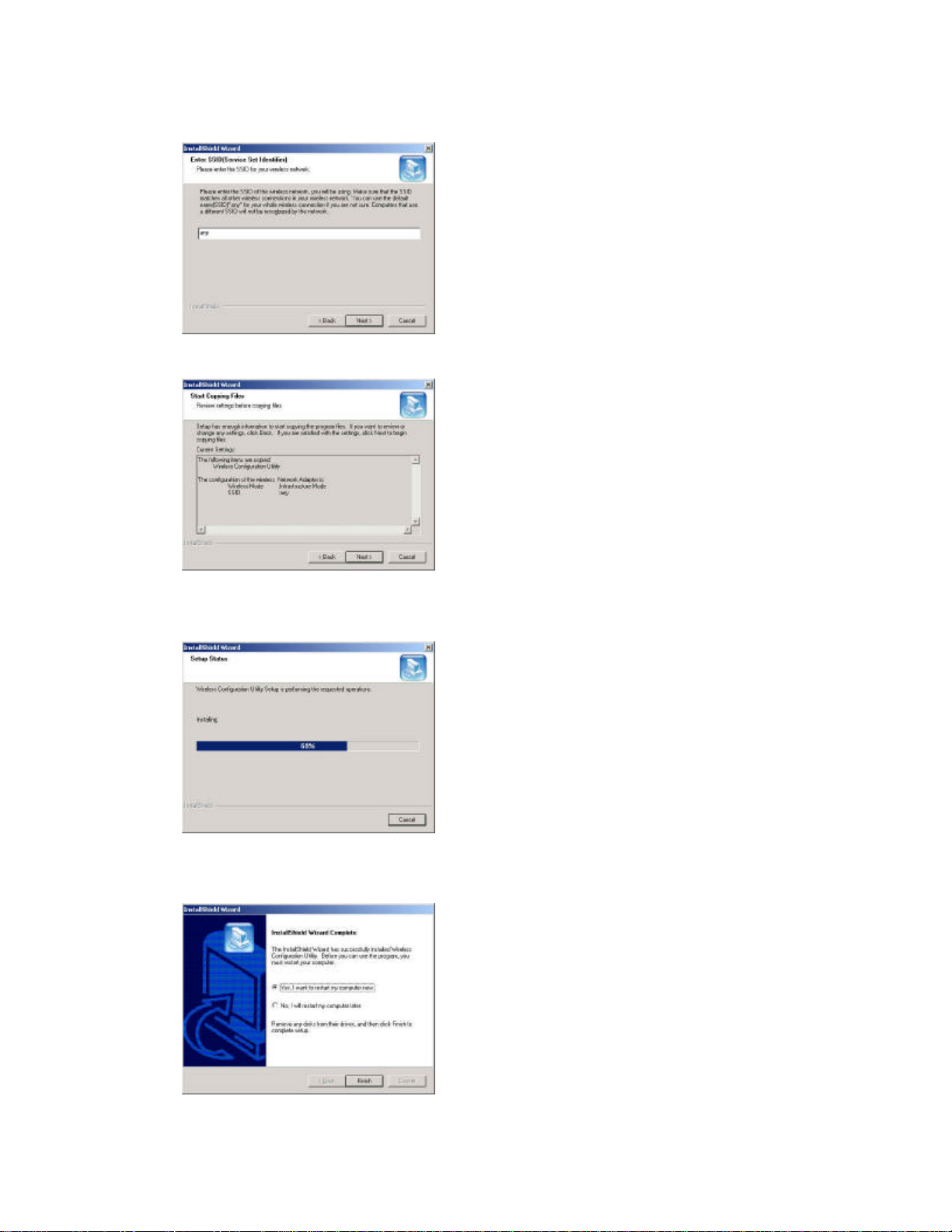
8. Enter SSID then click “Next”.
9. Click “Next” to start copying files.
10. Setup is copying files.
11. Upon completion, click “Finish” to restart computer.

9
3-2Installing WIRELESS USB Adapter Driver
1. Ensure you have followed the procedure as described in the previous section to finish hardware installation.
Plug the two sides of the USB cable into the USB slots of WIRELESS USB ADAPTER and your PC.
2. The Windows®will automatically detect the Wireless USB Adapter and prompt you to install the necessary
driver. Please make sure that the Setup Utility Driver Disk No. 2 is inserted into your Floppy and click
“Next” to begin the installation.
3. Select “Search for the best driver for your device…” and click “Next”.
4. Select “CD-ROM drive”. Windows® will automatically find the file. Then click “Next”.
5. The Windows®will then acknowledge that it has found the appropriate driver and click "Next".
Table des matières
Autres manuels Eusso Adaptateur

Eusso
Eusso UPL5500-201 Manuel utilisateur

Eusso
Eusso Wireless-N PCI Adapter Manuel utilisateur

Eusso
Eusso UGL2430-UHM Manuel utilisateur

Eusso
Eusso 200Mbps Powerline HomePlug Manuel utilisateur

Eusso
Eusso Wireless-N PCI Adapter Manuel utilisateur

Eusso
Eusso UGL2430-U2H2 Manuel utilisateur

Eusso
Eusso 85Mbps Powerline HomePlug Ethernet Adapter Manuel utilisateur