www.eurolube.com 205203 EUROLUBE EQUIPMENT
PART NO 16721, 16724, 16813, 16868 / ART.NR. 16721, 16724, 16813, 16868
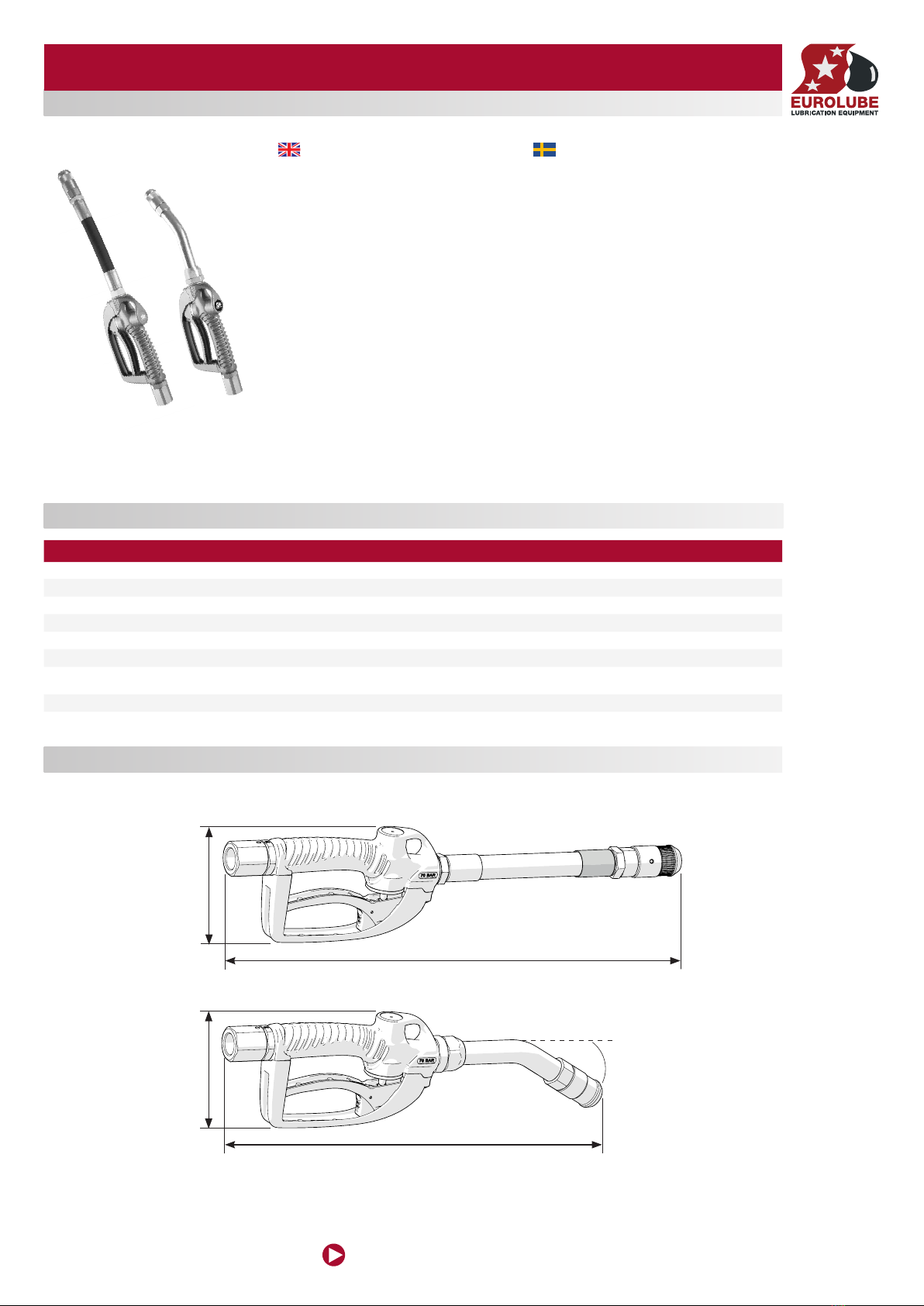
HIGH VOLUME OIL CONTROL GUN
5
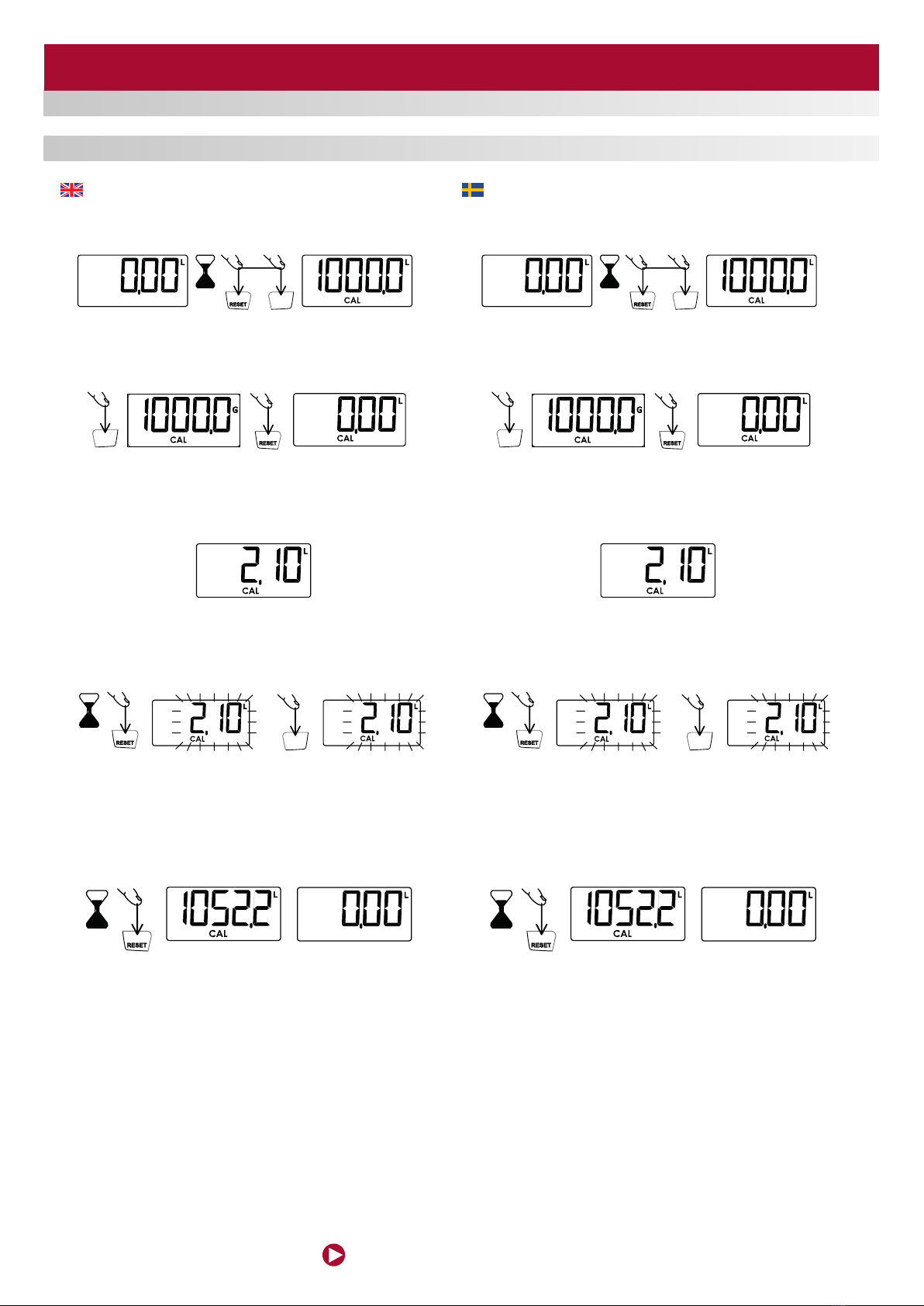
The calibration process is semi-automatic. To start the process, the meter must be in
partial meter mode (g. 14) and is accessed by simultaneously pressing the buttons
RESET and TOTAL/TRIP for 3 seconds (g. 15). After releasing the buttons the current
calibration factor is shown on the meter (g. 16).
If the screen does not show the correct measuring unit (g. 16) press the TOTAL/TRIP
button (g. 17) successively until displaying the required unit (g. 18). Press RESET (g.
19) to start the calibration process (g. 20).
It now starts to release the desired volume into the container. Remember that you
must release at least 2 litres to perform a good calibration. In the example shown in
the gures it is assumed that 2 litres are released according to the reading on the
calibrated container and that the meter records 2.1 litres (g. 21).
To administer the real quantity released (which is that measured in the calibrated
container or scales), press the RESET button for 1 second (g. 22). The digits start to
ash (g. 23) indicating that the value shown can be modied. Each press of the RESET
button increases the value by 0.1 litres and each press of the TOTAL/ TRIP button (g.
24) reduces this value by 0.1 litres (g. 25).
Once the real value released is set (g. 25) press the RESET button for 1 second (g.
26). The meter shows the new stored calibration factor (g. 27) and then exits the
calibration process. The screen shows the partial meter with the units set during the
calibration process (g. 28). If, during any phase of the calibration process, you wish
to exit without saving the changes made you must press the TOTAL/TRIP button for
1 second. Likewise, if 30 seconds of inactivity elapse during the process, the meter
switches off automatically and exits the calibration process without storing the data.
Kalibreringsproceduren är halvautomatisk. För att starta kalibreringen måste mätaren
stå i normal läge (g. 14). Tryck och håll in TOTAL/TRIP samt RESET knappen i tre
sekunder. När knapparna släpps kommer kalibreringsfaktorn visas i fönstret (g. 16).
Om fel enhet visas i fönstret (g. 16) tryck på TOTAL/TRIP tills önskad enhet visas. Tryck
på RESET (g. 19) för att starta kalibreringsprocessen (g 20).
Fortsätt genom att tappa upp minst två liter i mätcylindern. I följande exempel antas att 2
liter är tappat enligt mätcylindern och att mätaren har registrerat 2,1 liter (g. 21).
För att mata in det faktiska värde som är uppmätt i mätcylindern (eller våg)Tryck och
håll in RESET i en sekund. Siffrorna i displayen kommer att börja blinka för att visa att
de går att ändra. Varje intryckning av RESET kommer att öka värdet med 0,1 liter, varje
tryck på TOTAL/TRIP kommer minska värdet med 0,1 liter.
När det önskade värdet visas i fönstret (i detta fall 2,00), tryck och håll in RESET i en
sekund (g 26). Mätaren kommer nu att visa den nya kalibreringsfaktorn, och sedan
återgå till normalläge. Vill man i något steg avbryta kalibreringsproceduren utan att
spara några ändringar, görs detta genom att hålla in TOTAL/TRIP knappen i en sekund.
Om trettio sekunders inaktivitet inträffar kommer mätaren stängas av och återgå till
normalläge utan att spara ändringar.
CALIBRATION / KALIBRERING
105088
Alentec & Orion AB Grustagsvägen 4, SE-13840, Älta, SWEDEN · info@alentec.se · www.alentec.com
5
ENGLISHSVENSKAFRANÇAISDEUTSCH
ESPAÑOL
To administer the real quantity released (which is that measured in
the calibrated container or scales), press the RESET button for 1
second (fig. 22). The digits start to flash (fig. 23) indicating that the
value shown can be modified. Each press of the RESET button
increases the value by 0.1 litres and each press of the TOTAL/
TRIP button (fig. 24) reduces this value by 0.1 litres (fig. 25).
After the calibration process you will obtain precision within the
range of ±0.5% with the meter. If the meter exceeds this range it
could be due to the following:
• Unsuitable container used for the calibration.
The calibration process is semi-automatic. To start the process, the
meter must be in partial meter mode (fig. 14) and is accessed by
simultaneously pressing the buttons RESET and TOTAL/TRIP for
3 seconds (fig. 15). After releasing the buttons the current
calibration factor is shown on the meter (fig. 16).
If the screen does not show the correct measuring unit (fig. 16)
press the TOTAL/TRIP button (fig. 17) successively until displaying
the required unit (fig. 18).
Press RESET (fig. 19) to start the calibration process (fig. 20).
It now starts to release the desired volume into the container.
Remember that you must release at least 1 litre to perform a good
calibration. In the example shown in the figures it is assumed that
2 litres are released according to the reading on the calibrated
container and that the meter records 2.1 litres (fig. 21).
• The container is not empty before the calibration.
• Air in the fluid which has not been completely removed.
• The values are not properly introduced into the calibration
process.
Once the real value released is set (fig. 25) press the RESET
button for 1 second (fig. 26). The meter shows the new stored
calibration factor (fig. 27) and then exits the calibration process.
The screen shows the partial meter with the units set during the
calibration process (fig. 28).
If, during any phase of the calibration process, you wish to exit
without saving the changes made you must press the TOTAL/TRIP
button for 1 second. Likewise, if 30 seconds of inactivity elapse
during the process, the meter switches off automatically and exits
the calibration process without storing the data.
CALIBRATION
CALIBRATION CAPACITY
CALIBRATION PROCEDURES
Fig. 14 Fig. 15 Fig. 16
Fig. 21
Fig. 17 Fig. 19Fig. 18 Fig. 20
Fig. 22 Fig. 23 Fig. 24 Fig. 25
3"
1"
1"
Fig. 26 Fig. 27 Fig. 28
TOTAL / TRIP
105088
Alentec & Orion AB Grustagsvägen 4, SE-13840, Älta, SWEDEN · info@alentec.se · www.alentec.com
5
ENGLISHSVENSKAFRANÇAISDEUTSCH
ESPAÑOL
To administer the real quantity released (which is that measured in
the calibrated container or scales), press the RESET button for 1
second (fig. 22). The digits start to flash (fig. 23) indicating that the
value shown can be modified. Each press of the RESET button
increases the value by 0.1 litres and each press of the TOTAL/
TRIP button (fig. 24) reduces this value by 0.1 litres (fig. 25).
After the calibration process you will obtain precision within the
range of ±0.5% with the meter. If the meter exceeds this range it
could be due to the following:
• Unsuitable container used for the calibration.
The calibration process is semi-automatic. To start the process, the
meter must be in partial meter mode (fig. 14) and is accessed by
simultaneously pressing the buttons RESET and TOTAL/TRIP for
3 seconds (fig. 15). After releasing the buttons the current
calibration factor is shown on the meter (fig. 16).
If the screen does not show the correct measuring unit (fig. 16)
press the TOTAL/TRIP button (fig. 17) successively until displaying
the required unit (fig. 18).
Press RESET (fig. 19) to start the calibration process (fig. 20).
It now starts to release the desired volume into the container.
Remember that you must release at least 1 litre to perform a good
calibration. In the example shown in the figures it is assumed that
2 litres are released according to the reading on the calibrated
container and that the meter records 2.1 litres (fig. 21).
• The container is not empty before the calibration.
• Air in the fluid which has not been completely removed.
• The values are not properly introduced into the calibration
process.
Once the real value released is set (fig. 25) press the RESET
button for 1 second (fig. 26). The meter shows the new stored
calibration factor (fig. 27) and then exits the calibration process.
The screen shows the partial meter with the units set during the
calibration process (fig. 28).
If, during any phase of the calibration process, you wish to exit
without saving the changes made you must press the TOTAL/TRIP
button for 1 second. Likewise, if 30 seconds of inactivity elapse
during the process, the meter switches off automatically and exits
the calibration process without storing the data.
CALIBRATION
CALIBRATION CAPACITY
CALIBRATION PROCEDURES
Fig. 14 Fig. 15 Fig. 16
Fig. 21
Fig. 17 Fig. 19Fig. 18 Fig. 20
Fig. 22 Fig. 23 Fig. 24 Fig. 25
3"
1"
1"
Fig. 26 Fig. 27 Fig. 28
TOTAL / TRIP
105088
Alentec & Orion AB Grustagsvägen 4, SE-13840, Älta, SWEDEN · info@alentec.se · www.alentec.com
5
ENGLISHSVENSKAFRANÇAISDEUTSCH
ESPAÑOL
To administer the real quantity released (which is that measured in
the calibrated container or scales), press the RESET button for 1
second (fig. 22). The digits start to flash (fig. 23) indicating that the
value shown can be modified. Each press of the RESET button
increases the value by 0.1 litres and each press of the TOTAL/
TRIP button (fig. 24) reduces this value by 0.1 litres (fig. 25).
After the calibration process you will obtain precision within the
range of ±0.5% with the meter. If the meter exceeds this range it
could be due to the following:
• Unsuitable container used for the calibration.
The calibration process is semi-automatic. To start the process, the
meter must be in partial meter mode (fig. 14) and is accessed by
simultaneously pressing the buttons RESET and TOTAL/TRIP for
3 seconds (fig. 15). After releasing the buttons the current
calibration factor is shown on the meter (fig. 16).
If the screen does not show the correct measuring unit (fig. 16)
press the TOTAL/TRIP button (fig. 17) successively until displaying
the required unit (fig. 18).
Press RESET (fig. 19) to start the calibration process (fig. 20).
It now starts to release the desired volume into the container.
Remember that you must release at least 1 litre to perform a good
calibration. In the example shown in the figures it is assumed that
2 litres are released according to the reading on the calibrated
container and that the meter records 2.1 litres (fig. 21).
• The container is not empty before the calibration.
• Air in the fluid which has not been completely removed.
• The values are not properly introduced into the calibration
process.
Once the real value released is set (fig. 25) press the RESET
button for 1 second (fig. 26). The meter shows the new stored
calibration factor (fig. 27) and then exits the calibration process.
The screen shows the partial meter with the units set during the
calibration process (fig. 28).
If, during any phase of the calibration process, you wish to exit
without saving the changes made you must press the TOTAL/TRIP
button for 1 second. Likewise, if 30 seconds of inactivity elapse
during the process, the meter switches off automatically and exits
the calibration process without storing the data.
CALIBRATION
CALIBRATION CAPACITY
CALIBRATION PROCEDURES
Fig. 14 Fig. 15 Fig. 16
Fig. 21
Fig. 17 Fig. 19Fig. 18 Fig. 20
Fig. 22 Fig. 23 Fig. 24 Fig. 25
3"
1"
1"
Fig. 26 Fig. 27 Fig. 28
TOTAL / TRIP
TOTAL / TRIP
105088
Alentec & Orion AB Grustagsvägen 4, SE-13840, Älta, SWEDEN · info@alentec.se · www.alentec.com
5
ENGLISHSVENSKAFRANÇAISDEUTSCH
ESPAÑOL
To administer the real quantity released (which is that measured in
the calibrated container or scales), press the RESET button for 1
second (fig. 22). The digits start to flash (fig. 23) indicating that the
value shown can be modified. Each press of the RESET button
increases the value by 0.1 litres and each press of the TOTAL/
TRIP button (fig. 24) reduces this value by 0.1 litres (fig. 25).
After the calibration process you will obtain precision within the
range of ±0.5% with the meter. If the meter exceeds this range it
could be due to the following:
• Unsuitable container used for the calibration.
The calibration process is semi-automatic. To start the process, the
meter must be in partial meter mode (fig. 14) and is accessed by
simultaneously pressing the buttons RESET and TOTAL/TRIP for
3 seconds (fig. 15). After releasing the buttons the current
calibration factor is shown on the meter (fig. 16).
If the screen does not show the correct measuring unit (fig. 16)
press the TOTAL/TRIP button (fig. 17) successively until displaying
the required unit (fig. 18).
Press RESET (fig. 19) to start the calibration process (fig. 20).
It now starts to release the desired volume into the container.
Remember that you must release at least 1 litre to perform a good
calibration. In the example shown in the figures it is assumed that
2 litres are released according to the reading on the calibrated
container and that the meter records 2.1 litres (fig. 21).
• The container is not empty before the calibration.
• Air in the fluid which has not been completely removed.
• The values are not properly introduced into the calibration
process.
Once the real value released is set (fig. 25) press the RESET
button for 1 second (fig. 26). The meter shows the new stored
calibration factor (fig. 27) and then exits the calibration process.
The screen shows the partial meter with the units set during the
calibration process (fig. 28).
If, during any phase of the calibration process, you wish to exit
without saving the changes made you must press the TOTAL/TRIP
button for 1 second. Likewise, if 30 seconds of inactivity elapse
during the process, the meter switches off automatically and exits
the calibration process without storing the data.
CALIBRATION
CALIBRATION CAPACITY
CALIBRATION PROCEDURES
Fig. 14 Fig. 15 Fig. 16
Fig. 21
Fig. 17 Fig. 19Fig. 18 Fig. 20
Fig. 22 Fig. 23 Fig. 24 Fig. 25
3"
1"
1"
Fig. 26 Fig. 27 Fig. 28
TOTAL / TRIP
TOTAL / TRIP
105088
Alentec & Orion AB Grustagsvägen 4, SE-13840, Älta, SWEDEN · info@alentec.se · www.alentec.com
5
ENGLISHSVENSKAFRANÇAISDEUTSCH
ESPAÑOL
To administer the real quantity released (which is that measured in
the calibrated container or scales), press the RESET button for 1
second (fig. 22). The digits start to flash (fig. 23) indicating that the
value shown can be modified. Each press of the RESET button
increases the value by 0.1 litres and each press of the TOTAL/
TRIP button (fig. 24) reduces this value by 0.1 litres (fig. 25).
After the calibration process you will obtain precision within the
range of ±0.5% with the meter. If the meter exceeds this range it
could be due to the following:
• Unsuitable container used for the calibration.
The calibration process is semi-automatic. To start the process, the
meter must be in partial meter mode (fig. 14) and is accessed by
simultaneously pressing the buttons RESET and TOTAL/TRIP for
3 seconds (fig. 15). After releasing the buttons the current
calibration factor is shown on the meter (fig. 16).
If the screen does not show the correct measuring unit (fig. 16)
press the TOTAL/TRIP button (fig. 17) successively until displaying
the required unit (fig. 18).
Press RESET (fig. 19) to start the calibration process (fig. 20).
It now starts to release the desired volume into the container.
Remember that you must release at least 1 litre to perform a good
calibration. In the example shown in the figures it is assumed that
2 litres are released according to the reading on the calibrated
container and that the meter records 2.1 litres (fig. 21).
• The container is not empty before the calibration.
• Air in the fluid which has not been completely removed.
• The values are not properly introduced into the calibration
process.
Once the real value released is set (fig. 25) press the RESET
button for 1 second (fig. 26). The meter shows the new stored
calibration factor (fig. 27) and then exits the calibration process.
The screen shows the partial meter with the units set during the
calibration process (fig. 28).
If, during any phase of the calibration process, you wish to exit
without saving the changes made you must press the TOTAL/TRIP
button for 1 second. Likewise, if 30 seconds of inactivity elapse
during the process, the meter switches off automatically and exits
the calibration process without storing the data.
CALIBRATION
CALIBRATION CAPACITY
CALIBRATION PROCEDURES
Fig. 14 Fig. 15 Fig. 16
Fig. 21
Fig. 17 Fig. 19Fig. 18 Fig. 20
Fig. 22 Fig. 23 Fig. 24 Fig. 25
3"
1"
1"
Fig. 26 Fig. 27 Fig. 28
TOTAL / TRIP
TOTAL / TRIP
TOTAL / TRIP
105088
Alentec & Orion AB Grustagsvägen 4, SE-13840, Älta, SWEDEN · info@alentec.se · www.alentec.com
5
ENGLISHSVENSKAFRANÇAISDEUTSCH
ESPAÑOL
To administer the real quantity released (which is that measured in
the calibrated container or scales), press the RESET button for 1
second (fig. 22). The digits start to flash (fig. 23) indicating that the
value shown can be modified. Each press of the RESET button
increases the value by 0.1 litres and each press of the TOTAL/
TRIP button (fig. 24) reduces this value by 0.1 litres (fig. 25).
After the calibration process you will obtain precision within the
range of ±0.5% with the meter. If the meter exceeds this range it
could be due to the following:
• Unsuitable container used for the calibration.
The calibration process is semi-automatic. To start the process, the
meter must be in partial meter mode (fig. 14) and is accessed by
simultaneously pressing the buttons RESET and TOTAL/TRIP for
3 seconds (fig. 15). After releasing the buttons the current
calibration factor is shown on the meter (fig. 16).
If the screen does not show the correct measuring unit (fig. 16)
press the TOTAL/TRIP button (fig. 17) successively until displaying
the required unit (fig. 18).
Press RESET (fig. 19) to start the calibration process (fig. 20).
It now starts to release the desired volume into the container.
Remember that you must release at least 1 litre to perform a good
calibration. In the example shown in the figures it is assumed that
2 litres are released according to the reading on the calibrated
container and that the meter records 2.1 litres (fig. 21).
• The container is not empty before the calibration.
• Air in the fluid which has not been completely removed.
• The values are not properly introduced into the calibration
process.
Once the real value released is set (fig. 25) press the RESET
button for 1 second (fig. 26). The meter shows the new stored
calibration factor (fig. 27) and then exits the calibration process.
The screen shows the partial meter with the units set during the
calibration process (fig. 28).
If, during any phase of the calibration process, you wish to exit
without saving the changes made you must press the TOTAL/TRIP
button for 1 second. Likewise, if 30 seconds of inactivity elapse
during the process, the meter switches off automatically and exits
the calibration process without storing the data.
CALIBRATION
CALIBRATION CAPACITY
CALIBRATION PROCEDURES
Fig. 14 Fig. 15 Fig. 16
Fig. 21
Fig. 17 Fig. 19Fig. 18 Fig. 20
Fig. 22 Fig. 23 Fig. 24 Fig. 25
3"
1"
1"
Fig. 26 Fig. 27 Fig. 28
TOTAL / TRIP
TOTAL / TRIP
TOTAL / TRIP
105088
Alentec & Orion AB Grustagsvägen 4, SE-13840, Älta, SWEDEN · info@alentec.se · www.alentec.com
5
ENGLISHSVENSKAFRANÇAISDEUTSCH
ESPAÑOL
To administer the real quantity released (which is that measured in
the calibrated container or scales), press the RESET button for 1
second (fig. 22). The digits start to flash (fig. 23) indicating that the
value shown can be modified. Each press of the RESET button
increases the value by 0.1 litres and each press of the TOTAL/
TRIP button (fig. 24) reduces this value by 0.1 litres (fig. 25).
After the calibration process you will obtain precision within the
range of ±0.5% with the meter. If the meter exceeds this range it
could be due to the following:
• Unsuitable container used for the calibration.
The calibration process is semi-automatic. To start the process, the
meter must be in partial meter mode (fig. 14) and is accessed by
simultaneously pressing the buttons RESET and TOTAL/TRIP for
3 seconds (fig. 15). After releasing the buttons the current
calibration factor is shown on the meter (fig. 16).
If the screen does not show the correct measuring unit (fig. 16)
press the TOTAL/TRIP button (fig. 17) successively until displaying
the required unit (fig. 18).
Press RESET (fig. 19) to start the calibration process (fig. 20).
It now starts to release the desired volume into the container.
Remember that you must release at least 1 litre to perform a good
calibration. In the example shown in the figures it is assumed that
2 litres are released according to the reading on the calibrated
container and that the meter records 2.1 litres (fig. 21).
• The container is not empty before the calibration.
• Air in the fluid which has not been completely removed.
• The values are not properly introduced into the calibration
process.
Once the real value released is set (fig. 25) press the RESET
button for 1 second (fig. 26). The meter shows the new stored
calibration factor (fig. 27) and then exits the calibration process.
The screen shows the partial meter with the units set during the
calibration process (fig. 28).
If, during any phase of the calibration process, you wish to exit
without saving the changes made you must press the TOTAL/TRIP
button for 1 second. Likewise, if 30 seconds of inactivity elapse
during the process, the meter switches off automatically and exits
the calibration process without storing the data.
CALIBRATION
CALIBRATION CAPACITY
CALIBRATION PROCEDURES
Fig. 14 Fig. 15 Fig. 16
Fig. 21
Fig. 17 Fig. 19Fig. 18 Fig. 20
Fig. 22 Fig. 23 Fig. 24 Fig. 25
1"
1"
Fig. 26 Fig. 27 Fig. 28
TOTAL / TRIP
TOTAL / TRIP
TOTAL / TRIP
105088
Alentec & Orion AB Grustagsvägen 4, SE-13840, Älta, SWEDEN · info@alentec.se · www.alentec.com
5
ENGLISHSVENSKAFRANÇAISDEUTSCH
ESPAÑOL
To administer the real quantity released (which is that measured in
the calibrated container or scales), press the RESET button for 1
second (fig. 22). The digits start to flash (fig. 23) indicating that the
value shown can be modified. Each press of the RESET button
increases the value by 0.1 litres and each press of the TOTAL/
TRIP button (fig. 24) reduces this value by 0.1 litres (fig. 25).
After the calibration process you will obtain precision within the
range of ±0.5% with the meter. If the meter exceeds this range it
could be due to the following:
• Unsuitable container used for the calibration.
The calibration process is semi-automatic. To start the process, the
meter must be in partial meter mode (fig. 14) and is accessed by
simultaneously pressing the buttons RESET and TOTAL/TRIP for
3 seconds (fig. 15). After releasing the buttons the current
calibration factor is shown on the meter (fig. 16).
If the screen does not show the correct measuring unit (fig. 16)
press the TOTAL/TRIP button (fig. 17) successively until displaying
the required unit (fig. 18).
Press RESET (fig. 19) to start the calibration process (fig. 20).
It now starts to release the desired volume into the container.
Remember that you must release at least 1 litre to perform a good
calibration. In the example shown in the figures it is assumed that
2 litres are released according to the reading on the calibrated
container and that the meter records 2.1 litres (fig. 21).
• The container is not empty before the calibration.
• Air in the fluid which has not been completely removed.
• The values are not properly introduced into the calibration
process.
Once the real value released is set (fig. 25) press the RESET
button for 1 second (fig. 26). The meter shows the new stored
calibration factor (fig. 27) and then exits the calibration process.
The screen shows the partial meter with the units set during the
calibration process (fig. 28).
If, during any phase of the calibration process, you wish to exit
without saving the changes made you must press the TOTAL/TRIP
button for 1 second. Likewise, if 30 seconds of inactivity elapse
during the process, the meter switches off automatically and exits
the calibration process without storing the data.
CALIBRATION
CALIBRATION CAPACITY
CALIBRATION PROCEDURES
Fig. 14 Fig. 15 Fig. 16
Fig. 21
Fig. 17 Fig. 19Fig. 18 Fig. 20
Fig. 22 Fig. 23 Fig. 24 Fig. 25
1"
1"
Fig. 26 Fig. 27 Fig. 28
TOTAL / TRIP
TOTAL / TRIP
TOTAL / TRIP
105088
Alentec & Orion AB Grustagsvägen 4, SE-13840, Älta, SWEDEN · info@alentec.se · www.alentec.com
5
ENGLISHSVENSKAFRANÇAISDEUTSCH
ESPAÑOL
To administer the real quantity released (which is that measured in
the calibrated container or scales), press the RESET button for 1
second (fig. 22). The digits start to flash (fig. 23) indicating that the
value shown can be modified. Each press of the RESET button
increases the value by 0.1 litres and each press of the TOTAL/
TRIP button (fig. 24) reduces this value by 0.1 litres (fig. 25).
After the calibration process you will obtain precision within the
range of ±0.5% with the meter. If the meter exceeds this range it
could be due to the following:
• Unsuitable container used for the calibration.
The calibration process is semi-automatic. To start the process, the
meter must be in partial meter mode (fig. 14) and is accessed by
simultaneously pressing the buttons RESET and TOTAL/TRIP for
3 seconds (fig. 15). After releasing the buttons the current
calibration factor is shown on the meter (fig. 16).
If the screen does not show the correct measuring unit (fig. 16)
press the TOTAL/TRIP button (fig. 17) successively until displaying
the required unit (fig. 18).
Press RESET (fig. 19) to start the calibration process (fig. 20).
It now starts to release the desired volume into the container.
Remember that you must release at least 1 litre to perform a good
calibration. In the example shown in the figures it is assumed that
2 litres are released according to the reading on the calibrated
container and that the meter records 2.1 litres (fig. 21).
• The container is not empty before the calibration.
• Air in the fluid which has not been completely removed.
• The values are not properly introduced into the calibration
process.
Once the real value released is set (fig. 25) press the RESET
button for 1 second (fig. 26). The meter shows the new stored
calibration factor (fig. 27) and then exits the calibration process.
The screen shows the partial meter with the units set during the
calibration process (fig. 28).
If, during any phase of the calibration process, you wish to exit
without saving the changes made you must press the TOTAL/TRIP
button for 1 second. Likewise, if 30 seconds of inactivity elapse
during the process, the meter switches off automatically and exits
the calibration process without storing the data.
CALIBRATION
CALIBRATION CAPACITY
CALIBRATION PROCEDURES
Fig. 14 Fig. 15 Fig. 16
Fig. 21
Fig. 17 Fig. 19Fig. 18 Fig. 20
Fig. 22 Fig. 23 Fig. 24 Fig. 25
3"
1"
1"
Fig. 26 Fig. 27 Fig. 28
TOTAL / TRIP
TOTAL / TRIP
TOTAL / TRIP
105088
Alentec & Orion AB Grustagsvägen 4, SE-13840, Älta, SWEDEN · info@alentec.se · www.alentec.com
5
ENGLISHSVENSKAFRANÇAISDEUTSCH
ESPAÑOL
To administer the real quantity released (which is that measured in
the calibrated container or scales), press the RESET button for 1
second (fig. 22). The digits start to flash (fig. 23) indicating that the
value shown can be modified. Each press of the RESET button
increases the value by 0.1 litres and each press of the TOTAL/
TRIP button (fig. 24) reduces this value by 0.1 litres (fig. 25).
After the calibration process you will obtain precision within the
range of ±0.5% with the meter. If the meter exceeds this range it
could be due to the following:
• Unsuitable container used for the calibration.
The calibration process is semi-automatic. To start the process, the
meter must be in partial meter mode (fig. 14) and is accessed by
simultaneously pressing the buttons RESET and TOTAL/TRIP for
3 seconds (fig. 15). After releasing the buttons the current
calibration factor is shown on the meter (fig. 16).
If the screen does not show the correct measuring unit (fig. 16)
press the TOTAL/TRIP button (fig. 17) successively until displaying
the required unit (fig. 18).
Press RESET (fig. 19) to start the calibration process (fig. 20).
It now starts to release the desired volume into the container.
Remember that you must release at least 1 litre to perform a good
calibration. In the example shown in the figures it is assumed that
2 litres are released according to the reading on the calibrated
container and that the meter records 2.1 litres (fig. 21).
• The container is not empty before the calibration.
• Air in the fluid which has not been completely removed.
• The values are not properly introduced into the calibration
process.
Once the real value released is set (fig. 25) press the RESET
button for 1 second (fig. 26). The meter shows the new stored
calibration factor (fig. 27) and then exits the calibration process.
The screen shows the partial meter with the units set during the
calibration process (fig. 28).
If, during any phase of the calibration process, you wish to exit
without saving the changes made you must press the TOTAL/TRIP
button for 1 second. Likewise, if 30 seconds of inactivity elapse
during the process, the meter switches off automatically and exits
the calibration process without storing the data.
CALIBRATION
CALIBRATION CAPACITY
CALIBRATION PROCEDURES
Fig. 14 Fig. 15 Fig. 16
Fig. 21
Fig. 17 Fig. 19Fig. 18 Fig. 20
Fig. 22 Fig. 23 Fig. 24 Fig. 25
3"
1"
1"
Fig. 26 Fig. 27 Fig. 28
TOTAL / TRIP
TOTAL / TRIP
TOTAL / TRIP