5
2. Installation
Once you have purchased a license, you can download
the ESET NOD32 Antivirus installation package from the
ESET website.
Launch the installer and the installation wizard will guide
you through the basic setup. After agreeing to the End
User License Agreement, you can choose from the
following installation types:
Typical installation
Custom installation
Remote installation
2.1 Typical installation
Typical installation includes the configuration options
that are appropriate for most users. The settings provide
maximum security combined with excellent system
performance. Typical installation is the default option
and is recommended if you do not have particular
requirements for specific settings.
After selecting Typical installation mode and clicking
Continue, you will be prompted to enter your username
and password to enable automatic updates of the
program. This plays a significant role in providing
constant protection of your system. Enter your
Username and Password (the authentication data you
received after purchase or registration of your product)
into the corresponding fields. If you do not currently
have your username and password available, you can
select the Set update parameters later option to
continue your installation. You may enter your
username and password directly into the program at a
later time.
The ThreatSense.Net Early Warning System helps
ensure that ESET is immediately and continuously
informed of new infiltrations in order to quickly protect
our customers. The system allows for submission of new
threats to ESET Threat Lab, where they are analyzed,
processed and added to the virus signature database. By
default, the Enable ThreatSense.Net Early Warning
System option is selected. Click Setup... to modify
detailed settings for the submission of suspicious files.
(For more information see ThreatSense.Net ).
The next step in the installation process is to configure
Detection of potentially unwanted applications.
Potentially unwanted applications are not necessarily
malicious, but can often negatively affect the behavior of
your operating system. These applications are often
bundled with other programs and may be difficult to
notice during the installation process. Although these
applications usually display a notification during
installation, they can easily be installed without your
consent. Select the Enable detection of potentially
unwanted applications option to allow ESET NOD32
Antivirus to detect this type of threat (recommended). If
you do not wish to Enable this feature, select the
Disable detection of potentially unwanted
applications option.
The final step in Typical installation mode is to confirm
installation by clicking the Install button.
2.2 Custom installation
Custom installation is designed for experienced users
who wish to modify advanced settings during the
installation process.
After selecting the Custom installation method and
clicking Continue, you will need to enter your Username
and Password (the authentication data you received
after purchase or registration of your product) into the
corresponding fields. If you do not currently have your
username and password available, you can select the
Set update parameters later option to continue your
installation. You may enter your username and
password at a later time.
The next step is to specify your Internet connection. If
you are using a proxy server you can define its
parameters now by selecting the I use a proxy server
option. Enter the IP address or URL of your proxy server
in the Address field. In the Port field, specify the port
where the proxy server accepts connections (3128 by
default). In the event that the proxy server requires
authentication, enter a valid Username and Password
to grant access to the proxy server. If you are sure that
no proxy server is used, choose the I do not use a proxy
server option.If you are not sure, you can use your
current system settings by selecting Use the same
settings as system.
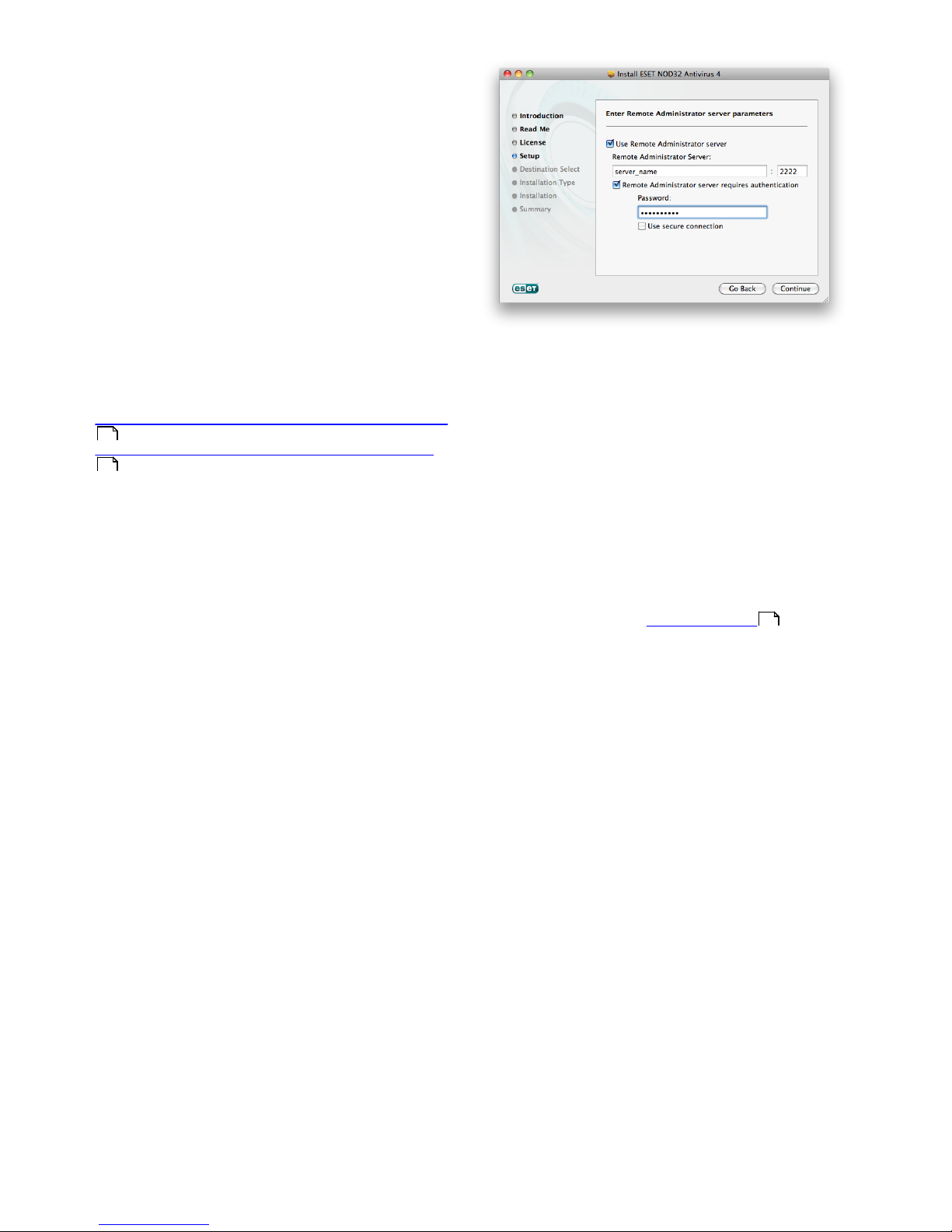
If your ESET NOD32 Antivirus will be administered by the
ESET Remote Administrator (ERA), you can set the ERA
Server parameters (server name, port and password) to
automatically connect your ESET NOD32 Antivirus to the
ERA Server after the installation.
In the next step you can Define privileged users that will
be able to edit the program configuration. From the list
of users on the left side, select the users and Add them
to the Privileged Users list. To display all system users,
select the Show all users option.
The ThreatSense.Net Early Warning System helps
ensure that ESET is immediately and continuously
informed of new infiltrations in order to quickly protect
our customers. The system allows for submission of new
threats to ESET Threat Lab, where they are analyzed,
processed and added to the virus signature database. By
default, the Enable ThreatSense.Net Early Warning
System option is selected. Click Setup... to modify
detailed settings for the submission of suspicious files.
For more information see ThreatSense.Net .
The next step in the installation process is to configure
Detection of potentially unwanted applications.
Potentially unwanted applications are not necessarily
malicious, but can often negatively affect the behavior of
your operating system. These applications are often
bundled with other programs and may be difficult to
notice during the installation process. Although these
5
5
6
19
19