envivo 1438 Manuel utilisateur

User Manual
Bluetooth Jukebox
0333 200 5846
• Retro BT Jukebox
• Power Adaptor
• 3.5 mm Audio Cable
• User Manual
AFTER SALES SUPPORT
IRE
GB 1890 917 060
YEAR WARRANTY
MODEL: 1438 PC: 69919 06/2016


3
0333 200 5846
• Retro BT Jukebox
• Power Adaptor
• 3.5 mm Audio Cable
• User Manual
AFTER SALES SUPPORT
IRE
GB 1890 917 060
YEAR WARRANTY
MODEL: 1438 PC: 69919 06/2016
CONTENTS
WELCOME.................................................................................................................................4
PRODUCT OVERVIEW .......................................................................................................... 5
GETTING STARTED................................................................................................................ 6
Turn On / Off the Jukebox................................................................................................6
Volume ....................................................................................................................................6
Play Bluetooth ......................................................................................................................6
Play AM/FM Radio...............................................................................................................7
Play CD ....................................................................................................................................7
AUX-In......................................................................................................................................8
Light Mode ............................................................................................................................9
SPECIFICATIONS...................................................................................................................10
FAQ ............................................................................................................................................11
SAFETY.....................................................................................................................................14
Important safety instructions .......................................................................................14
DISPOSAL................................................................................................................................15

4
0333 200 5846
• Retro BT Jukebox
• Power Adaptor
• 3.5 mm Audio Cable
• User Manual
AFTER SALES SUPPORT
IRE
GB 1890 917 060
YEAR WARRANTY
MODEL: 1438 PC: 69919 06/2016
WELCOME
You have made an excellent choice with the purchase of this quality EnVivo
brand product.
By doing so you now have the assurance and peace of mind, that comes with
purchasing a product that has been manufactured to the highest standards of
performance and safety, supported by the high quality standards of EnVivo.
We want you to be completely satisfied with your purchase so this EnVivo
product is backed by a comprehensive manufacturer’s 3-year warranty and an
outstanding after sales service through our dedicated Helpline.
We hope you will enjoy using your purchase for many years to come.
If you require technical support or in the unlikely event that the purchase you
have made is faulty, please telephone our Helpline for immediate assistance.
Faulty product claims made within the 3 year warranty period will be repaired
or replaced free of charge provided that you have satisfactory proof of purchase
(keep your till receipt safe!) This does not affect your statutory rights. However,
be aware that the warranty will become null and void if the product is found to
have been deliberately damaged, misused or disassembled.

5
0333 200 5846
• Retro BT Jukebox
• Power Adaptor
• 3.5 mm Audio Cable
• User Manual
AFTER SALES SUPPORT
IRE
GB 1890 917 060
YEAR WARRANTY
MODEL: 1438 PC: 69919 06/2016
PRODUCT OVERVIEW
1. Volume Controller
2. LCD Display
3. Light On/Off
4. Power/Mode
5. Play/Pause
6. Stop/Band
7. Previous Track/Rewind/Tuner –
8. Prog./Play Mode
9. Next Track/Fast Forward/Tuner +
10. Aux In
11. Speaker
12. CD Door Open/Close
13. FM Antenna
14. DC Input Socket
(Power Adaptor Socket)
15. Light Mode
1
4
5
6
7
3
9
10
11
12
11
8
2
LIGHT MODE
FM Ant
DC 9V 1A
PLAY HOLD
15
14
13
DC 9V 1.5A

6
0333 200 5846
• Retro BT Jukebox
• Power Adaptor
• 3.5 mm Audio Cable
• User Manual
AFTER SALES SUPPORT
IRE
GB 1890 917 060
YEAR WARRANTY
MODEL: 1438 PC: 69919 06/2016
GETTING STARTED
Turn On/Off the Jukebox
• To turn on the Jukebox, click on the Power/Mode button.
• To turn off the Jukebox hold down the Power/Mode button for 3 seconds.
Volume
To adjust the volume, rotate the Volume Controller to your desired volume.
Play Bluetooth
In Bluetooth mode it is possible to play your favourite music on the Jukebox
wirelessly from your Bluetooth enabled mobile device.
Connecting to the Jukebox from your
mobile device for the first time:
1. Turn on the Bluetooth Jukebox.
2. Click on the Power/Mode button
repeatedly until the display shows BL.
BL will be flashing to indicate that it
is in pairing mode.
3. Turn on Bluetooth on your mobile device.
4. Search for ENV-1438 and connect to it.
5. Your mobile device will now be connected to
the Jukebox, and you will be able to play your
favourite music from your mobile device on
the Jukebox. BL in the display will no longer be
flashing, indicating that it is connected to a Bluetooth device.
When your mobile device has been connected once:
1. Turn on the Bluetooth Jukebox.
2. Click on the Power/Mode Button until the display shows BL.
3. Make sure Bluetooth is enabled on your mobile device.
4. The Jukebox and your mobile device will now connect automatically.

7
0333 200 5846
• Retro BT Jukebox
• Power Adaptor
• 3.5 mm Audio Cable
• User Manual
AFTER SALES SUPPORT
IRE
GB 1890 917 060
YEAR WARRANTY
MODEL: 1438 PC: 69919 06/2016
Note: When connecting another mobile device to the Jukebox, make sure no
other mobile devices are connected to the Jukebox.
Play AM/FM Radio
• Turn on the Jukebox by clicking the Power/Mode button.
• Switch into FM/AM mode by clicking the Power/Mode button until the
Jukebox is in FM/AM mode.
• Click on the Stop/Band button to switch between FM and AM.
• Click on the Next/Tuner+ or Prev/Tune- button to increase or decrease
the frequency.
• Hold down the Next/Tuner+ or Prev/Tune- button for about 2 seconds
to search for the next or previous radio station.
• To automatically search for all available stations, click on the Play/Pause
button, and it will start to search for available stations and save them. It
can save up to 20 stations.
o To switch between the saved radio station click on the Prog./Play
mode button, and click on Next/Tuner+ or Prev/Tune- to switch
between next and previous station. When the desired station is
selected, just wait 2 seconds and it will automatically start to play.
Play CD
1. Turn on the Jukebox.
2. Click on the Power/Mode button until the dis
shows CD.
3. Insert the CD you wish to listen to.
4. The Jukebox will automatically start to play
your CD from the beginning.
Note: The CD door can only stay in a less than or
equal to the angle of 90°.
90o

8
0333 200 5846
• Retro BT Jukebox
• Power Adaptor
• 3.5 mm Audio Cable
• User Manual
AFTER SALES SUPPORT
IRE
GB 1890 917 060
YEAR WARRANTY
MODEL: 1438 PC: 69919 06/2016
While playing music from a CD the following functions are available:
• Click on the Prog./Play Mode button to switch between Normal, Repeat
1, Repeat All and Shuffle mode(RDM).
• Press the Play/Pause button to play and pause the Music.
• Click on the Next/Tuner+ or Prev/Tuner- button to skip to the next or
previous track. Hold down the Next/Tuner+ or Prev/Tuner- button to
fast forward or rewind the track.
• Click on the Stop/Band button to stop the CD playback.
Setting the play order of a CD:
1. Click on the Stop/Band button to stop the music if it is playing.
2. Click on the Prog./Play Mode button and PGM and P01 will begin flashing
in the display.
3. Click on the Prev/Tuner- or Next/Tuner+ button repeatedly to select the
desired track.
4. Press the Prog./Play Mode button again to confirm and save your
selection and P02 will be displayed.
5. Repeat step 3and 4by selecting the tracks of your choice, and the track
will be saved in the same order. Continue entering the tracks in this way
until all of your desired tracks are stored (up to 20 songs). If no buttons are
clicked for 2-3 seconds during the Play Order setup, it will automatically
save and end the setup.
6. When you have entered all the tracks that
you want, press the Play/Pause button to
begin playing the programmed sequence of
tracks.
7. To erase your programmed tracks, press the
Stop/Band button twice.
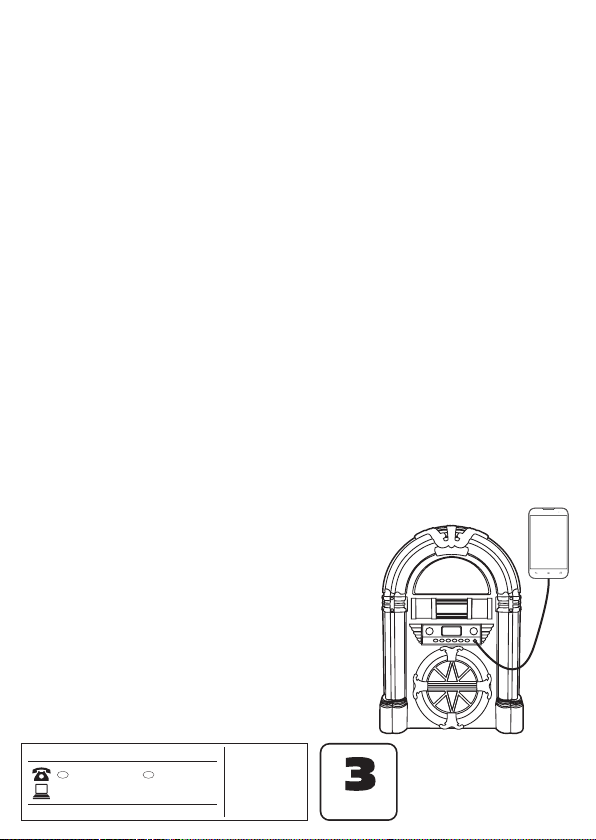
AUX-In
If you have a mobile audio device without
Bluetooth, you can connect it to the Jukebox
through the 3.5 mm audio cable.

9
0333 200 5846
• Retro BT Jukebox
• Power Adaptor
• 3.5 mm Audio Cable
• User Manual
AFTER SALES SUPPORT
IRE
GB 1890 917 060
YEAR WARRANTY
MODEL: 1438 PC: 69919 06/2016
1. Insert the provided 3.5 mm audio cable into the AUX-In port on the front
of the Jukebox. The Jukebox will automatically switch into AUX-In mode,
the Display will show AUX to indicate this.
2. Use your mobile device to switch between songs.
Note: To go out of AUX-In mode when not playing music from the AUX-In
jack, you must disconnect the 3.5 mm audio cable.
Light Mode
You can control the LED light on the Jukebox to either show only one colour,
or to gradually switch between different LED colours.
• Click on the Light switch on the front of the Jukebox
to toggle it on and off.
• When the LED light is switched on, there are two
different light modes that you may choose between.
They are Play and Hold and are located on the light
switch at the back of the Jukebox.
o Play mode – In this mode the LED light on
the Jukebox will gradually switch between
different colours
o Hold mode – In this mode the LED light on
the Jukebox will stay on one colour,
depending on the LED light color that is
being omitted at the moment of the switch
from Play mode into Hold mode. The LED
lights in Hold mode can display one of the 7
different colours.
• The LED light can remain on when the device is turned off as long as the
Jukebox is connected to power.
LIGHT MODE
FM Ant
DC 9V 1.5A
PLAY HOLD

10
0333 200 5846
• Retro BT Jukebox
• Power Adaptor
• 3.5 mm Audio Cable
• User Manual
AFTER SALES SUPPORT
IRE
GB 1890 917 060
YEAR WARRANTY
MODEL: 1438 PC: 69919 06/2016
SPECIFICATIONS
• Bluetooth
• Bluetooth name: ENV-1438
• AM/FM Radio
• CD player
• Line-in function
• Built-in changeable LED light
• DC 9V 1.5A
• Max output power: 8W
• Weight: 2.6 kg (approx.)
• Dimension: 270 x 170 x 390 mm (approx.)
• Frequency Response – 180 to 12.000Hz
• Impedance – 4 Ohms
• Tuner
o FM – Frequency Range – 87.5 to 108Mhz
o AM – Frequency Range 522 to 1620Khz
Table des matières