
Engler ADS 2000 Manuel utilisateur

REV. F 10 / 21 / 2014

COMPANY PROFILE
Engler Engineering Corporation has been in business since 1964 and occupies an 8000
s uare foot facility in Hialeah, Florida (USA). We manufacture ultrasonic dental scalers,
polishers and combination units including electro surgery e uipment and ultrasonic
instruments for the veterinary market as well as a microprocessor controlled anesthesia
delivery system and a respiratory monitor for veterinary use only.
We also manufacture dental e uipment for the human market. Please visit our website
www.englerusa.com for more detailed information or call us at the numbers shown
below.
Engler Engineering Corp. ac uired the exclusive manufacturing and marketing rights of
Dynax products, including stretchers, animal restraint devices, comfort cots, heating
pads, and other products. We also ac uired the Alpha-Sonic, Ora-Sonic, and Pro-Sonic
line of piezo scalers.
Engler Engineering Corporation’s brand name veterinary products proudly include:
Excelsior, high speed dental air unit with vacuum / electro-surge / ultrasonic scaler / low
speed / high speed / air / water syringe,
Son - Mate II, ultrasonic scaler / polisher,
Sonus II, ultrasonic dental scaler,
Poli - X, micromotor variable speed polisher,
Drill Aire, high speed dental air unit, high speed, air / water syringe,
Drill Aire Plus, high speed dental air unit, high speed, low speed, air / water syringe,
Scale - Aire Mini, high speed dental air unit with ultrasonic scaler / high speed / low
speed / air / water syringe,
Scale - Aire, high speed dental air unit with ultrasonic scaler / high speed / low speed /
air / water syringe and compressor / tank,
Tri - Mate, ultrasonic scaler / micromotor polisher / electro-surge,
ADS 2000, microprocessor controlled anesthesia delivery system / ventilator,
Sentinel V.R.M., respiratory monitor.
Engler manufactures the Sonus V ultrasonic dental unit for the human market
We manufacture all of the inserts and tips used in the Engler products as well as many
others on the market today in the 18K, 25K, and 30K fre uency range.
Our repair department has the technical knowledge to repair and maintain most dental
devices manufactured by other companies including Shorline.
Engler Engineering Corporation's (EEC) foreign sales are handled through a large and
growing network of dental and veterinary distributors. At the present time we are
represented throughout Europe, South and Central America, Canada, Asia, New Zealand,
Australia, the Middle East, and most other countries.
If you have any uestions or comments, please contact:
Engler Engineering Corporation
1099 East 47th Street, Hialeah, Florida 33013
800-445-8581 – 305-688-8581 – FAX 305-685-7671
Web site: www.englerusa.com Help site: www.engler411.com

TABLE OF CONTENTS
SECTION PAGE
_______________________________________________________________________
COMPANY PROFILE 2
PARTS LIST 4
SPECIAL INFORMATION – A must read preview. 5
INSTALLATION INSTRUCTIONS 6-7
GETTING FAMILIAR WITH THE ADS 2000 8-9
POUNDS TO KILOGRAMS CONVERSION CHART 10
TURNING ON THE ADS 2000 11-12
THE LCD DISPLAY in SET MODE 12-13
THE LCD DISPLAY in RUN MODE 14-15
UNDERSTANDING THE MINUTE VOLUME NUMBER 15-16
THE INSPIRATORY TIME 16-17
DISPLAYING TIDAL VOLUME 17
UNDERSTANDING FLOW RATE 17
UNDERSTANDING BREATHS PER MINUTE 18
HOW TO SET P.I.P. 18
UNDERSTANDING ASSIST 18
USING THE FILL / HOLD FEATURE 19
BUCKING THE ADS 19
UNDERSTANDING PEEP MODE 20
UNDERSTANDING THE FLUSH MODE 21
USING BREATHE FEATURE 22
USING THE MASK MODE 22
ENDOTRACHEAL TUBES and the ADS 2000 24
USING THE ADS 2000 in LAB MODE 25-26
USE OF EXTERNAL EQUIPMENT WITH THE ADS 2000 26
TROUBLESHOOTING THE ADS 2000 27-33
FREQUENTLY ASKED QUESTIONS 34-36
NOTICE OF CONFORMITY 37
ADS 2000 Engler Engineering Corporation 3

PARTS LIST
Upon opening the carton the ADS 2000 was shipped in, you will find:
ADS 2000 Unit,
ADS instruction manual,
Instructional DVD,
Breathing Circuit with gas sampling elbow,
Green Oxygen Hose,
“To” Vaporizer Hose,
“From” Vaporizer Hose,
Blue Scavenger Tubing,
Power Adapter,
Mask Adapter,
Test Lung,
Gas sampling hose with Luer lock connectors.
PLEASE READ VERY CAREFULLY
Engler Engineering Corporation (EEC) makes every effort to verify that all parts
for this device including any optional accessories ordered with it are included in
this shipment. It is imperative that you inspect the package and if you find
any pieces damaged or missing, you must notify us immediately. Claims for
damaged or missing parts will only be accepted within five days of reciept.
EEC makes every effort to verify that our devices are built and tested to approved
standards. Any modification to the device, hoses or power supply initiated by
others nullifies all warranty statements. Engler Engineering Corporation will not
be held liable in any way, for any damage, injury or death due to non-authorized
service, improper installation, or improper use of this device.
Engler Engineering Corporation
1099 East 47th Street, Hialeah, Florida 33013
800-445-8581 305-688-8581 FAX 305-685-7671
E-mail: [email protected]
4Engler Engineering Corporation ADS 2000

SPECIAL INFORMATION
There are a few special areas of information that must be read and understood prior to
operating the ADS 2000.
1. BATTERY BACKUP: The ADS 2000 has an internal battery backup system that
allows you to continue your procedures in the event of loss of electrical power. It
also protects the unit from electrical spikes that may occur during thunderstorms or
brownouts. In addition, it allows you to use it as an emergency ventilator in the field
if re uired. It is suggested that the power supply be plugged in, and connected to
the device at all times so you will have full power in the event of an emergency. The
battery backup should provide ten to twelve hours of use when fully charged.
2. The red LED on the face of the ADS 2000 will illuminate when the battery re uires
charging. It will also flash whenever the external gas sampling hose is
disconnected from the circuit.
3. The ADS 2000 can be damaged if any li uid or of anesthesia enters
it from the vaporizer. It is imperative that you do not overfill the vaporizer and
that you have it inspected and certified at least every year. Anesthesia
residue found in the ADS 2000 may void the warranty.
CAUTION: It is important when connecting the vaporizer to ensure that
The vaporizer is mounted lower than the ADS 2000. This will prevent
li uid anesthetic from possibly entering the ADS 2000.
4. This device must be flushed between procedures to ensure proper
operation. Failure to flush the device may allow unwanted foreign materials
to build up in the hoses and internal parts. This may cause incorrect
readings on the display, and / or interfere with the proper flow of gases
through the unit. Additionally, the unit may not be able to complete its self-
test causing a default which will show as an error on the display. Please
refer to page 21 of this manual for the flush procedure.
5. The breathing circuit hoses supplied with the ADS 2000 are “disposable”
type hoses and are easily replaceable. It is suggested that they be replaced
periodically.
6. The ADS 2000 will shut down the flow of oxygen, sound the alarm and
flash the LED, whenever the gas sampling circuit is disconnected. This is
an important safety feature for this device. Upon reconnecting the sampling
hose, the device will continue to operate with the settings as established.
ADS 2000 Engler Engineering Corporation 5

INSTALLATION INSTRUCTIONS
1. Connecting the Oxygen Hose - On the back panel of the unit there is a port marked
"OXYGEN IN", connect one end of the Green Oxygen Hose to this port and connect the
other end of this hose to your 50 PSI oxygen source. Since the oxygen fittings are
universally standard, you may use your own oxygen hose if desired.
CAUTION: IT IS EXTREMELY IMPORTANT THAT THE OXYGEN BE REGULATED TO A
PRESSURE OF 50 POUNDS PER SQUARE INCH (PSI), FOR THE MINUTE VOLUME PER
KILOGRAM DISPLAY TO READ ACCURATELY. PRESSURE OVER 50 PSI MAY DAMAGE
INTERNAL PARTS VOIDING THE WARRANTY.
2. Connecting the Vaporizer Hose - On the back panel of the unit there
is a port marked "TO VAPORIZER", connect one end of the non marked silicon hose to this
port and connect the other end to your vaporizer inlet port.
3. Connecting the Vaporizer Hose - On the back panel of the unit there is a port marked
"FROM VAPORIZER", connect one end of the blue striped silicon hose to this port and
connect the other end to your vaporizer outlet port.
NOTE: The ADS 2000 must be used with a precision vaporizer.
4. Connecting the Scavenger Tubing - Connect one end of the Blue Scavenger tubing
to the "SCAVENGER OUT” port on the back of the unit. Connect the other end to either a
"passive" or "active" scavenging system. This will help to eliminate all traces of anesthetic
gases used in the operating room that could pose a hazard to personnel. The use of a f/air
anesthesia gas filter unit or active anesthesia scavenger system is highly recommended.
Care must be taken to ensure that the scavenger port is not blocked by improper use of
these devices as the animal's ease of expiration depends on the resistance of the
scavenger line.
5. Connecting the Power Adapter - Connect the small male plug of the power
adapter into the back of the ADS 2000 at the 15 VDC @ 1.2 A outlet. Then plug the adapter
into an electrical outlet. The supplied power adapter continuously charges the internal
battery backup.
NOTE: On a full charge the ADS 2000 has 10 to 12 hours of battery backup for
uninterrupted operation during power failure. Complete battery recharging is
accomplished in approximately 8 hours.
6. Connecting the Breathing Circuit - Connect the two large ends of the breathing circuit to
the "BREATHING CIRCUIT" ports on the front panel of the ADS 2000. You may use your own
breathing circuit if you desire. The top port (inspiratory) of the ADS 2000 feeds oxygen / anesthesia
to the patient. The bottom port (expiratory) is the exhaust. After the lungs have been inflated
the internal exhale valve allows the natural elasticity of the animal's lungs to exhale oxygen /
anesthesia out through this port.
6Engler Engineering Corporation ADS 2000

7. Connecting the gas sampling system - To connect the external gas sampling system
perform the following steps:
1) Insert the Luer lock connector to the gas sampling input and rotate it clockwise one half turn.
2) Connect the two breathing circuits ends to the breathing circuit ports.
3) Now insert the gas-sampling elbow into the end of the breathing circuit as shown.
4) Insert the Luer lock connector to the gas-sampling elbow and rotate it clockwise one half
turn.
Note: You’re ADS 2000 unit is fitted with a hose disconnect safety system. In the event that the
external sampling hose becomes disconnected, the system will disconnect the gas input to the
patient, sound an alarm and flash the red LED on the front left corner of the unit.
Once the external sampling hose is reconnected, the unit will continue to work at its previous setting.
ADS 2000 Engler Engineering Corp 7
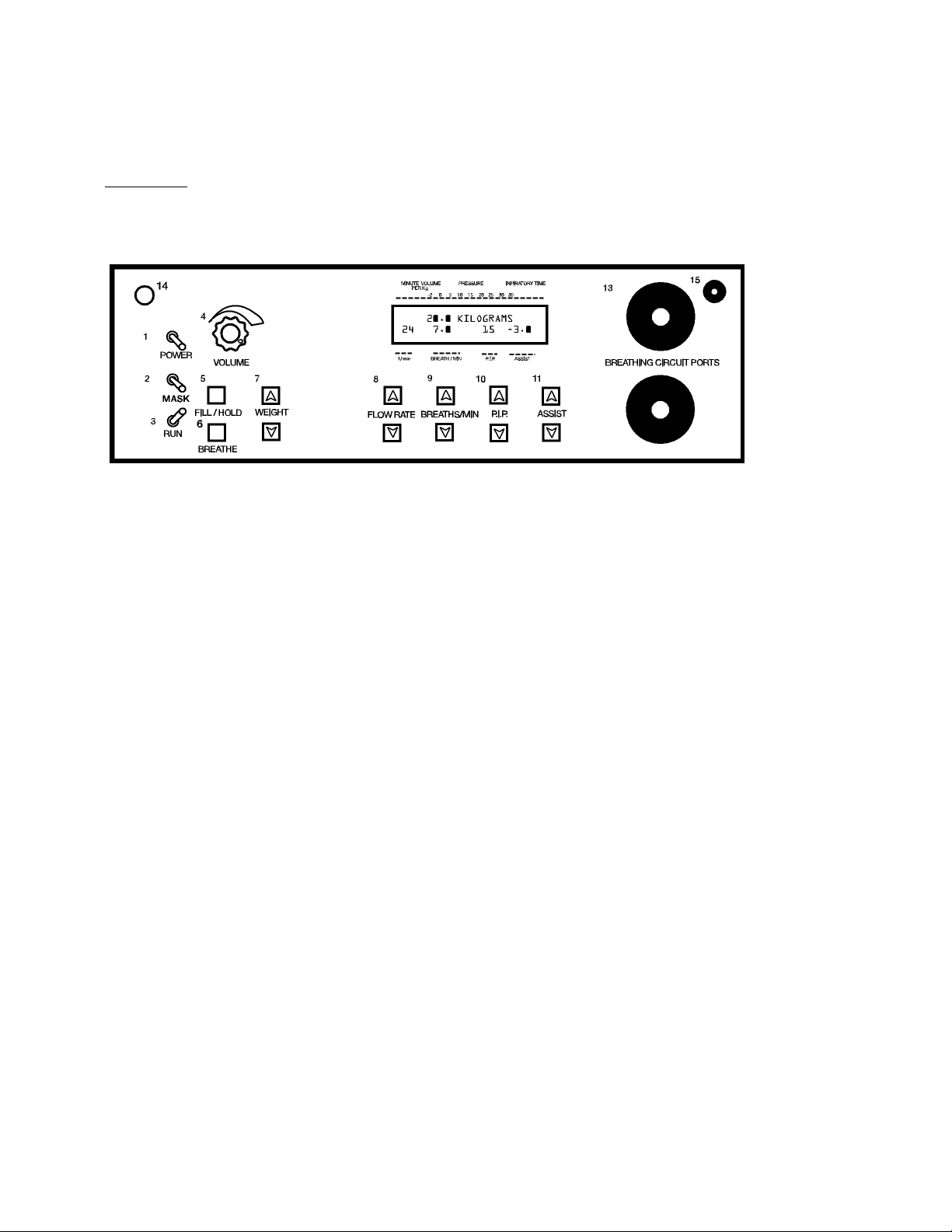
GETTING FAMILIAR WITH THE ADS 2000
In order to operate the ADS 2000 properly, you need know its controls.
Front View:
LCD DISPLAY - Displays Minute Volume, Inspiratory Time, Proximal Airway Pressure, Flow Rate,
Breaths Per Minute, Peak Inspiratory pressure, and Assist Pressure.
12
SET
POWER switch - This switch turns the power to the ADS 2000 ON and OFF.
MASK switch - This switch is used for enabling and disabling the Mask Mode
SET / RUN Switch - When in the SET, this switch allows the operator to enter in
the patients' weight. When switched to RUN the ADS 2000 begins ventilating the
patient.
VOLUME Knob - This knob controls the volume of the audible warning alarm. We suggest that you
start with it turned fully clockwise, i.e. full volume and adjust it as necessary.
FILL / HOLD Button - When this button is pressed, the ADS 2000 will fill the lungs of the patient to
the indicated peak inspiratory pressure and hold it until the button is released.
BREATHE Button - When this button is pressed, the ADS 2000 will initiate a breath to the
indicated peak inspiratory pressure to the patient.
WEIGHT UP / DOWN Buttons - When the ADS 2000 is in the SET MODE these buttons allow the
operator to enter the weight of the patient, from below 1.0 Kg. to 68 Kg.
FLOW RATE UP / DOWN Buttons - Depressing these buttons cause the FLOW RATE to increase
or decrease, from 0.2 LPM to 60 LPM.
BREATHS PER MINUTE UP / DOWN Buttons - These buttons control the minimum number
of times that the ADS 2000 will breathe per minute, from 1 to 95 B.P.M.
P.I.P. UP / DOWN Buttons - These buttons control the Peak Inspiratory Pressure in cm of
H2O, that the ADS 2000 will deliver to the patient, from 5.0 cm to 35 cm./ H2O
ASSIST UP / DOWN Buttons - These buttons set the sensitivity of inspiratory effort
necessary for the ADS 2000 to facilitate an assisted breath, from 0.3 to 6.0 cm. /
H2O They also allow the ASSIST feature to be turned off.
8 Engler Engineering Corporation ADS 2000
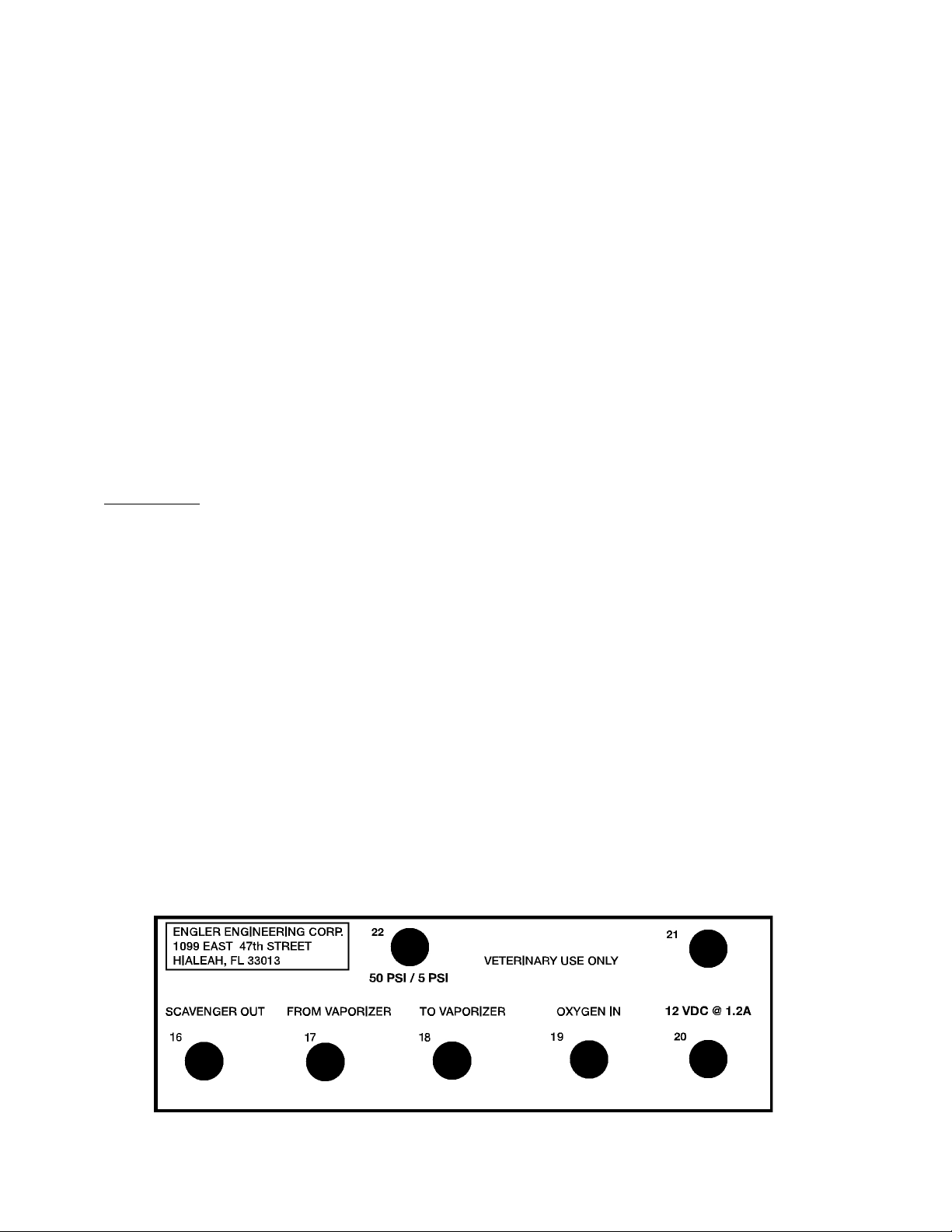
Getting familiar with the ADS 2000 cont.
BREATHING CIRCUIT PORTS - Connect the breathing circuit to these ports.
BATTERY LOW INDICATOR / SAFETY ALARM - The red led on the front panel of
the ADS 2000 is a warning indicator that the battery power is low, and that the unit
should be placed on charge immediately. When the unit is first powered up the led will
self test by flashing on and then should remain off.
The LED will also flash if the external sampling hose is disconnected.
GAS SAMPLING INPUT - To connect the Gas Sampling System, insert the Luer lock
connector to the Gas Sampling input and rotate it clockwise one half turn. The Luer
lock connector is located at the end of the 1/8” clear tube. Locate the other Luer lock
connector at the other end of the 1/8” clear tube. Connect it to the Gas Sampling elbow
on the Breathing Circuit.
Note: It is imperative that the Gas Sampling Hose stay connected during use.
Rear View:
SCAVENGER OUT - Connect one end of the blue "Scavenger" tubing to this port and
connect the other end to a scavenging filter canister or other scavenging device, either
active or passive.
FROM VAPORIZER - Connect one end of the "From Vaporizer" hose to this
port and connect the other end to the outlet port of your precision vaporizer.
TO VAPORIZER - Connect one end of the "To Vaporizer" hose to this port and
connect the other end to the inlet port or your precision vaporizer.
OXYGEN IN - Connect one end of the green "Oxygen" hose to this port and connect
the other end to an oxygen source that is set to a pressure of 50 PSI (pounds per
s uare inch).
POWER INLET - Connect your power cord to this port.
ALARM - This is the alarm speaker.
50 PSI / 5 PSI TOGGLE - This is the manual control to alternate between the 50 PSI
(normal) operating mode and the 5 PSI, (lab) mode.
ADS 2000 Engler Engineering Corporation 9

POUNDS TO KILOGRAMS CONVERSION CHART
In order for the ADS 2000 to operate properly, the correct patient weight must be entered. The ADS
2000 re uires that the patient's weight be entered in kilograms, therefore if the patients weight in
pounds is known then the following formula will help in determining the patients weight in kilograms.
Kg = P x 0.454
Where:
Kg = patient's weight in kilograms
P = patient's weight in pounds
Example: You have a 40 pound patient and need to find out it's weight in kilograms.
Kg = 40 x 0.454
Kg = 18.2 Kilograms or 18 Kilograms
Conversion from kilograms to pounds
Kilograms Pounds Kilograms Pounds
12.205 35 77.160
24.409 36 79.365
36.614 37 81.570
48.818 38 83.774
511.023 39 85.979
613.228 40 88.183
715.432 41 90.388
817.637 42 92.593
919.841 43 94.797
10 22.046 44 97.002
11 24.250 45 99.206
12 26.455 46 101.411
13 28.660 47 103.616
14 30.864 48 105.820
15 33.069 49 108.025
16 35.273 50 110.229
17 37.478 51 112.434
18 39.683 52 114.638
19 41.887 53 116.843
20 44.092 54 119.048
21 46.296 55 121.252
22 48.501 56 123.457
23 50.705 57 125.661
24 52.910 58 127.866
25 55.115 59 130.071
26 57.319 60 132.275
27 59.524 61 134.480
28 61.728 62 136.684
29 63.933 63 138.889
30 66.128 64 141.093
31 68.342 65 143.298
32 70.547 66 145.503
33 72.751 67 147.707
34 74.956 68 149.912
10 Engler Engineering Corporation ADS 2000
Table des matières


