
Endecotts Sonic Sifter Manuel utilisateur


The Sonic Sifter User Guide
Test Sieve Shaker
________________________________________________
ISSUE 03-03 Contents
Description Page 1
Setting Up: 2 - 6
Unpacking 2
Assembly & Operating Conditions 3
Electrical Connections 4
Sieve Stacking 5 - 6
Operating Instructions 7 - 12
Position of Controls 7
Setting & Functions
Run/Stop 8
Pause/Resume 8
Program 8
Memory 8
TestSequences 9
Adjusting Pulse Amplitude & Tappers 10
Programming-Saving-Recalling-Running 11 - 12
Maintenance 13 - 14
Cleaning 13
Care of Sieves 13
Care of Accessories 14
Fuse Replacement 14
General Advice 15
Specification 16
Description
_________________________________________
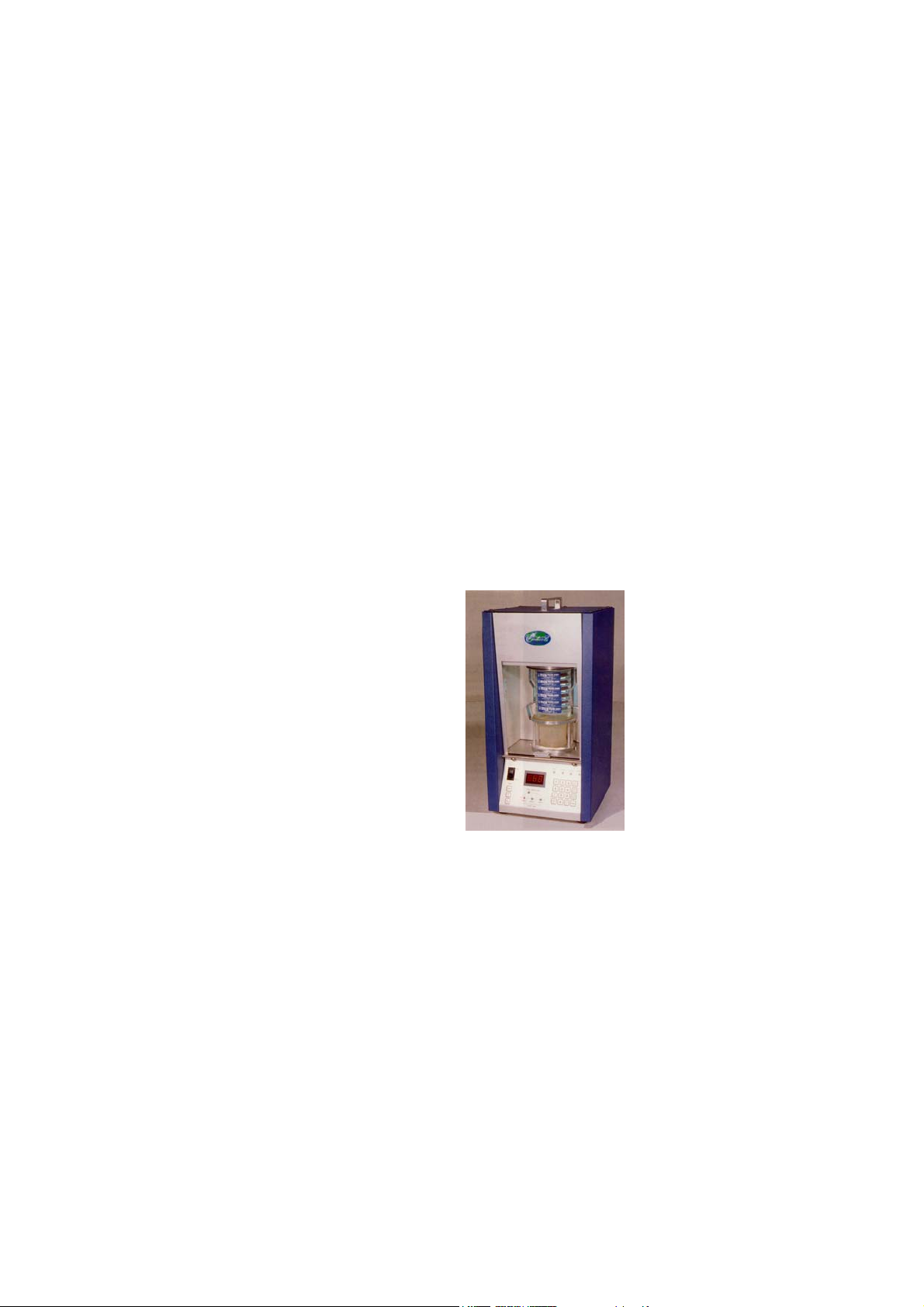
The Endecotts Sonic Sifter is a vibrating sifter employing an acoustic method to
carry out sieve tests for particle size analysis of various material samples.
It is based on the principle of pulsating a column of air through a stack of sieves at
a set frequency. This causes the particles of the sample material to vibrate and
move around the mesh of the sieves in order to pass through the apertures. To
assist in this movement of particles there is pulsator that periodically taps the base
of the table to release blocked or blinded apertures with particles that are close to
the aperture size. The Sonic Sifter incorporates
a horizontal pulse which provides an
electromechanical shock wave horizontally.
This assists in sifting samples that are 45µm
and finer where agglomeration occurs due to
electrostatic charges.
The Sonic Sifter has an amplitude control
to vary the vibration amplitude. It also has a
digital timer than can be programmed for process time. It switches of automatically
at the end.
- 1 -

Setting Up
_______________________________________________________
Unpacking
The Sonic Sifter should be set up according to the following procedure and the
diagram on Page 3:
Carefully remove the Sonic Sifter from carton, remove the internal packing
material and check the contents as follows:
1 off Endecotts Sonic Sifter
1 off Mains Cable
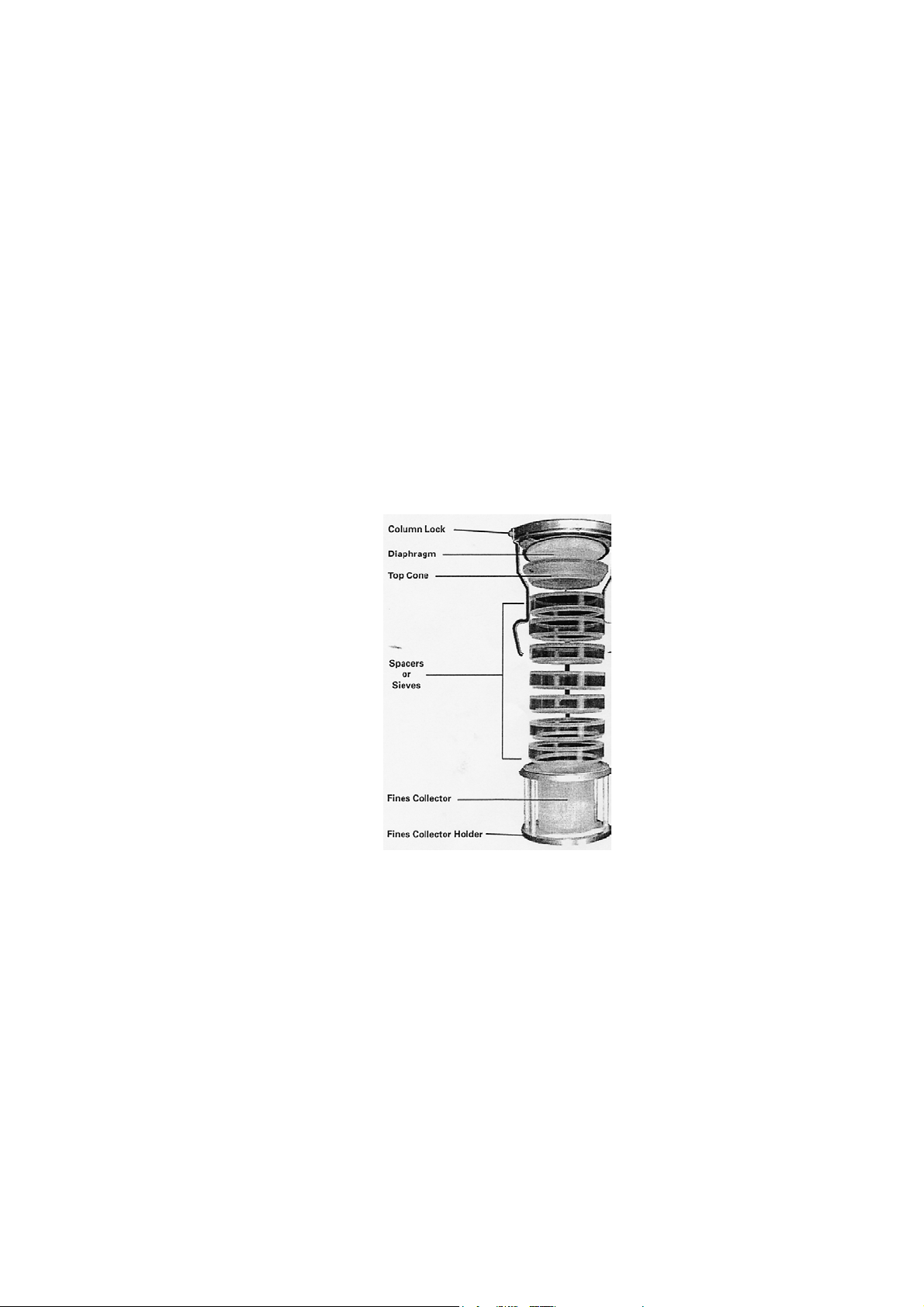
1 off Stack Assembly Comprising:-
1offColumnLock
6 off Spacers, Standard
1 off Fines Collector
1 off Fines Collector Holder
1 off Diaphragm
1 off Top Cone
1 off Instruction Manual
The Sonic Sifter does not need any assembly apart from connecting the mains
cable to the IEC connector at the rear of the instrument. Assembly of the sieve
stack is described in Sieve Stack Assembly.
- 2 -
Setting Up
______________________________________________________
Assembly & Operating Conditions
Operating Conditions
The Sonic Sifter will function correctly at any non-condensing humidity level
within the temperature limits of -18ºCto+49º(OºF to + 120ºF). However, for best
results, it is recommended that the ambient temperature and humidity be
controlled. Sieves should never
be subjected to temperatures above
+49ºC (+ 120ºF) or below
-43ºC (-45ºF). External vibrations
of low amplitude will have little
effect on the accuracy of the
results. To ensure that optimum
results are achieved the instrument
should be placed on a level surface.
This will help ensure an even layer
of particles on each sieve.
- 3 -

Setting Up
_______________________________________________________
Electrical Connections
Ensure that the voltage and frequency on the Rating Label and switchable fused
IEC inlet at the rear of the Sonic Sifter correspond with the local electrical mains
supply. If there is any discrepancy please consult your supplier or a qualified
electrician.
Do Not Connect to any supply other than that stated
on the nameplate
Important – This equipment must be connected to mains earth
The Endecotts Sonic Sifter is provided with a detachable 2 metre long mains cable
with an IEC moulded connector at the shaker end. Certain models may be supplied
with a fused plug. In the event of failure the fuse must be replaced with a fuse of
identical rating.
IF THERE IS ANY DOUBT CONSULT A QUALIFIED ELECTRICIAN
- 4 -
Setting Up
_______________________________________________________
Sieve Stacking
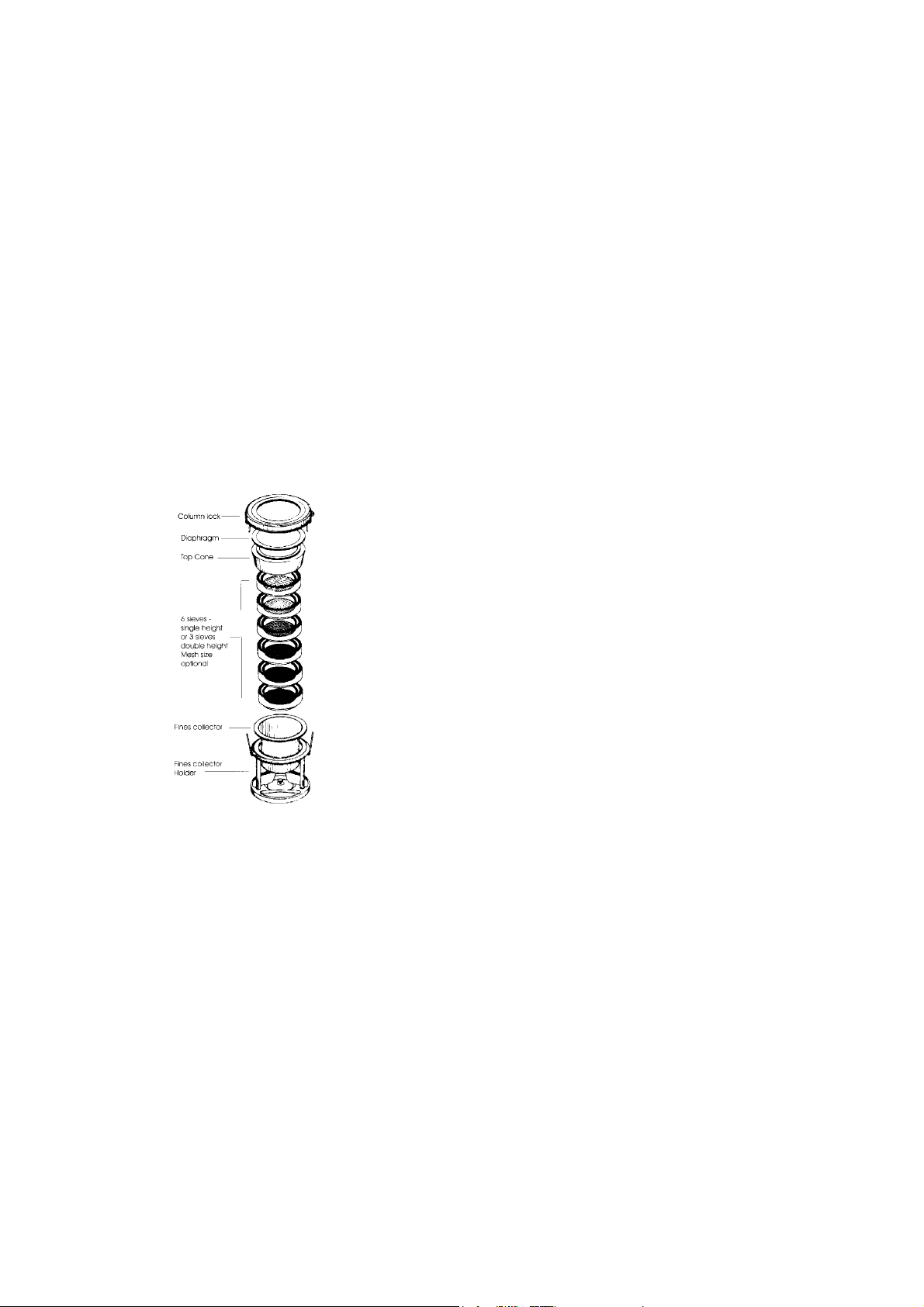
The Sonic Sifter accommodates
upto: 6 Standard Sieves or
1 Precision Sieve
+4Standardsieves
Any combination of Standard and
Precision Sieves can be used in one
stack provided that the stack height
is equivalent to the height of
6 Standard Sieves. When a sieve
stack is smaller in height, the
discrepancy can be made up with
spacers. Extra Spacers may be
purchased separately.
1. Assemble the sieve stack with the coarsest sieve at the top and the finest at the
bottom from the sieves that are selected for the test to be carried out. Generally
any spacers used are placed at the top of the stack.
2. Install the Fines Collector in the Fines Collector Holder.
3. Fasten the round metal plate at the bottom of the Fines Collector to the Fines
Collector Holder. This is done by sliding the keyhole slot in the Fines
Collector over the fastener mounted in the Fines Collector Holder base.
- 5 -

Setting Up
_______________________________________________________
Sieve Stacking
4. Place the sieve stack in the Fines Collector Holder with the Fines
Collector in position.
5. Place the Top Cone on the top sieve or spacer if it is used.
6. Sample material for test is then placed in the top sieve.
7. Position the Diaphragm with the metallic ring downwards on the Top one.
8. Place the Column Lock onto the sieve stack and press own until the latch
bars lock onto the Fines Collector Holder. The sieve stack is ready for
placing in the sift chamber.
9. Disassembling the sieve stack is done by sliding the thumb and forefinger
into the openings between the lowest sieve or spacer and the column
locking arms. While steadying the stack with the other hand, spread the
column locking arms. The spring loaded column lock will release.
Remove the column lock carefully and access can be gained to the rest of
the stacking components.
10. Test times vary with size, density, texture, and quantity of samples. Five
minutes is typical, but sieving time can be as little as 30 seconds under
favorable conditions.
When using woven wire sieves, maximum sample quantities are 10g or
4cc for samples smaller than 38µm, and 20g or 7cc for larger particle
samples. A one gram sample is typical for precision sieving with
electroformed sieves.
- 6 -
Operating instructions
_______________________________________________________
Position of Controls
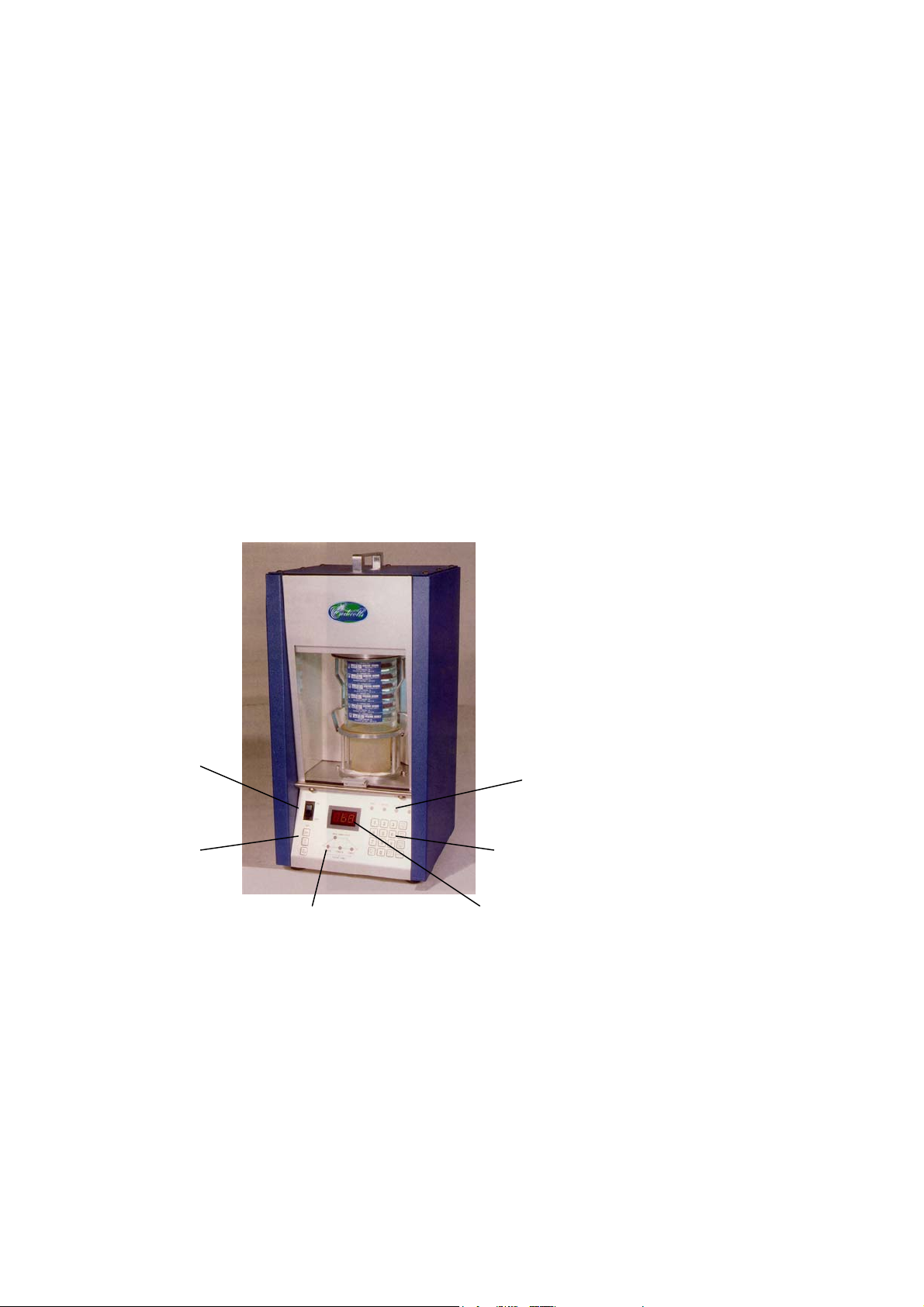
Operators should be familiar with, and fully understand the controls and indicators
before operating the machine. This should be done in conjunction with the diagram
below:-
ON/OFF
Power Switch
Operating Mode
Indicator
Lights
Tapping Action
Control Programmable
Buttons Control Keypad
LEDDigitalDisplay
Test Phase Diagram & Indicator Lights
- 7 -

Operating Instructions
_______________________________________________________
Settings & Functions
The 16-button keypad used for digital entries of amplitude and times is also used to
activate the following functions:
Run / Stop
The Run/Stop function starts and halts the sieving action. The LED light is on
when the Sonic Sifter is running. The digital display counts down from the total
test time to automatically stop when the counter reaches zero. The program
sequence LEDs indicate which phase is active.
Pause / Resume
The Pause/Resume function interrupts the progress of a sieving sequence. The
Pause LED light is lit when this function is activated. Tim remaining and the
position in the A,B,C sequence are indicated on the display and program LEDs.
Press the Pause button a second time to resume operation.
Program
Amplitude and Phase times are programmed in order by entering each via the
keypad. The Program button is used to advance to the next entry or is used without
entries to review an existing program from the memory.
Memory
The Memory function is used to store and retrieve programmed sequence from 10
memory locations coded from 0 to 9. Buttons to Save and Recall the programmed
sieving sequences are activated when operating in the Memory Mode.
- 8 -
Table des matières
Manuels Équipement de test populaires d'autres marques

SMART
SMART KANAAD SBT XTREME 3G Series Manuel utilisateur

Agilent Technologies
Agilent Technologies BERT Serial Manuel utilisateur

Agilent Technologies
Agilent Technologies N3280A Manuel utilisateur

Vernier
Vernier Go Direct Voltage Manuel utilisateur

Lifeloc
Lifeloc R.A.D.A.R. Manuel utilisateur

Fluke
Fluke T5-600 Instructions d'utilisation et d'installation


