SET
PRG
RESET
SET
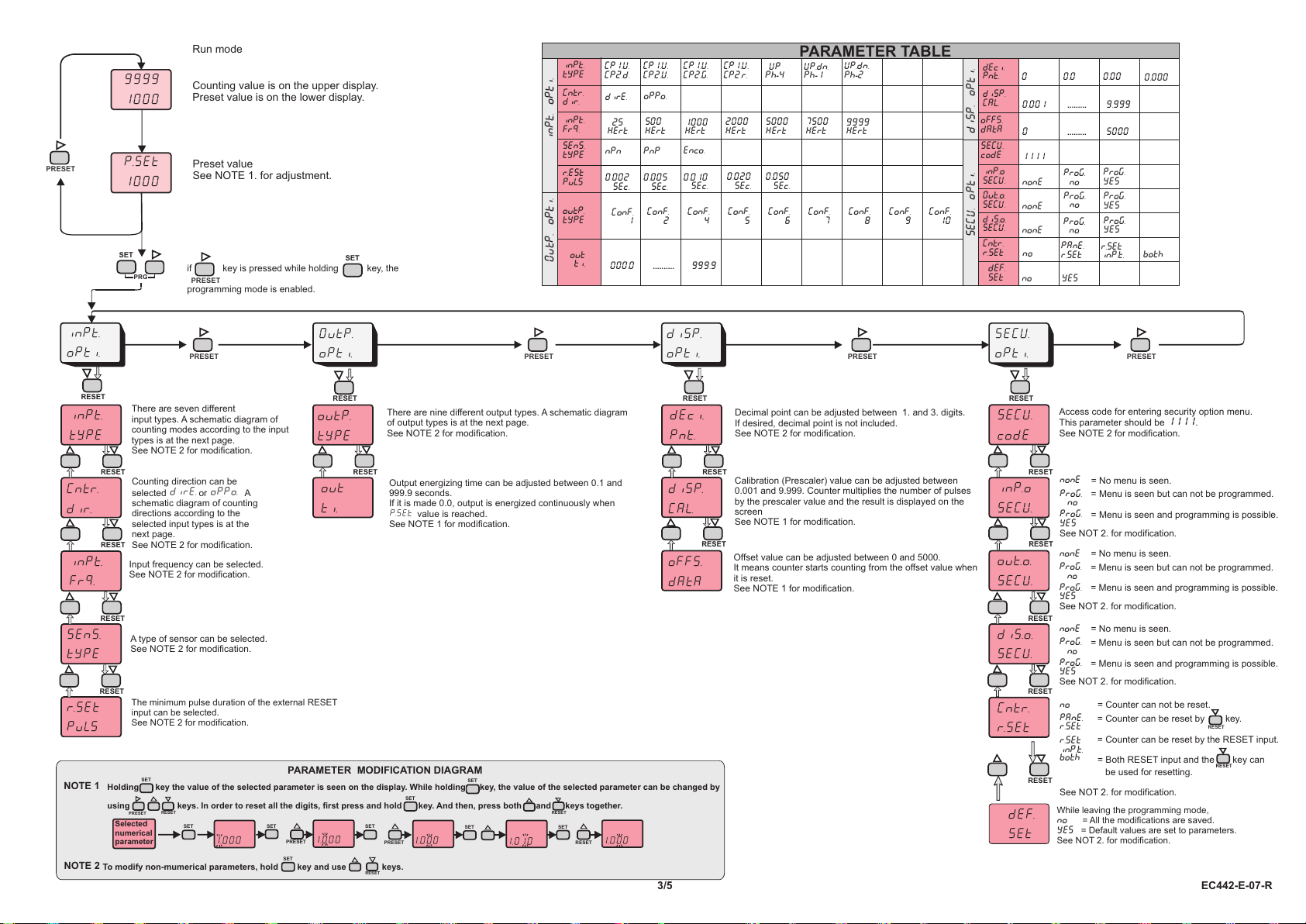
Run mode
Counting value is on the upper display.
Preset value is on the lower display.
Preset value
See NOTE 1. for adjustment.
OutP.
oPti.
dýsP.
oPti.
SECU.
oPti.
outP.
typE
out
tý.
dEcý.
Pnt.
oFFS.
dAtA
dýsP.
CAL.
Calibration (Prescaler) value can be adjusted between
0.001 and 9.999. Counter multiplies the number of pulses
by the prescaler value and the result is displayed on the
screen
See NOTE 1 for modification.
Decimal point can be adjusted between 1. and 3. digits.
If desired, decimal point is not included.
See NOTE 2 for modification.
Offset value can be adjusted between 0 and 5000.
It means counter starts counting from the offset value when
it is reset.
See NOTE 1 for modification.
ýnP.o
SECU.
out.o.
SECU.
dýs.o.
SECU.
SECU.
codE
Cntr.
r.SEt
def.
SEt
Access code for entering security option menu.
This parameter should be 1111.
See NOTE 2 for modification.
PARAMETER TABLE
25
Hert
500
Hert
1000
Hert
2000
Hert
5000
Hert
7500
Hert
Enco.
0.010
sec.
0.020
sec.
0.050
sec.
PnP
0.005
sec.
nPn
0.002
sec.
dirE. oPPo.
inPt.
typE
SEnS.
tyPE
r.est
puls
inPt.
Frq.
Cntr.
dir.
CP1.U.
CP2.d.
CP1.U.
CP2.U.
CP1.U.
CP2.G.
CP1.U.
CP2.r.
UP
Ph-4
UP.dn.
Ph-1
UP.dn.
Ph-2
ConF.
4
ConF.
1
ConF.
2
ConF.
5
ConF.
6
ConF.
7
ConF.
8
ConF.
9
ConF.
10
outP.
typE
out
ti. 000.0
INPT. oPTi.
OuTP. oPTi.
dEci.
Pnt.
diSP.
CAL.
oFFS.
dAtA
disP. oPTi.
0 0.0
0.001 ......... 9.999
0......... 5000
inP.o
SECU.
diS.o.
SECU.
def.
SEt
Out.o.
SECU.
nonE
Prog.
no
Prog.
yES
nonE
Prog.
no
Prog.
yES
nonE
no
Prog.
no
yes
Prog.
yES
SECU.
codE 1111
no
PAnE.
r.SEt
r.SEt
inP.t.
SECU. oPTi.
Cntr.
r.SEt
9999
Hert
.......... 999.9
0.00
Prog.
yES
Prog.
yES
Prog.
yES
= No menu is seen.
= No menu is seen.
= No menu is seen.
= Counter can not be reset.
= Both RESET input and the key can
be used for resetting.
See NOT 2. for modification.
See NOT 2. for modification.
See NOT 2. for modification.
= Menu is seen but can not be programmed.
= Menu is seen and programming is possible.
= Menu is seen but can not be programmed.
= Menu is seen and programming is possible.
= Menu is seen but can not be programmed.
= Menu is seen and programming is possible.
nonE
nonE
nonE
no
Prog.
no
Prog.
no
Prog.
no
both
= Counter can be reset by key.
= Counter can be reset by the RESET input.
See NOT 2. for modification.
PAnE.
r.SEt
r.SEt
inP.t.
PARAMETER MODIFICATION DIAGRAM
To modify non-mumerical parameters, hold key and use keys.
1.000
1.000
1.000
1.010
1.000
9999
1000
P.SEt
1000
ýnPt.
typE
Cntr.
dýr.
ýnPt.
Frq.
SEnS.
tyPE
R.set
puls
ýnPt.
oPti.
both
0.000
Selected
numerical
parameter
NOTE 1
NOTE 2
3/5 EC442-E-07-R
While leaving the programming mode,
no = All the modifications are saved.
Yes = Default values are set to parameters.
See NOT 2. for modification.
The minimum pulse duration of the external RESET
input can be selected.
See NOTE 2 for modification.
if key is pressed while holding key, the
programming mode is enabled.
There are seven different
input types. A schematic diagram of
counting modes according to the input
types is at the next page.
See NOTE 2 for modification.
Input frequency can be selected.
See NOTE 2 for modification.
A type of sensor can be selected.
See NOTE 2 for modification.
Counting direction can be
selected dirE. or oPPo. A
schematic diagram of counting
directions according to the
selected input types is at the
next page.
See NOTE 2 for modification.
There are nine different output types. A schematic diagram
of output types is at the next page.
See NOTE 2 for modification.
Output energizing time can be adjusted between 0.1 and
999.9 seconds.
If it is made 0.0, output is energized continuously when
P.SEt value is reached.
See NOTE 1 for modification.
Holding key the value of the selected parameter is seen on the display. While holding key, the value of the selected parameter can be changed by
using keys. In order to reset all the digits, first press and hold key. And then, press both and keys together.
PRESET
PRESET
RESET
RESET
RESET
RESET
RESET
PRESET PRESET PRESET PRESET
RESET
RESET
RESET
RESET
RESET
RESET
RESET
RESET
RESET
RESET
RESET
RESET
SET
PRESET RESET
SET SET
PRESET
SET
PRESET
SET
SET SET
RESET
RESET
SET
SET
RESET