
Emerson AV50 Manuel utilisateur

44
COMPACT AUDIO/VIDEO SYSTEM
DVD/CD/CD-RW/MP3 PLAYER
withAM/FM DIGITALTUNING RECEIVER
OWNER’S MANUAL
AV50
Visit our web site at www.emersonradio.com

1
Warning
To prevent fire or shock hazard, do not
expose the unit to rain or moisture.
To avoid electrical shock, do not open the
cabinet.
Refer servicing to qualified service
personnel only.
The AC cord must only be changed at
qualified service facility.
This appliance is classified as a CLASS 1 LASER
product.
The CLASS 1 LASER PRODUCT MARKING is located on
therearpanel.
This product contains a low power laser device. To ensure
continuedsafety, donotremoveanycoveror attempt togain
access to the inside of the product. Refer all servicing
toqualifiedpersonnel only.
This product incorporates copyright protection technology that
is protected by method claims of certain U.S. patents and
other intellectual property rights owned by Macrovision
Corporation and other rights owners. Use of this copyright
protection technology must be authorized by Macrovision
Corporation, and is intended for home and other limited
viewing uses only unless otherwise authorized by Macrovision
Corporation. Reverse engineering or disassembly is
prohibited.
Caution
Refer servicing to qualified service personnel only.
The following marking is printed on the rear panel.
This symbol is intended to alert the user of
the presence of uninsulated “dangerous
voltage” within the product enclosure that
may be of sufficient magnitude to constitute
a risk of electric shock to persons.
This symbol is intended to alert the user to
the presence of important operating and
maintenance (servicing) instructions in the
literatureaccompanyingthe applicance.
The symbol for class II (Double insulation)
Welcome...…
And thank you for purchasing this Emerson Compact
Audio/Video System. This state of the art system includes
everything you need to experience digital video and audio
in the comfort of your own living room. The only thing you
need to add is your own TV. We have designed this
system to be easy to set up, and even easier to use. But
please, review this manual before you operate your
system; have it handy while you are setting the system up;
and keep it available for future reference, or in the unlikely
event that you encounter any unexpected problems. We
have tried to keep this manual as simple as possible. It
begins with a description of the important controls on
the main unit and the remote. It then explains how to
connect the speakers, your TV, and optional external
sources to the main unit, and then how to operate the
DVD/CD player and the AM/FM Stereo Receiver. If you
follow the instructions carefully you can have the system
up and operating in less than an hour.
All of the optional system settings have been preset at our
factory for correct operation of the system in North America.
All you have to do is insert a disk, sit back, and enjoy a great
AUDIO/VIDEOexperience.
Eventually you may want to change some of the optional
settings. A description of all the optional settings, and
instructions for changing them, is found in the second half of
themanual.
This system was designed to provide you with many
years of reliable operation with a minimum of care and
maintenance. Every component in your system was in perfect
working condition when it left our factory. If you experience
any problems with the set up or operation of this system
please review the Trouble Shooting Guide at the end of this
manual before you contact your dealer or the Emerson
Customer Service Department.
Thanks again from all of us at Emerson Radio Consumer
Products Corp.
The serial number of your system can be found on a
label on the back panel of the main unit, and also on
the display carton. Please record the serial number in
the space below. You may need to refer to this number
if your system ever needs to be serviced.
ModelNo.:AV50
SerialNo.:

2
IMPORTANT SAFETY INSTRUCTIONS (CONTINUED)
Before using the unit, be sure to read all operating instructions carefully. Please note that these are general
precautions and may not pertain to your unit. For example, this unit may not have the capability to be connected
to an outdoor antenna.
1. READ INSTRUCTIONS
All the safety and operating instructions should be read before the product is operated.
2. RETAIN INSTRUCTIONS
Thesafety and operating instruction should be retained for future reference.
3. HEED WARNINGS
All warning on the product and in the operating instructions should be adhered to.
4. FOLLOW INSTRUCTIONS
Alloperating and use instructions should be followed.
5. CLEANING
Unplug this product from the wall outlet before cleaning. Do not liquid cleaners or aerosol cleaners. Use a damp
clothforcleaning.
6. ATTACHMENTS
Do not use attachments not recommended by the product’s manufacturer as they may cause hazards.
7. WATER AND MOISTURE
Do not use this product near water- for example, near a bathtub, washbowl, kitchen sink, or laundry tub, in a wet
basement, or near a swimming pool.
8. ACCESSORIES
Do not place this product on an unstable cart, stand, tripod, bracket, or table. The product may
fall, causing serious injury and serious damage to the product. Use only with a cart, stand,
tripod, bracket, or table recommended by the manufacturer or sold with the product.Any
mounting of the product should follow the manufacturer’s instructions, and should use a
mounting accessory recommended by the manufacturer.
8A. An appliance and cart combination should be moved with care. Quick stops, excessive force,
and uneven surface may cause the appliance and cart combination to overturn.
9. VENTILATION
Slots and openings in the cabinet and in the back or bottom are provided for ventilation and to ensure reliable
operation of the product and to protect it from overheating. These openings must not be blocked or covered. The
openings should never be blocked by placing the product on a bed, sofa, rug, or other similar surface. This product
should never be placed near or over a radiator or heat source. This product should not be placed in a built-in
installation such as a bookcase or rack unless proper ventilation is provided or the manufacturer’s instructions
havebeenadhered to.
10. POWER SOURCES
This product should be operated only from the type of power source indicated on the marking label. If you are not
sure of the type of power supply to your home, consult your appliance dealer or local power company. For
products intended to operate from battery power, or other sources, refer to the operating instruction.
11. GROUNDING OR POLARIZATION
This product is equipped with an alternating-current line plug (a plug having one blade wider than the other).
This plug will fit into the power outlet only one way. This is a safety feature. If you are unable to insert the plug fully
into the outlet, try reversing the plug. If the plug should still fail to fit, contact your electrician to replace your obsolete
outlet.
Do not defeat the safety purpose of the polarized plug.
12. POWER-CORD PROTECTION
Power-supply cords should be routed so that they are not likely to be walked on or pinched by items placed upon
or against them, paying particular attention to cords at plugs, convenience receptacles, and the point where they
exit from the appliance.
13. LIGHTNING
To protect your product from a lightning storm, or when it is left unattended and unused for long periods of time,
unplug it from the wall outlet and disconnect the antenna or cable system. This will prevent damage to the product
dueto lightning and power-line surges.
14. POWER LINES
An outside antenna system should not be located in the vicinity of overhead power lines or other electric light or
power circuits, or where it can fall into such powerlines or circuits. When installing an outside antenna system,
extreme care should be taken to keep from touching such power lines or circuits as contact with them might be
fatal.
3
IMPORTANT SAFETY INSTRUCTIONS (CONTINUED)
15. OVERLOADING
Do not overload wall outlets and extension cords as this can result in a risk of fire or electric shock.
16. OBJECT AND LIQUID ENTRY
Never push objects of any kind into this product through openings as they may touch dangerous voltage points
or short out parts that could result in fire or electric shock. Never spill or spray any type of liquid on the product.
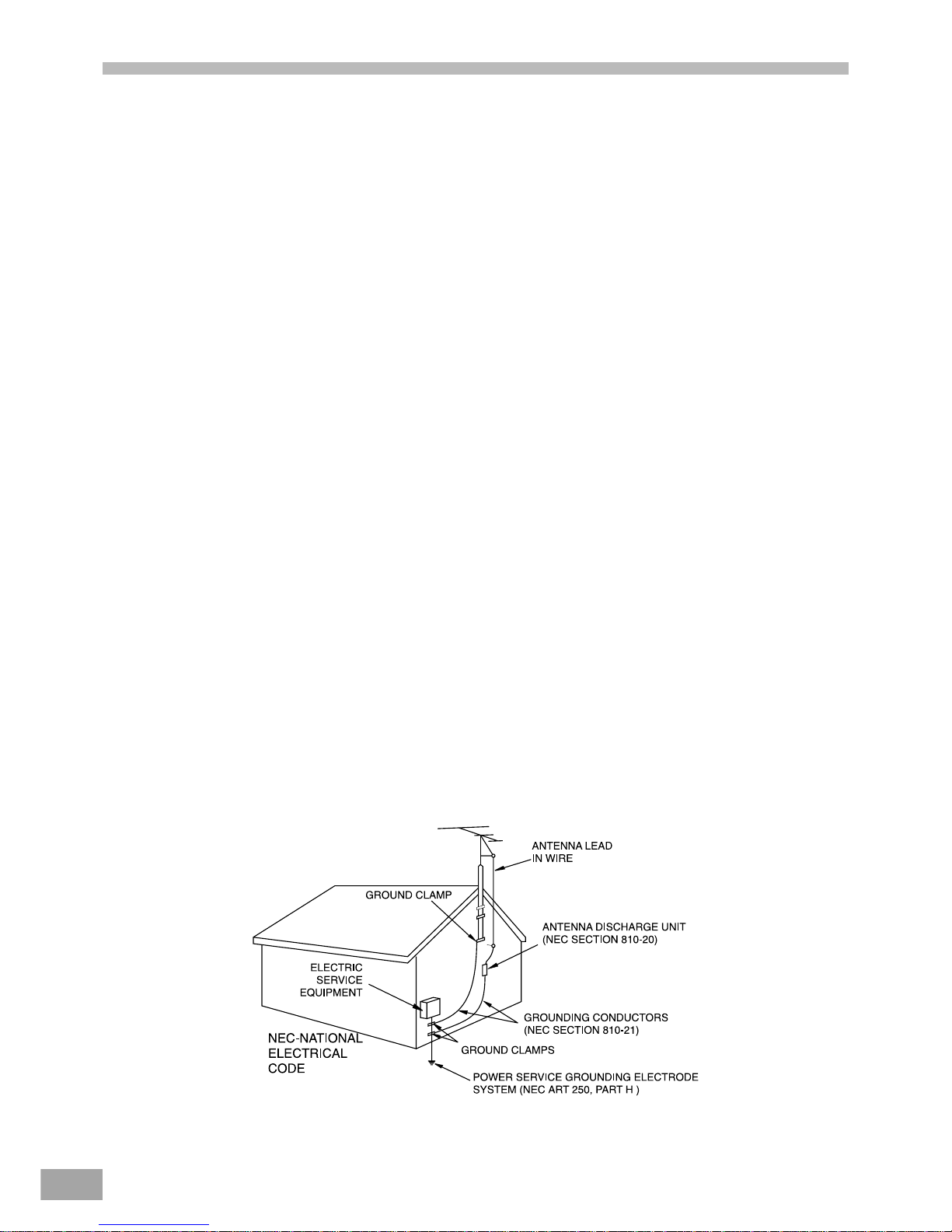
17. OUTDOOR ANTENNA GROUNDING
If an outside antenna is connected to the product, be sure the antenna system is grounded so as to provide
some protection against voltage surges and built-up static charges. Section 810 of the National Electric Code,
ANSI/NFPA 70, provides information with respect to proper grounding of the mast and supporting structure,
grounding of the lead-in wire to an antenna discharge product, size of grounding conductors, location of
antennadischargeproduct, connection to grounding electrodes, and requirements for grounding electrode.
18. SERVICING
Do not attempt to service this product yourself as opening or removing covers may expose you to dangerous
voltage or other hazards. Refer all servicing to qualified service personnel.
19. REPLACEMENT PARTS
When replacement parts are required, be sure the service technician uses replacement parts specified by the
manufacturer or those that have the same characteristics as the original part. Unauthorized substitution may
result in fire, electric shock or other hazards.
20. SAFETY CHECK
Upon completion of any service or repairs to this product, ask the service technician to perform safety checks to
determinethat the product is in proper operating condition.
21. WALL OR CEILING MOUNTING
The product should be mounted to a wall or ceiling only as recommended by the manufacturer.
22. DAMAGE REQUIRING SERVICE
Unplug the product from the wall outlet and refer servicing to qualified service personnel under the following
conditions:
a. When the power-supply cord or plug is damaged.
b. If liquid has been spilled, or objects have fallen into the product.
c. If the product has been exposed to rain or water.
d. If the product does not operate normally by following the operating instructions. Adjust only those controls
that are covered by the operating instructions, as an adjustment of other controls may result on damage and
will often require extensive work by a qualified technician to restore the product to its normal operation.
e. If the product has been dropped or the cabinet has been damaged.
f. When the product exhibits a distinct change in performance - this indicates a need for service.
23. HEAT
The product should be situated away from heat sources such as radiators, heat registers, stoves, or other
products (including amplifiers) that produce heat.
24. NOTE TO CATV SYSTEM INSTALLER
This reminder is provided to call the CATV system installer’s attention to Article 820-40 of NEC that provides
guidelines for proper grounding and, in particular, specifies that the cable ground shall be connected to the
grounding system of the building, as close to the point of cable entry as practical.

4
IMPORTANT SAFETY INSTRUCTIONS (CONTINUED)
FCC NOTICE:
This equipment has been tested and found to comply with the limits for a Class B digital device, pursuant to part 15 of the FCC
Rules. These limits are designed to provide reasonable protection against harmful interference in a residential installation. This
equipment generates, uses, and can radiate radio frequency energy and, if not installed and used in accordance with the
instructions, may cause harmful interference to radio communications.
However, there is no guarantee that interference will not occur in a particular installation. If this equipment does cause harmful
interference to radio or television reception, which can be determined by turning the equipment off and on, the user is encouraged
to try to correct the interference by one or more of the following measures:
Reorientorrelocatethereceivingantenna.
Increasetheseparationbetween the equipment and receiver.
Connect the equipment into an outlet on a circuit different from that to which the receiver is connected.
Consultthe dealer or an experienced radio/TV technician for help.
FCC Caution:
To assure continued compliance, follow the attached installation instructions and use only shielded cables when connecting to
other devices. Also, any changes or modifications not expressly approved by the party responsible for compliance could void
theuser’sauthority to operate the equipment.

5
Table of Contents
Warnings and Cautions
Welcome ................................................................................1
UL Safety Instructions ........................................................1-3
FCC Notice .............................................................................4
Basic System Information
Index ......................................................................................5
Location of Controls & Indicators .............................................6
Location of Jacks and Terminals ............................................7
Main Display Indicators ...........................................................8
Remote Control ......................................................................9
Important Safeguards and Precautions ...................................10
Features of This System ......................................................11
Important Information Regarding This Manual ..........................11
Types of Discs That Can be Played on This System .................12
Notes on Disc Handling ........................................................13
Installations and Connections
Unpacking ........................................................................14
Inserting Batteries into the Remote Control ............................14
Speaker System Connection .................................................15
Antenna Connections ...........................................................15
TV and Optical Component Connections ................................16
Connecting the AC power Cord .............................................16
Basic System Set Up
Controls and Their Functions ..................................................17
Presetting Radio Stations ......................................................18
Recalling Preset Stations ......................................................18
Changing Preset Stations .....................................................18
Last Station Memory .............................................................18
Playing Discs
Basic Playback ..............................................................19-20
Slow Motion Playback (DVD Disc Only) .................................20
Frame By frame Advance (’Step’ Function) .............................20
High-Speed Search (Fast Forward or Fast Reverse) ................20
Skipping Chapter or Tracks ...................................................20
Key Lock ..............................................................................20
CD-R/RW and MP3 Playback ....................................................21
Playing MP3 Audio CDs ......................................................21
Picture CD Operations ..........................................................21
Understanding DVD Disc Menus ...........................................22
Repeat Playback ................................................................23
A-B Repeat Playback ...........................................................23
Random Playback ...............................................................23
Program Play (Audio CDs Only) ............................................24
Selecting a Start Point by Chapter or Time Code .....................25
Selecting a CD Track Using Number Buttons ............................25
Checking Disc Information Using Display Button .....................26
Setting andAdjustments
Using the SETUP Menu and Navigation Buttons .....................27
SETUP Menu Listing ..........................................................28
TV Display Setting ...............................................................29
TV Type Setting (Multi/NTSC/PAL) ...................................29
Selecting Angle Mark ........................................................30
Selecting The On Screen Display (OSD) Language ..............30
Selecting Captions .............................................................31
Screen Saver Setting (SCR Saver) ........................................31
Dynamic Range Setting ......................................................31
Preferences
Selecting the Language for Audio .........................................32
Selecting the Language for Subtitles .....................................32
Selecting the Language for Disc Menus.................................32
Setting the Parental Control Level .........................................33
Changing the Parental Control Password ...............................33
Special Functions During Playback
Zoom Control ....................................................................34
Angle Selection ....................................................................34
Subtitle Language Selection .................................................35
Audio Language Selection ....................................................35
Bookmark Function (DVD only) .............................................35
Digest Display (for movie DVDs) ...........................................36
Digest/Intro-Scan Function (for Audio CDs) ............................36
Other Functions
Listening to the Radio .........................................................37
Bass and Treble Adjustments ................................................38
Adjusting the Left/Right Balance ...........................................38
Listening to an External Source .............................................39
Headphone Jack .................................................................39
Mute Control .......................................................................39
Reset Button .......................................................................39
Additional Information
Troubleshooting ..........................................................40-41
Contact Customer Service ........................................................41
Warranty ..............................................................................42

6
LOCATION OF CONTROLS AND INDICATORS
Main Unit (Front View)
1. POWERButton 12. HEADPHONEJack
2. SKIP FORWARD / REVERSE Button 13. OPEN/CLOSEButton
3. PAUSEButton 14. MEMORYButton
4. STOP Button 15. ROTARYJOG VOLUME KNOB
5. TV/AUXButton 16. STANDBYButton
6. DVD/CD Button 17. STANDBYLED
7. VIDEO/VCRButton 18. MONO/ST. (FM) Button
8. TUNER/BAND Button 19. PLAY Button
9. DISCTRAY 20. DISPLAYWINDOW
10. PRESET STATION UP Ù / DOWN Ú Button 21. REMOTE SENSOR
11. TUNING UP Ù / DOWN Ú Button

7
LOCATION OF JACKSAND TERMINALS
Main Unit (Back Panel)
1. Speaker (Main) Output 7. S-VIDEOOutput
2. RESET Button 8. COAXIALDIGITALAUDIOOutput
3. PowerCable 9. AUDIO(DVD) Output
4. AM LOOPAntennaTerminal 10. TV/AUXInput
5. FMAntennaTerminal 11. VIDEO (AUDIO)Input
6. VIDEOOutput

8
MAINDISPLAYINDICATORS
1. KEY LOCK Indicator 12. CHANNEL/ DECIBEL/MILLISECONDSIndicators
2. PLAY/PAUSEIndicator 13. REMAIN TIMEIndicator
3. DOLBYDIGITALIndicator 14. TOTALIndicator
4. DOLBY SURROUNDPROLOGICIndicator 15. STATUSBAR Indicator
5. DTS Indicator 16. TRACKIndicator
6. DSP MODEIndicator 17. CHAPTERIndicator
7. DOLBY 3-STEREOIndicator 18. TITLEIndicator
8. 2 CHANNELSTEREOIndicator 19. AMBAND Indicator
9. REPEAT1/A-BIndicator 20. FMBAND Indicator
10. FM STEREO Indicator 21. LEFT / RIGHTCHANNELIndicator
11. PRESETSTATIONIndicator
9
REMOTE CONTROL
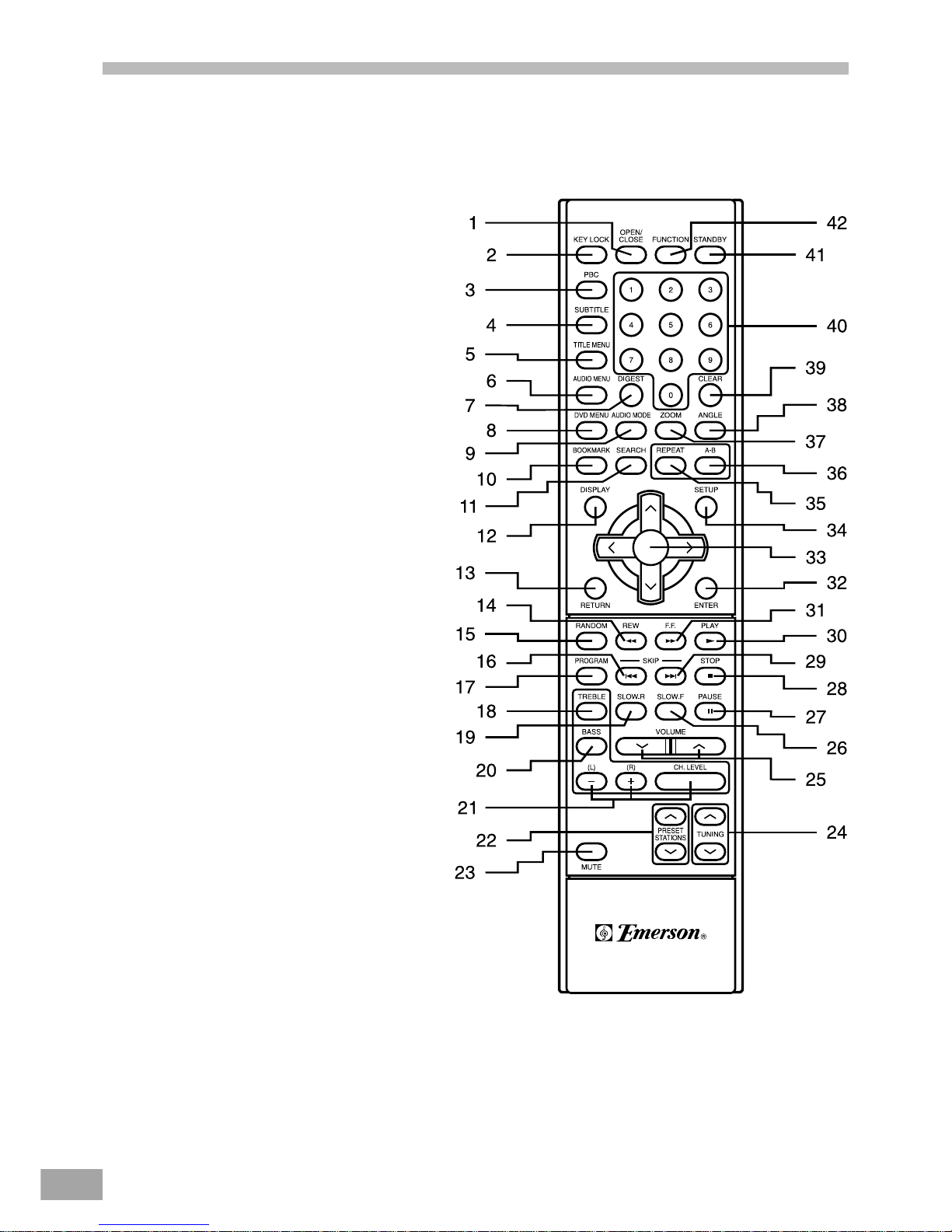
1. OPEN/CLOSEButton
2. KEY LOCK Button
3. PBCButton
4. SUBTITLEButton
5. TITLE MENU Button
6. AUDIOMENU Button
7. DIGESTButton
8. DVDMENU Button
9. AUDIOMODE Button
10.BOOKMARKButton
11. SEARCHButton
12.DISPLAYButton
13.RETURN Button
14.SEARCH REVERSE Button
15.RANDOMButton
16. SKIP REVERSE Button
17.PROGRAMButton
18.TREBLE Button
19.SLOW/RButton
20.BASSButton
21.SPEAKER CHANGELEVELButtons
22.PRESET STATION UP Ù / DOWN Ú Button
23.MUTE Button
24.TUNING UP Ù / DOWN Ú Button
25.VOLUME UP Ù / DOWN Ú Button
26.SLOW/FButton
27.PAUSE Button
28.STOP Button
29.SKIPFORWARDButton
30.PLAY Button
31.SEARCH FORWARD Button
32.ENTER Button
33.NAVIGATION ARROWS ( < / > / Ù / Ú )
34.SETUP Button
35.REPEAT Button
36.REPEATA-B Button
37.ZOOMButton
38.ANGLEButton
39.CLEARButton
40.NUMBER 0 TO 9 Buttons
41.STANDBY Button
42.FUNCTION Button
Table des matières
Autres manuels Emerson Lecteur multimédia


