
Elinz GPSTRACKWIRELESS Manuel utilisateur

www.elinz.com.au / sales@elinz.com.au / 1300 881 773

www.elinz.com.au / sales@elinz.com.au / 1300 881 773
GENERAL INFORMATION
The GPSTRACKWIRELESS is a battery-operated GPS/AGPS dual positioning tracker that is designed
to transmit its location at intervals of your choice. It also contains LBS (Land Based System) to give
approximate location based on mobile phone cell sites if, for some reason there is no satellite GPS
reception. LBS will show which cell tower area the tracker is within –not an actual accurate
location.
It contains a high capacity battery and the mobile APP displays the current battery condition. The
battery is re-chargeable –use the charger supplied. The tracker also contains strong magnets to
assist in attaching the tracker to the desired vehicle, equipment or asset.
The tracker allows free access to a 3rd party mobile APP and online PC website. The APP is a
powerful tool and is used for tracker location, historical travel as well as issuing commands that
control how the tracker operates. Location data is stored on the website for a continuing 3months
period. More detailed travel history and reporting functions can be found on the website.
Please read this manual to familiarize yourself with its features and how it works.
How does GPS tracking works?
The tracker uses fixed orbit GPS satellites to find its location on the earth. The tracker therefore
needs to be able to ‘see’ the sky in order the receive satellite information.
The tracker requires its own mobile SIM card so it can send GPS locations to the website and the
mobile APP. It also allows for text and voice communications.
Locations are automatically uploaded to the website using inexpensive mobile data. The website
saves the location data for up to 3months.
The mobile APP is used to display the information stored on the website. The APP and the website
are also used to control and change tracker settings. The tracker, APP and website work seamlessly
together with virtually no delay in operation.
The trackers 3G SIM card must have the ability for voice, text and data.
The only ongoing cost is for the SIM card usage payable to the SIM provider. Due to the nature of
this product, a PrePay SIM card is sometimes more than sufficient, but ensure ‘auto top-up’ is
selected when registering the SIM phone number with the service provider.

www.elinz.com.au / sales@elinz.com.au / 1300 881 773
GETTING STARTED
1. Fully charge the battery until the red charging LED goes out before using –see below.
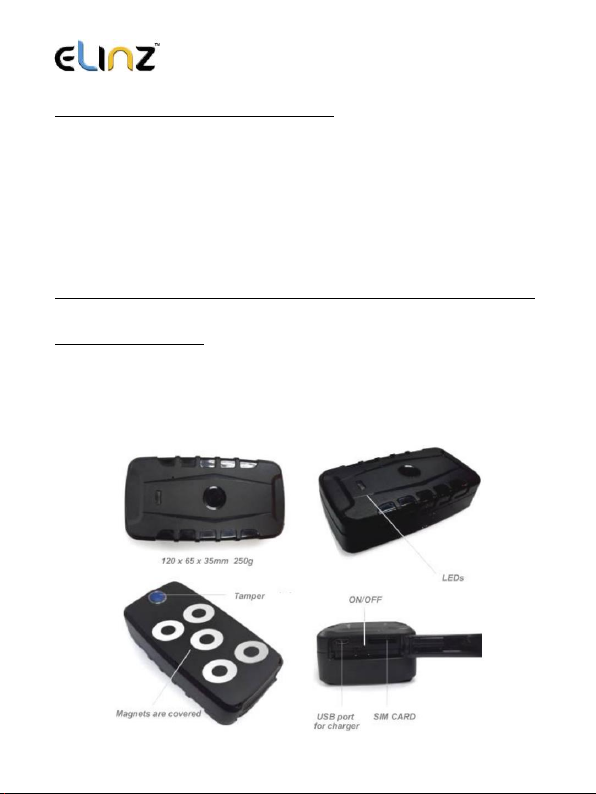
2. Insert the SIM card and turn on outdoors. (on/off switch is next to SIM slot) LEDs flash when
GSM and GPS signals are located.
3. Pair your mobile phone to the tracker and set the time zone.
4. Set the desired upload frequency of location& start reporting.
5. Download the mobile APP and logon to see your tracker.
BATTERY & CHARGER
We recommend to fully charge the battery for 12 to 18 hours. Subsequent charging should take
approximately 5~8 hours. Charge until the red charging LED goes out. Use the charger supplied.
The charging lead has a USB connector to the supplied wall charger.
NOTE: Do not use the USB lead connected to other equipment such as a computer to charge -
charging time will be considerably extended. The battery is 20,000mAh Li-ion and allows for up to 6
months on standby. Battery life is shorter when being used and is dependent on the settings
chosen. Example: If used to track a vehicle every 30 seconds when moving, battery life is
approximately 4 weeks.
SIM card Installation
The LEDs light solid whilst searching for both GSM and GPS signals. After approximately, 20~40
seconds the LEDs should start to flash. Reminder, the tracker must be outdoors or very close to a
window/door to receive GPS signals. Once signals are acquired, it can be initialized as detailed on
the following pages.
www.elinz.com.au / sales@elinz.com.au / 1300 881 773
PLACEMENT & SECURITY OF THE TRACKER
The tracker has built-in magnets to assist with attaching the tracker to a vehicle, equipment or
asset. Ideally, it should not be placed under metal which can block GPS satellite reception. We
strongly recommend experimentation in different placements before deciding on a long-term
location.
In some situations, the built-in magnets may not be strong enough, or suitable, to keep it attached.
Locations such as on a trailer chassis and then driving over speed bumps or potholes the shock of
which could cause the tracker to become detached. Placement must also take into consideration
the rubber cover over the on/off switch and SIM card slot. This should not be easily accessible to
anyone wishing to disable or turn the tracker off.
Other means of securing the tracker from becoming detached or tampered with must be sought.
TAMPER ALARM (SOS)
The tracker has a built-in optical tamper detector on its base. If the tracker is removed or falls off, it
will trigger an alert. The switch is spring loaded and the tracker must be secured to a flat surface
for the switch to be depressed. The magnets allow attachment to most suitable flat metal surfaces.
When setting up the tracker or testing its features you can cover the optical tamper with say black
tape to prevent unwanted alerts

www.elinz.com.au / sales@elinz.com.au / 1300 881 773
Just send these 4 text commands from your mobile phone to the trackers phone number
1. Pair your mobile phone to the tracker.
The tracker needs to know your mobile phone number so it can communicate with you.
Send this text message from your phone to the trackers SIM number;
admin123456 04XXXXXXXX
123456 is default password - 04XXXXXXXX is your mobile number.
Reply: admin okay
2. Set the time zone
Send this text message timezone123456 10 (10hours ahead of GMT).
Reply: Time ok
3. Set upload frequency
Send this text message upload123456 30 (upload location to website every 30 sec’s).
Reply: Upload ok
4. START GPRS DATA LOCATION REPORTING
Send this text message gprs123456
Reply: GPRS ok
THE APN NUMBER
The APN (Access Point Name) is the address of the SIM card provider’s data connection. Some SIM
cards, such as those in Australia automatically adds the APN to this GPS tracker which means you
don’t have to do anything.
Open and login into the mobile APP and if there is a message at the top of the screen ‘not enabled’,
this means that the website has not received any data from the tracker. One reason may be the
APN needs to be set. Contact your SIM card provider for the correct APN.

www.elinz.com.au / sales@elinz.com.au / 1300 881 773
Here are some Australian examples;
Telstra
telstra.internet or telstra.wap
Optus
connect or yesinternet or connectme
Vodafone AUS
live.vodafone.com
Aldi
mdata.net.au
To set the APN, send this text message: apn123456 xxxxxxxxxx
Reply: apn ok
*Note xxxxxxxxxx is your SIM cards APN
DOWNLOAD THE MOBILE APP
Open Google Play Store or Apple App Store and search for LKGPS and download the Android or IOS
APP. Or scan the QR Code to download.
The mobile APP gives you full control of the trackers features as well as showing real time location
and historical travel. The APP can only be used on Apple or Android smartphones and tablets.
Not compatible with Windows Smart Phones.

www.elinz.com.au / sales@elinz.com.au / 1300 881 773
APP LOGIN
For single user please select “Log in by IMEI/ID”in the bottom right corner of the screen. Then
input the IMEI number of your device and the default password "123456".
For multiple user please select “Log in by Username” in the bottom right corner of the screen.
Note:
so we can create username and default password for you.

www.elinz.com.au / sales@elinz.com.au / 1300 881 773
START TRACKING
Icon
Description
Real-time
Shows current or last
reported location.
Historical
Shows where the tracker
has been.
Geo-fence
set permitted areas of
travel
Issue
Let you control how the
tracker
works
Device info
Details of phone numbers
and other
tracker information
Device
messages
A record of alerts sent to
your phone
Alarm
Alerts do you want to
receive
Change
Password
Change the password on
the app
Logout
Logout
FORGOT APP PASSWORD?
the password for you.

www.elinz.com.au / sales@elinz.com.au / 1300 881 773
ONLINE TRACKING WEBSITE
Visit www.lkgps.net and log onto to the website as you would for the mobile APP.
The website stores all the location data. Travel is more detailed with engine start times, stop times
etc. Reports can be saved and printed. If you have more than one tracker, contact us to request a
username account and your own password that allows you to monitor and tracker all devices.
TEXT (SMS) LOCATION REQUEST
If not using the APP, send this text from any smart mobile phone to the trackers mobile number:
123
You will receive a text reply . Tap the blue link ‘to view’ portion of the text message and the mobile
phones own maps open to show the location.
If you require a status update as well as the link, send tis text: G123456

www.elinz.com.au / sales@elinz.com.au / 1300 881 773
LED INDICATOR
MEANING
Green LED
Mobile GPRS signal state
Unlit
Off or asleep
Lit solid
Searching
Flashing once every 3 sec’s
Working
Blue LED
GPS signal state
Unlit
Off or asleep
Lit solid
Searching
Flashing once every 3 sec’s
Working
Red LED
Battery
Lit solid
Charging
Off
Fully charged or not connected to charger
DEVICE INFO
IMPORTANT: If not completed, some functions will not operate.
On APP, select ‘device info’ and complete all the details.
FREQUENCY OF LOCATION REPORTING
To maximize the battery life to the expected 240 days, the tracker should be set to report its
location at reasonable time intervals. The more often it reports, the battery life will incrementally
decrease. The tracker only reports when moving.
When stationary for more than 10 minutes, it enters sleep mode –turns off GPS reception and
stops reporting locations to preserve battery life. Mobile reception (GSM) is still on.
There are two ways to set the upload frequency;
1. Send this text message upload123456 30 (upload every 30 seconds when moving)
2. Use the APP: ‘Issue command’ – ‘Send via GPRS’ – ‘Common’ – Select ‘Upload frequency’
Autres manuels pour GPSTRACKWIRELESS
1
Table des matières
Autres manuels Elinz GPS


