
Element One CONMIC FLAP Manuel utilisateur

Installation and Operating Instructions (EN)
CONMIC FLAP
CONMIC FLAP Extended

Installation and Operating Instructions CONMIC FLAP / CONMIC FLAP Extended (EN)
© ELEMENT ONE Multimedia GmbH
Explanation of symbols
Important Note
Caution
Ban

Installation and Operating Instructions CONMIC FLAP / CONMIC FLAP Extended (EN)
© ELEMENT ONE Multimedia GmbH
1
Dear Customer,
thank you very much for purchasing our
product.
Please read this installation and operating
instructions carefully and keep them in a safe
place.
In this manual we have endeavored to
provide you with all the necessary information
to enable you to have most success with the
products.
Ralf Küchel
Technical Manager / CTO

Installation and Operating Instructions CONMIC FLAP / CONMIC FLAP Extended (EN)
© ELEMENT ONE Multimedia GmbH
2
Table of Contents
Table of Contents ......................................................................................................................................................... 2
Commissioning Date .................................................................................................................................................... 3
Notes ........................................................................................................................................................................ 3
Description ................................................................................................................................................................... 5
Features ....................................................................................................................................................................... 5
Dimensions ................................................................................................................................................................... 6
Safety Instructions ....................................................................................................................................................... 7
Installation ................................................................................................................................................................... 8
Commissioning ........................................................................................................................................................... 10
General Information .............................................................................................................................................. 10
CONMIC FLAP | CONMIC FLAP Extended .............................................................................................................. 11
Operation ................................................................................................................................................................... 13
General Information .............................................................................................................................................. 13
Raising .................................................................................................................................................................... 13
Microphone operation ........................................................................................................................................... 14
Retracting ............................................................................................................................................................... 14
Service function DIRECT AXLE ACCESS (DAA) ......................................................................................................... 15
Care Instructions ........................................................................................................................................................ 16
TCP/IP - Control and Status request .......................................................................................................................... 17
Control via a Media Control System with 9-pin d-sub Remote Interface .................................................................. 18
Firmware Update (Authorized Personnel only) ........................................................................................................ 18
Technical Specification ............................................................................................................................................... 19
Safety Standards ........................................................................................................................................................ 20
Declaration of Conformity ......................................................................................................................................... 20
Warranty .................................................................................................................................................................... 21

Installation and Operating Instructions CONMIC FLAP / CONMIC FLAP Extended (EN)
© ELEMENT ONE Multimedia GmbH
3
Commissioning Date
Date:
Serial No.:
Keep this document for future reference.
Pass on this document when you pass on the device.
Notes

Installation and Operating Instructions CONMIC FLAP / CONMIC FLAP Extended (EN)
© ELEMENT ONE Multimedia GmbH
4
Scope of Supply
CONMIC FLAP | CONMIC FLAP Extended
Table Power Supply - Input: 100-240V AC, 50 / 60Hz. 1.5A; Output: 12V 60W
MAX 5.A (Cable Length DC ~ 140cm)
Power Cable 1.5m
Installation and Operating Instructions / Manual
[A microphone is not included in the standard scope of delivery].

Installation and Operating Instructions CONMIC FLAP / CONMIC FLAP Extended (EN)
© ELEMENT ONE Multimedia GmbH
5
Description
The CONMIC FLAP system includes an electromotive retractable microphone carrier with a mounting
frame for installation in a horizontal furniture surface.
In the starting position (retracted), the system is level to the furniture surface and covered by a
closing flap. By pressing a button, the microphone (not included in the standard scope of delivery)
drives into the working position (extended). By pressing again the button, the retraction is
triggered. Both movements can be paused by a short push of a button.
The sturdy frame and high-quality mechanical elements ensure smooth running without jerks or
vibrations.
To prevent personal injury and damage, CONMIC FLAP has been equipped with a safety control
system. If counterforces of 20 N or more occur during extension or retraction, an acoustic signal
sounds and the process is interrupted, and a countermovement is initiated for approx. 1 sec.
Features
Compact housing dimensions
Lightweight-Design
Brushed stainless steel mounting frame and closure flap
LowNoiseDesign & LowEnergy Design
RJ 45 Interface for TCP/IP Remote conrol
9-pin dSub interface for remote control via potential-free switch
DirectAxleAccess for optional, manual movement
Digital stepper motor 12V motor, toothed belt drive
German precision mechanism
Electronic & Acoustic Diagnostic System
Durable HighFlex cables
Integrated universal mounting rails
All-aluminum housing
Convenient cable & connection position
EMC + EMI protected
Installation and Operating Instructions CONMIC FLAP / CONMIC FLAP Extended (EN)
© ELEMENT ONE Multimedia GmbH
6
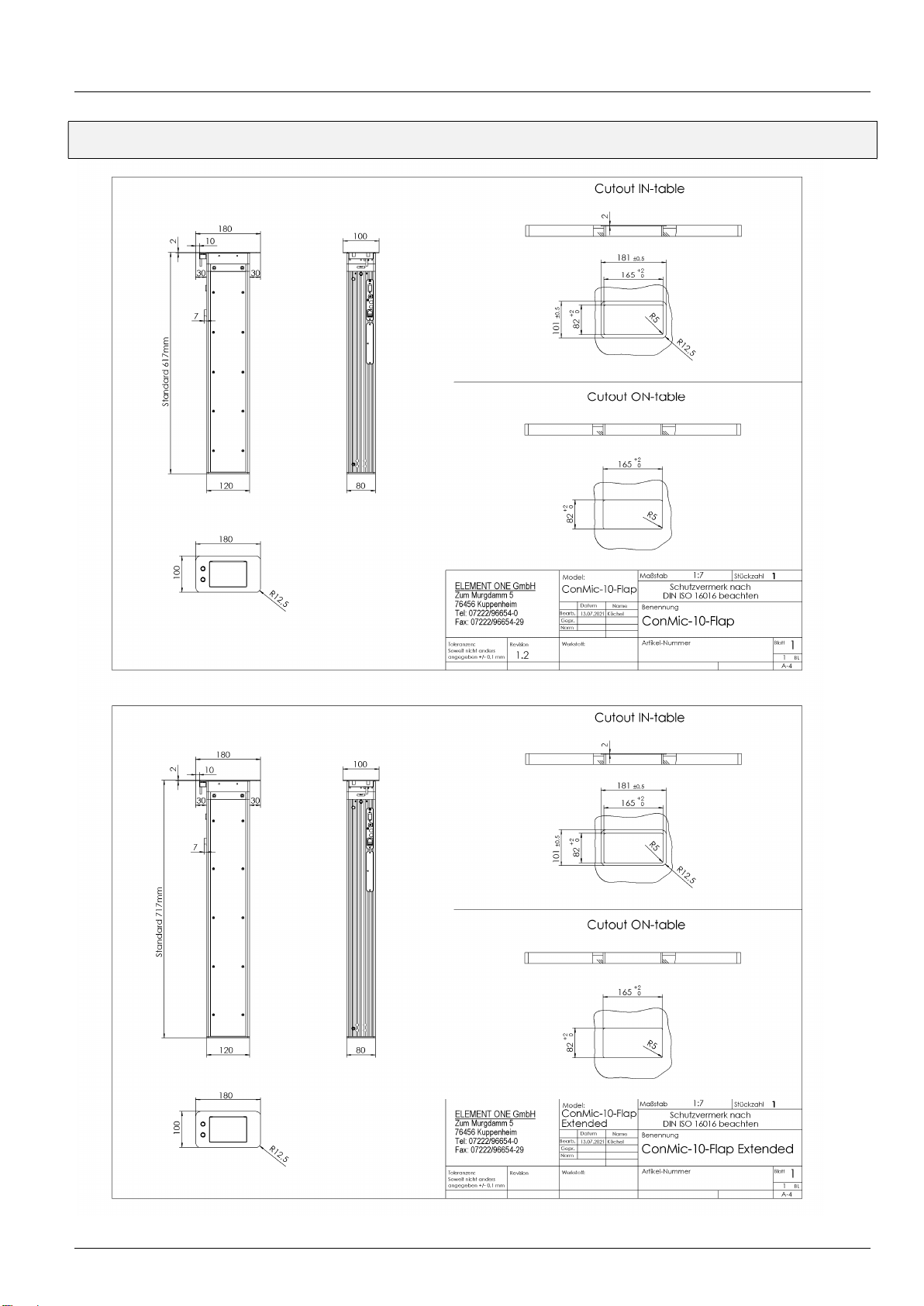
Dimensions
Installation and Operating Instructions CONMIC FLAP / CONMIC FLAP Extended (EN)
© ELEMENT ONE Multimedia GmbH
7
Safety Instructions
= Important Note
= Caution
= Ban
The device may only be opened by authorized personnel when it is disconnected from the
power supply!
Let damage and defects be repaired immediately by authorized specialists.
Do not operate this device with any accessories other than the supplied ones.
Gehäuse niemals gewaltsam öffnen oder schließen!
In the event of damage caused by third-party accessories, e.g. power supply unit, or
unauthorized attachments or modifications, any warranty and liability claims are excluded.
Remove all transport locks before start-up. We recommend that you keep them.
To avoid signal transmission errors, use only high-quality cables.
Do not slide sharp or hard objects over the surface, it may be damaged.
Immediately remove any liquids spilled on the surface with a cloth.
Do not load the device with more than 1.0 kg when closed.

Installation and Operating Instructions CONMIC FLAP / CONMIC FLAP Extended (EN)
© ELEMENT ONE Multimedia GmbH
8
Installation
= Important Note
= Caution
= Ban
Make sure that your furniture has sufficient load-bearing capacity and strength against
deflection and warping even after it has been weakened by the cut-out!
Stresses on the mechanics due to tension, pressure or shock can lead to damage or
malfunctions. Therefore, ELEMENT ONE devices should not be transported in their installed
state!
In the case of mandatory transport in the installed state, the following conditions must be
observed:
Retract microphone carrier | Close device
Transport and store devices vertically, i.e. according to the installation position
Do not tilt furniture with built-in appliances
Secure devices against slipping and falling out
observe the permissible load on the device, do not stack it.
ELEMENT ONE units are held in the furniture by means of the decorative/holding frame. The
optionally supplied clamping holders to be attached at the side are intended for horizontal
alignment and fastening in the furniture. Please note that these may only be applied lightly
(risk of damage to the furniture or tensioning of the device mechanics and thus possible
malfunction of the movement mechanics).
For customer´s mounting, ELEMENT ONE will provide an installation drawing upon request.
The table cutout must be milled or sawn out before mounting the unit and according to the
installation drawings (see dimensions)
It is recommended to install the device with two people.
Ce manuel convient aux modèles suivants
1
Table des matières


