
Elektronika MK-52 Manuel utilisateur

The MK -52 Instruction Manual.
© Scanning and Recognition - Сурок 2 9.
© Original Guide - aT.
Thank Forum "Polygon ghosts” for informational support :)
If you find a typo or somehow make this guide (for example, come up with how to
recognize tables), please contact me by email at [email protected] mail or ICQ
429825 43. The same would be happy if you share schemes calculator and magazines
for scanning
By purchasing any magazine, paper instructions for the MC -52, as well as other
interesting me an old portable computing.
I. GENERAL INFORMATION
1.1. The calculator "Elektronika MK-52" is available in various designs.
Versions differ in the presence of peripheral devices connected to the terminals
of the calculator.
1.2. When buying a calculator:
1) Take a completeness check;
2) Require verification of its performance on the control test (Table 1 and 1a).
Pre-testing should carefully review the control tests and the notes thereto;
3) Check the instruction manual and warranty card of one of the two ticket stubs
for warranty repair.
4) Make sure you have a warranty and a detachable coupon (see Appendices 1-3)
shops stamp or signature stamp seller and the date of sale;
5) check that the number on the warranty card number on the basis of the
calculator , as well as the safety seal on the body of the calculator and on the
power supply .
Remember that if you lose you lose the warranty card Warranty Service
calculator.
Tear-off coupons for warranty repair service organization employees are cut only
after the operation.
1.3. After storage in a cold room or after transport in winter before inclusion
calculator to stand at room temperature for 4 hours
1.4. Before using the calculator, please read this instruction manual.
1.5. The calculator is packed with a protective film on the color filter, which
is easily removed.
1.6. If necessary, repair the calculator during the warranty period, enter the
coupon number in the calculator and the date of it’s release.

Table I
Truncation of TEST OF CONTROL WITHOUT Calculator PERIPHERALS
Key Strokes: Display:
Notes

1. In Table 1, the key symbols, images of blue and yellow on the keypad,
enclosed in parentheses and placed on the keypad above the key, and white - and
a key to the right of the key.
2 Tests 12,13,17,21 and 22 are an appeal to the EEPROM, which are indicated (in
addition to information) minus signs in all places indicator. While accessing
the EEPROM transition to implement other tests are banned.
3. Elapsed time in test 36 is not more than 5 seconds.
4. To re-enable the calculator, turn it off 1 seconds at least.
Table 1a
TEST SEQUENCE FOR CONTROL OF PERIPHERAL DEVICES WITHOUT Calculator
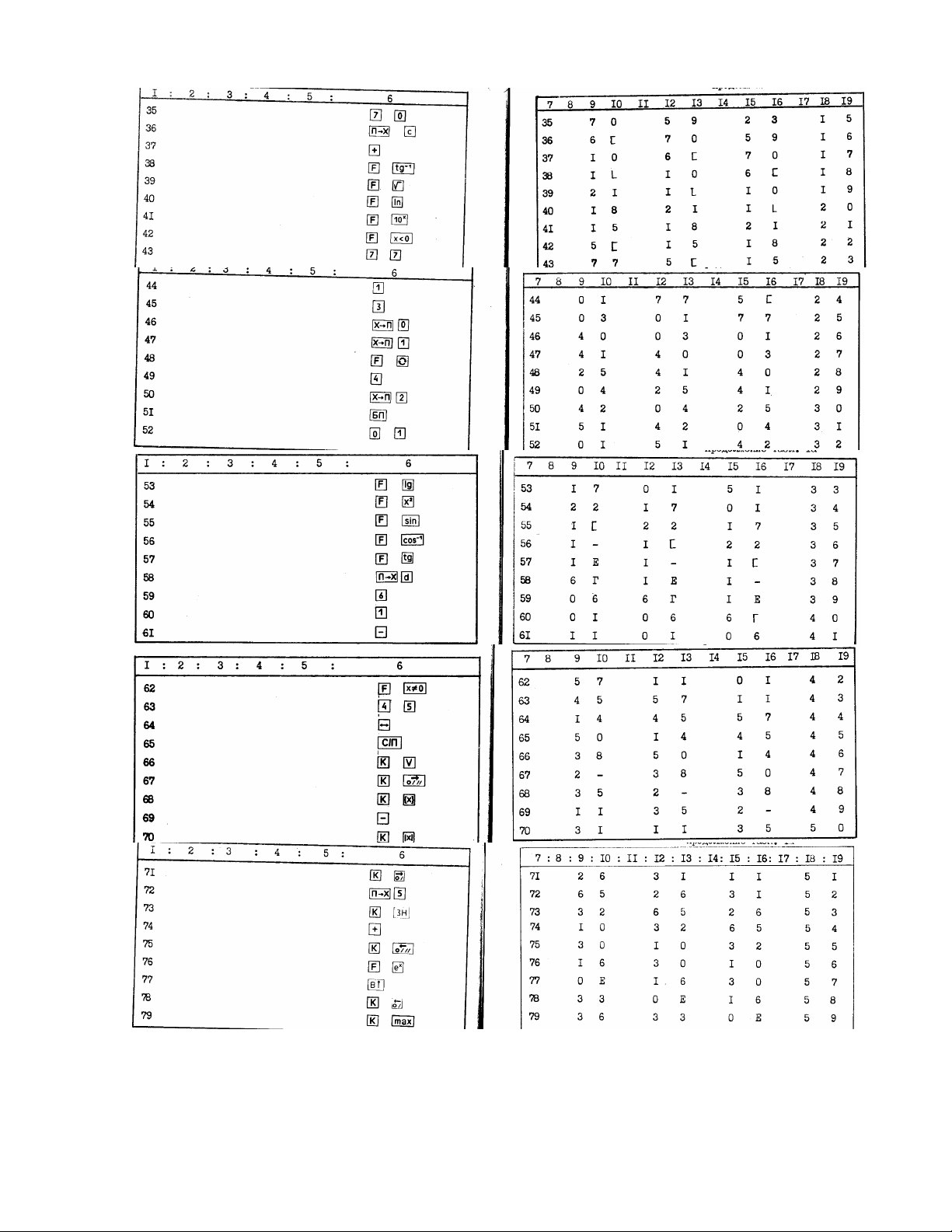
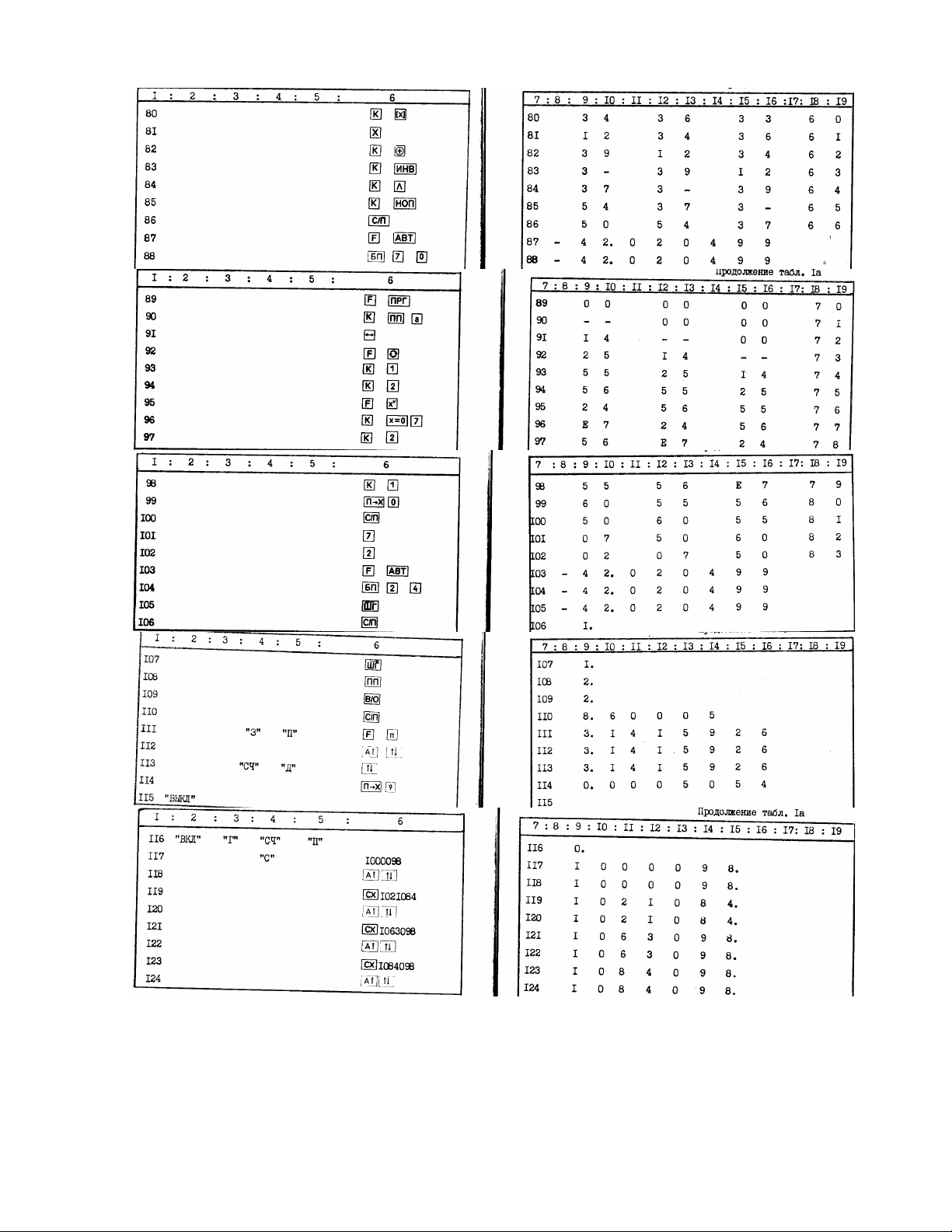

Notes:
1. In tests with the numbers 6, 7, 112, 113, 118, 12 , 122, 124, 126, 128, 129,
131, 132, 134.135, 137, 138 is reference to an EPROM. At the time of treatment
to the EEPROM in all digits displayed (in addition to information) minus sign (a
sign referring to PROM). While accessing the EEPROM transition to the
implementation of follow-up tests is prohibited.
2. The time between switching on and off of the calculator must be at least 1
seconds.
3. While the tests with the numbers 1 6 and 145 should be no more than 55 s, and
with the numbers 11 and 148, no more than 25 seconds.

2. DELIVERY
Name of devices and instruments Number in
execution
units, Ind.
- 1 2
I. The calculator"ElektronikaMK-52" 1 1 1
2. Operating Manual of the calculator "Elektronika
MK 52"
111
3. Power supply D2-37A 1 1 1
4. The elements of the A-316 "Quantum" 4 4 4
5. Expanded memory unit PDU-2 "Astro-Electronics" - - 1
6. Operating Manual of the expansion memory BRP-2 - - 1
7. Pack 1 1 -
8. Package 2 2 2
9. Lodgment - - 1
1 . Box - - 1
11. Cover 1 1 1
Notes:
I. The calculator in the performance of 1 available on purchase orders.
2. The calculator in the performance of the 2-trading network does not arrive.
3. Allowed to use the elements of the A- 316 "Prima, etc.
3. SAFETY REQUIREMENTS
3.1. The power supply has elements under voltage of 22 V, and the calculator -
the elements under the voltage of 27 V, so the repair or open the calculator and
the power supply is permitted only to persons eligible for repair calculator.
3.2. At the end of computing work, and in the event of faults turn the
calculator off and disconnect the power supply from the network first, and then
on the calculator (for running on AC power).
Connect the power adapter to 22 V without a calculator is prohibited.
3.3. In order to avoid the destruction of the battery:
1. Observe polarities.
2. Do not make recharging.

4. SUMMARY
4.1. Appointment
4.1.1. "Elektronika MK-52” is a portable Micro calculator for personal use and
is designed for complements you in scientific, engineering, and statistical
calculations.
4.2. Technical characteristics
4.2.1. The number system with input and output information - decimal.
4.2.2. The number of digits of the mantissa - eight (see paragraph 6.2).
4.2.3. The number of digits of the order number - two.
4.2.4. The range of computing 1 • 1 -99 ≤ | x | ≤ 9,9999999 • 1 99.
4.2.5. The presentation of the decimal point:
1) In the range 1 ≤ | x | ≤ 99999999 - Natural;
2) In the range of 1•1 99 ≤ | x | ≤ 1 and
99999999≤|x|≤9,9999999•1 99 floating.
4.2.6. Number of addressable memory registers - 15.
4.2.7. The volume of non-volatile memory (EEPROM) - 1 24 four-digit words or 512
program steps.
4.2.8. Amount of program memory in the calculator= 1 5 steps, the amount of the
read information from the EPROM, or from a block of memory expansion, occasional
handling up to 98 steps.
4.2.9. The input and output of a number displayed on the 12- bit fluorescent
display (8-bit mantissa, 2 discharge order 2 bits of mantissa digits and order).
4.2.1 . The calculator operates in two modes: "Automatic operation " and
"Programming”.
4.2.11. The calculator in the "Automatic operation" allows you to:
1) To perform the four arithmetic operations, “+",” -", “x ", "+ “;
2) Calculate the direct trigonometric functions sin x, cos x, tg X. The argument
of X can be entered in radians, grads and degrees;
3) Calculate the inverse trigonometric function arcsin X, arcos X, arctg X in
radians or degrees and grads;
4) Compute functions x y, ln X, lg X, Ex, 1 x,, x2 , 1 / x;
5} Cause constant in the operating register X;
6) The recording of information in the 15 addressable registers;
7) To cause the information in the register X of 15 addressable memory
registers;
8) To record information in the stack registers and control its movements;
9) Change the sign of the number in the register X;
1 ) To carry out the operation of exchange of information between business
registers X and Y;
11) The purification of the operational register X;
12) To restore the previous calculation result;
13) To produce chained calculations;
14) Allocate integer and fractional part of a number;
15) To determine the absolute value of the numbers;
16) To determine the sign of the number;
17) Provide the maximum number (of the two);
18) To generate a pseudo-random number between and I;
19) To transfer angular (time) value, expressed in degrees (hours), minutes,
seconds and fractions of a second, the values expressed in degrees (hours) and
fractions of degrees (hours);
2 ) To transfer angular (time ) value , expressed in degrees ( hours ), and
fractions of a degree ( h) , to the values expressed in degrees ( hours ) ,
minutes, seconds and fractions of a second;
21) To transfer angular (time) value, expressed in degrees (hours), minutes, and
fractions of a minute in the values expressed in degrees (hours) and fractions
of degrees (hours);
22) To transfer angular (time ) value , expressed in degrees ( hours ), and
fractions of a degree ( h) , to the values expressed in degrees ( hours ) ,
minutes, and fractions of a minute ;

23) Perform logical operations (multiplication, addition, and exclusive 2nd
inversion).
24) To write to the EEPROM program and data stored in the memory addressable
software parts of the calculator;
25) To make reading the information from the EPROM in the addressable memory and
software components;
26) To produce the selective erasure of information in the EEPROM;
27) To perform calculations for the program.
4.2.12. In the "Program" calculator allows you to:
1) Write a program using the keyboard;
2) To edit and adjust the program;
3) To write to the EEPROM program and data in the addressable memory and
software parts of the calculator;
4) To make reading the information from the EPROM in the addressable memory and
software components;
5) To selectively erase information in the EEPROM.
4.2.13. The computation time and arithmetic operations 1 / x,
x
, x2 to .5 sec.
Time calculation function xy no more than 3.5 seconds.
The average time for computing functions ln X, lg X, Ex, 1 x, sin x , cos x , tg
X, arc-sin X, arcos X, arc-tg X no more than 2 seconds.
4.2.14. In the calculation of trigonometric, logarithmic and exponential
functions should be considered valid values and the relative error are listed in
Table 2.
4.2.15. To extend the capabilities of programming, and facilities monitoring and
debugging programs are provided in the calculator:
1) The command of direct and indirect transitions to the routine and the command
return from subroutine;
2) The ability to access the inside of the subroutine subprograms. The depth of
such applications is 5 ;
3) The command of direct and indirect unconditional jump;
4) Four types of commands direct and indirect conditional branch (on the
conditions X = , X ≠ , x ≥ , X < );
5) Useful loop;
6) Command indirect writes the contents of the X register in the memory
registers;
7) Command indirect indication of register memory;
8) Command to reset the address zero state;
9) Start and stop the automatic calculation program;
1 ) Command -step through the program in the “Automatic operation " ;
11), the display code three consecutive steps of the program and the current
state of the counter addresses;
12) Buttons to step through the program in the fall or rise of addresses by
visual inspection of the program.
4.2.16. Accessing PROM (recording, erasing, reading) unit or a memory expansion
should be done with the work of the calculator from the power supply as at the
time of treatment to the PROM or to block a substantial power consumption occurs
, and if the battery voltage A -316 " Quantum " close to the edge of the
discharge may occur incorrect reading (writing , erasing ) information from the
EPROM or from a block of memory expansion . Accessing the EEPROM is only
possible when uncoupled from the block of memory expansion or if you change the
unit "ON" in the "on" position.
4.2.17. Programs and data stored in the EEPROM using the keyboard and can be
stored in the EEPROM in the " election will PROM " (power cuts, lack of access
to the EEPROM) for 5 hours If PROM is a request, the information stored in
the EEPROM is stored for at least 25 hours (total time of treatment, part of
5 h). Any piece of information that is stored in an EPROM, you can call a
calculator for processing, and, if necessary, delete, and in its place a new
record. The number of writes cycles data is 1 4.

4.2.18. The information stored in a block of memory expansion BRP- 2 “Astro -
Electronics “, its technical characteristics, as well as work with them are
described in detail in the manual unit supplied.
4.2.19. The calculator operates in a temperature range from 1 to 35 ° C at a
relative humidity of 5 to 9 % and an atmospheric pressure of 66 to 1 6 kPa.
4.2.2 . Power supply is provided by the calculator uninterruptible power supply
(four elements of A -316 "Quantum”), or from the power supply (D2- 37A)
connected to the AC mains 22 V with a tolerance of minus 33 to + 22 V, (5 ± 1)
Hz.
4.2.21. To re-enable the calculator is allowed not less than 1 seconds after
shutdown.
4.2.22. The power consumed by the calculator batteries A -316 "Quantum”, not
more than .7 W (without peripherals).
4.2.23. Overall dimensions of the calculator without peripheral devices = 212 x
78 x 42 mm.
4.2.24. Weight of the calculator (without power supply peripherals and
decorative cover) is not more than .25 kg.
4.2.25. The content of precious metals:
Gold - . 932 g,
Silver - . 7755 g
4.3. General information about the structure of the calculator
4.3.1. The appearance of the calculator is shown in Figure 1, and electrical
schematic diagram is shown in Annex 5.
4.3.2. Entering Numbers, operations and commands in the calculator by pressing
the appropriate keys. Many of the keys have a double and a triple symbolism.
Color symbols depicted above the key matches the color of the keys [F] and [K].
Input function symbol is shown on the keypad as follows: first the push button
[F] or [K], then the key on which the symbol of input functions. Key assignment
is given in Table 3 and 4.
4.3.3. The control input of numbers and codes of operations as well as reading
the results of the calculations are carried out visually with fluorescent
indicator.
4.3.4. For the reception, storage and distribution of input data and results of
calculations in the calculator are special functional parts registers.
4.3.5. In the calculator, there are two operating registers X and Y.
4.3.6. X is a register for receiving and storing the entered number and the
result of computation. Its content is displayed on the LCD.
4.3.7. Register We used to receive information from the register of X, which
provides for the necessary input to the register X of the second number. Entry
number in the register have going on when you press the [B ↑] (input).
Calculator APPEARANCE
Autres manuels Elektronika Calculatrice


