
Elektor SAND CLOCK Manuel utilisateur

Sand Clock Assembly Manual
Version 1.2 – 23 June 2017
This kit is designed for someone who has intermediate experience with assembling electronics and
mechanics.
If you believe that the kit is too complicated for your skill level please do not try to assemble it.
Take your time - it takes approximately 1 ½-2 hours to complete this kit.
nsure your work area is well lit (daylight preferred) and clean.
Assemble the sand clock in the order as stated in the instructions - read and understand each
step before you perform each operation.
The bags with the mechanical components are numbered from 1 to 5. During assembly you will
start with bag 1 and end with bag 5. Bag numbers are indicated in the text by use of square
brackets e.g. [1].
The following tools and materials will be required to assemble the clock:
•A good quality soldering iron (25-40W) with a small tip (2-3 mm).
•Thin solder wire with no-clean flux. Do not use any flux or grease.
•A set of pozidrive screwdrivers or a cordless screwdriver with pozidrive bits.
•Long nose pliers.
•Tweezers.
•A pencil sharpener.
•12 mm adhesive tape.
•A computer with the Arduino ID installed.
In this manual, commands are printed in bold e.g. svml 1800.
The position of a servo motor corresponds with the pulse width of the controlling PWM signal and
is expressed in microseconds (μs).
Disclaimer: All pictures are for illustration purpose only. Actual product may vary due to product
enhancement.

Assembly
Step 1 – 5
Push the pin headers into the socket headers of the Arduino and put the preassembled
shield PCB on top. Solder the two utmost pins of each header and carefully remove the
shield from the Arduino. In case pins have shifted by pulling them out of the Arduino socket
headers, just push the shield against a hard flat surface to get them in place again. Now
solder the remaining pins.
Mount the three angled servo headers and finally mount the DC/DC converter. Pay
attention to the correct orientation of the DC/DC converter.
Step 6
Attach the shield PCB to the Arduino and connect the three servo motors. Make sure you
attach the servo motor connectors to the shield with the correct orientation. You can mark
the servo motor connectors with a small label if you wish. Connect the power supply to the
Arduino and connect the Arduino to a PC using the USB cable. Compile the sketch and
send it to the Arduino board.
When the sketch starts up, it first checks if there's valid calibration data in the PROM.
When there's no valid data, which is the case when the Arduino board is used for the first
time in a sand clock, the sketch drives all three servo motors in the middle position i.e. a
pulse width of 1500 μs.
If you wish, you can check the position of the servo motors as follows: open the serial
monitor in the Arduino ID , select a non-empty character sequence as line ending
(carriage return, newline/linefeed, or both), and send command svd. The response should
indicate all three servo motor channels have a pulse width of 1500 μs. If not, you can drive
the servo motors in the middle position yourself by sending commands svml 1500,
svmr 1500, and svmp 1500.
Turn off power, disconnect the servo motors and remove the shield from the Arduino.
If you have a servo tester you can use that as well to set the servo motors to the middle
position. When using a servo tester there is no need to upload the sketch to the Arduino
now as you can do this later when the clock is almost finished (steps 31 - 32).
Step 7 – 8
Remove the protective film from the bottom plate (A) and stick 4 adhesive rubber bumpers
[1] to the corners. Make sure the orientation of the bottom plate is correct as it is quite
difficult to remove and reposition the rubber bumpers in case of an error.
Mount the 4 supports [2] for the sand box using M3x10 machine screws [3] and M3 plastic
washers [3]. Hand tighten only.
Step 9 – 10
Remove the protective film from the side panels (B) and the rear panel (C) of the frame.
Screw the panels together in a right angle using an M3x10 machine screw [3] and an M3
nut [3]. Do not over tighten the screws as this my cause the acrylic to break.

Step 11 – 12
Remove the protective film from the acrylic parts. Attach the lift servo to lift servo panel (D)
using two M2x10 machine screws [3] and M2 nuts [3]. Attach the servo horn to the servo
shaft using the M2.5 machine screw packed together with the servo accessories.
The servo horn should point more or less upright at an angle of 90 degrees. Don't worry if
you can't get it exactly at 90 degrees due to the teeth of the servo shaft and the servo
horn.
The acrylic lift servo lever ( ) has 2 holes. Screw it with the smallest hole to the servo horn
using a self tapping plastic screw from the servo accessories bag. Tighten the screw so
the lever can turn freely with as little slack as possible. The distance between the center of
the servo shaft and the mounting point of the lever should be +/- 13 mm. This is usually the
second last or third last hole in the servo horn.
Step 13 – 17
Attach the lift servo mechanism to the frame using an M3x10 machine screw [3] and an
M3 nut [3]. Mount the Arduino Uno to the base plate using M2.5x8 machine screws [3] and
3 mm plastic spacers [3]. Tighten the screws loosely so the Arduino can still move a bit.
Note that the screws are tapped into the base plate, nuts aren't required. Now attach the
frame with the lift servo mechanism to the bottom plate using two M3x10 machine screws
[3] and an M3 nut [3]. Finally tighten the Arduino mounting screws.
Step 18 – 19
Connect the shield to the Arduino and insert a CR2032 3 V lithium coin cell into the battery
holder.
Step 20 – 23
Attach the hinges (H) and (G) to the pantograph servo motors mounting plate (F) using
M3x10 machine screws [4] and M3 nuts [4].
Mount both servo motors using M2x10 machine screws [4] and M2 nuts [4].
Step 24 – 26
Attach the pantograph servo mechanism to the base of the clock using 2 M3x10 machine
screws [4] and 2 M3 lock nuts [4]. Tighten the screws so the pantograph mechanism can
rotate freely with as little slack as possible. Route the servo wires under the lift servo and
connect them to the Arduino shield. Turn the pantograph servo mechanism upright and
attach it to the lift servo lever using an M3x10 machine screw [4] and a M3 lock nut [4].
Tighten so the mechanism can operate freely with as little slack as possible.
Step 27 – 28
Assemble the pantograph arms. Screw part (J) on top of one of the parts (I) using an M3x8
machine screw [4]. Then screw part (K) on top of part (J) using an M3x8 machine screw
[4]. Finally screw the other side of part (K) on top of the second part (I) with the round
acrylic disc (L) in between using an M3x10 machine screw [4]. Tighten the screws so the

arms can rotate freely with as little slack as possible. Be gentle and do not use excessive
force as the acrylic may break. Finish the assembly of the pantograph arms by attaching
the servo horns. Temporarily fit an M2.5x8 machine screw [4] through the holes in the
acrylic and the servo horns. Then secure the servo horns to the acrylic arms (I) using 2
plastic screws supplied with the servo motors.
Carefully sharpen the plastic M4x30 machine screw [4] with a pencil sharpener and fit it
together with an M4 nut [4] to the pantograph assembly.
Step 29 – 30
Attach the pantograph mechanism to the pantograph servo motors using the M2.5x8 [4]
machine screws. Mount the arms so they form an angle of 90 degrees. Don't worry if you
can't position them exactly to 90 degrees due to the teeth on the servo motor shafts and
the servo horns. This will be compensated after calibration.
Step 31 – 32
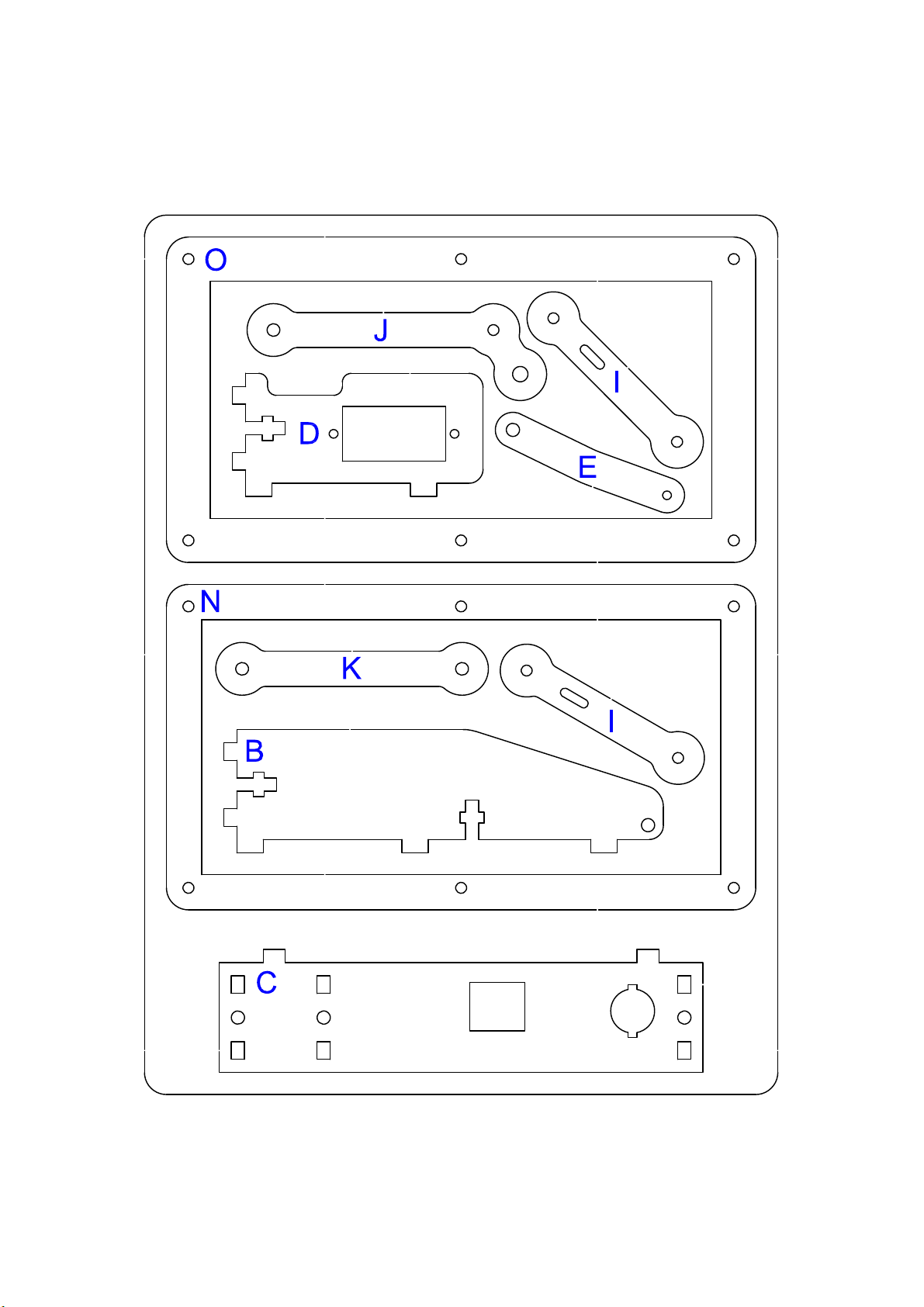
Remove the protective film of the acrylic parts of the sand box (M), (N) and (O). Screw the
panels together using 6 M2.5x12 machine screws [5]. Make sure the panels are secured
firmly against each other without over tightening the screws.
Calibration procedure
The calibration procedure involves sending commands to the sketch. Power on the
Arduino board and connect it to your computer via USB. All servos should now be at 1500
μs (this may not be the case if you've written settings to the PROM before).
Open the serial port using Arduino ID 's Serial Monitor. Select a non-empty character
sequence as line ending (carriage return, newline/linefeed, or both). Now you're set up to
send commands.
During the procedure you can always query the current settings and the position of the
servo motors by sending command sed and command svd respectively.
Calibration steps:
1. Move the left servo motor to the vertical position (towards 1000 μs), e.g. svml 1080.
Send this command with various values until you've determined the most accurate
position.
2. Store the setting: svslv.
3. Move the right servo motor to the vertical position (towards 2000 μs), e.g. svmr
2050. Send this command with various values until you've determined the most
accurate position.
4. Store the setting: svsrv.
5. Move the left servo motor to the horizontal position (towards 2000 μs), e.g. svml
1940. Send this command with various values until you've determined the most
accurate position.
6. Store the setting: svslh.
7. Move the left servo motor back to the vertical position using svml with the value

previously determined during step 1. You can query the correct value using sed.
8. Move the right servo motor to the horizontal position (towards 1000 μs), e.g. svmr
1080. Send this command with various values until you've determined the most
accurate position.
9. Store the setting: svsrh.
10. Move pen up: svmp 2000.
11. Set pen position: ps 0 40.
12. Place the partially finished sand box on the supports and make sure it lies perfectly flat
on all 4 supports. In case the sand box wiggles on the supports, twist it slightly
diagonally until it lies perfectly flat.
13. Move the pen servo motor to the down position (towards 1500 μs), e.g. svmp 1525.
Send this command with various values until you've determined the most accurate
position. The clock moves to pen to the down position when it wants to write something
in the sand. The pantograph arms should be perfectly horizontal and the tip of the pen
should hover approximately 1 – 2 mm above the surface of the sand box. If necessary,
mechanically adjust the pen by screwing it up or down. Use the M4 nut to lock it in
place.
14. Store the setting: svspd.
15. Check the pen down position in relation to the sand box:
* Pen position 1: ps 0 30.
* Pen position 2: ps 0 55.
Adjust the pen servo motor if needed.
16. Set the pen in a neutral position: ps 0 40.
17. Move the pen servo motor to the middle position (towards 1800 μs), e.g. svmp 1700.
Send this command with various values until you've determined the most accurate
position. The clock moves the pen to the middle position when it needs to move the
pen above the sand between continuous strokes.
18. Store the setting: svspm.
19. Move the pen servo motor to the top position (towards 2100 μs), e.g. svmp 2150.
Send this command with various values until you've determined the most accurate
position. Your goal is to move the pen to highest position possible (servo horn in line
with the acrylic lever). The clock moves the pen to the top position when it's not writing
the time.
20. Store the setting: svspu.
21. Set the vibration period (seconds), e.g. vms 5.
22. Review the settings with sed. Modify settings if needed. Note that start-up program
mode should be set to command. Don't change the mode at this point.
23. Store settings in PROM: se .
24. Set date and time in realtime clock, e.g. c 2016 08 27 18 40 00. Note that a
CR2032 battery must be installed.

25. Check date and time with cr.
26. Lift pen up with plu.
27. Power off the sand clock.
Step 33 – 36
Wrap a few turns of adhesive tape around the vibration motors to make them slightly
thicker.
Mount the plastic clips [5] on the bottom side of the sand box using 2 M3x6 machine
screws [5] and 2 M3 steel washers [5]. Do not tighten the screws completely yet.
Slide the vibration motors in the clips and position them in an angle of 45 degrees as in the
pictures. Now tighten the screws until the vibration motors are firmly in place and the clips
cannot rotate easily anymore. Normally there will be 4 plastic M3 washers left over from
bag [3]. In case one of the clip mounting screws should touch the lift servo motor holder,
you can insert these between the base plate (A) and the sand box supports to lift the sand
box slightly.
Step 37 – 38
Connect the wires of the vibration motors together and solder them to the pads on the
Arduino shield. Check the polarity. Be careful not to touch any acrylic parts with your
soldering iron while connecting the vibration motors. You can also shield the acrylic with
small pieces of cardboard while soldering. Place the sand box on top of the supports and
make sure wires are not touching the rotating parts of the vibration motors. Rearrange
wires if necessary. Test the clock without sand to make sure everything works well.
Step 39 – 40
Add the sand to the sand box. A layer of 4 – 5 mm will be sufficient, be sure to spread it
out evenly.
If you wish you can also color the sand using food coloring. Put the sand in a small jar and
add a few drops of food coloring. Shake vigorously until the sand gets evenly colored.
Repeat until you get the desired color intensity. Make sure the sand has dried completely
before you pour it in the sand box.
Power on the sand clock again. The device starts up in command mode.
Calibrate the pen further if necessary. The following commands draw an “8” in the sand:
ps -10 25
pg 8 1 1
Select the start-up mode. This is the mode that takes effect every time you power up or
reset the clock.
1. Send command msa for autonomous mode (normal clock behavior) or msc for
command mode (use serial monitor to control the device).
2. Send command se to program the selected start-up mode and other settings into
PROM.
Send command ma if you want to immediately switch from command mode to
autonomous mode.

Congratulations, your sand clock is now finished.


Manuels Robotique populaires d'autres marques

STEMCenter USA
STEMCenter USA Pi-Bot v2.00 Manuel utilisateur

SunFounder
SunFounder PiDog Manuel utilisateur

Universal Robots
Universal Robots UR5 Manuel utilisateur

Universal Robots
Universal Robots E Series Manuel utilisateur

YASKAWA
YASKAWA MOTOMAN-MPL80 II Manuel utilisateur

EFORT
EFORT ECR5 Manuel d'instructions


