09
Electrorad Digi-LineElectrorad Digi-Line
08
6.0 Warranty
The product is covered by a 10 years warranty
except for the electrical and electronic
components that are covered by a 2 years
warranty.
7.0 Operating Instructions
7.1 Display
The electronic thermostat has an LCD display
specially designed for the regulation of the
electrical radiator. It will optimise energy
consumption and increase comfort levels.
Features:
lDisplay with backlight
lWireless RF programmer options (see
separate instructions)
lTimed override function.
5.0 Waste Disposal According to The WEEE Directive (2012/19/EU)
Waste disposal according to
the WEEE Directive (2012/19/
EU). The symbol on the
product label indicates that
the product may not be
handled as domestic waste,
but must be sorted separately. When it
reaches the end of its useful life, it shall be
returned to a collection facility for electrical
and electronic products. By returning the
product, you will help to prevent possible
negative effects on the environment and
health to which the product can contribute if
it is disposed of as ordinary domestic waste.
For information about recycling and collection
facilities, you should contact your local
authority/municipality or refuse collection
service or the business from which you
purchased the product. Applicable to countries
where this Directive has been adopted.
Note: The radiator has a soft start feature built into the control software such that full
power is not applied at power up, whether it is the first time the radiator is switched on
or whenever the radiator loses power by switching it off. The software gradually increases
power from zero to full power over a 20 minute period.
7.2 Behaviour Indicator
7.3 Keyboard
Keys:
< = Left Navigation Key
> = Right Navigation Key
+ = Plus Key
- = Minus Key
OK
= Validation Key
8.3 Frost Protection Mode
Use this mode if you want to protect
your system against freezing when
leaving the property for extended
periods.
By pressing (+) or (-) keys, the reduced
setting temperature starts to blink and can be
adjusted.
8.1 Manual Comfort Mode
Manual working mode, the comfort
setting temperature will be followed
all the time. By pressing the (+) or (-)
keys, the comfort setting temperature starts to
blink and can be adjusted.
This temperature will also be used when
following the weekly schedule on the
programmer (if applicable).
8.2 Manual Reduced Mode
Manual working mode, the reduced
setting temperature will be followed
all the time. By pressing (+) or (-) keys,
the reduced setting temperature starts to blink
and can be adjusted.
The reduced temperature is intended to be
used during the night or for short periods of
time when not in the room/property.
This temperature will also be used when
following the weekly schedule on the
programmer (if applicable).
WEEE NO: WEE/HD0506VZ
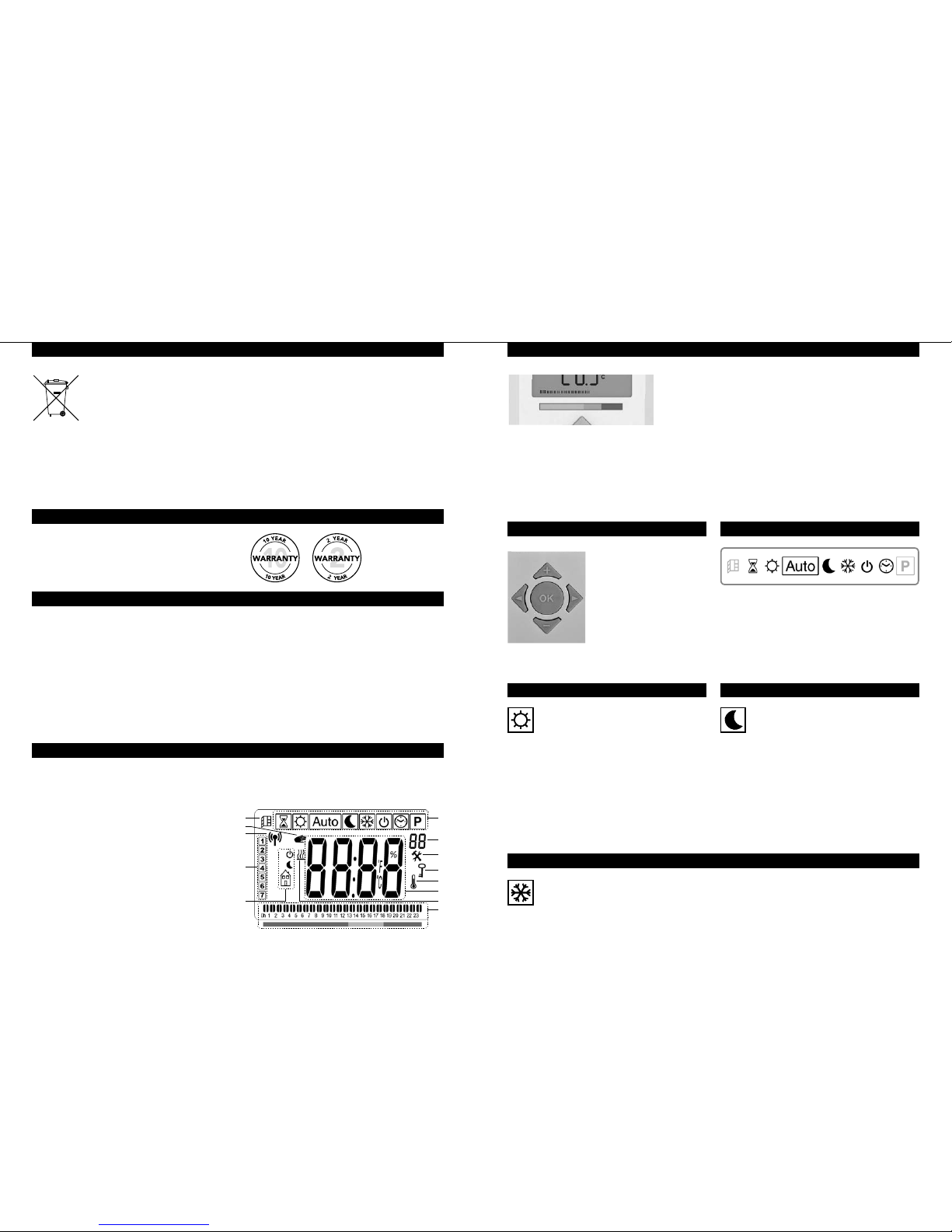
1. Operating mode menu (active mode is framed).
2. Front panel temperature limit, Parameters
number if icon “3” is displayed or selected
programme number.
3. Installation parameter indicator.
4. “Key lock” function indicator.
5. “Room temperature” indicator.
6. Display zone for temperatures,
parameters, or time.
7. “Heating demand” indicator.
8. “Behaviour” indicator or programme
information bar.
9. “Mode” indicator in “Automatic” mode.
10. Day of week indicator.
11. “RF connection” indicator (with RF clock or
Touch E3).
12. Hand icon.
13. “Window open” function indicator.
13 1
8
2
3
5
6
7
4
11
12
10
9
8.0 Working Mode Definition
How to change the working mode:
lUse the navigation keys left (<) or right (>)
to display the working mode line.
lMove the frame cursor on the desired
working mode and press (OK) to enter in
the operating mode you have chosen.
This is the bar at the bottom of the LCD
display that gives a visual indication of how
much energy the current temperature setting
is using i.e.
red = high
orange = medium
green = low energy consumption
As you increase the temperature setting, the
behaviour indicator “bar”, in section 8 of the
LCD display, will increase in length.
The opposite applies when decreasing the
temperature setting.
NOTE: The behaviour indicator is replaced
by the programme information bar when in
Automatic mode.