Elan TS2 Manuel utilisateur

Installation Manual
TS2
Film Interactive Touchpad
INSTALLATION MANUAL

ELAN HOME SYSTEMS TS2 INSTALLATION MANUAL
© ELAN Home Systems 2010 |All rights reserved.
Page 1
Preface
Purpose of this Manual
This manual provides step-by-step installation instructions and connection examples, along with basic user information for
installation and ongoing use of the TS2. This manual is written for the installer of this equipment.
Organization
The following information is contained in this manual.
TS2 Introduction Provides an introduction to ELAN Home Systems’ TS2 , along with system features to include Front
and Rear panel controls, indicators and connections, along with a short description of each.
TS2 System Design and
Installation
Provides a system design application overview and installation requirements for the TS2.
TS2 System Connections Provides a description of the TS2 system connections and direct connections from the TS2 to other
components.
TS2 Setup and Programming Provides directions for enabling / disabling TS2 features and initial TS2 incorporation into the system.
TS2 Display Overview Provides information on the display screens and their functions for the Home Page and sub-system
display and control.
Troubleshooting Provides troubleshooting tables to help fix common problems that may be encountered when
installing the TS2.
Specifications Provides equipment specifications for the TS2.

ELAN HOME SYSTEMS TS2 INSTALLATION MANUAL
© ELAN Home Systems 2010 |All rights reserved.
Page 2
Table of Contents
Preface ............................................................................................... 1
Purpose of this Manual.................................................................................................1
Organization .................................................................................................................1
Chapter 1: Introduction ............................................................4
Film Interactive Technology..........................................................................................4
The ELAN Story ............................................................................................................5
TS2 Features......................................................................................... 6
TS2 Controls and Display .......................................................................... 7
Front Panel Layout .......................................................................................................7
Front Panel Hardware ...................................................................................................8
TS2 Rear Panel Connections ...................................................................... 9
Chapter 2: System Design and Installation................................... 10
Planning............................................................................................ 10
Installation......................................................................................... 10
Pre-Wire............................................................................................ 10
Rough-In............................................................................................ 11
Mounting Height .................................................................................. 11
Changing Films.................................................................................... 12
Connectors/Pinout ................................................................................ 14
System Port RJ-45 Connector....................................................................................14
Local IR Interface Port................................................................................................15
IR-Emitter Out ............................................................................................................15
IR Receiver In.............................................................................................................16
Local Sense Input.......................................................................................................17
Chapter 3: System Connections ................................................ 18
HCxx Series System Controllers ................................................................ 18
TS2 to PPVN Connections ..........................................................................................18
Legacy Home Controllers ........................................................................ 19
Connection Method #1 ...............................................................................................19
Connection Method #2 ...............................................................................................20

ELAN HOME SYSTEMS TS2 INSTALLATION MANUAL
© ELAN Home Systems 2010 |All rights reserved.
Page 3
Chapter 4: Setup and Programming ........................................... 21
The Service Menu................................................................................. 21
Initial TS2 Integration .................................................................................................22
Speaker ......................................................................................................................24
IR Sensor ...................................................................................................................25
Light Sensor Disable ..................................................................................................26
Light Sensor Enable....................................................................................................27
OLED Info...................................................................................................................29
Chapter 5: Display Screens ..................................................... 32
Home Pages ....................................................................................... 33
Media Page ........................................................................................ 35
Source Page Samples.................................................................................................37
Light Page.......................................................................................... 39
Security Page...................................................................................... 41
Climate Page ...................................................................................... 43
Troubleshooting ................................................................................... 46
Specifications ..................................................................................... 47
Warranty…………………………………………………………………..…….Last Page

ELAN HOME SYSTEMS TS2 INSTALLATION MANUAL
© ELAN Home Systems 2010 |All rights reserved.
Page 4
Chapter 1: Introduction
TS2 Film Interactive Touchpad (FIT) is a double-gang, in-wall system controller that uses a
touch film in lieu of hard buttons to perform all functions normally associated with a
keypad. Source and system control icons and function names are printed on
interchangeable backlit film transparencies. Each icon or function name corresponds to an
active “hot spot” that issues a control command and gives both audible and visual
confirmation to the user when pressed.
The TS2 is for use with ELAN Home Controllers running Core Module Software 5.0 or later
and is not interchangeable with the Olé2XL.
The touchpad features a 2" color OLED to provide source, sub-system and programming
feedback to the user.
Programming for the TS2 resides in the Home Controller and is accomplished with ELAN’s
Configuration Software.
Film Interactive Technology
The TS2 utilizes a polyester plastic film suspended over a glass panel, which is placed over
a changeable backlit film. Depressing the polyester film with a finger allows the film to
touch the glass panel underneath, generating a location signal that is read by the
electronics.
Items in Package:
•TS2 Touchpad
•White Trim Plate
•Black Film Overlay
•White Film Overlay
•Quick Install Guide
•User’s Guide
•Mounting Screws (4)

ELAN HOME SYSTEMS TS2 INSTALLATION MANUAL
© ELAN Home Systems 2010 |All rights reserved.
Page 5
The ELAN Story
Located in Lexington, KY, USA, ELAN Home Systems has designed innovative multi-room
audio/video systems since 1989. ELAN systems were the first to integrate music, intercom
and TV distribution features that used the homeowner’s stereos, televisions and telephones
to create the whole-house entertainment experience. These Systems allow people to move
from room to room, controlling centrally located equipment with ease.
ELAN’s product line includes:
•Power Amplifiers
•Multi-Zone Pre-Amps
•Intelligent Keypads
•In-Wall LCD Color Touch Panels
•Wireless LCD Color Touch Panels
•Film Interactive Touchpads
•In-Wall and In-Ceiling Speakers
•Outdoor Speakers
•Home Automation Controllers
•A/V Controllers
•Volume Controls
•Telephone-Based Intercom Controllers
•Video Switchers
•Digital Music & DVD Management Systems
•Satellite Radios
•Accessories for Home Systems Installation

ELAN HOME SYSTEMS TS2 INSTALLATION MANUAL
© ELAN Home Systems 2010 |All rights reserved.
Page 6
TS2 Features
Full touchpad design, no hard buttons
2” color OLED (Organic LED) Display
Brightness-adjusting light sensor (can be disabled)
Audible ‘click’ to indicate a button press (can be disabled)
ELAN Configuration Software programming
Compatible with all current ELAN Home Controllers running 5.0 software or higher
System and sub-system feedback
Built-in IR receiver (can be disabled)
Connectivity for Remote IR Receiver
Sense Trigger Input (future use)
Fits in a double-gang electrical box
THE TS2 SUPPORTS THE FOLLOWING FEATURES:
Basic Time & Weather information: The home interface displays time and basic weather
information. Optionally, additional pages for weather forecast and/or house modes can be
enabled.
Lighting Control: The lighting interface displays a custom lighting keypad for 2-way control
of scenes or lighting loads.
Security Control: The security interface displays status of one partition and a keypad to
arm/disarm that partition.
Climate Control: The climate interface displays status of one climate zone and provides
mode, fan, and set point adjustments.
Media Control: The media interface displays status of one media zone and provides
controls for power, source, volume, mute, and basic source control. The interface provides
meta data feedback (no cover art at this time) for supported two way devices or
customizable single or multi-page interfaces for one way device control.

ELAN HOME SYSTEMS TS2 INSTALLATION MANUAL
© ELAN Home Systems 2010 |All rights reserved.
Page 7
TS2 Controls and Display
Front Panel Layout
Figure 1-1:
TS2 Front Panel Controls
and Display

ELAN HOME SYSTEMS TS2 INSTALLATION MANUAL
© ELAN Home Systems 2010 |All rights reserved.
Page 8
Front Panel Hardware
1) Mounting Screws (x4)
2) Film Hinge (x2)
3) Film Screw (x2) 6) Mini USB Download Port
(Future firmware upgrades)
5) Light Sensor
4) Service Menu Button
Figure 1-2:
TS2 Front Panel Hardware

ELAN HOME SYSTEMS TS2 INSTALLATION MANUAL
© ELAN Home Systems 2010 |All rights reserved.
Page 9
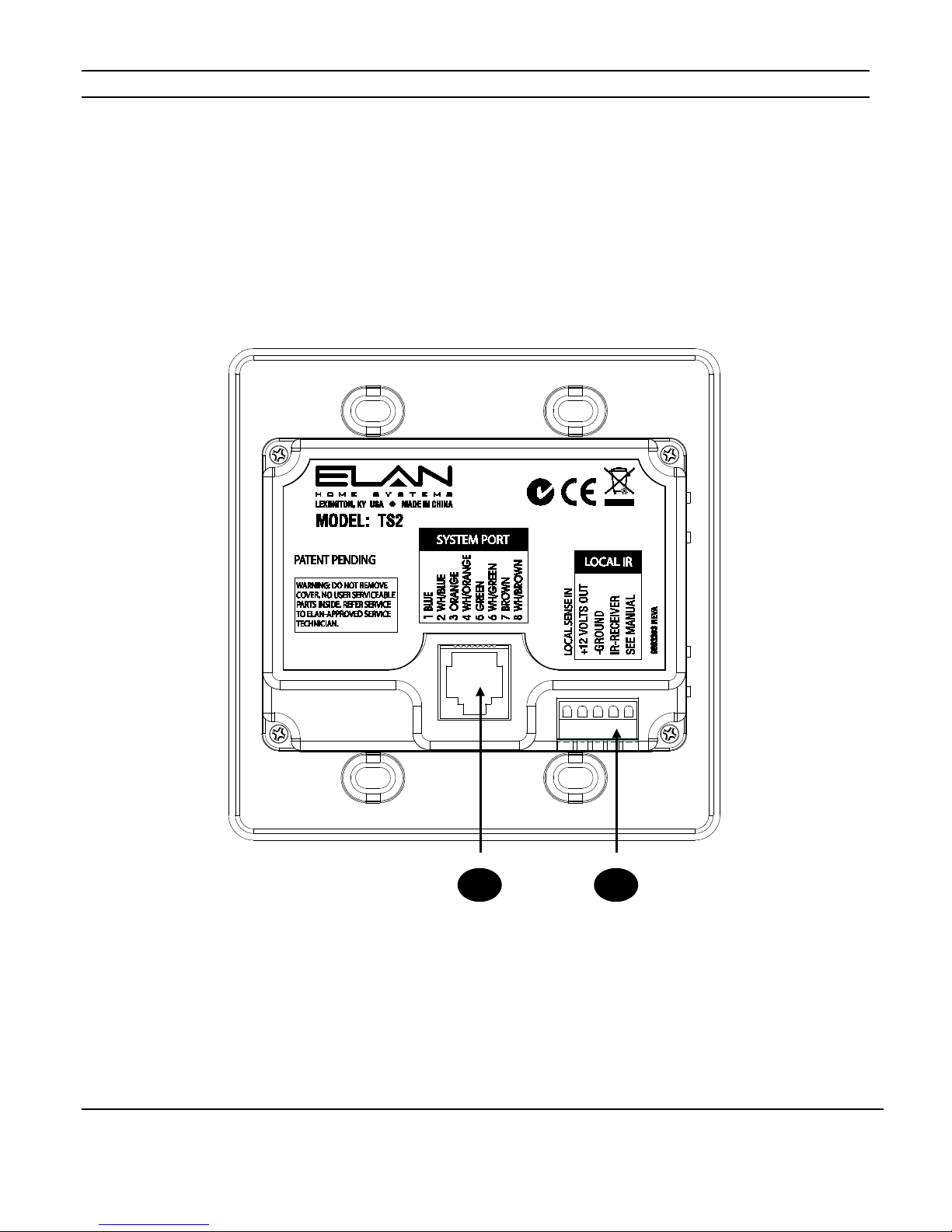
TS2 Rear Panel Connections
Figure 1-3:
TS2 Rear Panel Connections
1) System Port RJ-45 Jack 2) Local IR Interface
1
2
Autres manuels pour TS2
1
Table des matières
Autres manuels Elan Écran tactile

Elan
Elan ViA 2-8.4 Manuel utilisateur

Elan
Elan VIA! 4.0 Manuel utilisateur

Elan
Elan ITP-12 Manuel utilisateur

Elan
Elan vl10 Manuel utilisateur

Elan
Elan VIA!4.0-EM Manuel utilisateur

Elan
Elan VIA! 4.0 Manuel utilisateur

Elan
Elan XP84 Manuel utilisateur

Elan
Elan TS7 Manuel utilisateur

Elan
Elan TP7 Manuel utilisateur

Elan
Elan VIA! VALET100EM Manuel utilisateur
Manuels Écran tactile populaires d'autres marques

IBASE Technology
IBASE Technology ASTUT-152-RE1S Manuel utilisateur

YASKAWA
YASKAWA TP 610C Manuel utilisateur

B&R
B&R Power Panel C Series Manuel utilisateur

Beijer Electronics
Beijer Electronics X2 control Manuel utilisateur

AXIOMTEK
AXIOMTEK GOT321W-521 Manuel utilisateur

TRIDONIC.ATCO
TRIDONIC.ATCO x-touchBOX Manuel utilisateur