EchoStar HDS-600RS Manuel utilisateur

User Guide
HDS-600RS


1
IMPORTANT SAFETY INFORMATION!
Read these instructions carefully before using the product.
Install Safely
Place the unit on its feet on a firm, stable, horizontal surface.
Unplug the equipment from the power socket during installation and follow
all connection instructions.
The mains plug must remain easy to unplug from the power socket once
the equipment is installed.
DO NOT place heavy objects on the equipment.
Keep plastic packaging away from babies and children.
Protect from water
DO NOT expose the equipment to rain, moisture, dripping or splashing.
DO NOT place objects filled with liquids, such as vases or drinks, on or
near the equipment.
Prevent overheating
Locate the equipment in an open, well ventilated area away from heat
sources such as heaters, other electrical equipment or direct sunlight.
DO NOT block any of the ventilation openings, for example with
magazines, curtains or tablecloths.
General Precautions
DO NOT place naked flames such as lighted candles on or near the
equipment.
Whenever it is plugged into a live power socket, this equipment is still
connected to the mains even if the equipment is turned off.
DO NOT remove the cover due to risk of electric shock from live parts
inside.
DO NOT allow objects to drop or be pushed inside the equipment, for
example by children.
DO NOT expose the remote control batteries to excessive heat such as fire
or sunshine.

2
Equipment Care
Unplug the equipment from the power socket before cleaning. Clean with a
dry or slightly damp cloth.
If the equipment is damaged, unplug it from the power socket and have it
checked by qualified personnel before operating it any further.
Hard Drive
DO NOT move the receiver whilst the power is on.
DO NOT expose to receiver to intense vibration or magnetic objects, such
as loud speakers, transformers etc.
Disposal
The crossed-out wheeled bin symbol indicates that the
equipment should not be disposed of with other household
waste at the end of its working life and should be dealt with
separately -contact the place of purchase or local
authorities for details.
Uncontrolled disposal of such waste can harm the environment and human
health due to the presence of hazardous substances, so your role in
preventing this is important.

3
Contents
IMPORTANT SAFETY INFORMATION! ......................................... 1
1. Introduction....................................................................6
Unpacking the Box........................................................................ 7
Controls and Connectors ............................................................. 8
Front View.................................................................................... 8
Back View .................................................................................... 8
Remote Control ............................................................................ 9
2. Putting It All Together..................................................10
Satellite Inputs ............................................................................ 10
Connecting to the Internet.......................................................... 10
Remote Control........................................................................... 11
HDMI-TV Connections.................................................................12
SCART-based Connections........................................................ 13
Audio Connections ..................................................................... 14
3. Getting Started.............................................................15
Switching on for the First Time.................................................. 15
STEP 1: Enter your Postcode ..................................................... 16
STEP 2: Set the PIN (optional) ................................................... 17
STEP 3: Search for Services ...................................................... 18
STEP 4: Watching TV.................................................................19
Tuner Issues................................................................................ 20
Single Tuner Mode ..................................................................... 21
Checking the Signals.................................................................. 22
Controlling your TV..................................................................... 23
Viewing........................................................................................ 24
Changing Channel...................................................................... 24
Sound Controls........................................................................... 24

4
The Information Bar.................................................................... 25
Subtitles ..................................................................................... 26
Text and Interactive Services...................................................... 26
Watching freesat On Demand TV ............................................... 27
Pause, Rewind and Fast Forward .............................................. 28
Recording Programmes.............................................................. 29
Stopping a Recording.................................................................30
Series Linking............................................................................. 30
4. Moving On ....................................................................31
The Main Menu............................................................................ 31
Using the Guide .......................................................................... 32
Setting Reminders...................................................................... 32
The Guide’s Genres ................................................................... 33
Using Programme Information .................................................... 34
Creating a Favourites List .......................................................... 35
Renaming a Favourites List ........................................................ 35
Editing a Favourites List ............................................................. 36
Using the Library ........................................................................ 38
Managing Scheduled Recordings ............................................... 40
Using Apps.................................................................................. 42
Internet Connection Information.................................................. 42
5. Using TV anywhere......................................................43
Creating A Sling Account ........................................................... 43
Using SlingPlayer ....................................................................... 43
Your HDS-600RS Sling Settings................................................. 44
Sling ID ...................................................................................... 44
Sling Client Connections............................................................. 45
Rename your HDS-600RS ......................................................... 45
Change Password ...................................................................... 45
Sling ‘Activity Light’ Settings ....................................................... 46

5
6. Settings ........................................................................47
Languages................................................................................... 47
TV, Audio & Library Setup.......................................................... 48
Sling ............................................................................................ 50
Parental Control.......................................................................... 50
Menu Preferences ....................................................................... 51
Network Setup............................................................................. 51
Power Options ............................................................................ 51
Technical Information.................................................................52
Tuning Preferences..................................................................... 52
Factory Reset .............................................................................. 52
7. Getting Help .................................................................53
Updates ....................................................................................... 53
Over the Air Updates .................................................................. 53
Automatic Software Updates ...................................................... 53
Manual Software Update ............................................................ 53
FAQs............................................................................................ 54
Contacting Customer Support ................................................... 56
8. Remote Control TV Codes ..........................................57
Programming the Remote with Control Codes.......................... 57
Scanning through Control Codes .............................................. 57
TV Manufacturers’ Control Codes.............................................. 58
9. Symbols and Icons......................................................67
Symbols on HDS-600RS ............................................................. 67
Information Icons........................................................................ 68

6
1. Introduction
Thank you for purchasing your EchoStar Sling-Loaded HDS-600RS freesat+
set-top box.
The HDS-600RS is astate-of-the-art high definition digital video recorder
(DVR) combining dual channel freesat satellite television reception with the
flexibility of personal video recording.
Slingloaded™ – watch TV anywhere and control the HDS-600RS
from a PC or suitable mobile device over the internet.
Receives over 140 subscription-free freesat channels.
HDMI-enabled –watch high definition TV (when connected to a HDTV
via HDMI).
Pause and rewind live TV.
Record two channels simultaneously or watch one channel while
recording another.
Integrated 500GBhard disk drive.
Optical digital audio output for high quality audio, e.g. Dolby„Digital.

7
HDMI cable
Network cable
2 x AAA
batteries
Mains power lead
Remote control
HDS
-
600RS unit
Unpacking the Box
Carefully unpack the box and familiarise yourself with each item:
The HDS-600RS unit
1 Power cable
1 HDMI cable
1 Network cable
1 Remote control
2 AAA size batteries
User manual and Quick Start Guide

8
Controls and Connectors
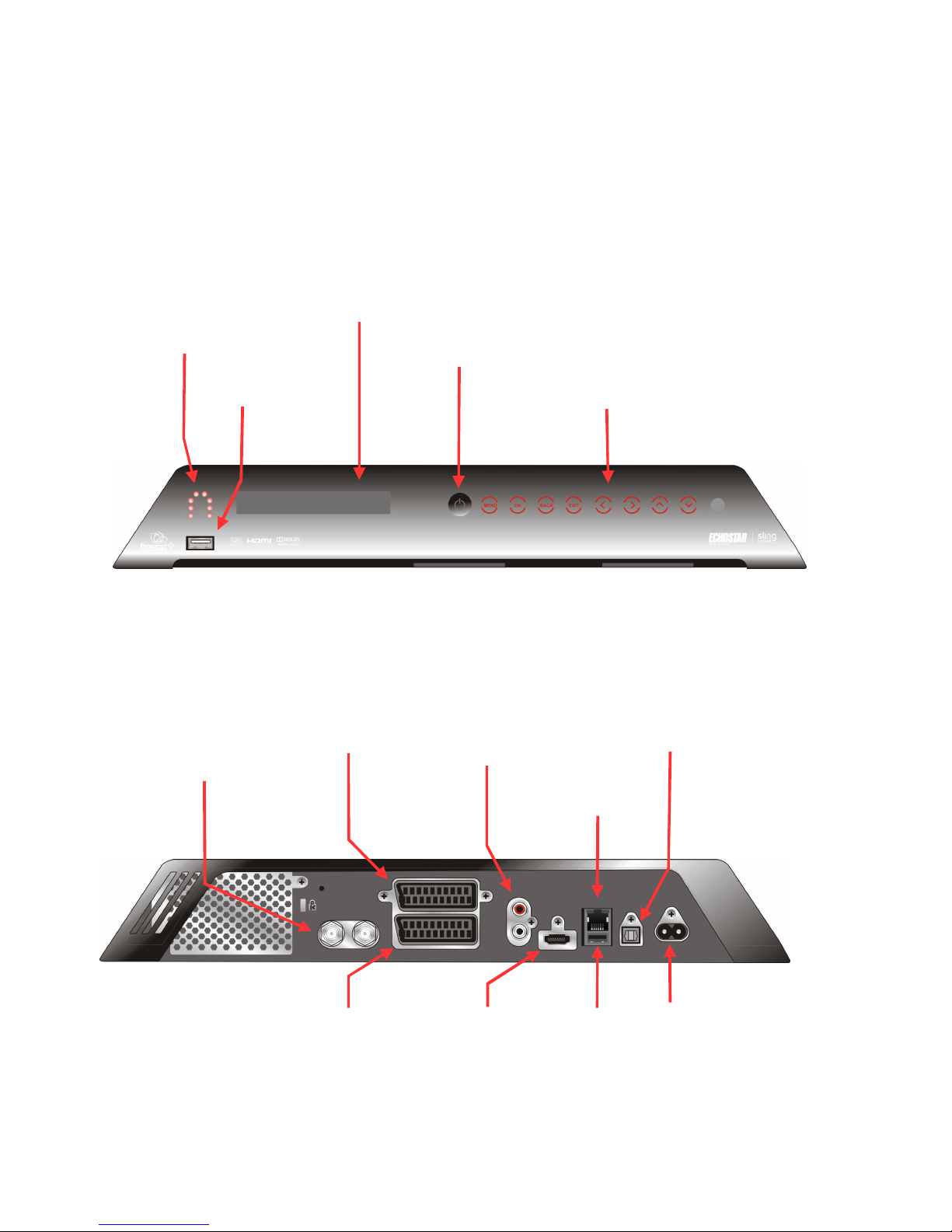
This section shows the main features of your HDS-600RS unit.
Front View
Back View
Sling Activity Light
LEDs flash to indicate
remote access to unit via
SlingPlayer.
Menu and navigation controls
Satellite
Signal inputs
LNB1 | LNB2
USB socket
SCART socket
VCR
Ste
reo
Audio Out
L/R channels
Digital Audio Out
Optical S/PDIF
Status Display
Shows current channel and other information.
Power button
HDMI output
TV
Ethernet
SCART socket
TV
USB
230VAC
Mains power
connection
Autres manuels pour HDS-600RS
1
Table des matières
Autres manuels EchoStar DVR