E-Tech IM400 Manuel utilisateur

FILE: IM400 manual.doc 2004.11.23
E-TECH Co., Ltd 1/19
▶User’s Manual◀
1. Introduction
2. DescriptionofUnit
3. TechnicalSpecifications
4. Features and Operation
5. Antenna Installation

FILE: IM400 Service manual.doc 2004.11.23
E-TECH Co., Ltd 2/19
1. Introduction
IM400 has a compact size with a various features in the range of 420~500MHz. IM400
Has a various features shown as below.
IM400 constructed with a microprocessor controlled, temperature compensated Phase Locked
Loop(PLL) frequency synthesizer. The radio features a double conversion receiver and a direct FM
transmitter modulator. A special integrated circuit provides support to sub-audible signaling(CTCSS & DCS)
and most of the receiving parts are switched off periodically in the power save mode to reduce battery current
drain during standby.
2. Description of Unit
Items Model
Radio IM400
Supplied
Package User manual
Items Model
Hand Microphone
VOX & PTT Headset
Power Cable
Accessories
Pedestal

FILE: IM400 Service manual.doc 2004.11.23
E-TECH Co., Ltd 3/19
3. Technical Specifications
3-1 General
1) Frequency range : 420~500 MHz
2) Channels : 255 Channels
3) Channel spacing : 12.5 kHz/25 kHz
4) Communication method : Simplex
5) Antenna Impedance : 50 ohm
6) Power supply voltage : DC 13.6V
7) Current Drain : When Transmitting(50W) - < 13A
When Receiving(5W) - < 1A
Transmit standby - < 100mA
8) Microphone : External Condenser Mic
9) Operating temperature range: -30 +℃∼ 60℃
10) Size : 178(W)x49(H)x195(D)
11) Weight : 1600g
3-2 Transmitter
1) PowerOutput : HIGH–50W, LOW-5W
2) Modulation : 8K50F3E/16K0F3E
3) Oscillator method : PLL
4) Frequency Stability : less than ±0.00025% (±2.5PPM)
5) Maximum frequency deviation: ±2.5 kHz(Narrow)/ ±5 kHz(Wide)
6) Audio Distortion : less than 5% (1 kHz 60%)
7) SPURIOUSEmission : -70[dBc]
8) FMHum&Noise : -40/-45[dB](HP8920A300Hz 3kHzBP∼F)
9) BAND SPREAD : 70[MHz]

FILE: IM400 Service manual.doc 2004.11.23
E-TECH Co., Ltd 4/19
3-3 Receiver
1) Receiver Type : Double Super Hetero type
2) Sensitivity : -0.25uV 이하(12dB SINAD 시)
3) Frequency Stability : ±0.00025%(±2.5PPM)
4) SPURIOUS Rejection : -75dB
5) Adjacent Channel Selectivity: -65 dB (Narrow) , -70 dB (Wide)
6)Distortion : 5%(1kHz60%)
7) Hum & Noise : -40 / -45 dB(HP8920A 300Hz 3kHz BPF)∼
8)Audiooutput : Normal3W(Max5W)
9)BANDSPREAD : 70MHz
10)Speakersize : 48*30Rectangle
4. Features & Operation
EXTERNAL VIEW
4)Emergency
Key
11)POWER ON/OFF
&Volume control
13)Ear/Mic Jack
PC-Programming
Jack
14)LCD
6)Menu Button
8)Squelch
14)SPEAKER
3)DOWN button
2)Monitor Button
1)TX POWER
HIGH
/
LOW
9) LED I
3)UP button

FILE: IM400 Service manual.doc 2004.11.23
E-TECH Co., Ltd 5/19
4-1 Features & Operation
1.Monitor
Press the Monitor key momentarily to disable the Tone squelch.
2. Radio Call
By using Various 5Tone, individual / Group call is available.
16 Receiving codes are available as well as open call.
3. Missed calls list
16 Missed calls can be listed. If a call remains unanswered, the call will be stored
by the radio.
4. contact list
During a call, the contact list may be used to give access to up to 16 preprogrammed
numbers accessed via the menu.
5. status list
A status is a code for transmitting prearranged messages, e.g. status “05” may indicate
“launch”. Status list contains up to 30 entries.
6. Channel : 255 channel
7. Scan ON/off
8. Power level : Power level is adjustable in each channel respectively.
9. Talkaround on/off
10. Emergency :
11. Lone Worker
12. Tx Tone select : In the menu, tx dcs /ctcss tone is adjustable.
13. Rx Tone select : In the menu, rx dcs /ctcss tone is adjustable.
14. Group : Defines group tone. You can select tone code for group, and it is used as a default value
. 0~9 and a, b, c, d available. And “A” is used as a basic value..
15. BEEP ON/OFF : BEEP sound ON/OFF.
16. KEY LOCK : LOCK/UNLOCK Button KEY.
17. SQUELCH : Squelch level is adjustable
18. AUTO SQUELCH : Squelch level is adjustable automatically by surroundings.
19. DTMF ON/OFF : DTMF function is available.
20. VOX : VOX LEVEL is adjustable by pushing up and down button.
21. AUTO VOX : VOX level is adjustable automatically by surroundings.
22. P - SCAN : Priority Scan
23. POWER SAVE : Power save mode is available.
24. PASS WORD : This function is useful for security reason.
25. LOCATION INDICATE : Indicate where the radio is located by blinking green light every 7 seconds.
26. SCRMABLE : Internal Voice Scrambler is available.
27. STUN / UNSTUN : For added security and to avoid abuse of the radio system in which you operate
a feature known as Stun/Unstun is included in your radio.
28. BACKLIGHT : Lamp is lighting when you check LCD status.

FILE: IM400 Service manual.doc 2004.11.23
E-TECH Co., Ltd 6/19
4-2 LCD Display and Icons
1.ANT GAZE ; Shows the received signal strength.
2.TX POWER HIGH: Indicate power level
3.KEY LOCK: Appears during key lock function is ON.
4.ALART(BEEP) ON/OFF: Appears when beep sound is turned ON.
5.Battery level indicator: Indicates reaming battery power.
6.VOX ON/OFF: Appears when VOX function is turned On.
7.SCAN: Appears when Scan function is activated.
8.SCRAMBLE: Appears while the voice scrambler function is activated.
9.TALK AROUND Indicator.
4-3 Features
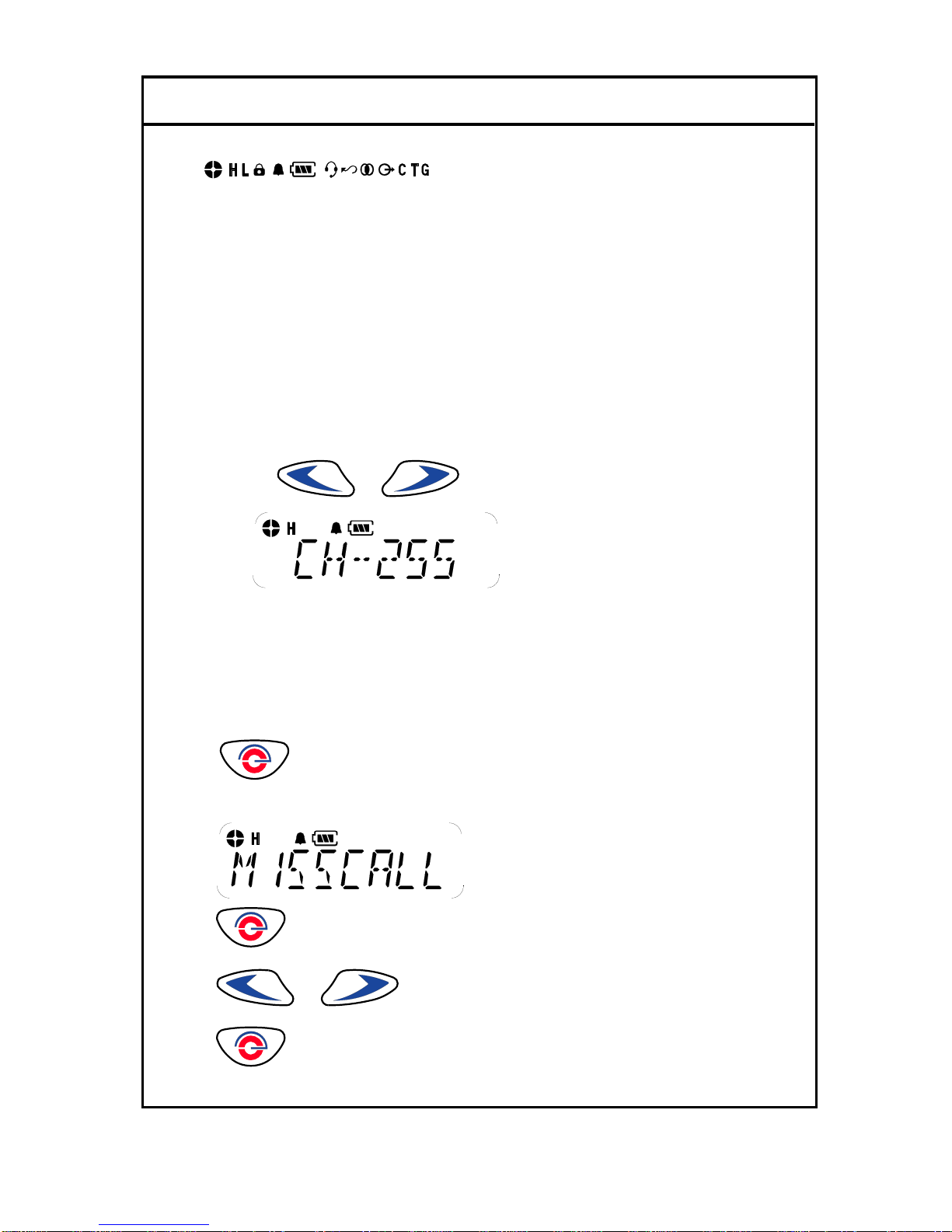
1. Channel
This radio offers up to 255 channels
1). By using or button, you can select the desired channel.
2. Missed calls list
Up to 16 calls can be stored. If the same radio calls more than once, only the most recent call is stored.
When fifteen calls have been stored by the radio, depending on the radio programming the sixteenth call
received may overwrite the first or not be stored by the radio.
1). to enter Menu Mode.
2) Display shows
3) to select
4) or to scroll list
5) to exit

FILE: IM400 Service manual.doc 2004.11.23
E-TECH Co., Ltd 7/19
3. Contact list
1). to enter Menu Mode.
2) or to until
3) to select
4) or to scroll list
5) to exit
4. Status call list
4-1. Making STATUS call
1) to enter Menu Mode.
2) or to until
3) to select
4) or to scroll list
5) Push PTT KEY for sending message on the LCD.
4-2 Make STATUS Message
1) to enter Menu Mode.

FILE: IM400 Service manual.doc 2004.11.23
E-TECH Co., Ltd 8/19
2) or to until
3) to select
4) or to scroll list
5) to SELECT
5. Lone work
1). to enter Menu Mode.
2) or to until
3) to select
4) or to select ON/OFF
6. Tx power
.1). to enter Menu Mode.
2) or to until
3) to select
4) or to select HIGH / LOW POWER

FILE: IM400 Service manual.doc 2004.11.23
E-TECH Co., Ltd 9/19
5) to select
7. Tx Tone
Selecting Transmitting TONE(CTCSS/DCS).
1). to enter Menu Mode.
2) or to until
3) to select
4) or to Select TONE을either CTCSS or DCS.
0= NON TONE
1-38CTCSS
101 – 183 DCS TONE
5) to select exit
8. Rx Tone
Changing Receiving TONE(CTCSS/DCS).
1). to enter Menu Mode.
2) or to until
3) to select
4) or to select TONE either CTCSS or DCS.
0= NON TONE
1-38CTCSS
101 – 183 DCS TONE.

FILE: IM400 Service manual.doc 2004.11.23
E-TECH Co., Ltd 10/19
5) to select exit
9. Group
Changing GROUP Tone.
1). to enter Menu Mode.
2) or to until
3) to select
4) or to select scroll list
5) to select exit
10. Beep on/off
1). to enter Menu Mode.
2) or to until
3) to select
4) or to select on off .
5) to select
11. Key lock
1). to enter Menu Mode.
Table des matières
Autres manuels E-Tech Radio