
e-motion W860 Manuel utilisateur

EMOTION W860
DECT Headset
Operation Manual

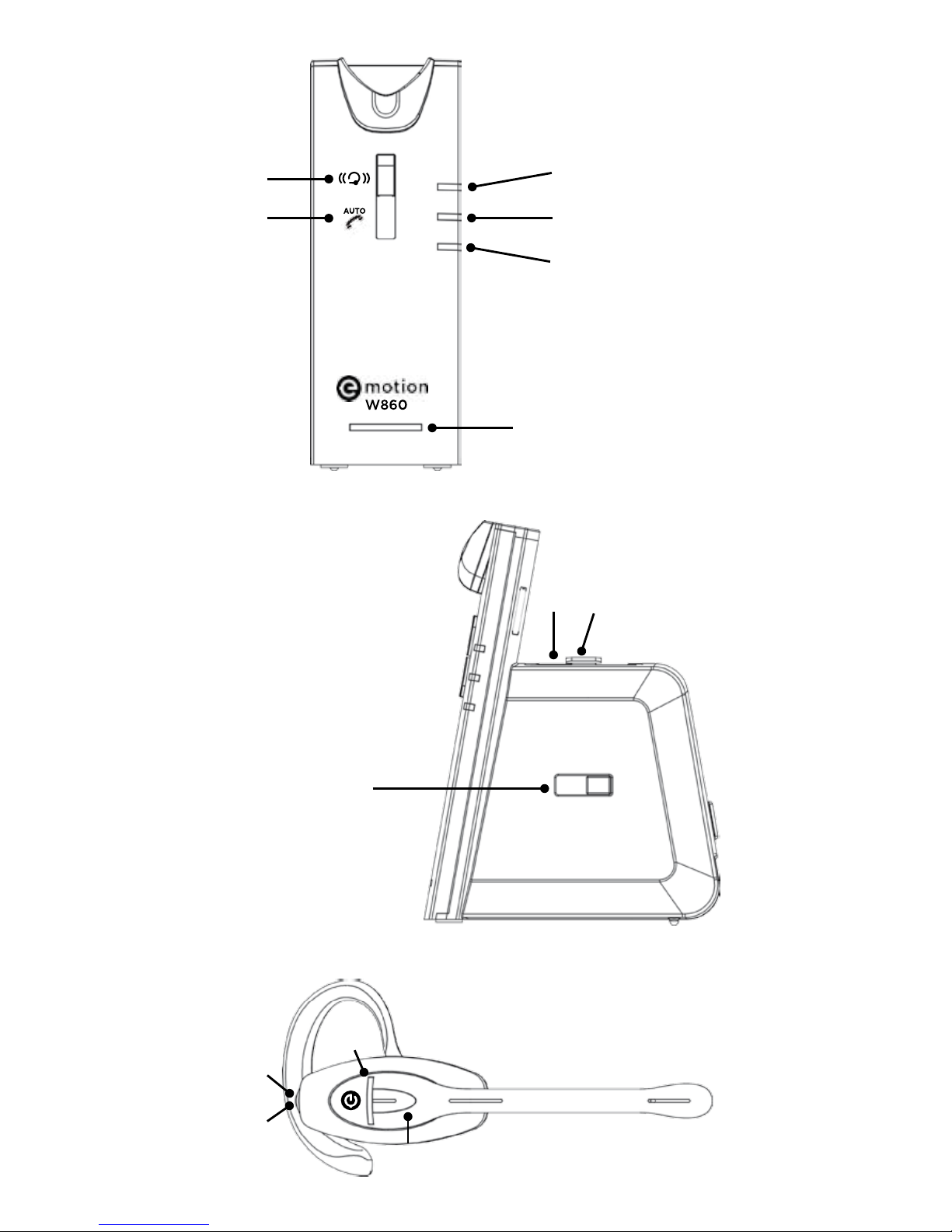
1 Headset ‘ON/OFF’ LED
2 Headset ‘ON/OFF’ button
3 Power LED
4 Headset charge LED
5 Headset ‘IN USE’ LED
6 Battery LED indicator
7 Microphone volume up
8 Microphone volume down
9 AUX port
10 Power socket
11 Handset connector
12 Telephone connector (‘TEL’ port)
13 Wiring switch
14 Receive volume up/down
15 Mute button
16 Battery charging slot
17 Battery remove button
18 Headset registration button
19 Auto answer disable button
5
●
4
17 16
2
14
●
3
●
●
6
●
13
●
●
1
●
15
●●
●
5
8
●
18
●
19
16 17
14
2

●
8
●
9
●
7
●
11
●
12
●
10

Contents:
1. Product description
2. Setup
2.1 Connecting to a telephone or terminal with
a headset port
2.2 Connection to a telephone or terminal
without a headset port
2.3 Connecting to a compatible handset lifter
(refer to your supplier)
2.4 Wearing style
3. Operation
3.1 Making and receiving calls
3.1.1 Making an outgoing call
3.1.2 Receiving an incoming call
3.2 Adjusting the ring volume
3.3 Muting the headset microphone
3.4 Headset transmitting volume setting
3.5 Adjusting headset receive volume
3.6 Battery hotswap
3.7 Battery level indication
3.8 Making a conference call
3.9 Overview of audio signals
3.10 Registering a new headset to the base
3.11 Switching o the auto pick-up mode
4. Troubleshooting

1. Product description
The Emotion DECT is a fully wireless headset
solution oering the user the ability to work
‘handsfree’ with true wireless mobility.
Main features:
• DECT wireless headset solution
• Convertible into two wearing styles:
headband and earhook
• Up to 6.5 hours talk time without recharging
• Auxiliary port for connecting handset lifter
or electronic hookswitch device
• Noise cancelling microphone for reduced
background noise
• Secure high quality audio
• Receive volume control on headset
• Mute button on headset
• Talk button with LED on headset
• Range up to 400m
• ‘Out of range’ warning
• DECT/GAP compatible
• Second battery storage/charging point on base
• Three way conferencing by connecting
additional headset
2. Setup
• Connect the power adaptor supplied with the
product to the base unit (10). The base
power LED (3) will light.
• Install the battery into the headset if not tted.
The little line on the battery has to match the
line on the battery slot, otherwise the battery
will not t.
• The headset LED (1) will turn on for about
2 seconds then turn o. Now your headset is in
standby mode.
NOTE: The rst time you use your headset, it is
recommended that the headset is charged for a
minimum of 4 hours before use.

2.1 Connecting to a telephone or terminal with a
headset port
• Using the headset cord supplied with the
product, connect the ‘TEL’ port (12) on the
headset base with the headset port on your
telephone.
• Use the power adaptor supplied with the
product to connect the headset base (10) to a
power socket.
• You may need to adjust the wiring switch (13)
that is located on the side of the headset base
to nd the correct wiring for your device.
2.2 Connecting to a telephone or terminal without
a headset port
• Using the headset cord supplied with the
product, connect the ‘TEL’ port (12) on headset
base with the ‘handset’ port on your telephone.
• Connect the telephone handset cord to the
handset (11) port on the headset base.
• Use the power adaptor supplied with the
product to connect the headset base (10) to a
power socket.
• You may need to adjust the wiring switch (13)
that is located on the side of the headset base
to nd the correct wiring for your device.
2.3 Connecting to a compatible handset lifter
(refer to your supplier)
• Fit the handset lifter to your telephone as
indicated in its user guide.
• Connect the handset lifter to the ‘AUX’ port (9)
located on the back of the headset base.
With the handset lifter connected, you will be able
to answer and end calls using the button located on
the headset while away from your desk.

2.4 Wearing style
Your Emotion DECT headset is supplied with a
headband and an earhook.
• Headband
This can be attached to the headset to allow
for either left or right ear wearing and the size
can be adjusted to allow the user to nd the
most comfortable t.
• Earhook
This can also be used on either the left or
right ear.
To remove the headband or earhook: put your
thumb on the speaker and carefully pull the
headband or earhook with your other hand
towards you.
3. Operation
3.1 Making and receiving calls
3.1.1 Making an outgoing call
• Lift the headset from the base to answer the
call. If you are already wearing the headset
press the headset’s ‘ON/OFF’ button (2). The
base ‘IN USE’ LED (5) will light. If a handset lifter
or electronic hookswitch device is connected
to the headset base, the line will be seized.
Otherwise, you will also need to activate the
headset port via your telephone terminal.
• Dial the telephone number on the telephone
terminal
• After nishing the call, replace the headset on
the base or press the ON/OFF button (2) to
disconnect. The ‘IN USE’ LED (5) will turn o.

3.1.2 Receiving an incoming call
• If there is an incoming call from the telephone
line and the headset base is connected to a
handset lifter or electronic hookswitch device,
the headset LED (1) will ash, also a ring tone
will be heard on the headset.
• Lift the headset from the base to answer the
call. If you are already wearing the headset
press the headset’s ‘ON/OFF’ button (2). The
base ‘IN USE’ LED (5) will light. If a handset lifter
or electronic hookswitch device is connected
to the headset base, the line will be seized.
Otherwise, you will also need to activate the
headset port via your telephone terminal.
• To end the call, replace the headset on the base
or press the headset ON/OFF button (2).
3.2 Adjusting the ringing volume
When the headset is ringing to indicate an
incoming call, you can adjust the ring volume by
moving the rocker switch (14) at the back of the
headset.
3.3 Muting the headset microphone
To mute the headset microphone when on a call,
press the mute button (15) on the back of the
headset. While the headset is in mute mode, a short
beep will be heard on the headset every 8 seconds.
Press the Mute button (15) again to release the
mute.
3.4 Headset transmitting volume setting
During a call you can adjust the transmit volume
of the headset by using the two buttons (7 and 8)
located on the back of the headset base.

3.5 Adjusting headset receive volume
Use the rocker switch (14) at the back of the headset
to adjust the receive volume on your headset. You
will hear a beep sound for each volume step up or
down.
3.6 Battery – hotswap
The user can “hotswap” the headset battery while
on a call. When the battery is removed from the
headset, the base unit will put the call on hold for a
maximum of 5 minutes.
When the new battery is tted to the headset, the
‘IN USE’ LED (1) will turn on and the call will be active
again.
Put the second battery in the battery charging slot
(16) on the top side of the base. The battery can be
removed by sliding the battery remove button (17)
sidewards.
3.7 Battery level indication
The four LEDs (6) on the front of the headset base
indicate the battery level of your headset battery.
Indication Battery level
One LED ashing < 20%
One LED on 20%-40%
Two LEDs on 40%-60%
Three LEDs on 60%-80%
Four LEDs on 80%-100%
3.8 Making a conference call
Your Emotion DECT headset allows a second
headset to be temporarily connected to the base
so that you can have a three way conference call.
Table des matières
Autres manuels e-motion casque


