
DSG InterPhone Manuel utilisateur

DSG Technology, Inc.
http://www.dsgtechnology.com
Operation Manual
Voice Communication for Free
InterPhone


Using Keypad & Buttons to Configure InterPhone 3-2
Main Menu & Sub Menu 3-3
Basic Setup 3-3
IP Address 3-4
Gateway IP Address 3-4
Subnet Mask 3-4
DHCP Function 3-5
ITSP Setup 3-5
ITSP Account 3-6
Your Phone Number 3-6
Long-distance Code 3-6
International Code 3-7
Country Code 3-7
Exit to Main Menu 3-7
System Setup 3-7
Device ID 3-7
DNS Address 3-8
E-mail Address 3-8
Play Volume 3-8
Voice Quality 3-8
TABLE OF CONTENTS
Chapter 2 Installing Your InterPhone 2-1
Chapter 3 Configuring Your InterPhone 3-1
Chapter 1 Understanding Your InterPhone 1-1
Installing Your InterPhone 2-2
Ready to Configure 2-3
Overview 1-2
All-in-one Design 1-2
User-friendly Interface 1-2
Comprehensive Operation Modes 1-4
InterPhone-to-InterPhone Mode 1-4
InterPhone-to-IPStar/InterStar Mode 1-4
InterPhone-to-Phone Mode 1-5
Phone-to-InterPhone Mode 1-5
Free Online Upgrade 1-5
Table of Contents

Make Sure You Are Online 4-2
Making A Device-to-Device Phone Call 4-2
Dialling the Device ID Number 4-3
Dialling the IP Address 4-3
Using the Speed Dial Buttons 4-3
Making A Device-to-Phone Phone Call 4-4
Dialling the Phone Number 4-4
Using the Speed Dial Buttons 4-4
Making A Phone-to-Device Phone Call 4-5
Monitoring the Status of InterPhone 4-5
Power On Status 4-5
Network Status 4-6
During Talking 4-6
To End an Internet Call 4-6
To Receive an Internet Call 4-7
To Pick Up Another Incoming Phone Call 4-7
Upgrading the Latest Software Version 5-2
Restoring Original Version 5-2
Chapter 4 Making Internet Phone Calls 4-1
Data Control 3-9
Jitter Delay 3-9
PSTN Flash Time 3-9
System Clock 3-9
Auto Upgrade 3-10
Telnet Password 3-10
Exit to Main Menu 3-10
How to Edit Your Phone Book 3-10
Speed Dial (PSTN) 3-11
Speed Dial (I-PHONE) 3-11
Exit Setup 3-12
Chapter 5 Upgrading Your InterPhone 5-1
InterPhone Operation Manual
nTable Of Contents

Purchasing Calling Points 6-2
Checking Your Account Balance 6-2
Chapter 6 How to Subscribe Calling Points 6-1
Problems of Configuration A-1
Problems of Making Internet Phone Calls A-2
LCD Messages A-3
Appendix A: Troubleshooting the InterPhone A-1
Appendix B: Specifications B-1
Table of Contents
nTable Of Contents

InterPhone Operation Manual
nTable Of Contents

CHAPTER 1
Understanding Your InterPhone
Congratulations! You have selected the future-proof Internet Telephony product.
InterPhone is an innovative and standards compliant
Voice over Internet Protocol (VoIP)
solution for corporation and individuals. InterPhone allows various connection modes such
as InterPhone-to-InterPhone, InterPhone-to-IPStar, InterPhone-to-InterStar, InterPhone-to-
Phone and Phone-to-InterPhone via Internet or other TCP/IP networks.
InterPhone provides Ethernet phone, digital phone, and mini-hub functions. It allows users
to receive phone calls from both Internet and PSTN (Public Switched Telephone Network) at
the same time. By using InterPhone, you will not miss any phone calls.
You start saving big budgets by owning an InterPhone today! Better yet, thanks to DSG’s
JustDialIt
Technology, your receiver end does not need another InterPhone to enjoy this
advanced VoIP technology. Your long-distance and international call charges will disappear
with this extraordinary device. It is the first intelligent Ethernet Phone that offers full duplex,
supreme quality and low latency voice conversation via Internet/Intranet at extra-low charges.
Note: IPStar and InterStar are series of DSG Internet phone devices. Please visit
http://www.dsgtechnology.com
for more details.
1-1Understanding Your InterPhone

InterPhone Operation Manual
nOverview
In the past, real-time voice communication is sent over the Public Switched Telephone Network
(PSTN). With the circuit switched technology, every call takes up a dedicated bandwidth. End-
to-end calls are established on the basis of a sequence of dialled digits, and the PSTN dedi-
cates a physical path between callers. Although the telephone equipment establishes the call
path at the beginning of the call, the path may change between calls, but not during any specific
call.
In comparison with the PSTN, an Internet Protocol (IP) network has a packet-switched
architecture. Data are transmitted in packets, and the path from end to end can vary within an
established session. The data packets also contain the destination IP address information,
with which packets are routed. As networking environments change, routing devices are up-
dated with dynamic protocols.
InterPhone is a complete Ethernet telephone set, which transmits voice traffic over IP-based
packet switched networks, and it is able to use as a traditional PSTN telephone.
All-in-one Design
InterPhone has its own processor and network interface; it works independently and intelligently!
Simply dial the IP address or device ID of the remote party from your InterPhone, then you are
ready to talk via the Internet. All of the communication costs will be eliminated except a local
Internet connection charge. InterPhone is the most convenient Ethernet phone for users to
make Internet phone calls remaining the same habit as they make IDD (International Direct
Dialling) calls.
1-2
Overview

1-3Understanding Your InterPhone
With LCD display and function keys, InterPhone is extremely easy to use and to configure.
Smart setup program makes your InterPhone ready to go in three minutes. You can clearly
monitor all the system status from the LCD panel.
User-friendly Interface
nUser-friendly Interface
IncomingCall
Alert Light
SpeedDial
Buttons
Volume Control
Buttons
Speaker Mode
Button
Phone Functions
Buttons
DTMF Digit
Buttons
Configuration
Buttons
LCD Panel
I -PHONE
Mode Button
IncomingCall
Holding Button
CallingPoints
Display Button
InterPhone Operation Manual
Comprehensive Operation Modes
nComprehensive Operation Modes
InterPhoneis anamazing electronicdevice. In additionto InterPhone-to-InterPhone,InterPhone-
to-IPStar and InterPhone-to-InterStar modes, the unparalleled InterPhone-to-Phone and Phone-
to-InterPhonemodes greatly enhancethe capabilityof voice communication byusing the Internet
or TCP/IP networks. InterPhone users can save significantly on long-distance and international
call charges with these features.
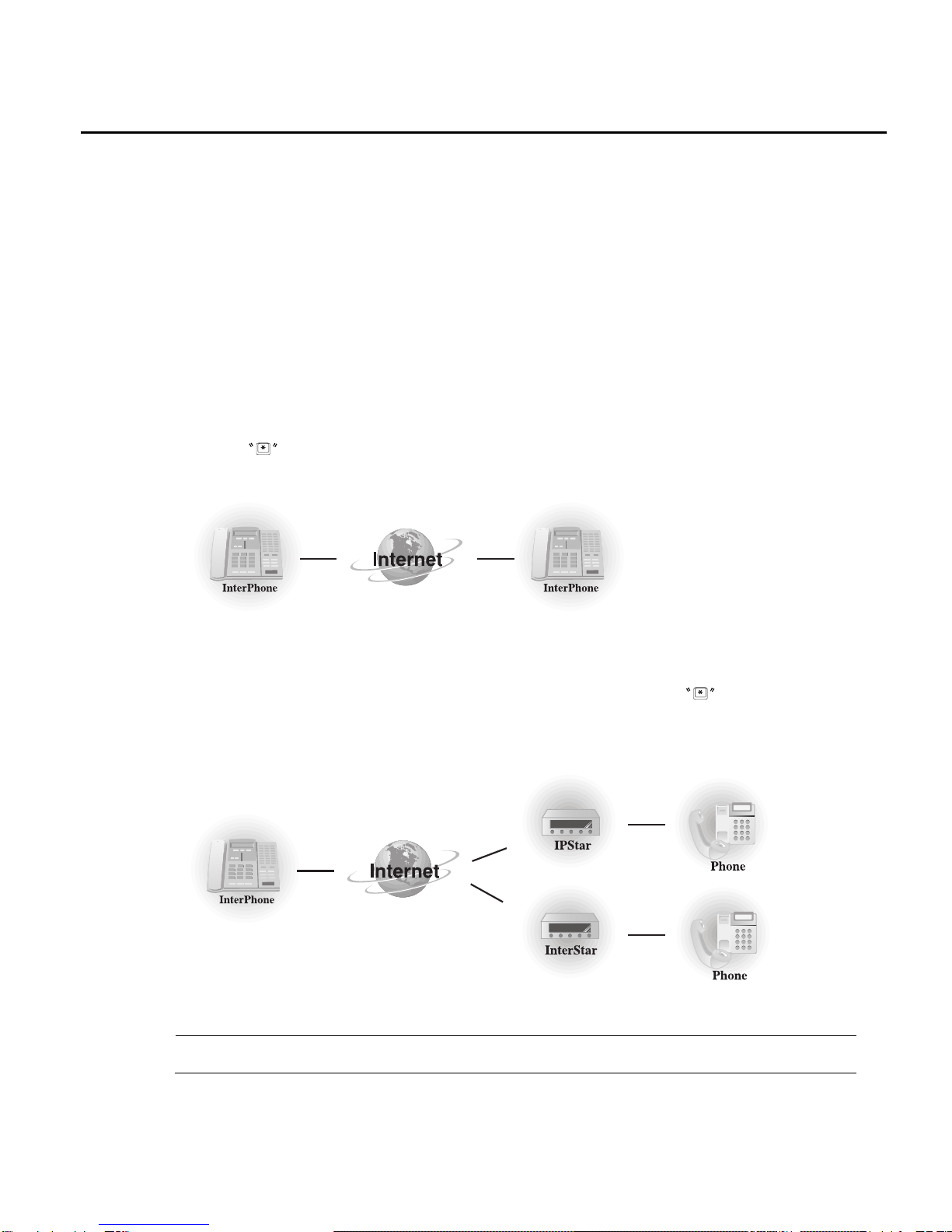
InterPhone-to-InterPhone Mode
If the party you wish to call is equipped with an InterPhone, you may enter the Device ID Num-
ber with button prefix or IP address directly and talk to the remote InterPhone owner
instantly. Or you may use IP Phone Book to call the receiving party with user-defined speed
dial buttons.
InterPhone-to-IPStar/InterStar Mode
Every DSG’s VoIP client device has a unique ID number. Make sure that your receiving
InterStar/IPStar user is already online, then simply dial the ID number with button prefix or IP
address, if it is available, of the receiving device and you will be automatically connected. Thus
all your connection charges can be saved!
Note: IPStar is a Modem-based Internet phone device. InterStar is an Ethernet phone device.
1-4
Table des matières
Autres manuels DSG Téléphone IP


