
DNA BHK900 Manuel utilisateur
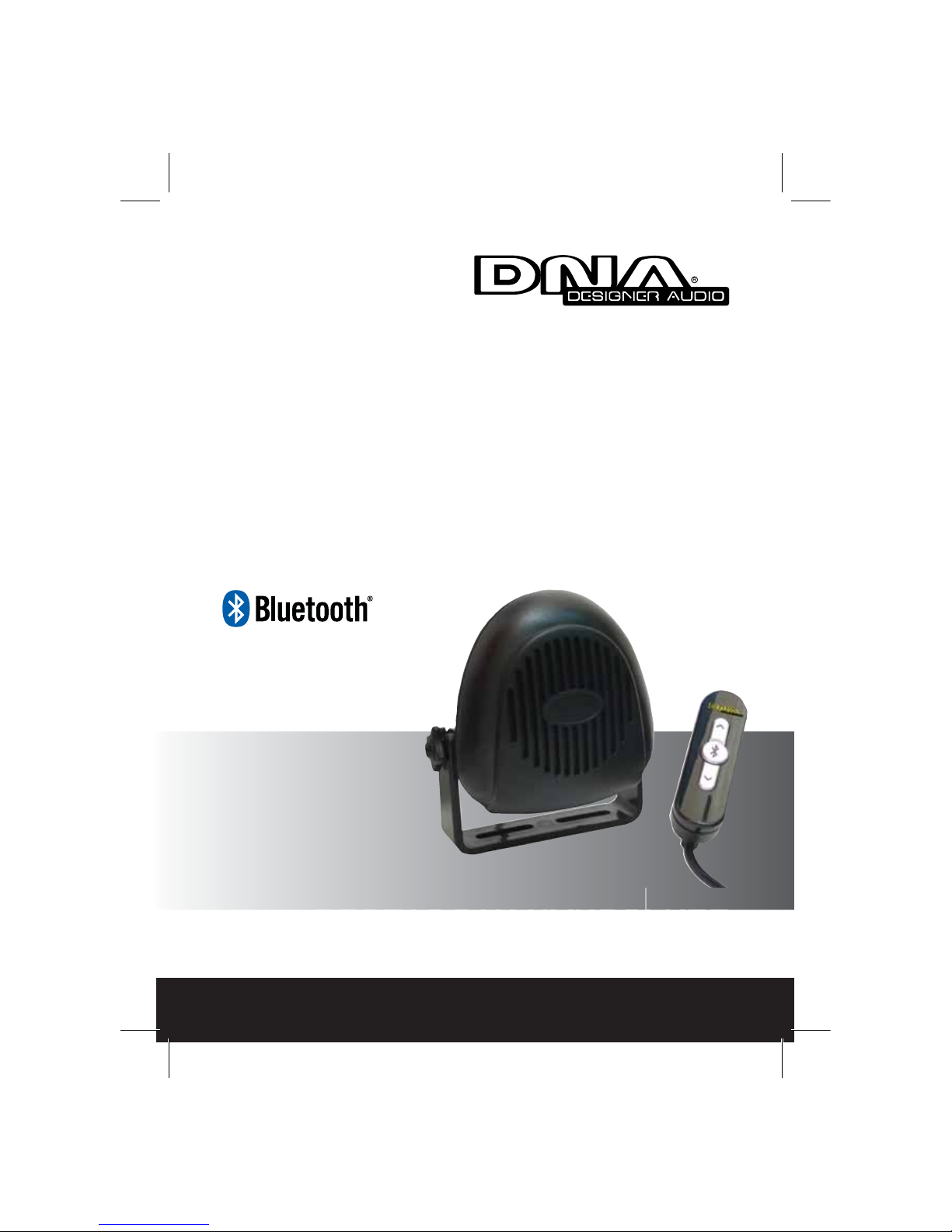
BHK9000
Instruction Manual
BLUETOOTH HANDSFREE
www.dnaaudio.com.au
BLU
E
E
TOO
T
T
HH
A
A
NDS
F
F
RE
E
E
BLUETOOTH
HANDSFREE
BLUETOO
T
T
HHANDS
F
F
REE
2
Introduction
Congratulations on your purchase.
The BHK9000 incorporates the latest technology in Bluetooth
handsfree car kits designed for your daily in-car mobile communication
usage. Combing elegance and simplicity the BHK9000 is one of most
friendly handsfree car kits around. Using the stylishly designed wired
remote control you can easily operate Bluetooth handsfree functions
that allow you to pair with multiple phones so you can easily answer an
incoming call, or dial out the last number called without accessing your
mobile phone.
By using the BHK9000 handsfree car kit you can avoid receiving hefty
fines while not worrying about missing important calls while driving.
Preface
This publication, including all photographs, illustrations and software,
is protected under international copyright laws, with all rights reserved.
Neither this manual, nor any of the material contained herein, may be
reproduced without the express written consent of the manufacturer.
Trademarks
purposes only and may be trademarks and/or registered trademarks of
their respective companies.
Limitation of Liability
While reasonable efforts have been made to ensure the accuracy
of this manual, the manufacturer and distributor assume no liability
resulting from errors or omissions in this manual or from the use of the
information contained herein.
Other product names mentioned herein are used for identification
3
Safety
Important Note on Safety!!
Please read the following notes before installing and using this car kit!
1. Unit Installation – Installing the BHK9000 Bluetooth
Handsfree Car Kit requires specialized knowledge and skills.
Incorrect installation may cause damage to your BHK9000 unit
and/or your vehicle! Therefore, it is strongly advised that the
system be installed by a qualified professional.
2. Installation Location – Unsuitable installation locations in
your vehicle may lead to incorrect functioning of the essential
vehicle safety equipments such as air bag or it may become a
source of injury in an accident situation. Please always consult
the professional installer and carefully choose the installation
location in your car.
3. Interference with on-board electronics – Incorrect
installation or unsuitable installation locations may cause
interference with the vehicle electronics systems. Please read
the vehicle manufacturer’s notes to the effect!
4. Road safety – We strongly advise that full attention is to be
paid to the traffic conditions whenever the vehicle is moving.
Distraction of attention can lead to dangerous traffic situation.
Even when using a handsfree car kit driver is always advised
to avoid phone call during difficult and complex traffic situation.
5. Use only approved replacement parts – Please always use
official parts for your car kit as unknown spare or replacement
parts may lead to malfunction.
4
Index
Introduction............................................................................ 2
Safety..................................................................................... 3
Contents
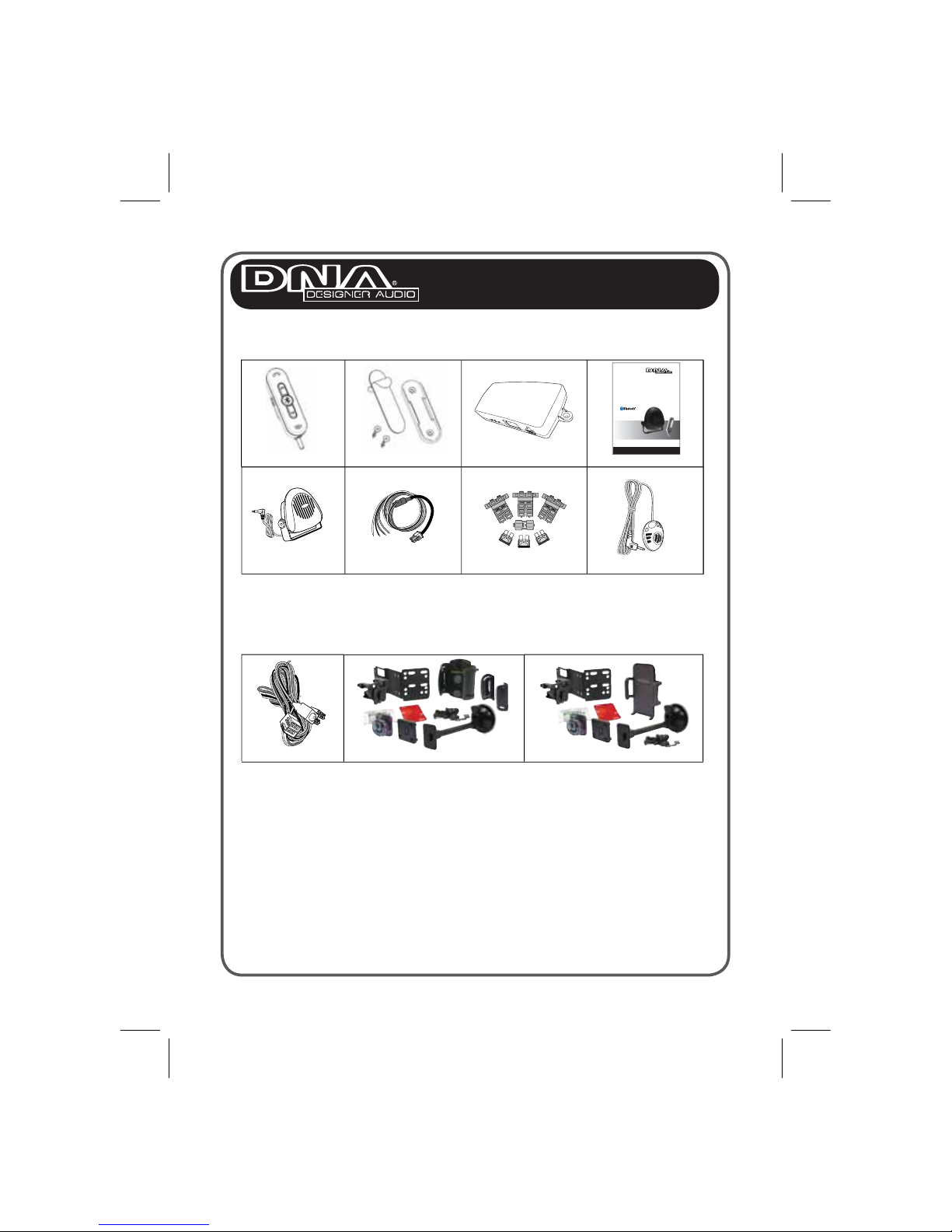
Package Contents.......................................................... 5
Installation
Installing the Contol Module........................................... 6
Connecting the Power Cable......................................... 7
Connecting Components............................................... 8
Installing the Wired Remote Control.............................. 9
Installing the Microphone............................................... 10
Car Kit Operation
Understanding your Wired Remote Control................... 11
Pairing Phones............................................................... 12
Operation....................................................................... 13 - 14
Resetting the Car Kit & Trouble Shooting...................... 15
Quick Reference Guide.......................................................... 16
5
Package Contents
Optional Components
Contents
Wired Remote
External Speaker
)64HPM(redloHenohPi)54HPM(redloHenohPeliboMOSI-0009KHB
Remote Holder
Power Cable
ediuGresUeludoMlortnoC
enohporciMteS
esuF
Note: If any items is missing or damaged, please contact your dealer.
BHK9000-ISO
ISO harness provides easy plug and play option for an ISO connection commonly
used in European vehicles. This integration automatically mutes your vehicles front
speakers for bluetooth audio. External bluetooth speaker supplied is not required for this
installation setup. Further infomation supplied with BHK9000-ISO harness.
BHK9000
Instruction Manual
BLUETOOTH HANDSFREE
www.dnaaudio.com.au
B
BLUE
ETOOT
TH
HA
ANDSF
FREE
BLUETOOTH
HANDSFREE
BLUETOOT
TH
HANDSF
FREE
6
This section demonstrates how to set up and install the BHK9000 into
a vehicle.
Installing the Control Module
The Car Kit is designed to work with either 12V or 24V vehicle supply
voltage. Refer to the following on how to install the control module in a
vehicle.
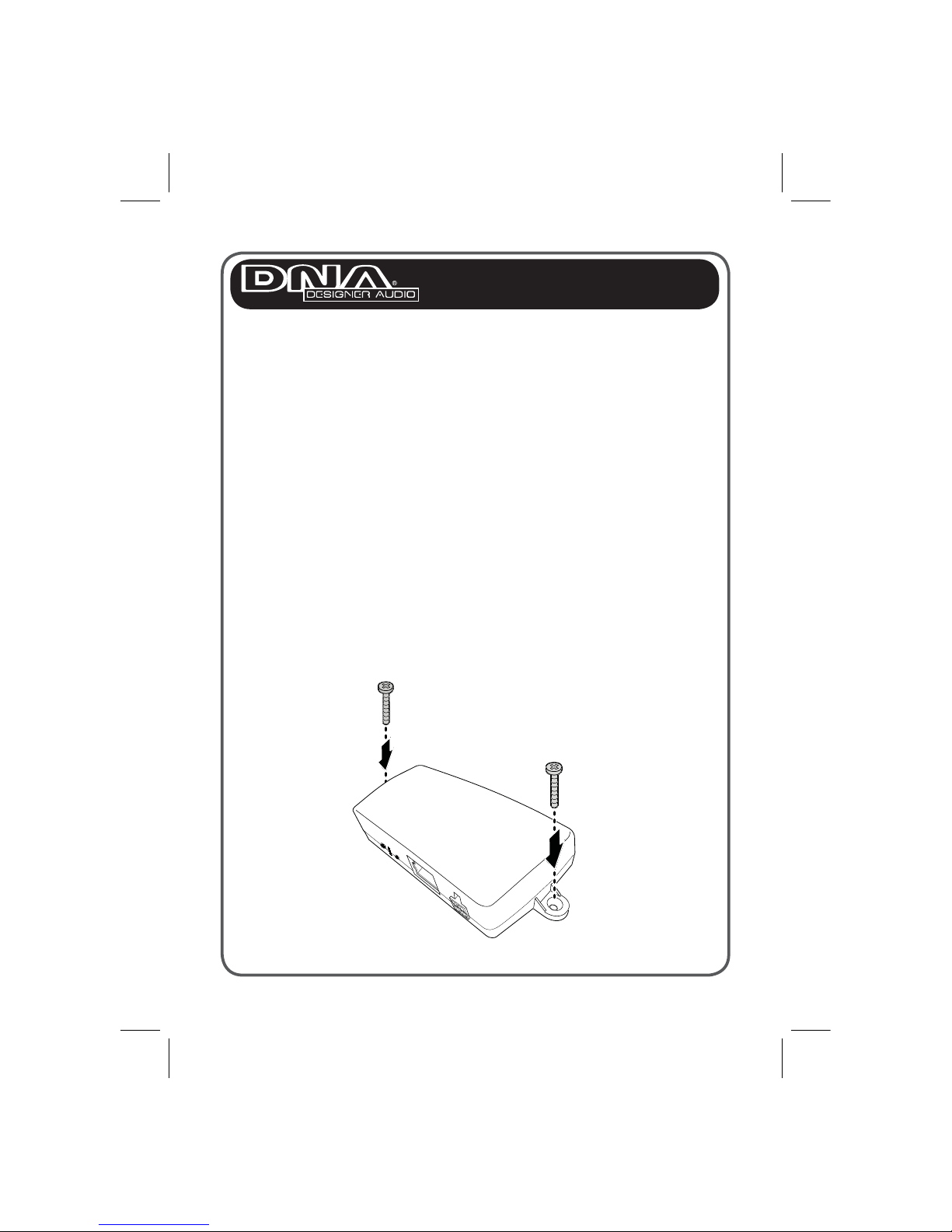
1. Locate a suitable place inside the car to mount the control module.
Select a dry place that avoids excessive heat and mechanical
vibration. Ideally, the control module should be hidden from view, but
still be easily accessible such as under the drivers dash area.
Note: Make sure that the cables are long enough to support the
location of the control module. If the cables are not long enough, do not
lengthen the cables. Instead, relocate the control module.
2. Use two screws to fasten the control module in place.
Installation
7
Connecting the Power Cable
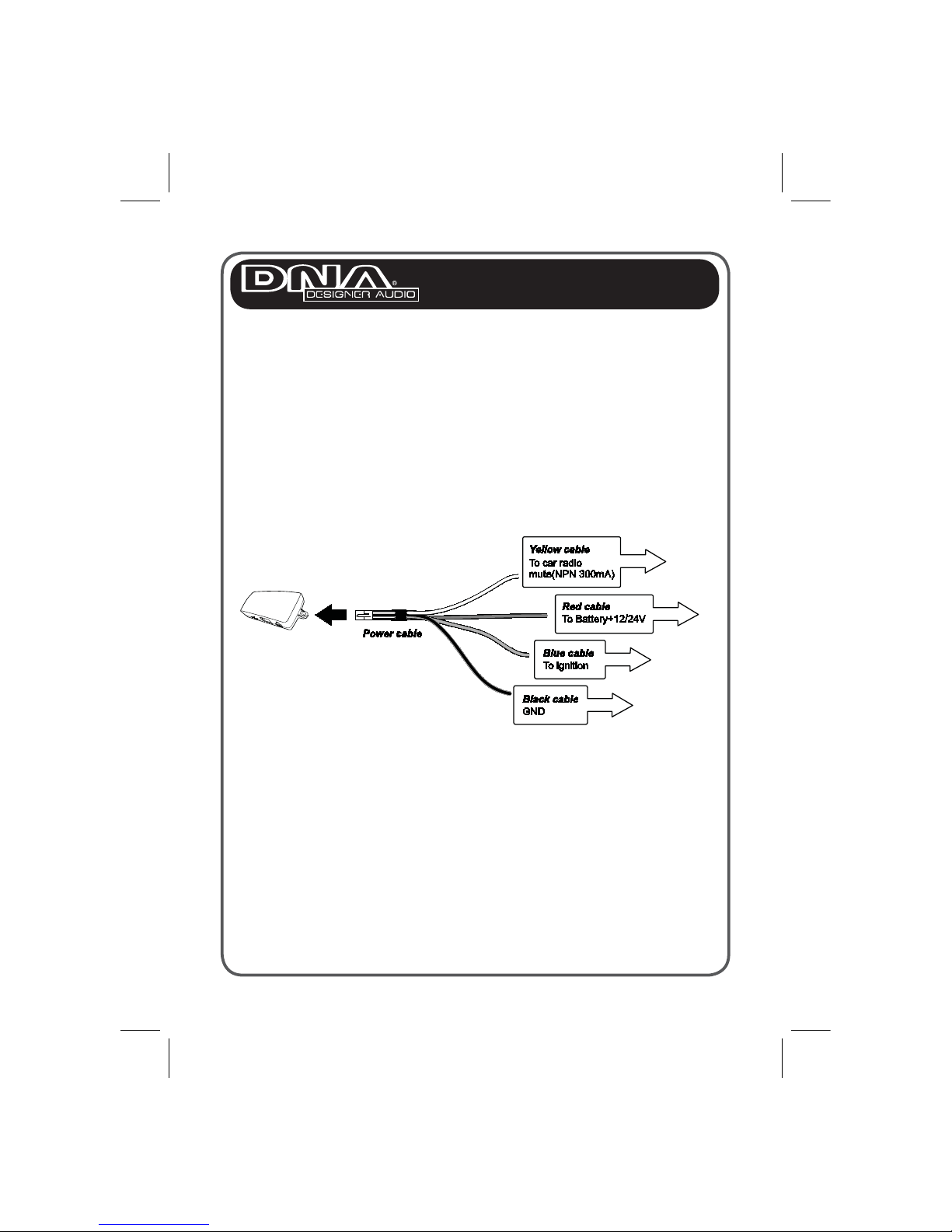
The following illustration demonstrates how to connect the Car Kit’s
power cables to the vehicle’s electrical system.
IMPORTANT!
Ensure the supplied fuse holders and fuses are installed in the following
configuration.
RED WIRE: 5 Amp Fuse
BLUE WIRE: 2 Amp Fuse
BLACK WIRE: 2 Amp Fuse
Warning!!
1. The blue cable must be connected to the 12/24V switched IGN wiring
to enable the Car Kit to go into standby mode when turned OFF.
2. Do not connect the blue cable to permanent +12/24V. Doing so may
discharge the battery of the vehicle and prevent the Car Kit from
being reset.
3. Please do not attempt to install the unit by yourself. Always consult
professional installer for power cable installation.
Installation
8
Connecting Components
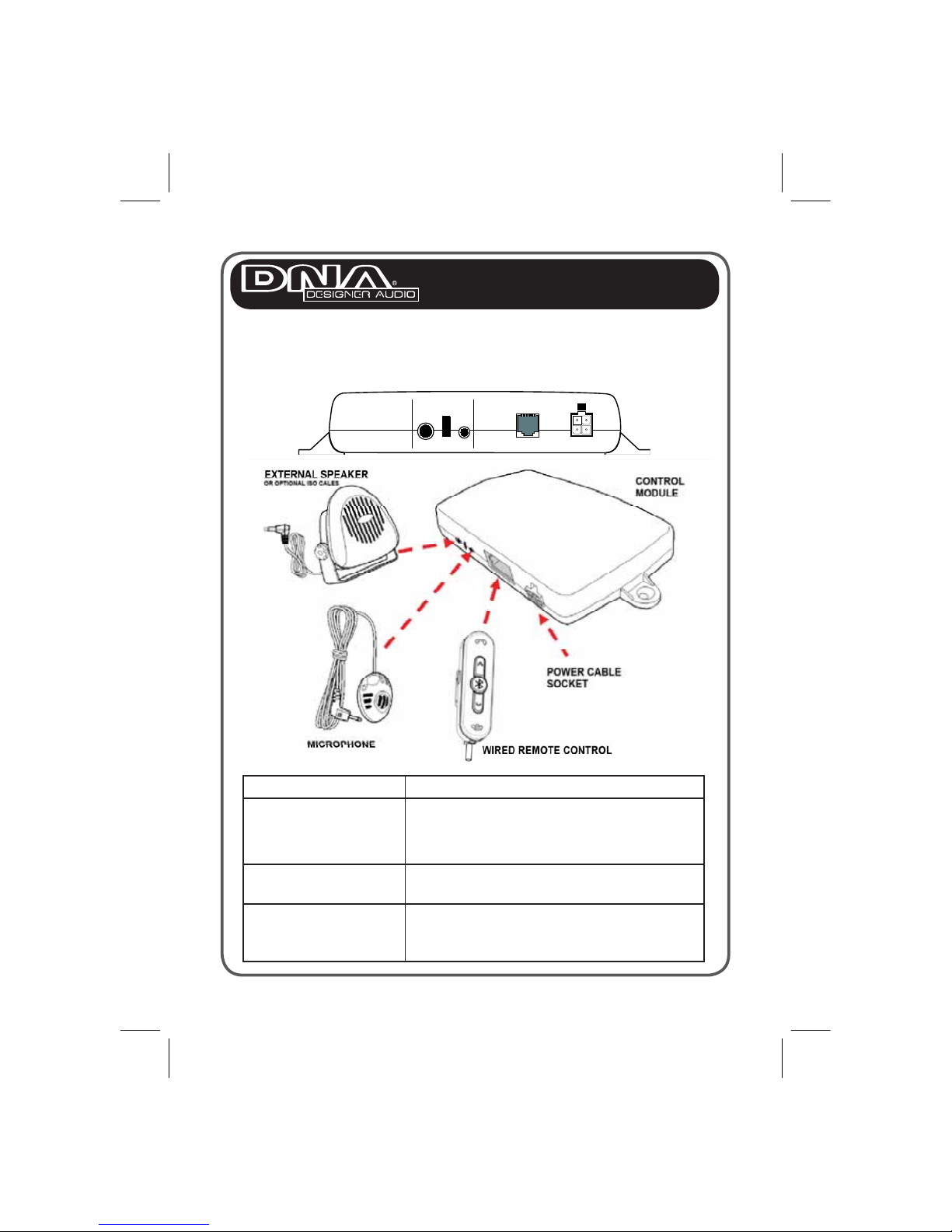
The following illustration shows where to connect component devices.
Installing the Wired Remote Control
Item Description
Wired Remote Control The wired remote control should be located
within reach and view of the driver.
Microphone Ideally, the microphone should be located in
front of the driver and above waist height.
Speaker For best reception, the speaker should be
mounted at least 80cm (30 inches) from the
Car Kit’s microphone.
Installation
9
Installation
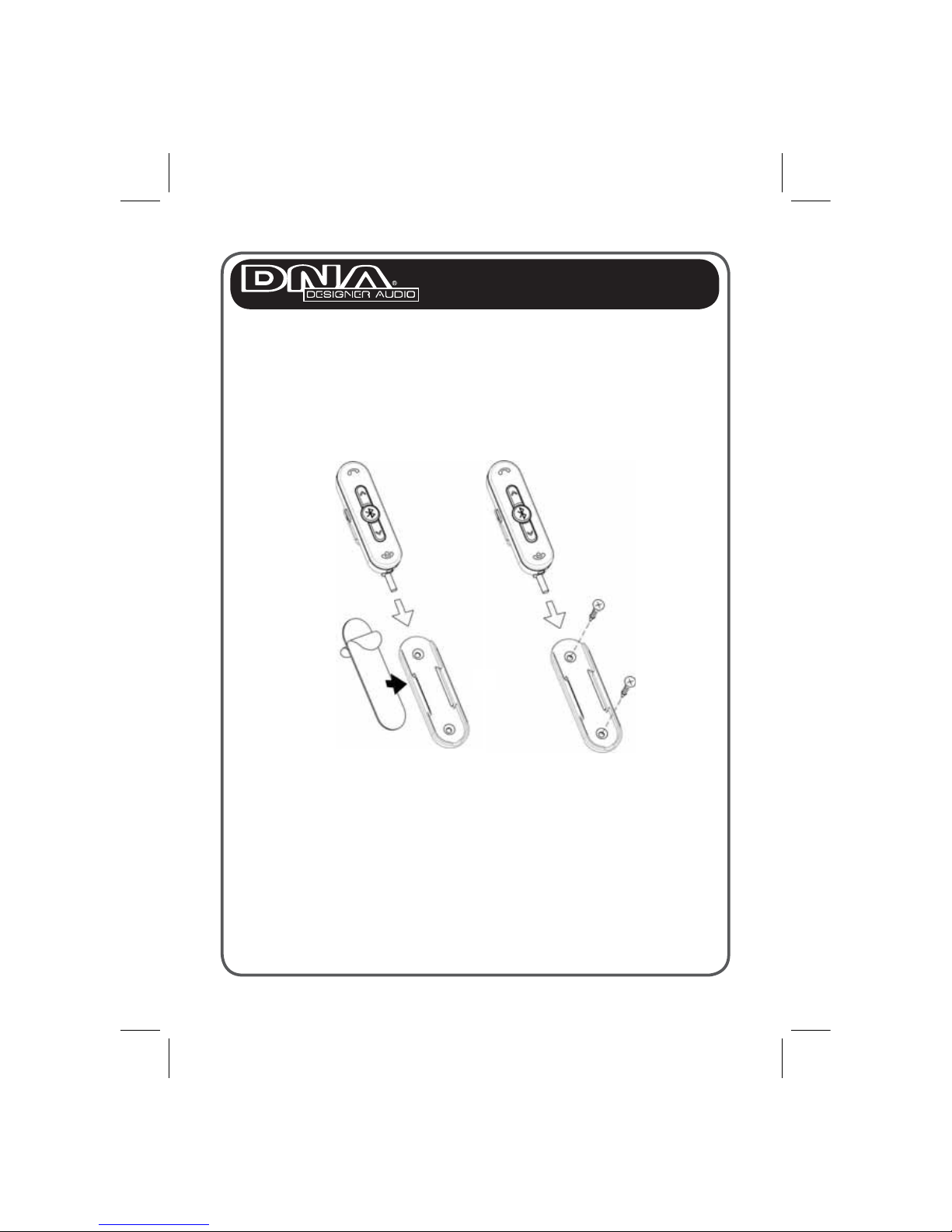
Installing the Wired Remote Control
Find a suitable place for the wired remote control that will provide the
best visibility. Remove dust and grease from the surface and firmly press
the wired remote control holder in place with the sticker pads provided,
or screw the holder into a suitable location with the enclosed screws.
Slide the wired remote control into the holder.
Option 1
Sticker Pad
Option 2
Screws
10
Installation
Installing the Microphone
Before installing the microphone, take note of the following:
Ensure the microphone cable can reach the control module. If the
cable is too short, relocate the microphone or the control module.
Do not attempt to lengthen the cables.
The supplied microphone is uni-directional. For best results, place the
microphone in front of the person talking. It has a reception angle of 60
degrees, and is most effective within a 60cm radius.
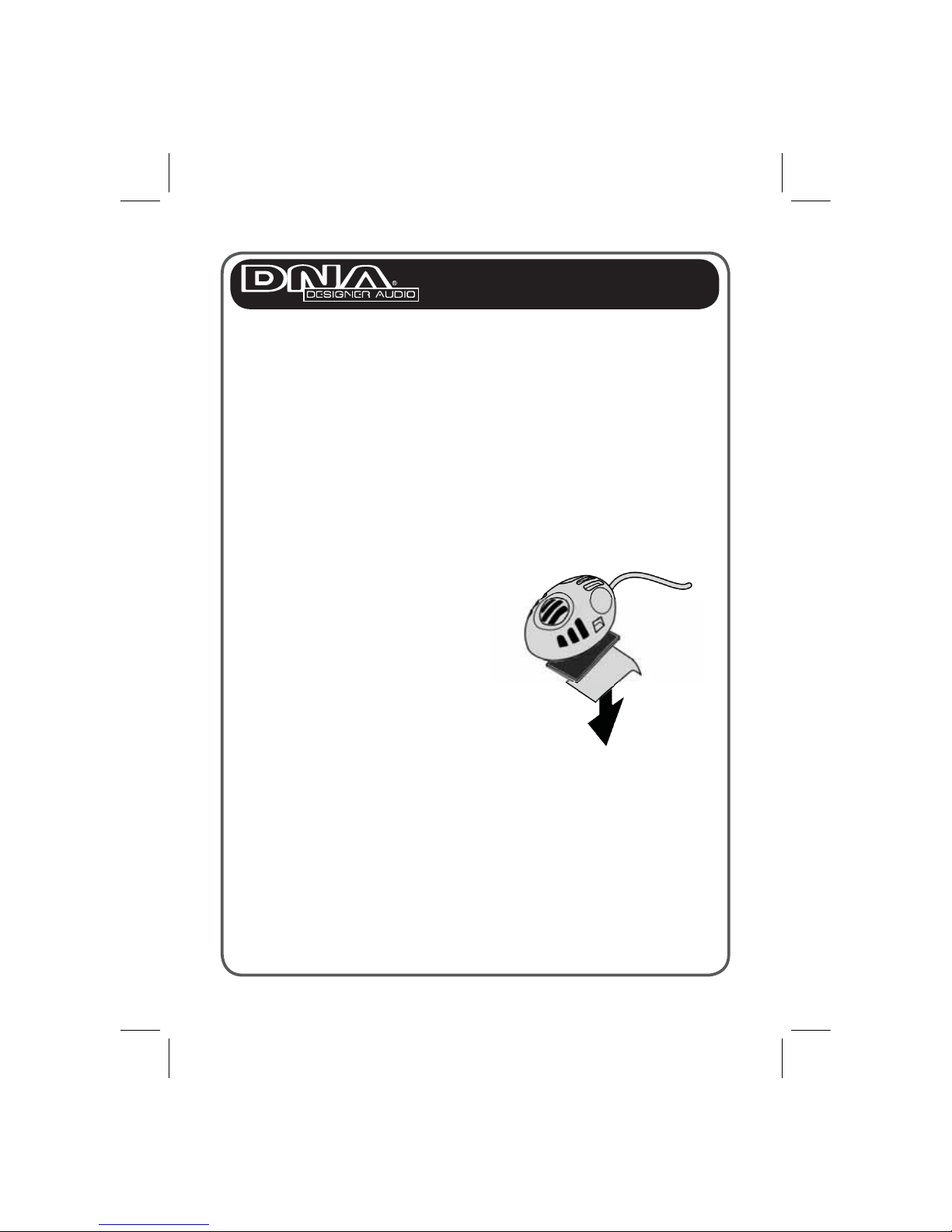
Installing the Microphone
Find a suitable place (e.g. sun visor) for the microphone. Remove dust
and grease from the surface.
1. Remove the protective cover
from the sticker pad at the
bottom of the microphone.
2. Firmly press the microphone
with the sticker pad in place.
Table des matières


